

Flutter GetX: Complete Guide to State Management, Navigation, Dependency Injection, and Performance


Flutter GetX is one of the most popular and powerful libraries in the Flutter ecosystem. It simplifies state management, navigation, dependency injection, and performance optimization using a clean and minimal approach.
This article is a complete, end-to-end guide to Flutter GetX, covering everything from basics to advanced usage, best practices, architecture patterns, real-world use cases.
If you are searching for Flutter GetX tutorial, GetX state management, or best Flutter state management solution, this guide is for you.
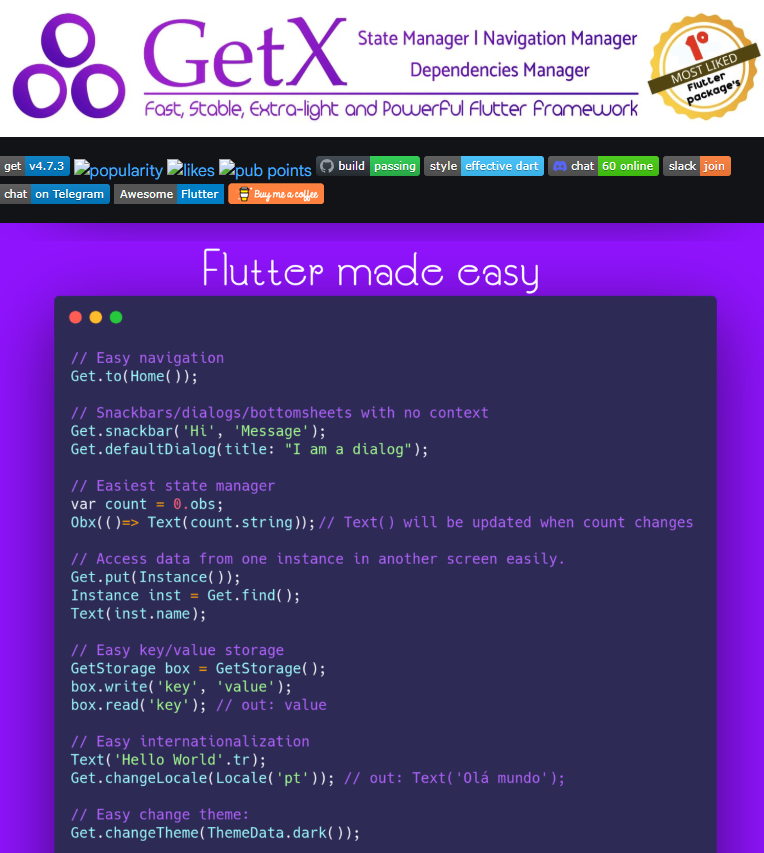
What Is GetX in Flutter?
GetX is a lightweight, high-performance Flutter package that provides:
- State Management
- Route Management (Navigation)
- Dependency Injection (DI)
- Reactive Programming
- Performance Optimization
Download Getx Package : Flutter Getx install
GetX is designed to reduce boilerplate code and improve developer productivity while keeping apps fast and scalable.
Why Use GetX in Flutter?
Developers choose GetX because it offers:
- Minimal code
- No context required
- High performance
- Simple syntax
- Built-in navigation and DI
- Easy scalability for large apps
Unlike other solutions, GetX combines multiple responsibilities in a single package, reducing dependency clutter.
Flutter GetX Key Features Overview
1. State Management
GetX provides both:
- Reactive State Management
- Simple State Management
2. Navigation Without Context
No need for BuildContext.
3. Dependency Injection
Controllers and services are managed efficiently.
4. High Performance
Only affected widgets rebuild.
5. Clean Architecture Support
Perfect for MVVM, MVC, and Clean Architecture.
Installing GetX in Flutter
Add GetX to pubspec.yaml:
dependencies:
  get: ^4.6.6
Import it:
import 'package:get/get.dart';
Flutter GetX State Management (Core Concept)
State management is the most common reason developers use GetX.
GetX Reactive State Management (Rx)
Reactive variables automatically update UI when data changes.
Example: Reactive Counter
class CounterController extends GetxController {
  var count = 0.obs;

  void increment() {
    count++;
  }
}
UI:
Obx(() => Text("Count: ${controller.count}"));
How .obs Works
- Converts variable into a reactive stream
- UI listens automatically
- No
setState()needed
GetX Simple State Management (GetBuilder)
Used when you want manual control.
class CounterController extends GetxController {
  int count = 0;

  void increment() {
    count++;
    update();
  }
}
UI:
GetBuilder<CounterController>(
  builder: (controller) => Text("${controller.count}"),
)
Obx vs GetBuilder :
| Feature | Obx | GetBuilder |
|---|---|---|
| Reactive | Yes | No |
| Performance | High | Very High |
| Auto updates | Yes | Manual |
| Best for | Frequent updates | Controlled updates |
Flutter GetX Navigation (Routing)
GetX removes the complexity of Flutter navigation.
Basic Navigation
Get.to(NextScreen());
Back Navigation
Get.back();
Remove All Routes
Get.offAll(HomeScreen());
Named Routes in GetX
GetMaterialApp(
  initialRoute: '/',
  getPages: [
    GetPage(name: '/', page: () => HomePage()),
    GetPage(name: '/login', page: () => LoginPage()),
  ],
);
Navigate:
Get.toNamed('/login');
Passing Data Between Screens (GetX)
Get.to(DetailsPage(), arguments: "Flutter GetX");
Receive:
final data = Get.arguments;
GetX Bindings (Production Ready)
Bindings help manage dependencies per screen.
class HomeBinding extends Bindings {
  @override
  void dependencies() {
    Get.put(HomeController());
  }
}
Attach to route:
GetPage(
  name: '/home',
  page: () => HomePage(),
  binding: HomeBinding(),
)
Flutter GetX Snackbar, Dialog & BottomSheet
Snackbar
Get.snackbar("Title", "Message");
Dialog
Get.defaultDialog(title: "Alert", middleText: "Message");
Bottom Sheet
Get.bottomSheet(Container());
GetX Controller Lifecycle in Flutter (Complete Explanation)
Understanding the GetX controller lifecycle is critical to avoid memory leaks, unexpected behavior, and performance issues.
GetX controllers extend GetxController and provide built-in lifecycle methods similar to Flutter widgets, but independent of UI context.
GetX Controller Lifecycle Methods
GetX provides three main lifecycle hooks:
1. onInit()
This method is called immediately after the controller is allocated in memory.
Use cases:
- Initialize variables
- Call APIs
- Start listeners
- Load initial data
Example:
class HomeController extends GetxController {
  @override
  void onInit() {
    super.onInit();
    fetchInitialData();
  }

  void fetchInitialData() {
    // API call or setup logic
  }
}
Key points:
- Called only once
- Similar to
initState()in widgets - Best place for startup logic
2. onReady()
This method is called after the UI is rendered for the first time.
Use cases:
- Show dialogs
- Trigger navigation
- Start animations
- Run logic that requires UI to be visible
Example:
@override
void onReady() {
  super.onReady();
  print("UI is ready");
}
Difference from onInit():
onInit()→ controller createdonReady()→ UI fully loaded
3. onClose()
This method is called just before the controller is removed from memory.
Use cases:
- Dispose timers
- Close streams
- Cancel subscriptions
- Clean up resources
Example:
@override
void onClose() {
  super.onClose();
  print("Controller disposed");
}
Why this is important:
- Prevents memory leaks
- Ensures clean resource management
Controller Lifecycle Summary Table
| Method | When Called | Purpose |
|---|---|---|
| onInit | Controller created | Initialization logic |
| onReady | UI rendered | UI-dependent logic |
| onClose | Controller destroyed | Cleanup logic |
How GetX Manages Controller Lifecycle Automatically
GetX automatically:
- Creates controller when route is opened
- Keeps it alive while route exists
- Disposes it when route is removed (if bound correctly)
This works only when you use Bindings or route-based injection.
Dependency Injection in GetX (Clear Explanation)
Dependency Injection (DI) means providing required objects to a class instead of creating them manually.
GetX has a built-in DI system, making it simple and efficient.
Ways to Inject Dependencies in GetX
1. Get.put() – Immediate Injection
Creates and stores the instance immediately.
Get.put(AuthController());
Use when:
- Controller is required instantly
- Object must live as long as app or route
Caution:
- Overuse can cause memory issues
2. Get.lazyPut() – Lazy Injection (Recommended)
Creates the instance only when it is first used.
Get.lazyPut(() => AuthController());
Benefits:
- Better performance
- Lower memory usage
- Preferred for large apps
This is the best practice in most cases.
3. Get.find() – Retrieve Injected Dependency
Used to access an already injected controller or service.
final controller = Get.find<AuthController>();
Rules:
- Dependency must already be registered
- Throws error if not found
4. Get.putAsync() – Async Dependency Injection
Used when initialization requires async work.
Get.putAsync(() async {
  await initService();
  return MyService();
});
Common use cases:
- Local database
- Shared preferences
- Secure storage
- API configuration
GetX Bindings (Best Practice for Dependency Injection)
Bindings define what dependencies are required for a route.
Example:
class HomeBinding extends Bindings {
  @override
  void dependencies() {
    Get.lazyPut<HomeController>(() => HomeController());
  }
}
Attach to route:
GetPage(
  name: '/home',
  page: () => HomePage(),
  binding: HomeBinding(),
);
Why bindings are important:
- Automatic lifecycle handling
- Clean separation of concerns
- Prevents global controllers
- Production-ready architecture
Controller Scope in GetX
| Injection Method | Scope |
|---|---|
| Get.put | Global or manual |
| Get.lazyPut | Route-based |
| Bindings | Route-scoped |
| Get.create | New instance every time |
Get.create() – Rare but Useful
Creates a new instance every time Get.find() is called.
Get.create(() => TempController());
Use cases:
- Forms
- Temporary controllers
- Short-lived state
Common Dependency Injection Mistakes in GetX
Avoid these errors:
- Injecting controllers globally without need
- Not using bindings
- Calling
Get.find()before injection - Mixing UI logic and DI logic
- Manually managing controller disposal
Best Practices Summary (Developer Checklist)
- Use
Bindingsfor every screen - Prefer
Get.lazyPut()overGet.put() - Use
onInit()for setup - Use
onClose()for cleanup - Keep controllers lightweight
- Move business logic to services
- Avoid global state unless required
GetX vs Provider vs Bloc
| Feature | GetX | Provider | Bloc |
|---|---|---|---|
| Boilerplate | Very Low | Medium | High |
| Learning Curve | Easy | Medium | Hard |
| Performance | Excellent | Good | Excellent |
| Navigation | Built-in | No | No |
Flutter GetX Architecture Best Practices
Recommended Folder Structure
lib/
 ├─ modules/
 │   ├─ login/
 │   │   ├─ controller.dart
 │   │   ├─ view.dart
 │   │   ├─ binding.dart
 ├─ services/
 ├─ routes/
 ├─ main.dart
Using GetX With API Calls
class ApiController extends GetxController {
  var loading = false.obs;

  fetchData() async {
    loading(true);
    await Future.delayed(Duration(seconds: 2));
    loading(false);
  }
}
Flutter GetX Performance Advantages
- No unnecessary widget rebuilds
- Reactive updates only
- Smaller app size
- Faster UI rendering
Common Mistakes in GetX (Avoid These)
- Overusing
.obs - Not disposing controllers
- Using GetX everywhere unnecessarily
- Mixing GetBuilder and Obx incorrectly
Is GetX Good for Large Applications?
Yes.
GetX is widely used in enterprise-scale Flutter apps, including fintech, e-commerce, and super apps.
When combined with Bindings + Modular architecture, it scales very well.
hings Developers Must Be Careful About While Using GetX in Flutter
GetX is powerful, but misuse can lead to architectural issues, memory leaks, and long-term maintenance problems. The following points are critical for professional Flutter development.
1. Do Not Overuse Reactive Variables (.obs)
A common beginner mistake is making every variable reactive.
Incorrect practice:
- Converting all fields into
.obs - Using reactive variables even when UI does not depend on them
Correct approach:
- Use
.obsonly for data that directly affects UI rendering - Keep static or one-time data as normal variables
Why this matters:
- Too many reactive variables increase unnecessary listeners
- Debugging becomes harder in large applications
2. Avoid Using Global Controllers Everywhere
Using Get.put() globally for every controller can cause serious problems.
Issues caused:
- Controllers remain in memory longer than needed
- Difficult lifecycle control
- Memory leaks in large apps
Best practice:
- Use screen-based controllers
- Prefer
Bindings - Use
Get.lazyPut()instead ofGet.put()wherever possible
3. Understand When to Use Obx vs GetBuilder
Incorrect mixing of Obx and GetBuilder is a frequent source of bugs.
Use Obx when:
- UI depends on frequently changing data
- Real-time updates are required
Use GetBuilder when:
- You want manual control over rebuilds
- Updates are event-driven, not continuous
Rule:
- Do not wrap the same UI with both
ObxandGetBuilder
4. Dispose Controllers Properly
GetX handles disposal automatically in most cases, but misuse can still cause issues.
Common mistakes:
- Manually keeping references to controllers
- Using controllers beyond their screen lifecycle
Correct approach:
- Let GetX manage controller lifecycle via routes and bindings
- Avoid storing controllers in global variables
5. Avoid Using GetX for Everything
GetX provides navigation, state management, and DI — but that does not mean every feature must use it.
Do not use GetX for:
- Heavy business logic without separation
- Data layer tightly coupled with UI
- Everything just for convenience
Combine GetX with:
- Repository pattern
- Clean Architecture principles
- Service classes for business logic
When Should You Use GetX in Flutter?
GetX is ideal in specific scenarios. It is not a universal solution.
GetX Is Best When:
- You want rapid development with minimal boilerplate
- You are building MVPs or startup products
- You want simple state management without complexity
- Your app requires fast navigation and lightweight DI
- Your team prefers pragmatic solutions over strict patterns
Avoid GetX When:
- You need very strict unidirectional data flow
- Your team prefers compile-time safety over flexibility
- You are building highly regulated enterprise systems
- Your architecture requires strict separation of layers enforced by tooling
Types of Applications Where GetX Works Best
GetX performs exceptionally well in the following app categories:
- Startup MVPs
- E-commerce applications
- Fintech dashboards
- Admin panels
- POS systems
- Vendor or partner apps
- Internal business tools
- Medium to large consumer apps
GetX is widely used in production-scale Flutter apps when architecture is handled properly.
Flutter GetX vs Riverpod vs Bloc (2026 Comparison)
This comparison reflects real-world Flutter development trends in 2026.
Feature Comparison Table
| Feature | GetX | Riverpod | Bloc |
|---|---|---|---|
| State Management Style | Reactive + Imperative | Declarative | Event-driven |
| Boilerplate | Very Low | Medium | High |
| Learning Curve | Easy | Medium | Hard |
| Performance | Excellent | Excellent | Excellent |
| Navigation | Built-in | External | External |
| Dependency Injection | Built-in | Built-in | Manual |
| Compile-time Safety | Medium | Very High | High |
| Scalability | High (with discipline) | Very High | Very High |
| Best For | Fast development | Large structured apps | Enterprise apps |
GetX vs Riverpod (Detailed 2026 Perspective)
Choose GetX If:
- You value speed and simplicity
- You want less boilerplate
- You are building fast-moving products
- You prefer runtime flexibility
Choose Riverpod If:
- You want compile-time safety
- You need predictable state flow
- Your team prefers functional programming concepts
- You are building long-lived enterprise systems
Key difference:
- GetX optimizes developer speed
- Riverpod optimizes architectural correctness
GetX vs Bloc (Detailed 2026 Perspective)
Choose GetX If:
- You want faster development cycles
- You want fewer files and less ceremony
- Your app logic is UI-driven
Choose Bloc If:
- You need strict event-state separation
- You work in large teams
- You need highly testable and predictable flows
- Your app is business-rule heavy
Bloc remains popular in banking and government-grade apps due to discipline enforcement.
What Experienced Flutter Developers Do With GetX
Professional developers follow these rules:
- Use GetX only for presentation layer
- Keep business logic in services or repositories
- Use bindings for every route
- Limit global dependencies
- Document controller responsibilities clearly
- Combine GetX with Clean Architecture principles
GetX is powerful when used intentionally, not blindly.
Common GetX Anti-Patterns to Avoid
- Treating GetX as a global state container
- Writing all logic inside controllers
- Using
.obseverywhere - Ignoring architecture just because GetX feels easy
- Mixing navigation logic with business logic
Keywords
- getx vs provider flutter
- getx vs bloc flutter
- flutter getx best practices
- flutter getx large application
- flutter getx clean architecture
- flutter getx performance
- flutter getx real world example
- flutter getx controller lifecycle
Final Thoughts
Flutter GetX is not just a state management solution — it is a complete Flutter productivity framework.
If used correctly, GetX can significantly reduce development time while keeping apps clean, fast, and scalable.
For developers building real-world Flutter applications, GetX remains one of the best choices in 2026.
Frequently Asked Questions (FAQ) About Flutter GetX
GetX is a lightweight Flutter package that provides state management, navigation, and dependency injection in a single solution. It reduces boilerplate code and improves performance by updating only the widgets that depend on changed data.
Yes, GetX can be used in large applications if proper architecture is followed. Using bindings, modular folder structure, repository pattern, and avoiding global controllers are key to scaling GetX successfully.
Use GetX when:
You want faster development
You prefer minimal boilerplate
Your app logic is UI-driven
You are building MVPs, startups, or medium-scale apps
Riverpod or Bloc may be better for very large, rule-heavy enterprise systems.
Obx is reactive and automatically rebuilds when observed variables change.
GetBuilder is manual and rebuilds only when update() is called.
Obx is better for frequent UI updates, while GetBuilder is better for controlled, event-based updates.
GetX itself does not cause memory leaks. Memory issues usually occur due to:
Improper use of global controllers
Not using bindings
Manually storing controller references
Following GetX lifecycle management prevents memory leaks.
GetX is not an official Flutter package, but it is widely used in production apps and maintained actively. Flutter does not officially recommend any single state management solution.
GetX can replace Provider in many cases, but they are conceptually different.
GetX focuses on productivity and flexibility, while Provider emphasizes simplicity and dependency injection using Flutter’s widget tree.
Beginners can learn GetX easily due to its simple syntax. However, it is recommended to first understand:
Basic Flutter state management
Widget lifecycle
Separation of concerns
This helps avoid misuse later.