

Riverpod Tutorials 2026 – Advanced Level Guide

If you have completed:
- Beginner Riverpod concepts
- Intermediate Clean Architecture setup
- Repository pattern & API integration
Now it’s time to move into Advanced Riverpod 2026.
At this level, you will learn:
- Riverpod Generator (Code Generation)
- AsyncNotifier & Notifier (New API)
- Family Providers
- AutoDispose
- Riverpod caching strategies
- Advanced dependency injection
- Performance optimization
- Unit testing with Riverpod
- Large-scale app architecture
This guide is written for serious Flutter developers building scalable production applications.
Why Advanced Riverpod Matters
In enterprise applications, you manage:
- Multi-feature architecture
- Authentication lifecycle
- Token refresh logic
- Complex API orchestration
- Real-time updates
- Caching layers
- Memory management
- State persistence
- Feature isolation
Riverpod handles all of this elegantly.
Riverpod 2.x Modern Architecture
Modern Riverpod uses:
- Notifier
- AsyncNotifier
- Riverpod Generator
- @riverpod annotation
This reduces boilerplate significantly.
Riverpod Code Generation (Modern Approach)
Install Dependencies
dependencies:
  flutter_riverpod: ^2.5.0
  riverpod_annotation: ^2.3.0dev_dependencies:
  riverpod_generator: ^2.3.0
  build_runner:
Run:
flutter pub run build_runner build
Example: Counter Using @riverpod
import 'package:riverpod_annotation/riverpod_annotation.dart';
part 'counter_provider.g.dart';@riverpod
class Counter extends _$Counter {
  @override
  int build() => 0;  void increment() {
    state++;
  }
}
Use in UI:
ref.watch(counterProvider);
ref.read(counterProvider.notifier).increment();
Why This Is Better?
- Less boilerplate
- Strong typing
- Cleaner structure
- Automatic provider naming
AsyncNotifier (Advanced Async Handling)
AsyncNotifier replaces FutureProvider + StateNotifier combination.
Example: Fetch Products
@riverpod
class ProductController extends _$ProductController {
  @override
  Future<List<Product>> build() async {
    return fetchProducts();
  }  Future<void> refresh() async {
    state = const AsyncLoading();
    state = AsyncData(await fetchProducts());
  }
}
UI:
final products = ref.watch(productControllerProvider);products.when(
  data: (data) => ...,
  loading: () => CircularProgressIndicator(),
  error: (e, _) => Text(e.toString()),
);
Benefits
- Built-in async lifecycle
- Cleaner refresh handling
- Structured loading state
- Better readability
Read : Riverpod Tutorials 2026 – Intermediate Level Guide
Family Providers (Dynamic Parameters)
Use Family when provider depends on runtime input.
Example: Fetch product by ID.
@riverpod
Future<Product> productDetail(
  ProductDetailRef ref,
  int id,
) async {
  return fetchProductById(id);
}
Usage:
ref.watch(productDetailProvider(10));
This allows dynamic dependency resolution.
AutoDispose for Memory Optimization
In large apps, memory leaks are critical.
Use autoDispose when provider should be destroyed when not used.
final tempProvider =
    FutureProvider.autoDispose((ref) async {
  return fetchTempData();
});
Benefits:
- Frees memory
- Prevents background state retention
- Ideal for screen-based state
Advanced Dependency Injection Strategy
In enterprise apps:
Core Layer
 ├── Network Client
 ├── Local Storage
 ├── Logger
 ├── Auth Service
Inject them globally:
final apiClientProvider = Provider<ApiClient>((ref) {
  return ApiClient();
});final authRepositoryProvider =
    Provider<AuthRepository>((ref) {
  return AuthRepository(
      ref.read(apiClientProvider));
});
Override providers in tests:
override: [
  apiClientProvider.overrideWithValue(MockApiClient()),
]
Riverpod makes testing seamless.
Riverpod Performance Optimization (Advanced)
Use select() Wisely
ref.watch(userProvider.select((u) => u.email));
Prevents full rebuild.
Use ref.listen() for Side Effects
ref.listen(authProvider, (prev, next) {
  if (next.isAuthenticated) {
    Navigator.push(...);
  }
});
Avoids unnecessary rebuilds.
Caching Strategy with Riverpod
Example:
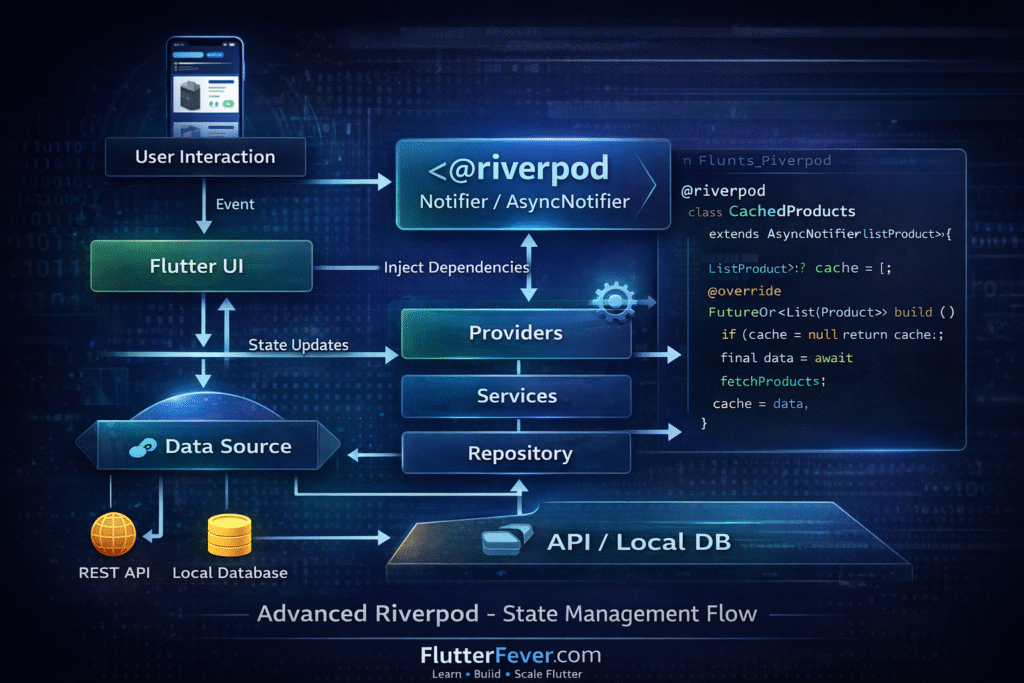
@riverpod
class CachedProducts extends _$CachedProducts {
  List<Product>? cache;  @override
  Future<List<Product>> build() async {
    if (cache != null) return cache!;
    final data = await fetchProducts();
    cache = data;
    return data;
  }
}
Advanced apps implement:
- In-memory caching
- Local storage caching
- Expiry-based caching
- Token-based refresh
Testing Riverpod (Enterprise Standard)
Unit Test Example:
void main() {
  test("Counter increments", () {
    final container = ProviderContainer();
    final counter =
        container.read(counterProvider.notifier);    counter.increment();    expect(
      container.read(counterProvider),
      1,
    );
  });
}
Benefits:
- No Flutter binding required
- Fast tests
- Dependency override support
Large-Scale Riverpod Architecture
Professional structure:
lib/
 ├── core/
 │     ├── services/
 │     ├── network/
 │     └── utils/
 ├── features/
 │     ├── auth/
 │     ├── dashboard/
 │     ├── products/
 │     └── profile/
Each feature contains:
- Model
- Repository
- Providers
- UI
This modular approach scales well.
Riverpod vs Other State Management (Advanced Perspective)
| Feature | Riverpod | BLoC | GetX |
|---|---|---|---|
| Code Generation | Yes | No | No |
| Async Handling | Excellent | Manual | Moderate |
| Dependency Injection | Built-in | Manual | Built-in |
| Testability | High | High | Moderate |
| Scalability | Excellent | High | Moderate |
Riverpod offers best balance of power + simplicity.
Read Articles: Flutter BLoC vs Riverpod vs Provider (2026): Which State Management Should You Choose?
When You Truly Master Riverpod
You can:
- Design scalable architecture
- Optimize performance
- Handle complex async logic
- Write testable code
- Use generator effectively
- Manage feature isolation
- Control memory via autoDispose
- Implement caching layers
At this level, Riverpod becomes architectural backbone.
Conclusion
This Advanced Riverpod Tutorial 2026 covered:
- Riverpod Generator
- AsyncNotifier
- Family Providers
- AutoDispose
- Dependency Injection
- Performance optimization
- Testing
- Enterprise architecture
If you master these concepts, you can build enterprise-grade Flutter applications confidently.
Read Articles: How to Design Flutter Enterprise App Architecture in 2026: Scalable & AI-Ready App Systems
Frequently Asked Questions – Advanced Riverpod (2026)
AsyncNotifier is an advanced Riverpod class designed for managing asynchronous state in a structured way.
It replaces the need for combining FutureProvider and StateNotifier.
Benefits:
Built-in loading and error handling
Better state control
Cleaner async refresh logic
More scalable architecture
AsyncNotifier is recommended for production-level Flutter apps in 2026.
Riverpod code generation uses the @riverpod annotation to automatically generate providers.
Benefits:
Less boilerplate
Strong typing
Cleaner provider naming
Better maintainability
For large projects and enterprise apps, code generation is highly recommended.
Use Family Providers when your provider depends on dynamic input such as:
User ID
Product ID
Route parameter
Filter value
Example:
ref.watch(productDetailProvider(productId));
Family providers allow scalable, parameter-based state management.
Riverpod improves performance through:
Fine-grained rebuild control using select()
autoDispose memory management
Scoped providers
Ref.listen for side effects
Avoiding unnecessary widget rebuilds
Advanced developers use these tools to optimize UI performance.
Read Articles: Flutter GetX: Complete Guide to State Management, Navigation, Dependency Injection, and Performance