

Best Extension for Flutter in VS Code (2026 Guide for Developers)

If you are building mobile apps using Flutter, choosing the best extension for Flutter in VS Code can significantly improve your productivity, debugging speed, and overall development experience.
In this guide, we will explore the top Flutter extensions for VS Code, how they help, and which ones you must install to build professional-grade apps faster.
Why Use VS Code for Flutter Development?
Visual Studio Code is one of the most popular editors among Flutter developers because:
- Lightweight and fast
- Rich extension ecosystem
- Excellent Dart and Flutter support
- Built-in debugging and terminal
But the real power comes from installing the right extensions.
Read : Flutter Installation and SDK Setup Guide Using VS Code in 2026
1. Flutter Extension (Must-Have)
This is the best extension for Flutter in VS Code and the most essential one.
Key Features:
- Full Flutter SDK support
- Hot Reload & Hot Restart
- Widget inspector
- Debugging tools
- Device emulator integration
Why It’s Important:
Without this extension, Flutter development in VS Code is incomplete. It provides everything needed to run, debug, and build apps.
2. Dart Extension (Core Dependency)
Since Flutter apps are written in Dart, this extension is mandatory.
Features:
- Syntax highlighting
- Code completion (IntelliSense)
- Error detection
- Refactoring tools
Pro Tip:
The Flutter extension automatically installs Dart, but understanding its role is important.
3. Awesome Flutter Snippets
Why Developers Love It:
- Speeds up coding
- Reduces repetitive typing
- Provides ready-made widget templates
Example:
Typing stless quickly generates a StatelessWidget.

4. Flutter Widget Snippets
Key Benefits:
- Quickly create widgets
- Clean boilerplate code
- Helps beginners understand structure
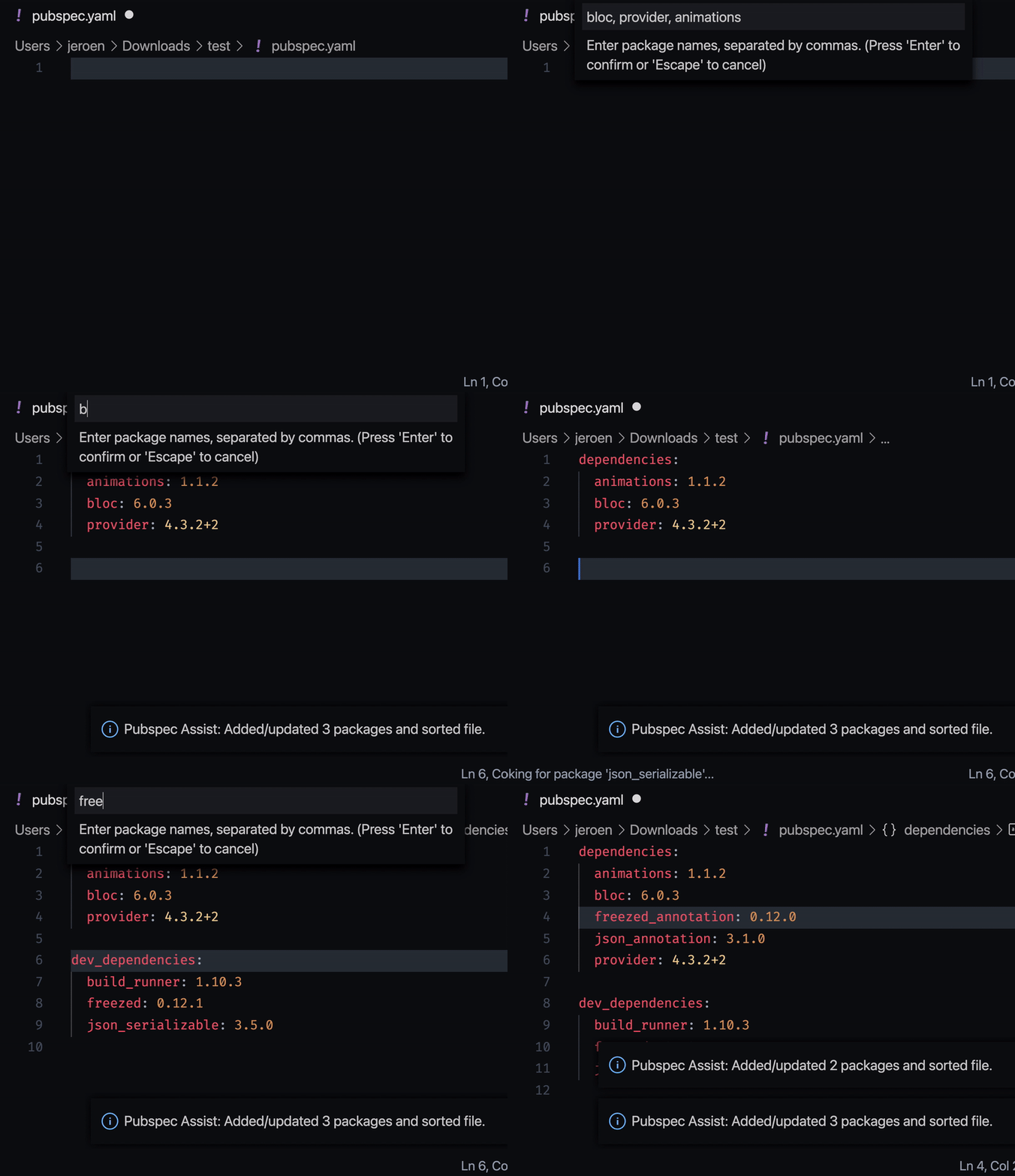
5. Pubspec Assist
What It Does:
- Search packages directly inside VS Code
- Add dependencies without manual typing
- Prevent version mistakes
Why It Matters:
Managing dependencies in Flutter becomes much faster and error-free.
6. Flutter Tree
Features:
- Visual widget tree
- Understand UI hierarchy easily
Best For:
Developers struggling with complex UI layouts.
7. Error Lens
Why You Need It:
- Shows errors inline (no need to hover)
- Faster debugging
Impact:
Improves coding speed and reduces bugs.

8. Bracket Pair Colorizer
Features:
- Color-coded brackets
- Better readability for nested widgets
9. GitLens
Benefits:
- Track code changes
- View commit history
- Blame annotations
10. Material Icon Theme
Why It’s Useful:
- Clean UI
- Recognizable file icons
- Better navigation
Best Extension for Flutter in VS Code – Final Recommendation
If you want a minimal yet powerful setup, install these first:
- Flutter Extension
- Dart Extension
- Pubspec Assist
- Awesome Flutter Snippets
- Error Lens
This combination gives you:
- Fast development
- Clean code
- Efficient debugging
Pro Developer Setup (Advanced)
For professional developers working on production apps:
- Flutter + Dart
- GitLens
- Flutter Tree
- Snippets extensions
- Error Lens
Conclusion
Choosing the best extension for Flutter in VS Code is not about installing everything, but selecting the tools that improve your workflow.
Start with the Flutter and Dart extensions, then gradually add others based on your needs.
A well-optimized VS Code setup can:
- Increase development speed by 2x
- Reduce bugs
- Improve code quality
FAQs
The official Flutter extension is the best and most important one.
It is usually installed automatically with Flutter extension.
Flutter Tree and Snippets extensions are best for UI.
Error Lens and Flutter DevTools integration.