

Flutter Performance Optimization in 2026: The Complete Guide to Building High-Performance Apps

Performance is no longer a “nice-to-have” in mobile applications. In 2026, users expect instant responsiveness, smooth animations, and zero lag across devices. Even a slight delay can lead to poor user retention, negative reviews, and revenue loss.
While Flutter is known for its near-native performance, poorly structured code, inefficient rendering, and unoptimized data handling can still lead to performance degradation. Developers who rely solely on Flutter’s default efficiency often overlook critical bottlenecks that surface at scale.
This guide provides a comprehensive, production-level approach to Flutter performance optimization, covering everything from rendering internals to memory management, network handling, and architectural decisions.
Understanding Flutter’s Rendering Pipeline
Before optimizing performance, it is essential to understand how Flutter renders UI.
Flutter uses a layered architecture:
- Framework Layer (Dart) – Handles widgets and UI logic
- Engine Layer (C++) – Responsible for rendering using Skia
- Embedder Layer – Connects Flutter with the host platform
The rendering pipeline consists of:
- Build phase (widget tree creation)
- Layout phase (size and position calculation)
- Paint phase (drawing pixels)
- Compositing phase (layer merging)
Performance issues often arise when unnecessary rebuilds or heavy computations occur during these phases.
Identifying Performance Bottlenecks
Optimization should always begin with measurement.
Use Flutter DevTools
Flutter DevTools provides:
- CPU profiling
- Memory tracking
- Widget rebuild tracking
- Frame rendering analysis
Key metrics to monitor:
- Frame rendering time (should be under 16ms for 60 FPS)
- Rebuild frequency
- Memory allocation spikes
Without profiling, optimization efforts are often misguided.
Widget Rebuild Optimization
Excessive widget rebuilds are one of the most common causes of performance issues.
Best Practices
- Use
constconstructors wherever possible - Avoid rebuilding large widget trees unnecessarily
- Split widgets into smaller, reusable components
- Use
ValueListenableBuilder,Selector, orObx(GetX) for granular updates
Example
Instead of rebuilding an entire screen:
setState(() {});
Use targeted updates:
ValueListenableBuilder<int>(
  valueListenable: counter,
  builder: (context, value, child) {
    return Text('$value');
  },
);
This minimizes unnecessary UI work.
Efficient List Rendering
Large lists can significantly impact performance if not handled properly.
Use Lazy Loading Widgets
ListView.builderGridView.builder
These render only visible items instead of the entire dataset.
Avoid
- Using
ListView(children: [...])for large datasets - Nesting scrollable widgets without constraints
Advanced Optimization
- Use
AutomaticKeepAliveClientMixinfor preserving state - Implement pagination or infinite scrolling
- Cache list items when appropriate
State Management Optimization
Improper state management leads to unnecessary rebuilds and memory overhead.
Recommended Approaches
- Use scoped updates instead of global state changes
- Prefer efficient solutions like:
Key Principle
Update only what is necessary.
Avoid triggering UI rebuilds across unrelated components.
Reducing Overdraw and Layout Complexity
Overdraw occurs when multiple widgets paint over the same pixels.
Optimization Techniques
- Avoid deep widget nesting
- Use
RepaintBoundaryto isolate repaint areas - Minimize usage of
OpacityandClipwidgets
Example
RepaintBoundary(
  child: ComplexWidget(),
);
This ensures only the affected part of the UI repaints.
Image Optimization
Images are one of the largest contributors to performance issues.
Best Practices
- Use compressed formats (WebP preferred)
- Resize images to match display dimensions
- Use
CachedNetworkImagefor network images - Avoid loading large images unnecessarily
Memory Optimization
Image.network(
  url,
  cacheWidth: 300,
  cacheHeight: 300,
);
This reduces memory usage significantly.
Network and API Optimization
Inefficient API handling can cause UI lag and poor user experience.
Key Strategies
- Use asynchronous programming (
async/await) - Implement caching (local storage or memory cache)
- Handle retries and timeouts
- Avoid blocking the main thread
Example
final response = await http.get(uri).timeout(Duration(seconds: 5));
Advanced
- Use background isolates for heavy data parsing
- Implement request debouncing for search inputs
Using Isolates for Heavy Computation
Dart runs on a single-threaded event loop. Heavy computations can block UI rendering.
Solution: Isolates
final result = await compute(parseLargeJson, jsonData);
Use isolates for:
- JSON parsing
- Image processing
- Data transformation
Read : Dart Isolates with SendPort : Complete Guide to Parallel Processing in Dart
Animation Optimization
Smooth animations are critical for user experience.
Best Practices
- Use
AnimatedBuilderinstead of rebuilding entire widgets - Avoid expensive operations inside animation frames
- Prefer hardware-accelerated animations
Monitor
Ensure animations maintain 60 FPS (or higher on supported devices).
Read : Flutter Animation Real Life Use Cases That Feel Like Magic (Advanced UI Guide)
Memory Management
Memory leaks can degrade performance over time.
Common Issues
- Unreleased controllers
- Large object retention
- Improper stream handling
Best Practices
- Dispose controllers properly:
@override
void dispose() {
  controller.dispose();
  super.dispose();
}
- Avoid retaining unnecessary references
- Use weak references where applicable
App Size Optimization
Large app size affects installation rates and performance.
Techniques
- Enable tree shaking
- Remove unused assets
- Use split APKs / App Bundles
- Compress assets
Platform-Specific Optimizations
Android
- Use
android:hardwareAccelerated="true" - Optimize Gradle build settings
iOS
- Reduce launch time by optimizing initial widgets
- Minimize heavy work during app startup
Performance Testing Strategy
Performance should be tested continuously, not just before release.
Testing Methods
- Profile mode testing
- Real device testing
- Stress testing with large datasets
Tools
- Flutter DevTools
- Firebase Performance Monitoring
Architecture-Level Optimization
Performance is not only about code—it starts with architecture.
Recommended Practices
- Use clean architecture
- Separate UI, business logic, and data layers
- Avoid tightly coupled components
A well-structured app scales better and performs more efficiently.
Common Performance Mistakes
Avoid these critical mistakes:
- Overusing
setState - Ignoring rebuild patterns
- Loading unnecessary data
- Blocking the main thread
- Skipping profiling
These issues often go unnoticed until the app reaches production scale.
Read : Flutter App Architecture in the AI Era: Why Code Generation Isn’t Enough
Future of Flutter Performance in 2026
Flutter continues to evolve with:
- Improved rendering engines
- Better Impeller integration
- Enhanced tooling for profiling
- Optimized web and desktop performance
Developers who stay updated with these advancements will gain a competitive advantage.
Read : Debug vs Release Mode in Flutter – Complete Advanced Guide
How to Optimize Flutter App Performance in 2026
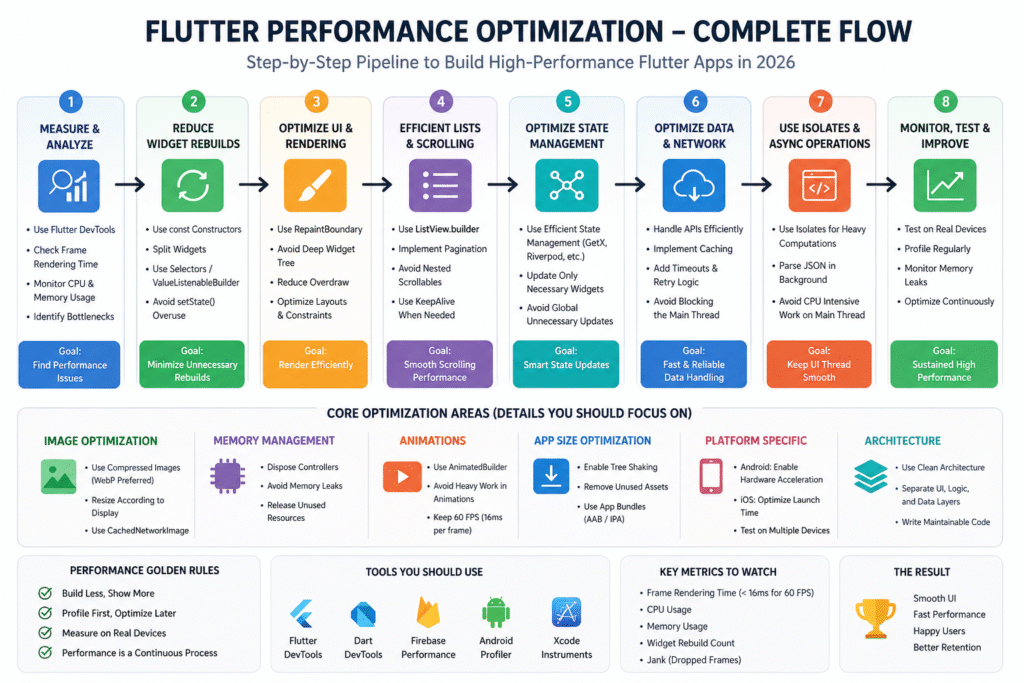
Follow these step-by-step methods to improve Flutter app performance:
Step 1: Analyze Performance Using DevTools
Start by identifying bottlenecks using Flutter DevTools. Monitor frame rendering time and memory usage.
Step 2: Reduce Widget Rebuilds
Use const widgets and split UI into smaller components to avoid unnecessary rebuilds.
Step 3: Optimize Lists and UI Rendering
Use ListView.builder for large datasets and avoid rendering all items at once.
Step 4: Improve State Management
Use efficient state management like GetX or Riverpod to update only required parts of UI.
Step 5: Optimize Images and Assets
Use compressed images, caching, and proper resolution handling.
Step 6: Handle API Efficiently
Use async calls, caching, and error handling to prevent UI blocking.
Step 7: Use Isolates for Heavy Tasks
Move CPU-intensive work like JSON parsing to isolates.
Step 8: Monitor and Test Regularly
Continuously test performance on real devices and optimize based on results.
Conclusion
Flutter provides a strong foundation for high-performance applications, but achieving optimal performance requires deliberate effort.
By understanding the rendering pipeline, optimizing widget rebuilds, managing state efficiently, and leveraging tools like DevTools, developers can build applications that are not only functional but also fast and scalable.
Performance is not a one-time task—it is an ongoing process that should be integrated into every stage of development.
Frequently Asked Questions (FAQs)
Flutter performance optimization refers to techniques used to improve the speed, responsiveness, and efficiency of Flutter applications. This includes reducing widget rebuilds, optimizing rendering, managing memory efficiently, and improving API handling.
In 2026, users expect instant app response and smooth UI. Poor performance leads to higher app uninstall rates, lower engagement, and negative reviews. Optimized apps provide better user experience and higher retention.
Lightweight and efficient state management solutions like GetX and Riverpod are widely used for better performance. The best choice depends on app complexity and scalability needs.
Flutter DevTools helps identify performance bottlenecks by providing insights into:
Frame rendering time
CPU usage
Memory consumption
Widget rebuild frequency
The ideal frame rate is 60 FPS or higher. For smoother experiences on modern devices, 120 FPS is preferred where supported.
Isolates run heavy computations in a separate thread, preventing the main UI thread from blocking. This ensures smooth UI rendering even during intensive operations.
You can reduce app size by:
Removing unused assets
Enabling tree shaking
Compressing images
Using App Bundles
Yes, Flutter is highly suitable for high-performance apps when optimized properly. Many production-level apps use Flutter successfully at scale.
Keywords:
- Flutter performance optimization 2026
- Flutter app performance improvement
- Flutter optimization techniques
- Flutter DevTools performance
- Flutter speed optimization