

Adalo Review in 2026: Features and a Practical Comparison with Flutter

No-code app builders are no longer “toy tools.” Platforms like Adalo now target founders, agencies, and even software teams that want to ship quickly without committing to a full engineering build cycle.
But if you’re a Flutter developer, the question is not “Is Adalo good?” The real question is:
- When is Adalo the fastest route to a working product?
- When does Flutter become the only serious option?
- And how does Adalo compare to other popular no-code/low-code tools?
This article answers that with current platform capabilities, recent updates, and a decision framework you can actually use.
What is Adalo?
Adalo is a no-code visual builder for creating apps that can be published to iOS, Android, and web/PWA from a single project.
It focuses on:
- Database-driven apps (collections, relationships)
- UI building via drag-and-drop
- Native publishing workflows
- Integrations via external data sources and APIs
What’s New in Adalo (Late 2025 → Early 2026)
If you’re researching Adalo “today,” you should know what changed recently.
1) Adalo 3.0 Release (Sept 2025)
Adalo 3.0 included improvements like scheduled notification UX, CSV import error handling, larger collections display viewport, and lazy loading for social media lists (performance boost for long feeds).
2) Sheetbridge (Google Sheets integration) moving into 2026
Adalo announced Sheetbridge, a Google Sheets integration being tested for release in 2026—positioned as a direct external spreadsheet data source with CRUD and performance improvements (from a few concurrent users to ~40–50+).
3) Infrastructure & builder productivity improvements (Nov 2025)
Adalo shared updates including features like better component layer navigation and improved access to collection documentation—small changes, but they matter in daily building velocity.
4) AI chat inside the builder
Adalo rolled out an experimental AI chat trained on Adalo documentation accessible from the builder interface.
5) X-Ray performance auditing
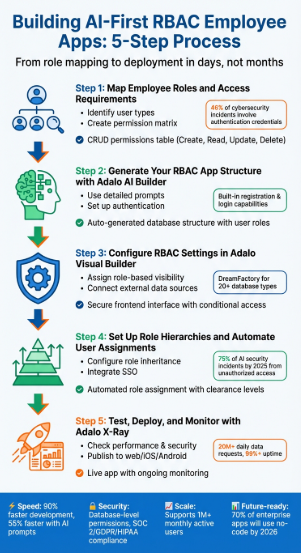
Adalo released X-Ray, a performance auditing tool that flags bottlenecks and problematic patterns before they harm the user experience.
Read Articles : Codex CLI, OpenAI Codex, ChatGPT Codex — How to Build Flutter Apps Smartly in 2026
Core Adalo Capabilities (What You Can Build)
A) Database + UI in one place
Adalo’s “Collections” are its internal database concept, used across screens and components.
B) External Data and APIs (External Collections + Custom Actions)
Adalo supports two big integration paths:
1) External Collections (data sources you treat like native collections)
- Connect to outside data via APIs and use results like a standard collection.
- Use lists/forms/actions to create, update, delete records on external sources.
Adalo also clearly documents limitations: it supports JSON REST APIs over HTTP, but does not support GraphQL, XML, RSS, etc.
2) Custom Actions (trigger external requests / webhooks)
Custom Actions let you call external services via API requests when a user taps a button or submits a form, including retrieving data back into the app.
C) Marketplace components (extend Adalo with custom components)
Adalo has a component marketplace and supports installing additional components; it also encourages developers to build custom components for the marketplace.
D) Publishing + PWA
Adalo supports publishing to mobile stores and PWA deployment with a paid plan and a custom domain for PWA.
Adalo Pros (Where It’s Strong)
1) MVP speed for database apps
If your app is mostly CRUD + user flows (marketplace, booking, directory, internal tool), Adalo can be extremely fast compared to building the entire stack in Flutter.
2) External collections for “real backend” scenarios
Using external collections, you can connect to tools like Airtable, Firebase, Xano, and Google Sheets, and treat them like native collections in UI binding.
3) Performance awareness via X-Ray
No-code teams often fail at performance patterns. X-Ray exists to reduce that risk by surfacing known bottlenecks.
4) Extensibility with marketplace components
When you hit a missing feature, marketplace components may fill gaps without going fully custom.
Adalo Cons (Where Flutter or “low-code with code export” wins)
1) Platform constraints and “ceiling”
No-code platforms naturally enforce constraints. As logic, data shape, and performance demands grow, teams often hit limits—especially for advanced animations, complex offline sync, heavy background tasks, or very custom UI behavior.
2) API structure limits
If your world requires GraphQL or non-JSON REST formats, Adalo’s external collections won’t fit without middleware to translate.
3) Deep engineering control is limited
Flutter gives you full control: custom rendering, isolates, background services, advanced local storage patterns, native platform channels, and fine-grained performance optimization. Adalo cannot match that depth.
4) Some “advanced features” become integration projects
Payments, auth complexity, analytics, and certain native SDKs may require workarounds or custom components—meaning you’ll still need engineers eventually.
Adalo vs Flutter (for Flutter Developers)
Choose Adalo when:
- You want to validate a product quickly (1–4 weeks)
- Your app is mostly CRUD + workflows + standard UI
- You want non-developers to manage screens, collections, and content
- Your backend needs are basic, or can be handled via external collections/custom actions
Choose Flutter when:
- You need full UI and performance control
- You have complex offline-first requirements
- You need advanced device features (BLE with complex flows, background location, native streaming, heavy sensors)
- You need to ship a long-lived product with strict scalability guarantees
- You want ownership of the codebase and full CI/CD control
Practical view:
Adalo is a great “MVP and iteration engine.” Flutter is a great “product and platform engine.”
Comparison with Similar Tools (2026)
1) Adalo vs FlutterFlow
FlutterFlow is “builder + Flutter code ecosystem.” It supports downloading source code and project files (including CLI export tooling).
High-level difference:
- Adalo: more beginner-friendly no-code experience + built-in approach
- FlutterFlow: closer to real Flutter development, more control, code export path
Read Articles : What is FlutterFlow AI? Pricing, Pros & Cons, and Real-World Use Cases in 2026
2) Adalo vs Bubble
Bubble historically dominated web app no-code, and now also markets a native mobile builder (beta).
If your core product is web-first SaaS with heavy workflows, Bubble is often compared. If you are mobile-first and want rapid store publishing workflows, Adalo competes more directly.
3) Adalo vs Glide
Glide is strongly positioned as “turn spreadsheets into apps” and focuses on internal tools, operations apps, and quick business workflows.
If your product is basically an operational layer on top of Sheets/SQL, Glide can be extremely fast. For mobile app-store-first experiences, Adalo is usually more directly aligned.
4) Adalo vs Draftbit
Draftbit is positioned as a visual builder with code export for React Native apps; their docs describe exporting project source code.
If you want a builder workflow but insist on owning and extending the exported codebase, Draftbit is a serious alternative.
5) Adalo vs Thunkable
Thunkable typically sits in the “very accessible no-code mobile builder” segment and is often used for quick prototypes and simpler apps. (If your primary requirement is speed + basic logic, it can fit; for more complex products, teams often migrate to Flutter/React Native or FlutterFlow.)
Decision Matrix (Quick Selection)
Pick Adalo if:
- MVP in weeks
- Mostly standard UI
- Standard data + workflows
- You want minimal engineering overhead
Pick FlutterFlow if:
- You want builder speed but still want Flutter-based flexibility and code export
- You are okay with a learning curve closer to Flutter
Pick Flutter if:
- Long-term product, scaling, performance, and deep native needs matter most
- You need full control and code ownership from day 1
Pick Glide if:
- The app is essentially “business process + spreadsheet/DB”
- You want immediate internal deployment
Pick Draftbit if:
- You want a visual builder + code export path (React Native ecosystem)
FAQs
Adalo can be used for production, especially for database-driven apps, and it includes performance tooling like X-Ray. However, highly complex or deeply native apps often outgrow no-code constraints.
Yes. Adalo supports External Collections and Custom Actions. External Collections work with JSON REST APIs over HTTP and do not support GraphQL/XML/RSS.
If you work with founders, agencies, or early-stage MVPs, learning Adalo can help you deliver faster and validate ideas before committing full Flutter engineering time.
FlutterFlow (Flutter ecosystem with code download/export tooling) and Draftbit (React Native with export) are strong options when you want “builder speed” but still want a path to owning/extending the code.