

Codemagic Flutter CI/CD Guide: Automate Build, Test & Deploy Like a Pro

In modern app development, speed, consistency, and automation are no longer optional—they are essential. Flutter developers, especially those building production-grade applications, often struggle with manual build processes, inconsistent environments, and deployment delays. This is where Codemagic becomes a game-changer.
Codemagic is a CI/CD (Continuous Integration and Continuous Delivery) platform specifically designed for Flutter applications. It automates the process of building, testing, and deploying apps, ensuring faster releases and fewer errors.
This article provides a complete deep-dive into Codemagic, covering everything from fundamentals to advanced workflows, specifically tailored for Flutter developers.
What is Codemagic?
Codemagic is a cloud-based CI/CD tool that allows developers to:
- Automatically build Flutter apps
- Run tests on every commit
- Generate APK, AAB, and IPA files
- Deploy apps directly to Play Store and App Store
Unlike generic CI/CD tools, Codemagic is Flutter-first, meaning it is optimized for Flutter workflows out of the box.
Understanding CI/CD in Flutter
Before diving into Codemagic, let’s understand the core concept.
Continuous Integration (CI)
CI is the process where:
- Developers push code to a repository (GitHub, GitLab, Bitbucket)
- Automated builds and tests run immediately
- Errors are detected early
Continuous Delivery (CD)
CD ensures:
- Apps are automatically prepared for release
- Builds are deployed to testers or stores
Why Flutter Needs CI/CD
Flutter apps involve:
- Multiple platforms (Android, iOS, Web)
- Complex dependencies
- Frequent updates
Without CI/CD:
- Builds become manual and error-prone
- Deployment takes time
- Team collaboration suffers
Why Use Codemagic for Flutter?
Codemagic offers several advantages:
1. Flutter-Native Support
- No complex setup required
- Pre-installed Flutter SDK
- Supports multiple Flutter versions
Read : Flutter FVM – Complete Guide to FVM (Flutter Version Management)
2. Automated Build Pipeline
- Automatically builds on code push
- Supports multiple workflows
3. Multi-Platform Support
- Android (APK, AAB)
- iOS (IPA)
- Web
4. Easy Deployment
- Direct Play Store upload
- TestFlight integration
- Firebase App Distribution
5. Scalable and Fast
- Cloud-based builds
- Parallel execution
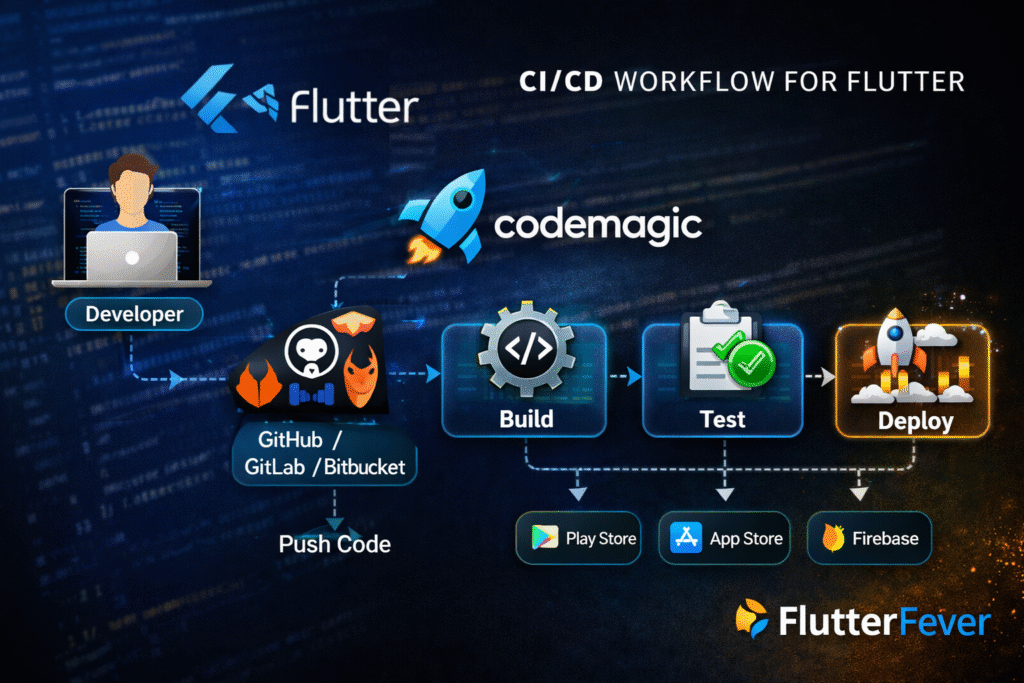
How Codemagic Works (Architecture Overview)
The workflow typically follows this structure:
- Developer pushes code to Git repository
- Codemagic detects changes
- Workflow triggers automatically
- Build process starts:
- Fetch dependencies
- Compile code
- Run tests
- Artifact is generated
- Deployment is executed
Setting Up Codemagic for Flutter (Step-by-Step)
Step 1: Connect Repository
- Go to Codemagic dashboard
- Connect GitHub / GitLab / Bitbucket
- Select Flutter project
Step 2: Choose Workflow Type
Codemagic provides:
- GUI-based setup (easy)
- YAML-based setup (advanced)
Step 3: Configure Build
Basic configuration includes:
- Flutter version
- Build platform (Android/iOS)
- Build mode (debug/release)
Read : Debug vs Release Mode in Flutter – Complete Advanced Guide
Step 4: Add Environment Variables
- API keys
- Signing credentials
- Firebase tokens
Step 5: Trigger Build
- Push code OR
- Manual trigger
Codemagic YAML Configuration (Advanced)
For professional projects, YAML configuration is recommended.
Example:
workflows:
  flutter-app:
    name: Flutter App CI/CD
    environment:
      flutter: stable
    scripts:
      - flutter pub get
      - flutter test
      - flutter build apk --release
    artifacts:
      - build/app/outputs/flutter-apk/app-release.apk
Key Sections Explained
- environment → Flutter version setup
- scripts → Build commands
- artifacts → Output files
- publishing → Deployment configuration
Automating Android Builds
To generate APK/AAB:
flutter build apk --release
flutter build appbundle
Codemagic can:
- Sign APK automatically
- Upload to Play Store
- Manage keystore securely
Automating iOS Builds
iOS build requires:
- Apple Developer Account
- Certificates and provisioning profiles
Codemagic simplifies:
- Automatic code signing
- Xcode integration
- TestFlight deployment
Deployment Options in Codemagic
1. Google Play Store
- Upload AAB directly
- Manage tracks (alpha, beta, production)
Read : How to Deploy Flutter App on Google Play Store in 2026 (Complete Checklist)
2. Apple App Store
- Upload to TestFlight
- Release to App Store
3. Firebase App Distribution
- Share builds with testers
4. Direct Download
- Share APK link instantly
Real-World Flutter CI/CD Workflow
A typical production workflow:
- Developer pushes code to
main - Codemagic triggers build
- Tests run automatically
- APK/AAB generated
- Build uploaded to Play Store (internal testing)
- QA team tests
- Production release
Benefits of Codemagic in Flutter Projects
1. Faster Development Cycle
No manual builds → faster releases
2. Error Reduction
Automated testing → fewer bugs
3. Team Collaboration
Centralized pipeline
4. Scalability
Works for startups to enterprise apps
Advanced Features of Codemagic
1. Parallel Builds
Run multiple builds simultaneously
2. Build Caching
Speeds up dependency installation
3. Custom Scripts
Run custom commands
4. Environment Management
Secure storage of secrets
5. Conditional Workflows
Trigger builds based on branch or tags
Codemagic vs Other CI/CD Tools
| Feature | Codemagic | GitHub Actions | Jenkins |
|---|---|---|---|
| Flutter Support | Native | Manual setup | Complex |
| Setup Time | Easy | Medium | High |
| UI | Clean | Moderate | Complex |
| Deployment | Built-in | Custom | Custom |
Codemagic stands out because it is Flutter-focused, reducing setup time drastically.
Common Mistakes Developers Make
- Not using CI/CD early
- Hardcoding API keys
- Skipping automated testing
- Manual deployment
Best Practices for Using Codemagic
- Use YAML for advanced control
- Separate workflows for dev and production
- Enable caching for faster builds
- Use environment variables securely
- Automate testing before deployment
When Should You Use Codemagic?
Use Codemagic if:
- You are building Flutter apps
- You want automated builds
- You need faster deployment
- You are working in a team
Read : Codemagic Flutter CI/CD for Android: Build, Sign, Version, and Deploy to Google Play
Codemagic in 2026: Why It’s matter for Flutter Developers
Codemagic is not just a tool—it is a complete CI/CD ecosystem for Flutter developers. It removes the pain of manual builds, reduces errors, and accelerates development cycles.
In 2026, the demand for faster and more reliable app delivery has significantly increased, especially in the Flutter ecosystem where multi-platform development is the norm. Tools like Codemagic are no longer optional—they have become a core part of modern Flutter development workflows. With increasing competition in mobile apps, developers cannot afford manual build processes or delayed deployments.
Codemagic enables fully automated CI/CD pipelines, reducing human error and improving release speed. As DevOps practices continue to evolve, Flutter developers are rapidly adopting Codemagic to streamline testing, build generation, and continuous deployment across Android and iOS platforms. In fact, teams that implement CI/CD early are able to release updates faster, maintain code quality, and scale their applications more efficiently in production environments.
For more : Codemagic official documentation
Read : Flutter Developer Roadmap 2026: Complete Skill Path, Career Scope, and Future Trends
Keywords
Codemagic Flutter, Flutter CI/CD, CI/CD in Flutter, Codemagic tutorial, Flutter deployment automation, Flutter build automation, Codemagic YAML, Flutter DevOps, Flutter app deployment, CI CD tools Flutter
FAQs
Codemagic is a CI/CD platform designed for automating Flutter app builds, testing, and deployment.
It offers free and paid plans depending on usage.
Basic usage is simple, but advanced YAML configuration benefits from DevOps understanding.
Yes, it can deploy directly to Play Store, App Store, and Firebase.