

Flutter Install Error Fixes Guide for Windows, Mac & Linux

If you are searching for Flutter install error fixes, you are not alone. Every day, thousands of developers face Flutter installation errors during initial setup.
The good news? Almost every Flutter installation error has a simple configuration-based solution.
In this complete 2026 guide, we will cover:
- Most common Flutter install error fixes
- Flutter doctor error solutions
- Android toolchain setup problems
- JDK mismatch fixes
- Gradle build errors
- Emulator detection problems
By the end of this guide, your Flutter environment will run without errors.
Why Flutter Installation Errors Happen
Most Flutter install error fixes are related to environment misconfiguration rather than Flutter itself.
Common causes of Flutter installation errors include:
- Incorrect PATH configuration
- Missing Android SDK components
- JDK version mismatch
- Android licenses not accepted
- Emulator not configured
- Corrupted Gradle cache
- Incomplete Flutter SDK download
For Re install Flutter SDK: Re-Install Flutter SDK (Windows) — Also for Mac & Linux
Understanding these causes makes Flutter install error fixes much easier.
1. Flutter Command Not Recognized Error
Error Message
'flutter' is not recognized as an internal or external command
This is one of the most common Flutter install error fixes developers search for.
Cause
Flutter bin folder is not added to your system PATH.
Flutter Install Error Fix (Windows)
- Locate your Flutter folder
- Open
flutter > bin - Copy the full path
- Go to System Environment Variables
- Edit “Path”
- Add Flutter bin path
- Restart terminal
Now run:
flutter doctor
If output appears, the Flutter install error is fixed.
2. Flutter Doctor Android Toolchain Error
Error
Android toolchain – develop for Android devices (Android SDK version unknown)
This Flutter doctor error is extremely common.
Cause
Android SDK components missing or improperly installed.
Flutter Install Error Fix
- Install Android Studio
- Open SDK Manager
- Install:
- Android SDK Platform
- Android SDK Command-line Tools
- Android Emulator
- Build Tools
Read : Installation Process for Android Studio and SDK setup
After installation, run:
flutter doctor
Most Android-related Flutter install error fixes are solved here.
if you don’t know how to use flutter doctor Read :
Flutter Doctor command — What is flutter doctor
3. JDK Version Mismatch (Unsupported Java Version)
Error
Unsupported Java version detected
Flutter works best with JDK 17 (recommended for 2026 setup).
Flutter Install Error Fix
- Download JDK 17
- Set JAVA_HOME environment variable
- Add JDK bin to PATH
Verify:
java -version
If version shows 17, your Flutter install error is resolved.
4. Android Licenses Not Accepted
Error
Android license status unknown
This simple error blocks many Flutter installations.
Flutter Install Error Fix
Run:
flutter doctor --android-licenses
Press:
y
for all prompts.
Then run:
flutter doctor
This step alone solves a large percentage of Flutter install error fixes globally.
For Android Studio Download Read : How to install Android Studio and setup Android SDK for Faster Flutter development
5. Gradle Build Failed After Installation
Error
Gradle task assembleDebug failed
This error appears after creating a new Flutter project.
Cause
- Gradle cache corruption
- Incompatible Gradle version
- Network dependency failure
Flutter Install Error Fix
Delete Gradle cache:
Windows:
C:\Users\YourName\.gradle
Mac/Linux:
~/.gradle
Then run:
flutter clean
flutter pub get
Restart your IDE.
Gradle-related Flutter install error fixes often require cache clearing.
6. Emulator Not Launching / No Devices Found
Error
No connected devices found
Flutter Install Error Fix
- Open Android Studio
- Open AVD Manager
- Create new virtual device
- Select system image
- Start emulator
Then check:
flutter devices
If device appears, installation issue is resolved.
7. Dart Not Recognized Error
Error
'dart' is not recognized
Flutter Install Error Fix
Dart SDK is bundled inside Flutter.
Make sure Flutter bin path is added to environment variables.
Check:
dart --version
If version prints, Dart is configured properly.
8. Flutter Doctor Still Showing Errors?
Run:
flutter upgrade
flutter doctor -v
Verbose output shows detailed diagnostics.
Many advanced Flutter install error fixes require reading verbose output carefully.
Read Articles : Free flutter development tutorials for Beginners in 2026
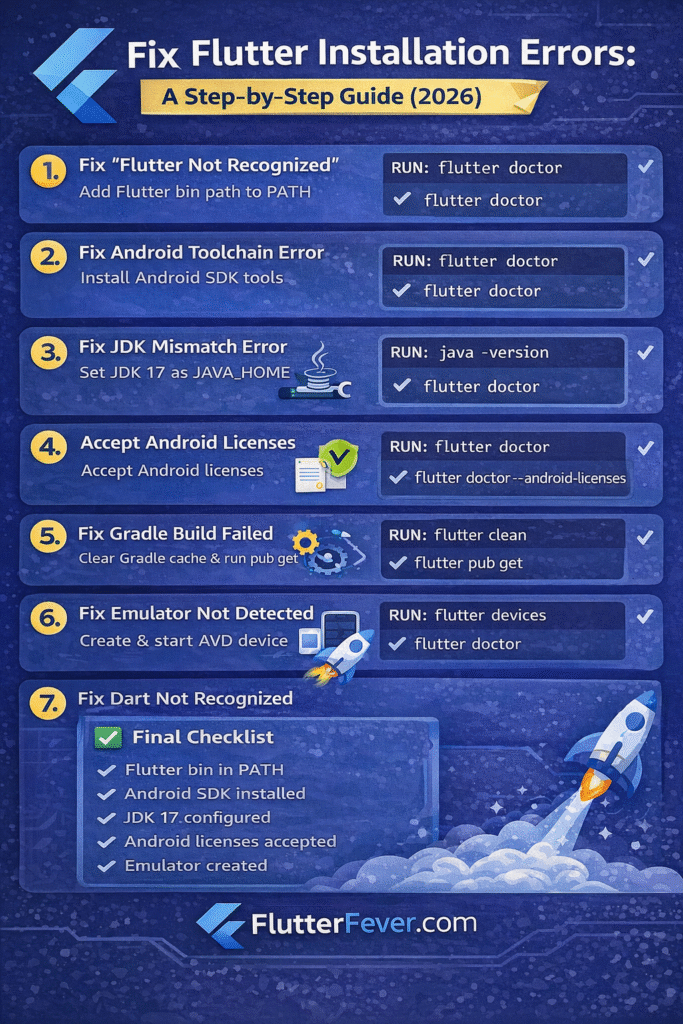
Complete Flutter Installation Checklist
Before concluding, confirm:
- Flutter SDK fully downloaded
- Flutter bin path configured
- Android Studio installed
- Android SDK components installed
- JDK 17 configured
- Android licenses accepted
- Emulator created
- flutter doctor shows all green checkmarks
If everything is green, your Flutter install error fixes are complete.
Read : Android Studio Download and Android SDK Setup steps for Flutter Development
Advanced Flutter Install Error Fix Tips
If errors persist:
- Disable antivirus temporarily
- Check firewall blocking Gradle
- Verify internet connectivity
- Use stable Flutter channel:
flutter channel stable
flutter upgrade
- Restart system after environment changes
Why This Flutter Install Error Fix Guide Works
This guide covers:
- Windows Flutter install error fixes
- Mac Flutter install error fixes
- Linux Flutter setup problems
- Android toolchain errors
- Java configuration issues
- Emulator setup problems
Instead of random troubleshooting, this guide provides systematic Flutter install error fixes.
Flutter Installation Error Fixes Command
Final Thoughts
Most Flutter install error fixes are environment-related, not framework-related.
Once configured properly:
- Flutter runs smoothly
- Build time improves
- Gradle errors disappear
- Emulator connects instantly
Read Articles : Download Flutter PDF Book – Free Beginner to Advanced Dart Programming Guide
FAQ – Flutter Install Error Fixes
Because the Flutter bin folder is not added to your system PATH.
JDK 17 is recommended for latest Flutter versions.
Because Android SDK or command-line tools are missing.
Clear Gradle cache and run flutter clean.
You need to create and start a virtual device in AVD Manager.