

GitHub Tutorials 2026: From Beginner to Expert Complete Guide for flutter developers

GitHub is one of the most important tools for every modern developer. If you are learning Flutter, Dart, app development, web development, backend development, or full-stack development, GitHub is not optional. It is a must-have skill for managing code, working with teams, building a portfolio, tracking changes, and automating professional development workflows.
This GitHub tutorials 2026 guide is specially written for beginners and Flutter developers who want to learn GitHub from zero level to expert level. In this complete guide, you will learn how GitHub works, how to upload a Flutter project to GitHub, how to use Git commands, how to create branches, how to create pull request in VS Code and GitHub, how to use GitHub Actions for Flutter CI/CD, how to manage releases, and how to protect your code using GitHub security features.
GitHub is built around Git, a version control system that tracks code changes. GitHub adds cloud hosting, collaboration, pull requests, Issues, Projects, Actions, Codespaces, security tools, and Copilot on top of Git. GitHub Actions also allows developers to automate workflows directly inside a repository, including CI/CD pipelines.
What is GitHub?
GitHub is a cloud-based platform used to store, manage, share, and collaborate on software projects. It allows developers to save code online, track every change, work with branches, review code through pull requests, manage bugs, automate testing, and publish releases.
For a Flutter developer, GitHub can store your complete app project, including:
lib/
android/
ios/
web/
test/
pubspec.yaml
README.md
.gitignore
In simple language:
| Term | Meaning |
|---|---|
| Git | A version control tool that tracks code changes on your computer |
| GitHub | A cloud platform where Git repositories are hosted |
| Repository | A project folder stored on GitHub |
| Commit | A saved checkpoint of your code |
| Branch | A separate workspace for a new feature or bug fix |
| Pull Request | A request to merge one branch into another after review |
| GitHub Actions | Automation tool for testing, building, and deploying code |
Why GitHub is Important for Flutter Developers in 2026
Flutter developers work with multi-platform projects. A single Flutter app may contain Android, iOS, web, desktop, backend API integration, Firebase setup, environment files, and release builds. Without GitHub, managing this kind of project becomes difficult.
GitHub helps Flutter developers to:
- Store Flutter project code safely online.
- Track every change in Dart files and project configuration.
- Work on new features without breaking the main app.
- Create pull requests for code review.
- Manage bugs and feature requests using GitHub Issues.
- Organize app development using GitHub Projects.
- Run Flutter tests automatically using GitHub Actions.
- Build APK, AAB, and Flutter web builds using CI/CD.
- Publish release notes and app versions.
- Protect API keys and credentials using GitHub Secrets.
- Detect leaked secrets using secret scanning.
- Use GitHub Copilot for AI-assisted coding.
GitHub secret scanning can scan repository history for hardcoded credentials such as API keys, passwords, and tokens, which is very important for Flutter apps using Firebase, payment gateways, maps, or private APIs.
Part 1: Git and GitHub Basics
1. Git vs GitHub: What is the Difference?
Many beginners search for GitHub tutorials 2026 but first they need to understand the difference between Git and GitHub.
| Feature | Git | GitHub |
|---|---|---|
| Type | Version control tool | Online hosting and collaboration platform |
| Works On | Local computer | Cloud |
| Main Purpose | Track code changes | Store, share, review, and automate code |
| Internet Required | Not always | Required for push, pull, and collaboration |
| Example | git commit | Pull request, GitHub Actions, Issues |
| Best For | Local code history | Team workflow and online backup |
For Flutter developers, Git tracks your local app changes, while GitHub stores your project online.
2. What is a GitHub Repository?
A repository is a project folder hosted on GitHub. It contains your source code, commits, branches, pull requests, Issues, Actions, releases, and documentation.
Example of a Flutter repository:
flutter-ecommerce-app/
│
├── android/
├── ios/
├── lib/
│   ├── main.dart
│   ├── screens/
│   ├── widgets/
│   ├── services/
│   └── models/
├── test/
├── pubspec.yaml
├── README.md
└── .gitignore
A repository can be:
| Repository Type | Meaning | Best Use |
|---|---|---|
| Public | Anyone can view the code | Portfolio, open-source, tutorials |
| Private | Only selected users can view the code | Client projects, startup apps, production apps |
For FlutterFever readers, public repositories are useful for portfolio building, while private repositories are better for real business applications.
3. How to Create a GitHub Account
Follow these steps to create a GitHub account:
- Open the official GitHub website.
- Click on Sign up.
- Enter your email address.
- Create a strong password.
- Choose a professional username.
- Verify your email address.
- Add a profile photo.
- Add a short developer bio.
- Add your website, LinkedIn, or portfolio link.
- Enable two-factor authentication for account security.
A professional GitHub profile helps recruiters, clients, and companies understand your coding skills.
4. How to Install Git on Windows, macOS, or Linux
Before using GitHub from your computer, you need to install Git.
Read : Download Git for Flutter for Windows, Linux and macOS: Complete Step-by-Step Guide
After installation, check Git version:
git --versionSet your Git username:
git config --global user.name "Your Name"Set your Git email:
git config --global user.email "your-email@example.com"Check Git configuration:
git config --listUse the same email address that is connected with your GitHub account. This helps GitHub show your commits correctly on your profile.
Part 2: How to Upload Flutter Project to GitHub
5. How to Create a New GitHub Repository
Follow these steps to create a new GitHub repository:
- Login to your GitHub account.
- Click on the + icon in the top-right corner.
- Click on New repository.
- Enter your repository name. Example:
flutter-login-app - Add a short description. Example:
A Flutter login app with clean UI and Firebase authentication. - Choose Public or Private.
- Do not add README if your local Flutter project already has one.
- Click on Create repository.
6. How to Initialize Git in a Flutter Project
Open your Flutter project in VS Code. Make sure you are inside the root folder where pubspec.yaml is available.
Run this command:
git initThis command starts Git tracking in your Flutter project.
7. How to Check Project Status in Git
Run:
git statusThis command shows:
- Modified files.
- New untracked files.
- Deleted files.
- Files ready for commit.
Example:
modified: lib/main.dart
modified: pubspec.yaml
untracked: lib/screens/login_screen.dart
8. How to Add Files in Git
To add all changed files:
git add .To add only one file:
git add lib/main.dartFor Flutter projects, use git status before git add . so you know exactly what you are adding.
9. How to Commit Flutter Project Changes
A commit is a saved checkpoint of your code.
Run:
git commit -m "Initial Flutter project setup"Good commit message examples:
git commit -m "Added login screen UI"
git commit -m "Integrated Firebase authentication"
git commit -m "Fixed home page overflow issue"
git commit -m "Updated app theme and colors"
Avoid poor commit messages like:
git commit -m "update"
git commit -m "changes"
git commit -m "final"
Professional commit messages improve teamwork and project history.
10. How to Push Flutter Project to GitHub
After creating your GitHub repository, connect your local Flutter project with GitHub.
Run:
git remote add origin https://github.com/username/repository-name.gitRename branch to main:
git branch -M mainPush code to GitHub:
git push -u origin mainNow your Flutter project is uploaded to GitHub.
Part 3: Best .gitignore for Flutter GitHub Repository
11. Why .gitignore is Important in Flutter Projects
Flutter projects generate many temporary files, build files, IDE files, and local configuration files. These files should not be uploaded to GitHub.
A proper .gitignore keeps your repository clean and secure.
12. Flutter .gitignore Example
Use this .gitignore for Flutter projects:
# Dart and Flutter
.dart_tool/
.packages
.pub/
build/
.flutter-plugins
.flutter-plugins-dependencies

# Android
android/.gradle/
android/local.properties

# iOS
ios/Pods/
ios/.symlinks/
ios/Flutter/Flutter.framework
ios/Flutter/Flutter.podspec

# IDE
.idea/
.vscode/
*.iml

# Environment files
.env
.env.local
.env.production

# Signing files
*.jks
*.keystore
key.properties

# OS files
.DS_Store
Thumbs.db
13. Files Flutter Developers Should Never Push to GitHub
| File | Why You Should Not Push |
|---|---|
.env | May contain API keys |
key.properties | May contain signing password |
.jks / .keystore | Android app signing key |
| Firebase service account JSON | Can expose Firebase admin access |
| Payment gateway secret | Can expose payment system |
| Private API token | Can be misused |
| Production database URL | Can expose backend access |
For production Flutter apps, secrets should be stored safely using GitHub Secrets or environment-specific configuration.
Part 4: GitHub Branches for Flutter Developers
14. What is a Branch in GitHub?
A branch is a separate development line where you can work on a feature, bug fix, or experiment without affecting the main app.
Example Flutter branch names:
feature/login-screen
feature/cart-page
feature/firebase-auth
bugfix/home-overflow
hotfix/payment-crash
release/v1.0.0
Branches are important because professional developers do not directly change the main branch.
15. How to Create a Branch in VS Code Terminal
Follow these steps:
- Open your Flutter project in VS Code.
- Open terminal using:
Ctrl + J - Create a new branch:
git checkout -b feature/login-screen - Check current branch:
git branch
Now you can work safely on the new feature.
16. How to Switch Branch in Git
To switch to the main branch:
git checkout mainOr:
git switch mainTo switch to another feature branch:
git checkout feature/login-screen17. How to Push a New Branch to GitHub
Run:
git push -u origin feature/login-screenAfter pushing the branch, GitHub will show an option to create a pull request.
Part 5: How to Create Pull Request in VS Code and GitHub
18. What is a Pull Request in GitHub?
A pull request, also called PR, is a request to merge code from one branch into another branch. GitHub explains that pull requests are used to propose and collaborate on changes before they are merged into the default branch.
For Flutter developers, pull requests are useful when:
- You create a new screen.
- You fix a UI bug.
- You add Firebase authentication.
- You update dependencies.
- You add API integration.
- You refactor code.
- You prepare a release.
19. Why Pull Request is Important for Flutter Developers
| Benefit | Explanation |
|---|---|
| Safe merging | Code is reviewed before going to main |
| Better teamwork | Developers can discuss changes |
| Bug prevention | Errors can be found before merge |
| UI review | Screenshots can be checked before approval |
| Clean history | Every feature has proper tracking |
| Testing | GitHub Actions can run tests before merge |
| Professional workflow | Companies use PR-based development |
20. How to Create Pull Request in VS Code
This is a very important section because many developers search for how to create pull request in VS Code.
Follow these steps:
- Open your Flutter project in VS Code Open the root folder of your Flutter project. Make sure the
pubspec.yamlfile is visible in the Explorer. - Install GitHub Pull Requests extension Open Extensions in VS Code and install:
GitHub Pull Requests and IssuesThis extension allows developers to review and manage GitHub pull requests and issues inside VS Code. - Sign in to GitHub from VS Code After installing the extension, sign in with your GitHub account.
- Create a new feature branch Open the terminal and run:
git checkout -b feature/login-screen - Make changes in your Flutter project Example changes:
lib/screens/login_screen.dart
lib/widgets/custom_button.dart
lib/routes/app_routes.dart - Check changed files Run:
git status - Add changed files Run:
git add . - Commit your changes Run:
git commit -m "Added Flutter login screen with validation" - Push your branch to GitHub Run:
git push -u origin feature/login-screen - Open GitHub Pull Requests panel in VS Code
In the left sidebar, open the GitHub Pull Requests section.
- Click on Create Pull Request
Select your source branch and target branch.
Example:
Source branch: feature/login-screen
Target branch: main- Add pull request title
Example:
Added Flutter login screen with validation- Add pull request description
Example:
## What changed?
- Created login screen UI
- Added email and password fields
- Added form validation
- Added loading button state

## Testing
- Tested on Android emulator
- Checked empty field validation
- Checked invalid email validation

## Screenshots
Add screenshots here if UI changed.- Create the pull request
Click on Create Pull Request.
- Wait for review
Your team can now review, comment, request changes, or approve the pull request.
21. How to Create Pull Request on GitHub Website
You can also create a pull request directly from GitHub.
Follow these steps:
- Push your branch to GitHub.
git push -u origin feature/login-screen - Open your GitHub repository in the browser.
- Click on Compare & pull request.
- Select the base branch.
base: main - Select the compare branch.
compare: feature/login-screen - Add a clear pull request title.
- Write a detailed pull request description.
- Add screenshots if you changed Flutter UI.
- Assign reviewers.
- Add labels such as:
feature
flutter
ui
bugfix- Link related GitHub Issue if available.
- Click on Create pull request.
- Wait for review and approval.
- Merge the pull request after approval.
GitHub also supports draft pull requests, which are useful when you want to share work-in-progress code without requesting formal review immediately.
22. Pull Request Checklist for Flutter Developers
| Checklist | Why It Matters |
|---|---|
| Code formatted | Keeps Dart code clean |
flutter analyze passed | Finds code issues |
flutter test passed | Confirms basic functionality |
| Screenshots added | Helps UI review |
| No secrets committed | Protects API keys and credentials |
| Branch is updated | Reduces merge conflicts |
| Clear PR title | Helps team understand changes |
| Description added | Explains what changed |
| Reviewer assigned | Ensures code review |
| Issue linked | Improves project tracking |
Part 6: GitHub Issues and Projects
23. What are GitHub Issues?
GitHub Issues are used to track bugs, tasks, improvements, and feature requests.
Examples for Flutter projects:
Bug: Login button not working
Feature: Add dark mode
Task: Create onboarding screen
Improvement: Optimize app startup time
Bug: Bottom navigation overflow on small devices
Issues help you manage development clearly.
24. GitHub Issue Template for Flutter Apps
Use this template:
## Issue Type
Bug / Feature / Improvement / Task

## Description
Explain the issue clearly.

## Steps to Reproduce
1. Open the app
2. Go to login screen
3. Enter wrong password
4. Tap login button

## Expected Result
The app should show an error message.

## Actual Result
The app crashes or freezes.

## Device Details
- Device:
- Android/iOS version:
- Flutter version:
- App version:

## Screenshot
Attach screenshot if available.
25. What are GitHub Projects?
GitHub Projects help you manage work using boards and tables.
For a Flutter app, you can create columns like:
| Column | Meaning |
|---|---|
| Backlog | Future ideas |
| To Do | Planned tasks |
| In Progress | Work currently active |
| Review | Pull request review stage |
| Testing | QA and device testing |
| Done | Completed work |
GitHub Projects are useful for solo developers, agencies, startups, and development teams.
Part 7: GitHub Actions for Flutter CI/CD
26. What is GitHub Actions?
GitHub Actions is an automation platform built into GitHub. It allows you to run workflows when code is pushed, a pull request is created, or a manual trigger is used. GitHub describes Actions as a way to automate, customize, and execute software development workflows directly inside a repository.
For Flutter developers, GitHub Actions can:
- Run
flutter pub get. - Run
flutter analyze. - Run
flutter test. - Build APK.
- Build AAB.
- Build Flutter web.
- Upload build artifacts.
- Create releases.
- Deploy Flutter web.
- Check pull requests automatically.
27. Basic GitHub Actions Workflow for Flutter
Create this file:
.github/workflows/flutter-ci.ymlAdd this workflow:
name: Flutter CI

on:
  push:
    branches: [ main ]
  pull_request:
    branches: [ main ]

jobs:
  flutter-ci:
    runs-on: ubuntu-latest

    steps:
      - name: Checkout repository
        uses: actions/checkout@v4

      - name: Setup Flutter
        uses: subosito/flutter-action@v2
        with:
          flutter-version: '3.35.0'

      - name: Install dependencies
        run: flutter pub get

      - name: Analyze Dart code
        run: flutter analyze

      - name: Run Flutter tests
        run: flutter test
The Flutter Action available in GitHub Marketplace is used to set up Flutter in GitHub Actions workflows and supports Linux, Windows, and macOS runners.
28. GitHub Actions Workflow to Build Flutter APK
Use this workflow when you want GitHub to generate APK automatically.
name: Flutter APK Build

on:
  workflow_dispatch:
  push:
    branches: [ main ]

jobs:
  build-apk:
    runs-on: ubuntu-latest

    steps:
      - name: Checkout code
        uses: actions/checkout@v4

      - name: Setup Flutter
        uses: subosito/flutter-action@v2
        with:
          flutter-version: '3.35.0'

      - name: Get packages
        run: flutter pub get

      - name: Analyze code
        run: flutter analyze

      - name: Build release APK
        run: flutter build apk --release

      - name: Upload APK artifact
        uses: actions/upload-artifact@v4
        with:
          name: release-apk
          path: build/app/outputs/flutter-apk/app-release.apk
29. GitHub Actions Workflow to Build Flutter Web
name: Flutter Web Build

on:
  push:
    branches: [ main ]

jobs:
  build-web:
    runs-on: ubuntu-latest

    steps:
      - name: Checkout repository
        uses: actions/checkout@v4

      - name: Setup Flutter
        uses: subosito/flutter-action@v2
        with:
          flutter-version: '3.35.0'

      - name: Install dependencies
        run: flutter pub get

      - name: Build Flutter web
        run: flutter build web --release

      - name: Upload web build
        uses: actions/upload-artifact@v4
        with:
          name: flutter-web-build
          path: build/web
30. Important GitHub Actions Terms
| Term | Meaning |
|---|---|
| Workflow | Automation file written in YAML |
| Job | A group of steps inside workflow |
| Step | A single command or action |
| Runner | Server where workflow runs |
| Trigger | Event that starts workflow |
| Artifact | Output file generated by workflow |
| Secret | Secure value used inside workflow |
GitHub workflow syntax uses YAML files to define automated workflows, jobs, steps, and triggers.
Part 8: GitHub Releases for Flutter Apps
31. What is GitHub Release?
A GitHub Release is used to publish a stable version of your project.
For Flutter apps, releases can include:
- APK file.
- AAB file.
- Flutter web build.
- Release notes.
- Version number.
- Bug fixes.
- Feature list.
- Installation instructions.
32. Flutter App Version Naming
Common release version format:
v1.0.0
v1.1.0
v1.2.0
v2.0.0
Example:
| Version | Meaning |
|---|---|
v1.0.0 | First stable release |
v1.1.0 | New feature added |
v1.1.1 | Small bug fix |
v2.0.0 | Major update |
33. Flutter Release Notes Example
# Version 1.1.0

## New Features
- Added login screen
- Added dark mode
- Added profile page

## Bug Fixes
- Fixed button overflow on small devices
- Fixed Firebase login error
- Fixed app crash on logout

## Improvements
- Improved app startup speed
- Updated UI spacing
- Optimized home screen performance

## Build
- APK attached below
Professional release notes help users and team members understand what changed in each app version.
Part 9: GitHub Security for Flutter Developers
34. Why GitHub Security is Important
Flutter apps often use Firebase, REST APIs, payment gateways, Google Maps, notification services, and backend credentials. If you accidentally push secrets to GitHub, your app and backend can be at risk.
GitHub provides security features such as secret scanning, Dependabot alerts, code scanning, and security alerts. GitHub Advanced Security includes secret protection and code security features for detecting secret leaks and finding vulnerabilities.
35. GitHub Secrets
GitHub Secrets are used to store sensitive values safely for GitHub Actions.
Examples:
API_BASE_URL
FIREBASE_TOKEN
PLAY_STORE_SERVICE_ACCOUNT
KEYSTORE_BASE64
KEY_PASSWORD
STORE_PASSWORD
Never write secrets directly inside your workflow file.
Bad practice:
API_KEY: "my-secret-api-key"Good practice:
API_KEY: ${{ secrets.API_KEY }}36. Dependabot for Flutter Projects
Dependabot helps detect vulnerable dependencies and creates alerts when security issues are found. GitHub Dependabot alerts include details about the affected dependency, vulnerability severity, and fixed version when available.
For Flutter projects, Dependabot can help with:
- GitHub Actions dependency updates.
- npm dependency updates for Flutter web tools.
- Android Gradle-related dependency monitoring.
- Security issue tracking.
37. Secret Scanning
Secret scanning helps detect hardcoded credentials in your repository history, including tokens, passwords, and API keys.
For Flutter developers, secret scanning is useful because Flutter apps may accidentally include:
| Secret Type | Example |
|---|---|
| API key | Third-party service token |
| Firebase credential | Service account key |
| Payment key | Razorpay, Stripe, PayPal secret |
| Map key | Google Maps API key |
| Server token | Private backend token |
| Signing key | Android signing credential |
38. GitHub Security Best Practices
| Best Practice | Why It Matters |
|---|---|
| Enable two-factor authentication | Protects your GitHub account |
Use .gitignore | Avoids uploading sensitive files |
| Use GitHub Secrets | Protects CI/CD credentials |
| Enable Dependabot | Finds vulnerable dependencies |
| Enable secret scanning | Detects leaked credentials |
| Protect main branch | Prevents direct risky changes |
| Review pull requests | Finds mistakes before merge |
| Rotate leaked keys | Reduces damage after exposure |
Part 10: GitHub Copilot and AI Development
39. What is GitHub Copilot?
GitHub Copilot is an AI coding assistant that helps developers write code, explain code, generate tests, refactor functions, and improve productivity. GitHub documentation describes Copilot as a tool that assists developers while working on code.
For Flutter developers, GitHub Copilot can help with:
- Creating Flutter widgets.
- Writing Dart models.
- Creating API service classes.
- Generating Riverpod providers.
- Writing Bloc events and states.
- Explaining error messages.
- Creating form validation.
- Writing README files.
- Generating unit tests.
- Refactoring repeated code.
40. GitHub Copilot Cloud Agent
GitHub Copilot cloud agent can research a repository, create an implementation plan, make code changes on a branch, and let developers review diffs before creating a pull request.
This is important for 2026 because GitHub is moving toward AI-assisted development workflows.
However, Flutter developers should remember:
- AI-generated code must be reviewed.
- Flutter UI should be tested on real devices.
- Security-related code should be checked manually.
- Business logic should not be blindly copied.
- Generated code should match your architecture.
Part 11: GitHub Codespaces, Pages, Wiki, and Discussions
41. What is GitHub Codespaces?
GitHub Codespaces is a cloud development environment. It allows you to code in a browser-based development setup.
Codespaces is useful for:
- Quick project editing.
- Learning GitHub.
- Team onboarding.
- Backend development.
- Documentation editing.
- Flutter web experiments.
For full Flutter Android emulator testing, local VS Code or Android Studio setup is still more practical.
42. What is GitHub Pages?
GitHub Pages allows you to host static websites from a GitHub repository.
Flutter developers can use GitHub Pages for:
- Portfolio website.
- App documentation.
- Flutter web demo.
- Package documentation.
- Landing page.
Example Flutter web build command:
flutter build web --release43. What is GitHub Wiki?
GitHub Wiki is useful for long project documentation.
You can use Wiki for:
- Project setup guide.
- Architecture explanation.
- API documentation.
- Release process.
- Developer onboarding.
- Flutter folder structure guide.
44. What are GitHub Discussions?
GitHub Discussions are used for community conversations.
They are useful for:
- Questions.
- Ideas.
- Feature requests.
- Announcements.
- Open-source Flutter package support.
Part 12: GitHub Portfolio Guide for Flutter Developers
45. How to Make a Professional GitHub Profile
A professional GitHub profile should clearly show your skills, projects, and coding style.
Add these things:
- Profile photo.
- Short bio.
- Portfolio website.
- Flutter skills.
- Featured repositories.
- Clean README files.
- Screenshots of Flutter apps.
- GitHub profile README.
- Regular commits.
- Clear project documentation.
46. Best Flutter Projects to Upload on GitHub
| Project Idea | Skill Shown |
|---|---|
| Flutter Todo App | State management basics |
| Weather App | API integration |
| Firebase Login App | Authentication |
| E-commerce UI | UI design and navigation |
| Expense Tracker | Local database |
| Chat App | Firebase and real-time data |
| Mandi Rate App | API, data, and agriculture tech |
| Food Delivery App UI | Professional app UI |
| Riverpod App | State management |
| Clean Architecture App | Advanced structure |
47. GitHub Profile README Example for Flutter Developers
# Hi, I am Rahul

I am a Flutter developer focused on building clean, scalable, and production-ready mobile apps.

## Skills
- Flutter
- Dart
- Firebase
- REST API
- Riverpod
- Bloc
- GitHub Actions
- Clean Architecture

## Featured Projects
- Flutter E-commerce App
- Firebase Login App
- Mandi Rate App
- Food Delivery App UI

## Contact
- Website: yourwebsite.com
- Email: your-email@example.com
Part 13: GitHub Commands Cheat Sheet
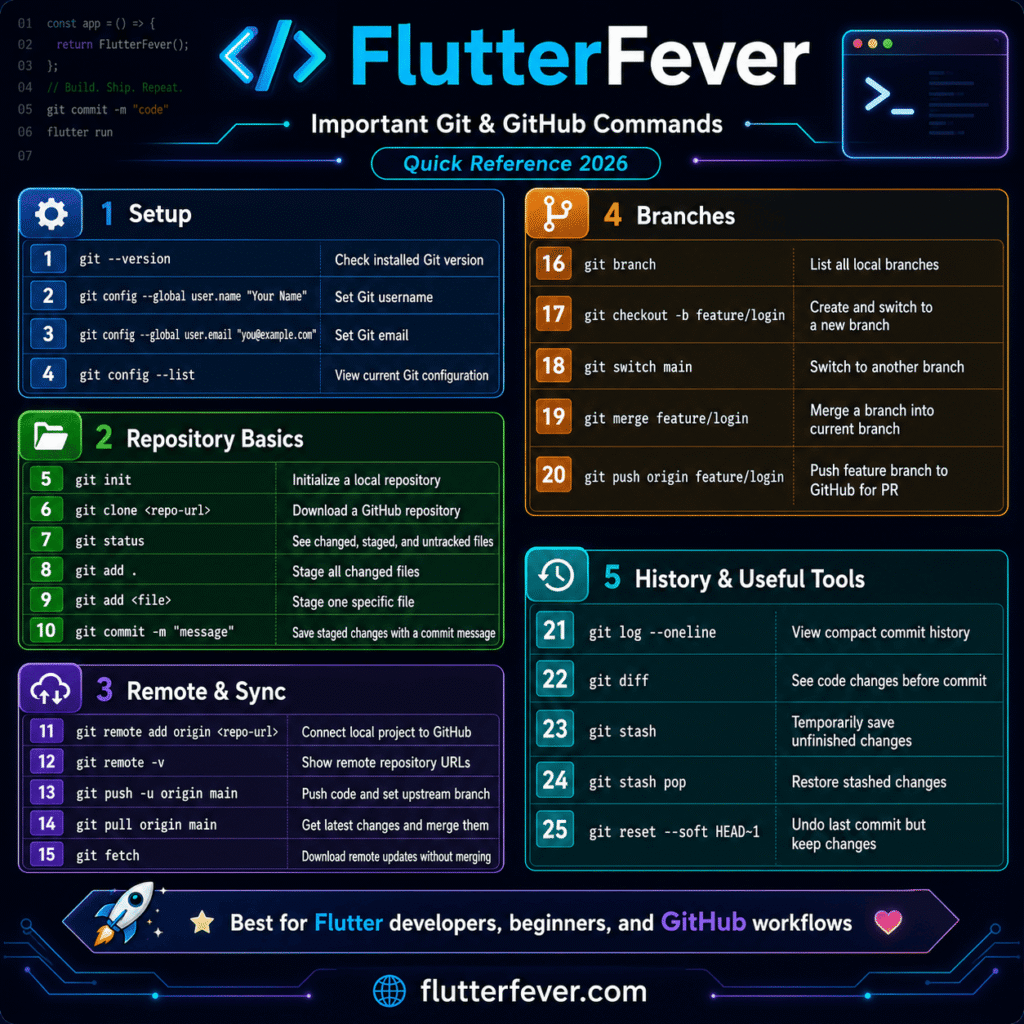
48. Most Important GitHub Commands for Beginners
| Task | Command |
|---|---|
| Check Git version | git --version |
| Set username | git config --global user.name "Your Name" |
| Set email | git config --global user.email "email@example.com" |
| Initialize Git | git init |
| Check status | git status |
| Add all files | git add . |
| Commit changes | git commit -m "message" |
| Add remote | git remote add origin URL |
| Push code | git push -u origin main |
| Pull latest code | git pull |
| Create branch | git checkout -b branch-name |
| Switch branch | git checkout branch-name |
| Merge branch | git merge branch-name |
| Clone repository | git clone URL |
| View remote | git remote -v |
| View commits | git log --oneline |
Part 14: Common GitHub Problems and Solutions
49. Remote Origin Already Exists
Error:
remote origin already existsSolution:
git remote -v
git remote remove origin
git remote add origin https://github.com/username/repository-name.git
50. GitHub Push Rejected Error
Error:
Updates were rejected because the remote contains workSolution:
git pull origin main --rebase
git push origin main
51. GitHub Authentication Failed
GitHub does not use normal account passwords for Git push authentication. Use a Personal Access Token or SSH authentication.
Solution options:
- Use GitHub Personal Access Token.
- Setup SSH key.
- Login using GitHub CLI.
- Use VS Code GitHub authentication.
52. Git Merge Conflict
Conflict example:
<<<<<<< HEAD
your code
=======
other branch code
>>>>>>> feature-branch
Steps to solve merge conflict:
- Open the conflicted file.
- Decide which code to keep.
- Remove conflict markers.
- Save the file.
- Run:
git add . - Commit the resolved conflict:
git commit -m "Resolved merge conflict"
53. Accidentally Committed Secret File
If you accidentally commit .env, API key, or keystore file:
- Remove the file from repository.
- Add it to
.gitignore. - Rotate the leaked secret immediately.
- Check GitHub security alerts.
- Rewrite Git history if required.
- Never reuse leaked credentials.
Part 15: 30-Day GitHub Learning Roadmap for Flutter Developers
Week 1: GitHub Beginner Basics
| Day | Topic |
|---|---|
| Day 1 | Understand Git vs GitHub |
| Day 2 | Create GitHub account |
| Day 3 | Install Git and configure username/email |
| Day 4 | Create first repository |
| Day 5 | Push Flutter project to GitHub |
| Day 6 | Write README file |
| Day 7 | Practice Git status, add, commit, push |
Week 2: Branches and Pull Requests
| Day | Topic |
|---|---|
| Day 8 | Learn branches |
| Day 9 | Create feature branch |
| Day 10 | Push branch to GitHub |
| Day 11 | Create pull request in GitHub |
| Day 12 | Create pull request in VS Code |
| Day 13 | Review and merge PR |
| Day 14 | Solve merge conflict |
Week 3: Flutter Project Workflow
| Day | Topic |
|---|---|
| Day 15 | Create Flutter .gitignore |
| Day 16 | Add screenshots in README |
| Day 17 | Create Issues |
| Day 18 | Use GitHub Projects |
| Day 19 | Create release notes |
| Day 20 | Upload APK in release |
| Day 21 | Improve GitHub profile |
Week 4: Advanced GitHub
| Day | Topic |
|---|---|
| Day 22 | Learn GitHub Actions |
| Day 23 | Create Flutter CI workflow |
| Day 24 | Run flutter analyze in Actions |
| Day 25 | Run flutter test in Actions |
| Day 26 | Build APK using Actions |
| Day 27 | Learn GitHub Secrets |
| Day 28 | Enable Dependabot |
| Day 29 | Learn GitHub Copilot |
| Day 30 | Final portfolio optimization |
Best Practices for GitHub in 2026
- Use Git from the first day of every Flutter project.
- Write clear commit messages.
- Create separate branches for every feature.
- Use pull requests even for solo projects.
- Never push secrets to GitHub.
- Use
.gitignoreproperly. - Add screenshots in Flutter project README files.
- Use GitHub Issues for bugs and tasks.
- Use GitHub Projects for planning.
- Use GitHub Actions for testing and builds.
- Use GitHub Releases for stable app versions.
- Enable two-factor authentication.
- Use GitHub Secrets for sensitive values.
- Keep dependencies updated.
- Review AI-generated code carefully.
Github Command Cheat Sheet
Conclusion
GitHub is one of the most important tools for developers in 2026. It is not only a code hosting platform. It is a complete development ecosystem for version control, collaboration, automation, security, releases, documentation, and AI-assisted coding.
For Flutter developers, GitHub is even more important because Flutter projects are multi-platform and require proper code management. A professional Flutter developer should know how to create repositories, push projects, manage branches, create pull requests in VS Code, run GitHub Actions, build APK files, write README files, manage releases, and protect secrets.
This GitHub tutorials 2026 guide explained GitHub from beginner to expert level with a special focus on Flutter developers. If you want to become a professional Flutter developer, learning GitHub properly is one of the best investments in your career.
FAQs: GitHub Tutorials 2026
GitHub is used to store code online, track code changes, collaborate with developers, create pull requests, manage issues, run automation, publish releases, and build a professional developer portfolio.
Yes, GitHub is very important for Flutter developers because it helps manage Flutter project code, branches, releases, CI/CD workflows, and team collaboration.
Git is a version control tool that tracks code changes locally. GitHub is an online platform where Git repositories are stored, shared, reviewed, and automated.
To upload a Flutter project to GitHub, initialize Git, add files, commit changes, create GitHub repository, add remote origin, and push code using git push -u origin main.
Install the GitHub Pull Requests and Issues extension in VS Code, sign in to GitHub, create a feature branch, commit changes, push the branch, open the GitHub Pull Requests panel, add title and description, and create the pull request.
GitHub Actions is used to automate Flutter workflows such as running flutter analyze, running tests, building APK, building AAB, building Flutter web, and uploading artifacts.
Flutter developers should not upload .env, key.properties, .jks, .keystore, Firebase private keys, payment secrets, API tokens, and production credentials.
GitHub Copilot is an AI coding assistant that helps developers write code, explain code, generate tests, refactor code, and improve productivity.
Yes, GitHub Actions can build Flutter APK automatically using a workflow file. You can also upload the APK as a GitHub Actions artifact.
To make your GitHub profile professional, add a profile README, upload clean projects, write detailed README files, add screenshots, use proper commit messages, create releases, and keep repositories organized.
Reference Links
| No. | Title | URL |
|---|---|---|
| 1 | GitHub Docs | https://docs.github.com/ |
| 2 | GitHub Actions Documentation | https://docs.github.com/actions |
| 3 | GitHub Pull Requests Guide | https://docs.github.com/pull-requests |
| 4 | Creating a Pull Request | https://docs.github.com/articles/creating-a-pull-request |
| 5 | GitHub Copilot Documentation | https://docs.github.com/copilot |
| 6 | GitHub Pages | https://pages.github.com/ |
| 7 | GitHub Codespaces Documentation | https://docs.github.com/codespaces |
| 8 | GitHub Security Documentation | https://docs.github.com/code-security |
| 9 | GitHub Dependabot Documentation | https://docs.github.com/code-security/dependabot |
| 10 | GitHub Pull Requests and Issues VS Code Extension | https://marketplace.visualstudio.com/items?itemName=GitHub.vscode-pull-request-github |
Keywords for Article
- GitHub tutorials 2026
- GitHub tutorial for beginners
- GitHub complete guide
- GitHub for Flutter developers
- GitHub beginner to expert guide
- How to use GitHub
- How to upload Flutter project to GitHub
- How to create pull request in VS Code
- How to create pull request in GitHub
- GitHub Actions Flutter
- Flutter GitHub workflow
- GitHub repository tutorial
- GitHub branch tutorial
- GitHub commit tutorial
- GitHub pull request tutorial
- GitHub Issues tutorial
- GitHub Projects tutorial
- GitHub Releases Flutter
- GitHub Secrets Flutter
- GitHub security features
- GitHub Dependabot
- GitHub Copilot tutorial
- GitHub Codespaces tutorial
- GitHub Pages Flutter
- Flutter CI/CD GitHub Actions
- GitHub portfolio for Flutter developer
- GitHub commands cheat sheet
- GitHub profile README
- GitHub expert guide 2026