

JSON To Dart Model Generator Free: Convert JSON To Dart Class Online For Flutter

When you build Flutter apps that consume APIs, one of the most repetitive tasks is converting raw JSON into clean Dart model classes. This step is essential for structured code, safer parsing, and better maintainability. A reliable JSON to Dart Model Generator tool can save hours of manual work, reduce errors, and help Flutter developers generate production-ready models much faster.
If you work with REST APIs, mock APIs, Firebase responses, ecommerce payloads, authentication responses, user profiles, nested order data, or paginated APIs, you already know how time-consuming manual model creation can become. That is exactly where a modern JSON To Dart Model Generator tool becomes highly useful.
This tool on FlutterFever is designed to help Flutter developers paste JSON, generate nested Dart models, detect lists, support nullable fields, identify DateTime values, and even provide advanced output styles like json_serializable and Equatable-ready code. It is not just a basic converter. It is a developer productivity tool made for real Flutter workflow.
What is a JSON To Dart Model Generator
A JSON To Dart Model Generator is a developer tool that converts JSON data into Dart classes. Instead of manually writing fields, constructors, fromMap, toMap, copyWith, and nested model structures, the tool automatically generates that code for you.
For example, if your API returns user data like name, email, profile, order history, tags, and timestamps, the generator can analyze the structure and convert it into clean Dart models that are much easier to use in your Flutter project.
This is especially important in Flutter because strongly typed models improve:
- Code readability
- API parsing safety
- Autocomplete support
- Refactoring confidence
- State management clarity
- long-term project maintainability
Why this tool is useful for Flutter developers
A lot of Flutter beginners start by accessing API values directly from dynamic maps. That may work in small demos, but in real apps it quickly becomes messy. As soon as your API response grows, or has nested fields, lists, optional values, or timestamps, dynamic handling becomes difficult to maintain.
A JSON to JSON to Dart Model Generator tool helps by turning unstructured API responses into reusable models.
It is useful because it helps you:
Save development time
Manual model writing is repetitive. If your response has 20 fields and 3 nested objects, writing everything by hand is slow and error-prone.
Reduce parsing mistakes
A generator automatically maps fields and nested structures, which lowers the risk of typos and incorrect type assignments.
Work faster with real APIs
When integrating authentication, product listing, orders, user profile, payments, or dashboard APIs, you can quickly generate classes and continue development.
Keep Flutter code clean
Clean model classes make your repository layer, controller layer, provider, bloc, cubit, or GetX logic much more readable.
Improve team productivity
If multiple developers are working on the same project, consistent model generation helps standardize code structure.
Who should use this JSON To Dart Model Generator free tool
This tool is useful for many types of Flutter developers and teams:
- Flutter beginners learning API integration
- Intermediate developers building production apps
- Advanced developers who want faster model generation
- Freelancers handling multiple client APIs
- Startup teams building MVPs quickly
- Backend-integrated Flutter projects
- Firebase and REST API consumers
- Developers working with nested and complex JSON payloads
Where this tool is helpful in real projects
The tool becomes valuable in almost every Flutter project where data comes from an API or external source.
If you are beginner and no any idea about JSON response First Should Learn with Mock API Playground for Flutter.
1. User profile APIs
If your API returns user ID, name, email, phone, profile image, address, and preferences, you can convert everything into a Dart model instantly.
2. Ecommerce apps
Product list, cart items, order summary, shipping address, payment details, category tree, and reviews often come with deeply nested JSON. This tool helps generate structured models much faster.
3. Authentication systems
Login responses often include token, user details, role, permissions, expiry time, and metadata. The generator helps you build clean auth models.
4. Dashboard and admin apps
Analytics responses, chart data, metrics, and pagination objects are easier to manage when converted into Dart classes.
5. Blog and CMS apps
Article, author, tags, categories, and content sections usually come in nested response format. The tool simplifies conversion.
6. Booking and service apps
Appointment details, slot timings, customer info, location, pricing, and status history can all be modeled automatically.
7. Finance and fintech apps
Transactions, wallets, KYC records, statements, account summaries, and nested metadata become easier to manage when typed properly.
8. Agriculture, logistics, or marketplace apps
If your app deals with vendors, product inventories, delivery routes, expert bookings, farm records, or store data, this tool becomes especially useful because such APIs usually contain many nested layers.
Why typed Dart models are better than using raw JSON directly
A common question is: why not just use the JSON response directly?
Technically, you can. But that approach becomes weak in larger apps.
Typed Dart models are better because they offer:
- Better IDE autocomplete
- Safer access to fields
- Easier debugging
- Clearer architecture
- Better state management integration
- Stronger long-term code quality
For example, accessing user.profile.city from a typed model is much safer and clearer than repeatedly using json['user']['profile']['city'].
That is why tools like this are not just convenient. They are practical and important for serious Flutter development.
if you want Just Format your API response or want check node Try : API Response Viewer Online Tool – Format and Inspect JSON Instantly
Main features available in this JSON To Dart Model Generator
This FlutterFever tool includes modern and useful features that make it more than a simple converter.
1. Root model name input
You can define your own root model name before generating the code.
For example:
UserModelProductModelOrderResponseApiResponse
This helps keep your generated code meaningful and project-friendly.
When to use it
Use a custom root model name when:
- you already follow naming conventions
- you want the output to match your app architecture
- you want better readability in your codebase
2. Paste JSON input
You can paste either:
- a JSON object
- or a JSON array of objects
The tool analyzes the structure and generates the corresponding Dart classes.
When to use it
Use this whenever you:
- copy sample API response from Postman
- inspect backend response in browser
- receive mock API payload
- want to test nested response structures
3. Quick samples
The tool includes sample presets such as:
- User
- Product
- Order
- Pagination
This is helpful for testing the generator quickly without manually searching for example JSON.
When to use it
Use quick samples when:
- you want to understand how the tool works
- you are checking output styles
- you are teaching someone model generation
- you want to quickly test tabs and code output
4. Null safety support
The tool supports null-safe Dart code generation.
That means optional fields can be marked properly and the generated code fits modern Flutter and Dart standards.
Why it matters
Null safety is important because many real APIs return missing or optional values. If your model does not account for that, runtime errors can occur.
When to use it
Use null safety almost always in modern Flutter development.
5. Final fields option
You can generate fields as final, which is useful for immutable model patterns.
Why it matters
Immutable models are cleaner, easier to reason about, and work better in many state management approaches.
When to use it
Use final fields when:
- you prefer immutable classes
- you are using clean architecture
- you want predictable model behavior
- you are building scalable apps
6. copyWith support
The tool can generate copyWith() methods automatically.
Why it matters
copyWith() is very useful when you want to create updated copies of a model without mutating the original object.
For example:
- change only user name
- update order status
- replace one field in app state
- manage immutable state in bloc, cubit, provider, or GetX
When to use it
Use copyWith() when:
- working with app state
- updating part of a model
- building forms
- using immutable architecture
7. fromMap / toMap support
The tool can generate fromMap() and toMap() methods automatically.
Why it matters
This helps you convert JSON maps to Dart objects and Dart objects back into maps.
When to use it
Use this when:
- parsing API response manually
- sending structured data back to API
- storing local data
- integrating with custom data layers
8. DateTime detection
One of the strongest practical features is DateTime detection.
If the tool sees date strings like ISO timestamps, it can identify them and generate DateTime fields instead of plain strings.
Why it matters
Date fields are everywhere:
- created_at
- updated_at
- order_date
- booking_time
- payment_timestamp
Keeping them as strings makes date formatting, sorting, and time calculations harder.
When to use it
Use DateTime detection when your API returns timestamps and you plan to:
- format dates in UI
- compare dates
- filter by time
- show relative time
- sort history items
9. snake_case to camelCase conversion
Many APIs return keys in snake_case, but Dart usually prefers camelCase.
This tool can convert JSON keys like:
full_name→fullNamecreated_at→createdAttotal_amount→totalAmount
Why it matters
It makes the generated code look natural in Dart and easier to read.
When to use it
Use this when:
- your backend uses snake_case
- you want Dart-friendly property names
- you want clean Flutter code style
10. Nested model generation
If your JSON contains objects inside objects, the tool generates nested Dart classes automatically.
For example:
- user profile inside user
- category inside product
- customer inside order
- address inside booking
Why it matters
Nested models are common in real-world APIs. Manual generation becomes tedious and inconsistent.
When to use it
Use nested model generation when your response has deeper structures, not just flat key-value pairs.
11. List detection
If your JSON contains arrays, the tool can generate:
List<String>List<int>List<double>List<CustomModel>
Read : What is Dart Lists & How many types of Lists in dart?
Why it matters
Lists are everywhere in APIs:
- tags
- products
- cart items
- comments
- transactions
- order lines
When to use it
Use it for any response that contains arrays or collections.
12. JSON Serializable tab
The tool provides a dedicated JSON Serializable output tab.
This helps generate code in a format that fits the json_serializable package approach.
Why it matters
Many Flutter teams use json_serializable for scalable and maintainable code generation.
When to use it
Use the JSON Serializable tab when:
- your project uses
json_annotation - you generate
.g.dartfiles - you prefer annotation-based serialization
- you want structured, scalable model code
13. Equatable tab
The tool also provides an Equatable output tab.
Why it matters
Equatable is extremely useful for value comparison and is widely used with:
- Bloc
- Cubit
- Clean architecture
- Immutable model classes
When to use it
Use the Equatable tab when:
- your project uses
equatable - model equality matters
- state comparison matters
- you want more professional Flutter model structure
Read : Dart with Real-World Examples, API Handling, Cart Logic, and Async Programming
14. Copy code button
You can instantly copy the generated code.
The tool also improves UX by showing a success state after clicking copy.
When to use it
Use copy when:
- you want to quickly paste into your editor
- you are testing multiple JSON structures
- you do not need file download every time
15. Download .dart button
You can directly download the generated code as a Dart file.
Why it matters
This is useful for faster workflow, especially when you are generating multiple models and want to save them quickly.
When to use it
Use download when:
- you want a direct file
- you are moving code into project folders
- you are generating multiple variants
- you want to keep a reusable local copy
Step-by-step process to use the tool
Now let us go through the full usage process from opening the tool to copying or downloading the generated Dart code.
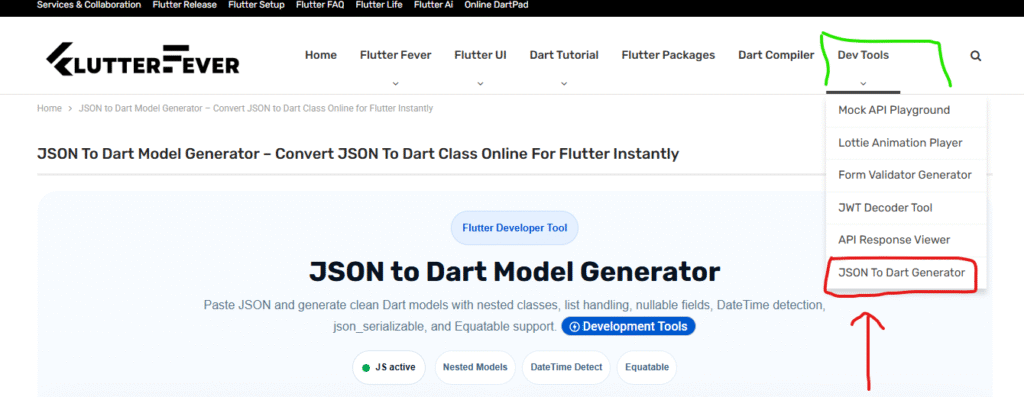
Step 1: Open the tool on FlutterFever
Go to FlutterFever and open the JSON To Dart Model Generator from the Dev Tools section.
Once the page opens, you will see:
- tool title
- root model name field
- JSON input area
- sample chips
- code options
- smart detection options
- output tabs
- copy and download buttons
Step 2: Set the root model name
In the Root Model Name input, write the main model name you want.
Examples:
UserModelProductModelOrderModelApiResponse
This name becomes the main generated Dart class.
Step 3: Paste your JSON
Paste your API response into the JSON text area.
You can paste:
- direct API response from Postman
- response copied from browser network tab
- sample JSON from backend team
- mock API payload
- nested response object
Make sure the JSON is valid.
Step 4: Choose quick sample if needed
If you do not have JSON ready, click any quick sample:
- User
- Product
- Order
- Pagination
This fills the input automatically and helps you test the tool quickly.
Step 5: Choose code options
Select the features you want.
Null safety
Keep it enabled for modern Dart projects.
Final fields
Enable it if you want immutable fields.
copyWith
Enable it if your state management or app logic needs copy-based model updates.
fromMap / toMap
Enable it if you want manual mapping support.
Step 6: Choose smart detection options
These options make the generated code smarter.
Detect DateTime
Enable this if your JSON contains timestamps.
json_serializable tab
Enable this if your project uses json_serializable.
Equatable tab
Enable this if your project uses equatable.
snake_case to camelCase
Enable this if your API keys are in snake_case and you want Dart-style field names.
Step 7: Click Generate Dart Code
Now click the Generate Dart Code button.
The tool will:
- parse the JSON
- detect object or array structure
- generate root model
- generate nested classes
- detect lists
- detect nullable or optional fields
- detect DateTime strings
- prepare multiple output styles
Step 8: Review the generated code
On the right side, you will see generated code output.
You can switch among:
- Basic
- JSON Serializable
- Equatable
Each tab provides a different style of code generation.
Step 9: Use the right output tab for your project
This step is important because not every project needs the same output format.
Use Basic tab when
- you want direct model code
- you prefer simple classes
- you are learning model generation
- you want quick output
Use JSON Serializable tab when
- your project uses
json_serializable - you want annotation-based generation
- your team uses package-based serialization
- you want scalable codebase structure
Use Equatable tab when
- your project uses Bloc or Cubit
- equality comparison matters
- you want value-based model classes
- you want a more advanced architecture-friendly model
Step 10: Copy the code
If you want to paste directly into VS Code or Android Studio, click Copy Code.
The button gives a success state after copy, which improves usability.
Step 11: Download the code
If you want a file, click Download .dart.
This is useful when:
- you want to save the model locally
- you want to organize generated files
- you are handling multiple APIs
- you prefer file-based workflow
When to use each feature in practical Flutter development
Here is a quick practical breakdown.
Use null safety
Always use it in modern Flutter projects.
Use final fields
Use when your models should remain immutable.
Use copyWith
Use when models are part of UI state or need partial updates.
Use fromMap / toMap
Use when you manually parse API data or store object data locally.
Use DateTime detection
Use when your API has timestamps and your UI needs readable date formatting.
Use snake_case to camelCase
Use when API naming style and Dart naming style differ.
Use JSON Serializable
Use when your team uses annotation-driven serialization.
Use Equatable
Use when comparing models is important in Bloc or state-based architecture.
Why this tool is better than manual model writing
Manual model writing has several common problems:
- slow process
- easy to make typos
- hard to manage nested JSON
- repetitive boilerplate
- inconsistent field naming
- missed nullable cases
- missed DateTime conversion
- poor developer productivity
This tool solves those problems by automating the most repetitive part of Flutter API integration.
Common use cases for this tool
Here are some common scenarios where this generator saves time.
Parsing login response
Generate model for token, user, role, and metadata.
Building product listing page
Generate product model with category, tags, stock, and pricing data.
Creating order details screen
Generate nested order model with customer, items, total amount, and timestamps.
Handling dashboard API
Generate analytics models for counts, stats, and chart data.
Working with paginated APIs
Generate response wrapper and list item model together.
Integrating backend quickly during MVP stage
Paste sample payload and get models fast without wasting time on boilerplate.
Best practices after generating code
Once the code is generated, do not stop there. Follow a few good practices.
Review field names
Check whether the generated model names match your project style.
Split files when needed
For larger projects, move classes into separate files if necessary.
Align with architecture
If your app uses data, domain, and presentation layers, place models in the correct data layer folder.
Test with real API
Generated code should always be tested with actual API responses, especially where null values or optional fields may vary.
Regenerate after API changes
If backend response changes, regenerate and update your model accordingly.
Keywords for JSON To Dart Model Generator tool
- JSON to Dart model generator free
- JSON to Dart class online
- convert JSON to Dart model Flutter
- JSON to Dart class generator
- JSON to Dart model online free
- Flutter JSON to model converter
- Dart class generator from JSON
Final thoughts
A good JSON to JSON to Dart Model Generator free tool is more than just a convenience utility. It directly improves Flutter development workflow. It saves time, reduces mistakes, handles nested structures, generates clean models, and supports modern patterns like null safety, json_serializable, and Equatable.
If you regularly work with Flutter APIs, this tool can become part of your daily development process. Whether you are parsing user profiles, orders, products, dashboard data, or pagination responses, generating correct Dart models quickly makes a real difference.
The FlutterFever JSON To Dart Model Generator is useful because it is designed around real Flutter needs. It does not just convert raw JSON. It gives you practical code generation features that help in real app development from first API testing to final integration.
If your goal is faster Flutter development, cleaner architecture, and better model handling, this tool is worth using regularly.
FAQ
It is an online tool that converts JSON responses into Dart model classes for Flutter apps.
Yes, it supports nested objects and nested class generation.
What is the benefit of the Equatable tab