

GenUI + Firebase AI in Flutter (2026): Building Dynamic, AI-Driven User Interfaces


Flutter has always been strong at building beautiful, high-performance cross-platform apps. But traditionally, Flutter apps are static in structure — screens, routes, widgets, and flows are predefined at compile time.

Generative UI changes that.
With the combination of GenUI SDK and Firebase AI Logic (via genui_firebase_ai), Flutter developers can now build applications where the UI itself is dynamically composed by an AI model — using structured schema, tool calling, and brand-safe widget catalogs.
This article is not hype.
This is a balanced, developer-first deep dive into:
- What GenUI really is
- How
genui_firebase_aiworks internally - Real architectural implications
- Pros and cons
- When you should use it
- When you absolutely should not
- Production considerations
- Long-term future
If you are a serious Flutter developer evaluating Generative UI in 2026, this guide is for you.
What is Generative UI in Flutter?
Generative UI is not just rendering dynamic JSON.
It is an agentic UI orchestration loop where:
- User provides intent
- AI generates structured UI instructions
- Flutter renders interactive widgets dynamically
- User interacts with generated components
- AI refines the UI in real time
Instead of:
Screen → Widgets → Navigation
We move toward:
Intent → Agent → UI Composition → Interaction → Refinement
GenUI acts as the orchestration layer between:
- Your Flutter widgets
- Your AI model (Gemini via Firebase AI Logic)
- Your UI schema/catalog
Genui Package: https://pub.dev/packages/genui
Where genui_firebase_ai Fits
The genui_firebase_ai package integrates:
GenUI SDK
+
Firebase AI Logic
+
Gemini models
It provides:
FirebaseAiContentGenerator(connects to Firebase AI Logic)- Tool support (AI can trigger structured actions)
- Schema adaptation
- Error stream monitoring
- Token usage tracking
- Default Gemini model configuration
This allows you to:
Build dynamic AI-driven UI
without maintaining your own LLM backend server.
For Flutter developers, this is huge.
Read Articles: Notebook LM for Flutter Developers: Research Faster, Build Better
How It Actually Works (Architecture Deep Dive)
Let’s simplify the real flow.
Step 1: You define a Widget Catalog
This is critical.
The AI is NOT allowed to generate arbitrary Flutter widgets.
You define:
- Allowed components
- Layout blocks
- Interactive elements
- Tool-accessible actions
This protects:
- Branding
- Security
- Predictability
Step 2: You Create a GenUI Conversation
You initialize:
- A catalog
- An A2UI message processor
- Firebase AI content generator
- Optional tools
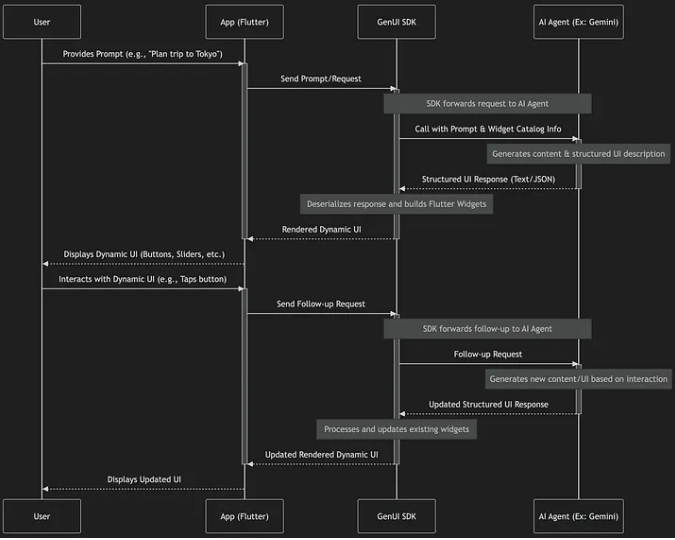
Step 3: User Sends Prompt
Example:
“Help me plan a Tokyo trip.”
Step 4: Model Generates Structured Response
Instead of text:
It generates UI instructions.
Example structure:
- Hero image section
- Date picker
- Budget slider
- Save button
- Recommendation cards
Step 5: Flutter Renders Widgets
GenUI deserializes the structured UI
and maps it to your defined widgets.
Step 6: User Interacts
User adjusts slider →
This triggers tool call or new model request →
UI updates.
That is the agentic loop.
How does GenUI SDK for Flutter work?
Why Should Flutter Developers Care?
Let’s think practically.
As a Flutter developer, your pain points may include:
- Building dynamic onboarding flows
- Custom dashboards per user
- Personalization logic
- AI assistant UIs
- Adaptive form builders
- Multi-step recommendation flows
GenUI reduces the need to predefine every possible path.
Instead, you define:
Boundaries + components
And the AI composes within them.
Read Articles : Flutter Developer Roadmap 2026: Complete Skill Path, Career Scope, and Future Trends
Real Use Cases (Where It Makes Sense)
1. AI Assistants with Interactive UI
Not chat.
Not static cards.
Real interactive components.
2. Guided Planning Apps
- Travel planner
- Workout planner
- Financial budgeting
- Crop advisory systems
3. Personalized Dashboards
- Different layout per user
- Different modules per role
4. Adaptive Forms
Form fields appear only when needed
Conditional sections generated dynamically
Pros of Using GenUI + Firebase AI in Flutter
Let’s be honest and structured.
1. Faster Prototyping of AI Experiences
You don’t need to build every layout manually.
2. Secure Model Access
Firebase handles API keys and security.
3. Tool Calling Enables Real Actions
Not just content — actual app behavior.
4. Cross-Platform Consistency
Works on mobile, web, desktop.
5. Token Tracking Built In
Important for cost control.
6. Error Monitoring Support
You can observe failures via error streams.
7. Schema Discipline
Helps keep outputs structured and predictable.
Cons and Risks (Critical Section)
Now let’s talk reality.
1. Complexity
You’re adding:
- AI
- Schema
- Orchestration
- Tooling
- Token budgets
This is not simple Flutter development anymore.
2. Cost Management
Generative UI can consume more tokens than plain text responses.
3. Debugging Difficulty
UI generated by model
means harder to reproduce bugs.
4. Overengineering Risk
Not every app needs generative UI.
5. Latency
LLM calls introduce delay.
You must handle progressive rendering.
6. Security Surface Expansion
More attack vectors:
- Tool misuse
- Malformed schema
- Prompt injection
When You Should NOT Use GenUI
Be disciplined.
Do NOT use it for:
- Simple CRUD apps
- Static dashboards
- Offline-first apps
- Performance-critical minimal UI
- Highly regulated flows where structure must be fixed
Use it only when:
Adaptability provides real product value.
Performance and Production Considerations
1. Token Budgeting
Track:
- input tokens
- output tokens
Set per-session limits.
2. Remote Kill Switch
Always add a way to disable GenUI.
3. Fallback Static UI
If model fails, show minimal safe UI.
4. Catalog Discipline
Keep allowed widgets small and controlled.
5. Tool Validation
Never trust model arguments blindly.
6. Image Handling
If using images, pass real data — not just URLs.
Developer Mindset Shift
Traditional Flutter mindset:
“I will design every screen.”
GenUI mindset:
“I will design the system that composes screens.”
This is architectural thinking.
You become:
Experience system designer
not just UI builder.
Long-Term Outlook (2026 and Beyond)
Generative UI is still evolving.
Possible future improvements:
- Progressive streaming rendering
- Full-screen layout composition
- Navigation orchestration by AI
- Deeper Firebase ecosystem integration
- Stronger schema enforcement
- Better tooling around debugging
But the direction is clear:
Intent-driven interfaces will grow.
This is sample App Github Repo Try it : https://github.com/flutter/genui
Final Verdict: Should Flutter Developers Use GenUI + Firebase AI?
Short answer:
Yes — but selectively.
Use it when:
- Personalization matters
- Experience must adapt
- AI is central to product value
Avoid it when:
- UI must remain fixed
- Budget is tight
- Complexity outweighs benefit
GenUI is powerful.
But power requires architectural maturity.
Frequently Asked Questions
Yes, but only if implemented with schema discipline, tool validation, token monitoring, and fallback UI strategies. Without guardrails, it can become unstable.
No. You still design the widget catalog and layout boundaries. The AI composes within those constraints.
Not entirely. It can orchestrate parts of flows, but fixed navigation remains important for stability and clarity.
It can be, especially due to token usage and complexity. Monitoring, budgeting, and schema discipline are necessary to keep it sustainable.