

DartPad | Dart Compiler Online | Dartpad Flutter | Online Dart Editor | Flutter Online Widget Test | Dart IDE Online
Learn Dart by writing real code live
Welcome to the FlutterFever Practice Lab. Read the concept, modify the code, run it instantly, and understand how Dart works in real time.
Interactive Learning
Users can edit the code directly and test logic instantly without leaving the page.
Beginner Friendly
Perfect for loops, functions, variables, collections, OOP, and daily coding practice.
FlutterFever Branding
A premium practice section that feels more polished than a plain embedded editor.
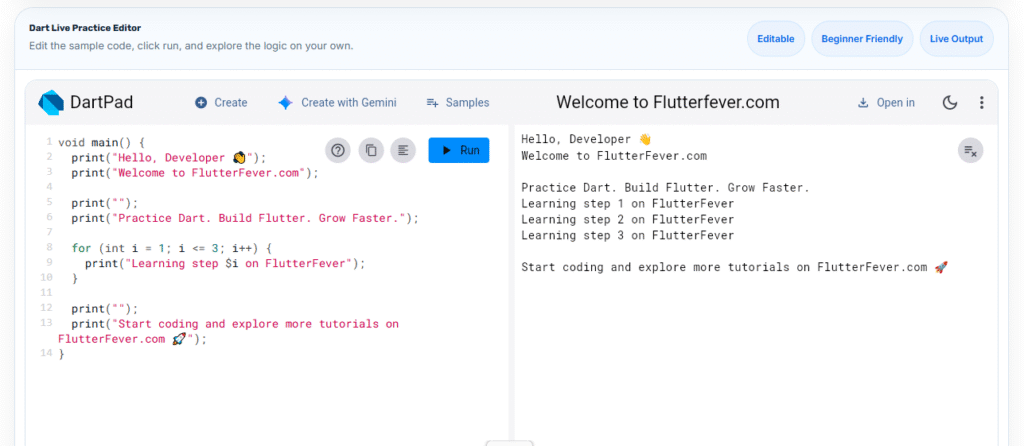
Dart Live Practice Editor
Edit the sample code, click run, and explore the logic on your own.
Dart Compiler Online: Why DartPad Live Is the Easiest Way to Practice Dart in Your Browser
If you are searching for a dart compiler online, you are most likely looking for a fast and simple way to write, test, and understand Dart code without setting up a local development environment. For beginners, students, and even experienced Flutter developers, using a dart compiler online can save time, remove setup friction, and make learning much easier. One of the most practical tools for this purpose is DartPad Live, a browser-based coding environment that lets you run Dart code instantly.
A good dart compiler online is not only about compiling code. It should also help you experiment, debug logic, understand syntax, and practice concepts in real time. This is where DartPad live becomes especially useful. Instead of installing dart SDKs, configuring editors, or worrying about machine setup, you can simply open the browser, write code, click run, and see the result immediately. For learners who want a fast and smooth way to practice Dart, this makes dart compiler online tools extremely valuable.
What Is a Dart Compiler Online
A dart compiler online is a web-based tool that lets users write Dart code and execute or compile it directly in the browser. This means you do not need to install Dart locally just to test simple programs, loops, conditions, functions, classes, or logic snippets. Many learners search for a dart compiler online because they want a zero-setup environment where they can start practicing immediately.
In practical terms, a dart compiler online helps users do the following:
- test Dart syntax quickly
- practice logic building
- verify small programs
- learn language fundamentals
- share examples easily
- teach Dart concepts interactively
For educational websites, tutorials, and blog platforms, integrating a dart compiler online experience is even more powerful because readers can move from reading to practice without switching platforms.
Why DartPad Live Is Popular
When people search for a dart compiler online, they often discover DartPad live because it is one of the easiest tools for instant practice. DartPad provides an interactive code editor in the browser, allowing users to write and run Dart examples quickly. The biggest advantage is convenience. A learner can start with a simple main() function and immediately see the output.
The reason DartPad live stands out is that it reduces resistance. A beginner who is still learning variables, loops, strings, and functions may not want to spend time setting up an IDE. A student reading a tutorial on a website may want to test the concept immediately. A blogger teaching Dart can use DartPad live to make articles more interactive. In all these cases, a dart compiler online like DartPad becomes a bridge between theory and practical understanding.
Benefits of Using DartPad Live for Learning Dart
The biggest strength of DartPad live is accessibility. It works directly in the browser, which makes it ideal for tutorials, quick experiments, and classroom-style learning. If your goal is to improve programming confidence, a dart compiler online can help you practice more frequently because the barrier to entry is very low.
Here are some major advantages of using DartPad live as your preferred dart compiler online:
1. No Installation Required
A local setup can be confusing for beginners. With a dart compiler online, you can skip environment setup and start coding instantly. This makes DartPad live a beginner-friendly option for students and self-learners.
if you want install dart SDK on local machine read : Dart SDK Download for Windows, Linux and Mac
2. Fast Experimentation
When you are trying to understand loops, functions, lists, maps, or conditions, speed matters. A dart compiler online lets you test changes immediately. This is helpful when you want to compare outputs or debug small mistakes.
3. Better Practice Experience
Reading alone is not enough. To learn programming, you need active practice. A dart compiler online supports this by turning passive reading into direct coding action. That is why DartPad live is useful for educational blogs and coding practice platforms.
4. Cleaner Learning Workflow
With a local environment, beginners often get distracted by installation errors, package issues, or editor settings. Using a dart compiler online keeps the focus on Dart syntax and logic. This makes learning more focused and less frustrating.
5. Great for Teaching and Blogging
For platforms like FlutterFever, adding a dart compiler online experience through DartPad live can increase engagement. Instead of only reading a code example, users can modify and run the same example on the page.
Dart Compiler Online for Beginners
For beginners, choosing the right dart compiler online matters. A beginner usually wants a tool that is easy to understand, simple to use, and quick to respond. DartPad live works well because the interface is straightforward and the workflow is intuitive. You write code, click run, and observe the output.
A beginner-friendly dart compiler online should encourage curiosity. For example, if a learner is reading about for loops, they should be able to increase the loop count, change output text, and instantly see what happens. If they are learning about strings, they should be able to test interpolation and formatting. This hands-on interaction helps concepts stay in memory much longer.
Why a Dart Compiler Online Is Useful for Flutter Learners
Even though Flutter development eventually requires a complete setup, many Flutter learners begin with Dart basics. Since Flutter uses Dart, strengthening Dart fundamentals first is a smart approach. A dart compiler online helps users focus on the language before moving into widgets, state management, and UI building.
This is why DartPad live is useful for Flutter beginners:
- it improves confidence with Dart syntax
- it makes logic practice faster
- it helps learners understand functions and classes
- it creates a smooth transition into Flutter coding
Before building apps, every learner benefits from stronger command over lists, maps, conditions, loops, null safety, and functions. A dart compiler online is one of the most practical ways to develop that comfort level.
Best Use Cases for DartPad Live
A dart compiler online is helpful in many real situations. It is not limited to beginners only. Here are some practical use cases where DartPad live becomes valuable:
Teaching Tutorials
If you publish articles about Dart topics, embedding DartPad live can make your blog more interactive. Readers can immediately practice examples instead of copying them elsewhere.
Solving Small Logic Problems
When you want to test a small code snippet, check syntax, or explore output, using a dart compiler online is often faster than opening a full local project.
Practice Sections in Learning Platforms
Websites focused on coding education can use a dart compiler online to provide “Try It Yourself” sections. This increases user interaction and learning time.
Sharing Examples
A dart compiler online makes it easier to share simple programs with learners or teammates. Instead of long setup instructions, you can share a working practice environment.
How to Use DartPad Live Effectively
Using DartPad live is simple, but using it effectively is even better. If you want to grow faster with Dart, treat your dart compiler online as a regular practice lab.
Start with small concepts:
- variables
- data types
- print statements
- conditions
- loops
- functions
- lists and maps
Then move into structured exercises:
- reverse a string
- count even numbers
- find sum of a list
- check palindrome
- build small class examples
The best way to use a dart compiler online is to modify code repeatedly. Change values, alter conditions, add print statements, and observe behavior. This trial-and-error approach builds real understanding.
DartPad Live vs Local Setup
A dart compiler online and local setup both have their place. If you are working on complete applications, package management, or production-level projects, local development is necessary. But if you are learning, practicing, teaching, or testing quick examples, DartPad live is often the better starting point.
Use DartPad live when:
- you want instant practice
- you are learning basics
- you are reading tutorials
- you need quick testing
- you want to teach examples interactively
Use local setup when:
- you are building full apps
- you need package integration
- you are working with files and project structure
- you want full debugging and tooling
For most article readers searching dart compiler online, the immediate need is practice, not project setup. That is why DartPad live serves the search intent very well.
Conclusion
If you want the easiest way to practice Dart in the browser, using a dart compiler online is a smart choice. Among the available options, DartPad live is one of the most beginner-friendly and practical tools for learning, testing, and teaching Dart. It supports fast experimentation, improves hands-on learning, and reduces the friction that often comes with local setup.
For learners, it means faster progress. For educators and bloggers, it means more engaging content. For coding platforms, it means a better learning experience. If your goal is to help users practice Dart directly on the page, then combining useful tutorials with a dart compiler online experience can be a very powerful strategy.
FAQ – Dart live compiler
A dart compiler online is a browser-based tool that lets you write and run Dart code without installing the Dart SDK locally. It is ideal for quick testing, learning, and practice.
Yes, DartPad live is generally used as a free browser-based practice environment for Dart learning and code experimentation.
Yes, beginners can use a dart compiler online very easily. It is actually one of the best ways to start learning because it removes setup complexity.
Yes, DartPad live is useful for Flutter learners because Flutter uses Dart. Practicing Dart fundamentals in a dart compiler online helps learners prepare for Flutter development.
Suggested Keywords
dart compiler online, dartpad live, run dart online, online dart compiler, dart online editor, practice dart online, dart code editor online, learn dart online, browser dart compiler, interactive dart practice