

Dart SDK vs Flutter SDK: Architecture, Differences, and How Flutter Uses Dart

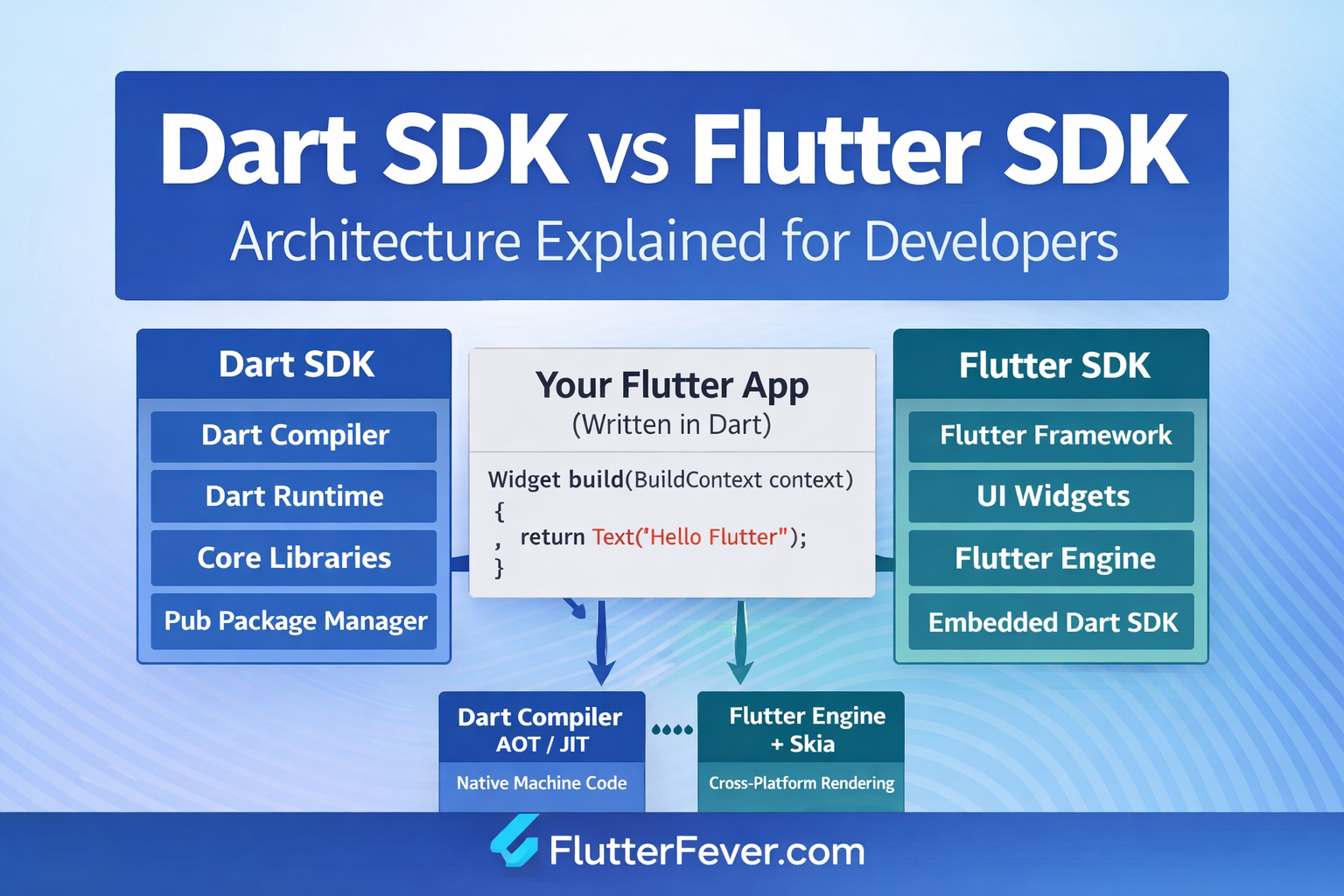
When developers start working with Flutter, one of the first architectural questions that arises is the difference between the Dart SDK and the Flutter SDK. Many developers initially assume that Flutter and Dart are essentially the same thing because Flutter applications are written in Dart. However, under the hood, they serve very different purposes in the software development ecosystem.
Understanding the distinction between Dart SDK and Flutter SDK is extremely important for professional developers. It helps clarify how Flutter works internally, how Dart executes code, how Flutter renders UI, and why Google chose Dart as the foundation of the Flutter framework.
This article provides a deep technical explanation of Dart SDK vs Flutter SDK, including architecture, usage, components, compilers, runtime behavior, and real-world development scenarios. By the end of this guide, you will fully understand:
- What the Dart SDK is
- What the Flutter SDK is
- Why Flutter uses Dart
- How Dart and Flutter interact internally
- When each SDK is used
- How they differ in architecture and purpose
What is the Dart SDK?
The Dart SDK (Software Development Kit) is the core development environment for the Dart programming language.
It includes everything required to write, compile, and run Dart applications.
Dart itself is a general-purpose programming language developed by Google, designed for building high-performance applications across web, mobile, server, and desktop environments.
The Dart SDK provides:
- Dart compiler
- Dart runtime
- Dart core libraries
- Package management tools
- Command line tools for development
In simple terms:
Dart SDK = tools required to run and manage Dart programs
if you want to install Dart SDK : Dart SDK Download for Windows, Linux and Mac
Core Components of Dart SDK
The Dart SDK contains several important components that make Dart applications possible.
Dart Compiler
The Dart compiler converts Dart code into machine-executable formats.
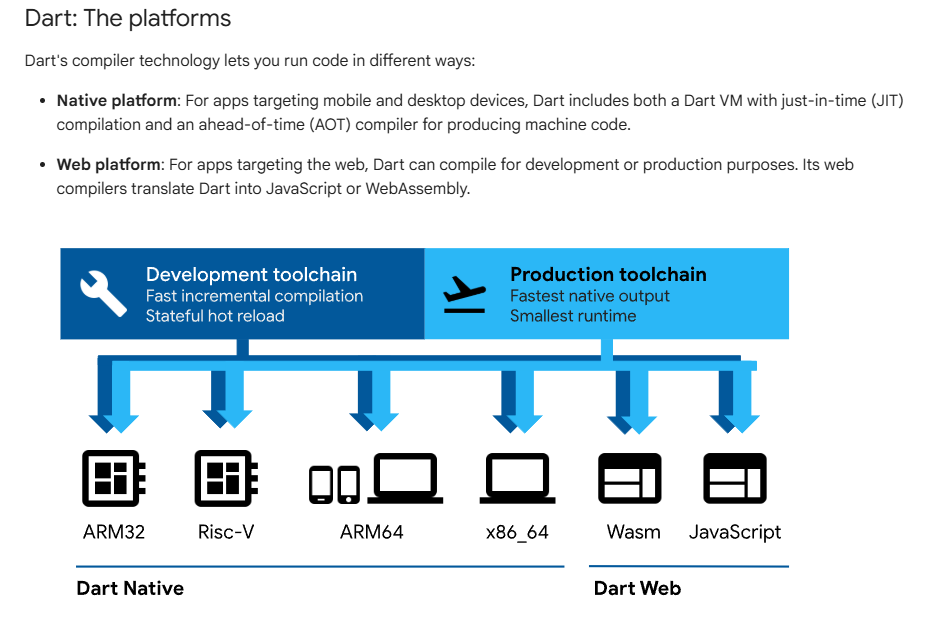
There are two main compilation approaches:
Just-in-Time (JIT) compilation
Used during development.
Benefits:
- Fast development cycle
- Supports Hot Reload in Flutter
- Faster debugging
Ahead-of-Time (AOT) compilation
Used in production.
Benefits:
- Native machine code generation
- Faster app startup
- Improved performance
Dart Runtime
The Dart runtime is responsible for executing Dart programs.
It provides:
- Memory management
- Garbage collection
- Thread execution
- Runtime libraries
The runtime ensures Dart applications can run efficiently across platforms.
Dart Core Libraries
Dart SDK includes several built-in libraries such as:
- dart:core
- dart:async
- dart:math
- dart:convert
- dart:io
These libraries provide fundamental capabilities like:
- Data structures
- Streams
- JSON parsing
- File handling
- Networking
Dart Package Manager (pub)
Dart SDK includes a package manager called pub.
It allows developers to:
- Install dependencies
- Manage packages
- Handle versioning
- Publish libraries
Example command:
dart pub get
This downloads required dependencies for a project.
Dart Command Line Tools
The Dart SDK includes useful CLI tools such as:
- dart run
- dart compile
- dart analyze
- dart format
- dart test
These tools help automate development tasks.
What is the Flutter SDK?
The Flutter SDK is a complete framework and toolkit used to build cross-platform applications.
While Dart SDK provides the language and runtime, Flutter provides the UI framework and rendering engine.
Flutter allows developers to build applications for:
- Android
- iOS
- Web
- Windows
- macOS
- Linux
All using a single codebase written in Dart.
Core Components of Flutter SDK
The Flutter SDK contains several important components.
Flutter Framework
The Flutter framework provides UI libraries that allow developers to build applications using widgets.
Important layers include:
- Material Design widgets
- Cupertino widgets
- Layout system
- Animation framework
- Rendering pipeline
Everything visible in a Flutter application is built using widgets.
Flutter Engine
The Flutter Engine is written in C++ and is responsible for:
- Rendering UI using Skia graphics engine (Latest Impeller For ios and Android both)
- Managing Dart runtime
- Handling platform channels
- Processing user input
- Rendering frames
This engine ensures that Flutter applications run smoothly across platforms.
Dart SDK (Embedded Inside Flutter)
One of the most important points developers should understand:
Flutter SDK already includes the Dart SDK internally.
When you install Flutter, the Dart SDK is automatically installed within the Flutter directory.
Example structure:
flutter/
 ├── bin/
 ├── packages/
 ├── engine/
 ├── framework/
 └── dart-sdk/
This means Flutter manages Dart automatically.
Developers normally do not install Dart separately when working with Flutter.
If you want install Flutter SDK : Download Flutter SDK (Windows) — Also for Mac & Linux
Flutter CLI Tools
Flutter SDK includes several command line tools such as:
flutter create
flutter run
flutter build
flutter doctor
flutter test
These tools help developers manage Flutter applications.
Key Difference Between Dart SDK and Flutter SDK
| Feature | Dart SDK | Flutter SDK |
|---|---|---|
| Purpose | Provides Dart programming language tools | Provides UI framework for building apps |
| Language | Dart | Uses Dart |
| UI System | None | Widget-based UI framework |
| Compiler | Dart compiler | Uses Dart compiler internally |
| Runtime | Dart runtime | Embedded Dart runtime |
| Platform Support | Server, CLI, Web | Mobile, Web, Desktop |
| Rendering Engine | None | Skia graphics engine |
| Dependency Management | pub | pub via Dart |
| Command Tools | dart CLI | flutter CLI |
In simple terms:
Dart SDK = programming language toolkit
Flutter SDK = application development framework
Why Flutter Uses Dart
One of the most common developer questions is:
Why did Google choose Dart for Flutter instead of JavaScript, Kotlin, or Swift?
There are several strong technical reasons.
Fast Compilation Dart supports both JIT and AOT compilation.
During development:
- JIT enables Hot Reload
During production:
- AOT generates native machine code
This provides excellent performance.
Predictable Performance
Dart avoids certain unpredictable behaviors found in other languages.
This helps maintain consistent rendering performance.
Flutter requires rendering 60–120 frames per second, so language predictability is critical.
Garbage Collection Optimized for UI
Dart’s garbage collector is optimized for short-lived UI objects, which Flutter generates frequently.
This prevents frame drops during rendering.
Single Language Development
Using Dart allows Flutter developers to write:
- UI code
- business logic
- backend integrations
all in one language.
How Dart and Flutter Work Together
Understanding the interaction between Dart and Flutter is key to mastering the framework.
Step 1: Developer writes code in Dart
Example:
Widget build(BuildContext context) {
  return Text("Hello Flutter");
}
Step 2: Dart Compiler Processes Code
During development:
Dart JIT compiler runs code dynamically.
During production:
Dart AOT compiler converts code to native ARM or x64 machine code.
Step 3: Flutter Engine Executes Code
The Flutter Engine:
- loads compiled Dart code
- communicates with platform APIs
- renders UI using Skia and Impeller
Step 4: UI Rendered on ScreenFlutter renders UI directly without using native components.
This ensures consistent UI across platforms.
When Should You Use Dart SDK Alone?
The Dart SDK can be used independently without Flutter.
Common use cases include:
Server Applications
Using frameworks like:
- Dart Frog
- Shelf
Example:
dart run server.dart
Command Line Tools
Dart is excellent for building CLI utilities.
Example:
dart run tool.dart
Web Development
Dart can compile to JavaScript.
This allows web applications to run in browsers.
When Should You Use Flutter SDK?
Flutter SDK is used when building applications with UI.
Typical use cases include:
Mobile Apps
- Android apps
- iOS apps
Read: How to Build Your First App with Flutter: Beginner-Friendly Step-by-Step Tutorial
Desktop Applications
- Windows
- macOS
- Linux
Web Applications
Flutter Web enables browser-based applications.
Real Development Example
Suppose you build a mobile app.
Dart SDK Role
Handles:
- logic
- async programming
- API requests
- state management
- data models
Flutter SDK Role
Handles:
- UI widgets
- layout
- animations
- gesture detection
- screen rendering
Read : Flutter Advance Animation: Implicit and Explicit Animations
Architecture Summary
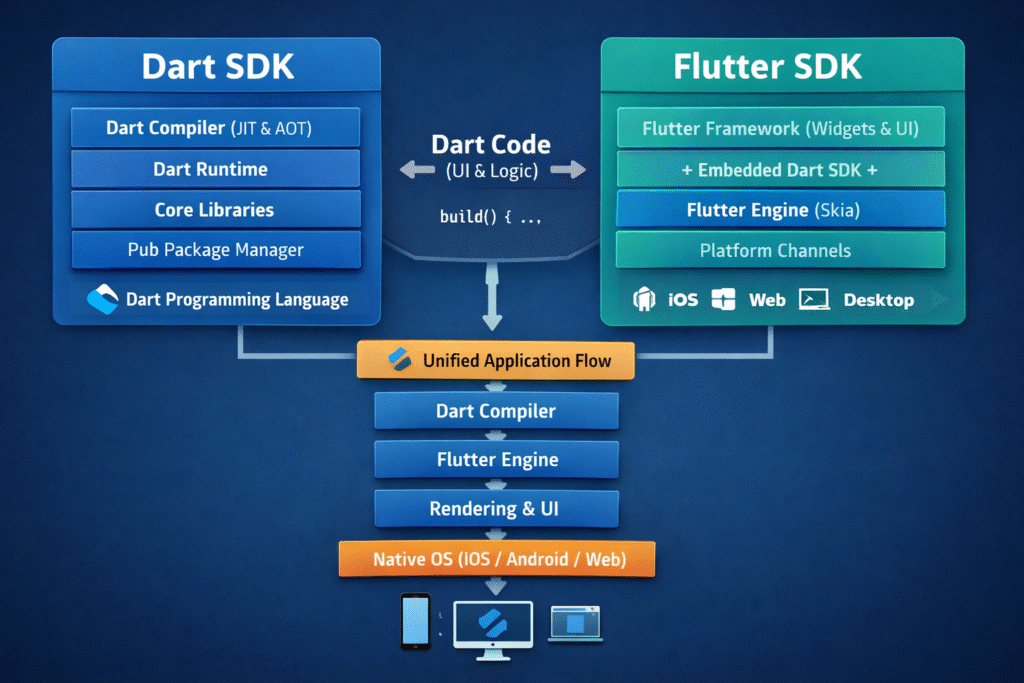
The full Flutter stack looks like this:
Application Code (Dart)
        ↓
Flutter Framework
        ↓
Flutter Engine (C++)
        ↓
Dart Runtime
        ↓
Operating System
This layered architecture allows Flutter to maintain high performance and cross-platform consistency.
Why Dart is Embedded in Flutter
Flutter bundles Dart SDK internally for several reasons.
Version Control
Flutter requires a specific Dart version.
Bundling ensures compatibility.
Toolchain Stability
Flutter tools depend on Dart CLI.
Bundling prevents version conflicts.
Developer Simplicity
Developers only install Flutter.
No separate Dart setup required.
Common Developer Misconceptions
Flutter is a programming language
False.
Flutter is a framework, not a language.
Dart is only used for Flutter
False.
Dart can be used for:
- backend
- web
- command line tools
Dart SDK must be installed separately Usually false.
Flutter installation already includes Dart.
Summary Conclusion
Understanding the difference between Dart SDK and Flutter SDK is essential for developers working in the Flutter ecosystem.
The Dart SDK provides the language, runtime, compiler, and development tools needed to run Dart applications. It forms the foundation of Flutter development.
The Flutter SDK, on the other hand, builds on top of Dart by providing a complete UI framework, rendering engine, and cross-platform application toolkit.
In essence:
- Dart SDK powers the language
- Flutter SDK powers the UI framework
Flutter would not function without Dart, which is why the Dart SDK is embedded inside the Flutter SDK.
For professional developers, mastering both layers—Dart and Flutter—is key to building high-performance applications that scale across mobile, desktop, and web platforms.
Read : Flutter Developer Roadmap 2026: Complete Skill Path, Career Scope, and Future Trends
FAQ
Yes. Flutter bundles the Dart SDK internally.
Yes. Dart can be used for server applications, CLI tools, and web development.
No. Installing Flutter automatically installs Dart.
The Dart SDK compiler compiles the code, while the Flutter engine executes and renders the UI.
References
- Dart Official Documentation
https://dart.dev/guides - Flutter Official Documentation
https://docs.flutter.dev - Flutter Architectural Overview – Google
https://docs.flutter.dev/resources/architectural-overview - Dart Language Overview – Dart.dev
https://dart.dev/language - Flutter Engine and Rendering – Flutter.dev
https://docs.flutter.dev/resources/architectural-overview#engine - Dart Compilation (JIT vs AOT) – Dart Documentation
https://dart.dev/overview#platform - Flutter Rendering Pipeline – Flutter Official Guide
https://docs.flutter.dev/resources/architectural-overview#rendering