

Flutter Download for Windows, macOS, and Linux in 2026
If you are searching for Flutter sdk download, this is the most complete and step-by-step guide you need in 2026.
In this article, you will learn:
- How to download Flutter SDK
- Flutter download for Windows
- Flutter download for macOS
- Flutter download for Linux (Ubuntu)
- How to set up environment variables
- How to run
flutter doctor - How to install Android Studio & VS Code
- Common installation errors and fixes
Let’s begin.
What is Flutter?
Flutter is an open-source UI toolkit developed by Google for building:
- Android apps
- iOS apps
- Web apps
- Desktop apps
With a single codebase.
Before building apps, you must complete the Flutter download and installation process correctly.
Step 1: Flutter Download
Always download Flutter Latest Version:
Note: If you want download only Dart SDK then no need Flutter SDK then Follow Articles:
Dart SDK Download for Windows, Linux and Mac
Download the latest stable version of Flutter SDK Download.
Flutter Download for Windows (Step-by-Step Guide)
System Requirements (Windows 10/11)
- Windows 10 or 11 (64-bit)
- At least 8 GB RAM
- 2.5 GB free disk space
Step 1: Download Flutter SDK for Windows
- Go to the official Flutter website.
- Click on “Windows”.
- Download Flutter SDK ZIP file.
This is usually named like:
flutter_windows_x.x.x-stable.zip
Step 2: Extract Flutter SDK
- Extract the ZIP file.
- Move the extracted folder to:
C:\src\flutter
Do NOT place it inside Program Files.
Step 3: Set Flutter Path (Environment Variables)
- Press Windows + R
- Type:
sysdm.cpl - Click Environment Variables
- Under System Variables → Select “Path” → Click Edit
- Click New
- Add:
C:\src\flutter\bin
- Click OK.
Read : How to Set Flutter Path in Windows (Step-by-Step Guide for Beginners)
Step 4: Verify Flutter Installation
Open Command Prompt and run:
flutter doctor
If Flutter is installed correctly, it will show system status.
Read : Flutter Doctor command — What is flutter doctor
Flutter Download for macOS (Intel & Apple Silicon)
System Requirements
- macOS 12 or later
- Xcode installed
- 8 GB RAM recommended
Step 1: Download Flutter for Mac
- Visit official Flutter website.
- Select macOS.
- Download the stable SDK ZIP.
Step 2: Extract Flutter
Open Terminal and run:
cd ~/development
unzip ~/Downloads/flutter_macos_x.x.x-stable.zip
Step 3: Add Flutter to PATH
Edit .zshrc or .bash_profile:
export PATH="$PATH:`pwd`/flutter/bin"
Then run:
source ~/.zshrc
Step 4: Install Xcode (Important)
For iOS development:
- Install Xcode from Mac App Store.
- Run:
sudo xcode-select --switch /Applications/Xcode.app/Contents/Developer
- Accept license:
sudo xcodebuild -license
Step 5: Verify Installation
Run:
flutter doctor
Fix any red errors shown.
Flutter Download for Linux (Ubuntu Guide)
System Requirements
- Ubuntu 20.04 or later
- 8 GB RAM
- 2 GB disk space minimum
Step 1: Download Flutter SDK
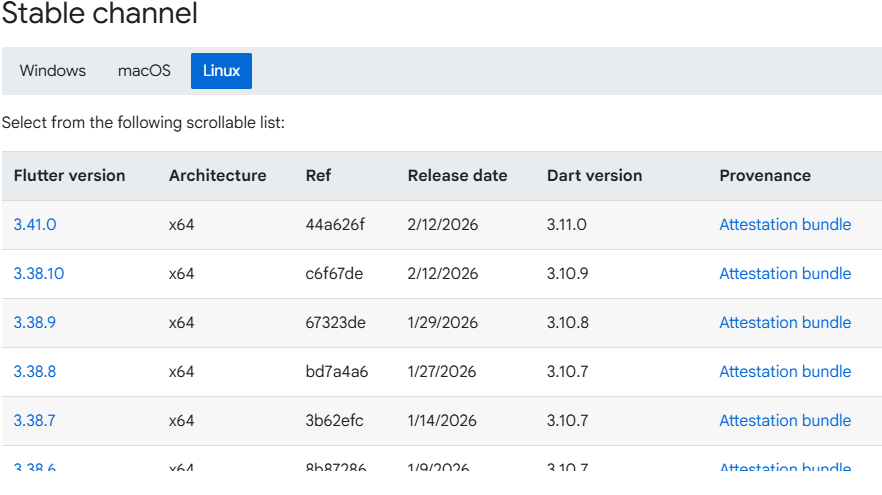
From official website → Choose Linux → Download TAR.XZ file.
For Archive stable:
https://docs.flutter.dev/install/archive
Step 2: Extract SDK
cd ~/development
tar xf ~/Downloads/flutter_linux_x.x.x-stable.tar.xz
Step 3: Add Flutter to PATH
Edit .bashrc:
export PATH="$PATH:$HOME/development/flutter/bin"
Then run:
source ~/.bashrc
Step 4: Install Required Dependencies
sudo apt update
sudo apt install curl git unzip xz-utils zip libglu1-mesa
Step 5: Verify Installation
flutter doctor
Install Android Studio for Flutter
After Flutter download, you must install Android Studio.
Steps:
- Download Android Studio.
- Install Android SDK.
- Install Android Emulator.
- Open Android Studio → SDK Manager → Install required SDK tools.
- Install Flutter and Dart plugin.
Read : Android Studio Download and Android SDK Setup steps for Flutter Development
Install VS Code for Flutter
- Download VS Code.
- Open Extensions.
- Install:
- Flutter Extension
- Dart Extension
VS Code is lightweight and preferred by many Flutter developers.
Download the Flutter SDK bundle
Download the following installation bundle to get the latest stable release of the Flutter SDK
Run Your First Flutter App
After Flutter download and setup:
Read Articles :How to Build Your First App with Flutter: Beginner-Friendly Step-by-Step Tutorial
flutter create myapp
cd myapp
flutter run
If emulator or device is connected, your first Flutter app will launch.
Flutter SDK archive
https://docs.flutter.dev/install/archive
Common Flutter Download Errors & Fixes
1. ‘flutter’ is not recognized
Fix: Check PATH variable.
2. Android licenses not accepted
Run:
flutter doctor --android-licenses
3. Xcode issues (Mac)
Install command line tools:
xcode-select --install
Flutter Download Latest Version (2026)
To upgrade Flutter:
flutter upgrade
To check version:
flutter --version
Always use stable channel unless testing beta features.
Still Facing issue in flutter download or installation process?
View Articles : Flutter Install Error Fixes Guide for Windows, Mac & Linux
Why Download Flutter in 2026?
Flutter remains powerful because:
- Single codebase
- Fast UI development
- Strong community
- Backed by Google
- Cross-platform apps
- High demand in jobs
Frequently Asked Questions (Flutter Download FAQ 2026)
To download Flutter SDK, visit the official Flutter website and choose your operating system (Windows, macOS, or Linux). Download the latest stable version and extract it to a safe directory. Then add Flutter to your system PATH and run flutter doctor to verify installation.
To download Flutter for Windows 11:
Download the Windows ZIP file from the official site.
https://docs.flutter.dev/install
Extract it to C:\src\flutter.
Add C:\src\flutter\bin to Environment Variables.
Run flutter doctor to complete setup.
You can download older versions of Flutter from the official Flutter archive section. This is useful if your project requires a specific SDK version for compatibility.
To switch Flutter channels:flutter channel stable flutter upgrade
Stable is recommended for production apps.
Yes. You can clone Flutter from GitHub using:git clone https://github.com/flutter/flutter.git
This method is useful for advanced users and contributors.
Stable: Production-ready and tested.
Beta: New features but may have bugs.
Master: Experimental and unstable.
Stable is recommended for most developers.
Yes. macOS users should download the correct architecture version (Apple Silicon or Intel) based on their system.
Read articles : Flutter Developer Roadmap 2026: Complete Skill Path, Career Scope, and Future Trends
Keywords For Flutter download:
- flutter download
- flutter download sdk
- flutter download for windows
- flutter sdk download
- download flutter sdk
- flutter sdk for windows
- flutter for windows download
- flutter latest version download
- flutter stable version download
- how to download flutter sdk
- how to download flutter in windows
- flutter download and install windows
- flutter download for windows 10
- flutter download for windows 11
- flutter sdk download zip
- flutter download 64 bit
- flutter sdk latest version for windows
- flutter windows setup guide
- flutter install windows step by step