Learn how to test WebSocket APIs in Postman with this complete 2026 guide. Covers connections, messaging, scripting, best practices, troubleshooting, and more for real-time apps.
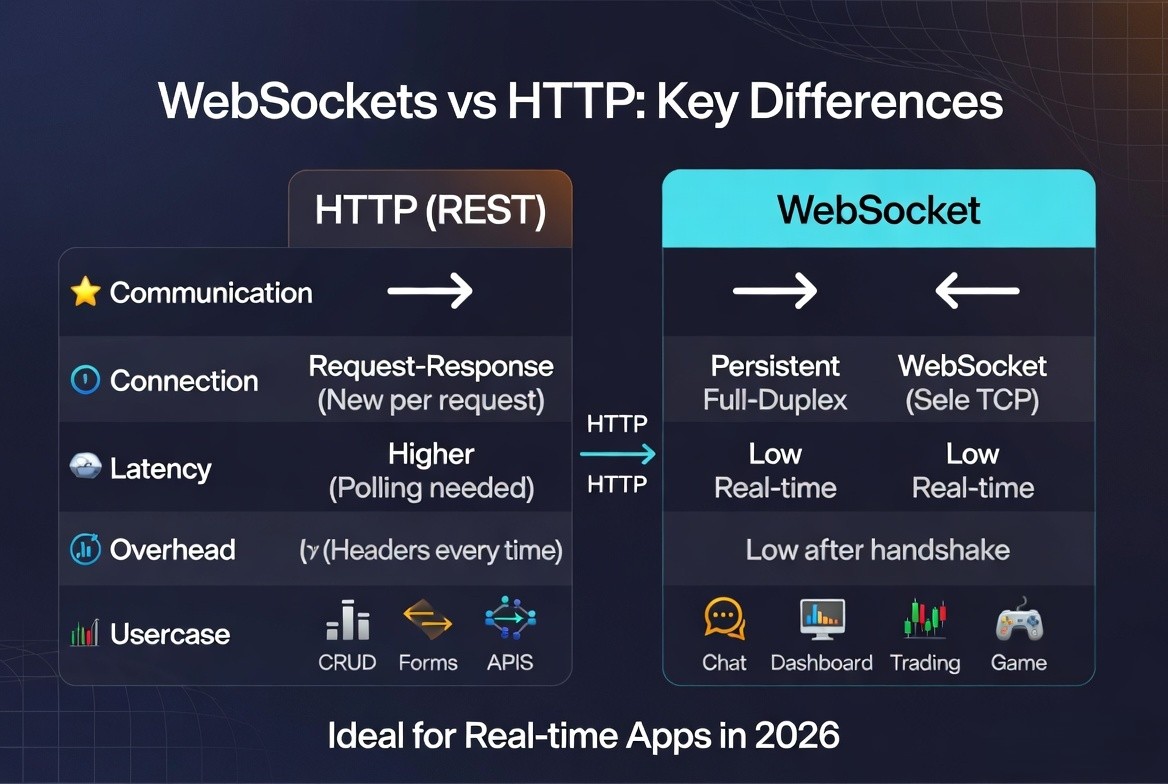
WebSocket APIs power real-time applications like chat systems, live dashboards, trading platforms, collaborative tools, and blockchain data streams. Unlike traditional REST APIs with request-response cycles, WebSockets enable persistent, bidirectional, full-duplex communication over a single TCP connection. This makes testing more complex but essential.
In 2026, Postman remains one of the most popular and powerful tools for testing WebSocket APIs, with robust native support, scripting, collections, and integration features. This in-depth guide covers everything: fundamentals, step-by-step instructions, advanced techniques, best practices, troubleshooting, alternatives, and more. Use it as a complete resource for your projects or as the foundation for your own content.
If you are fresher in Postman Testing then read Complete Guide for Developers. Learn Postman For Freshers.
Why WebSocket Testing Matters in 2026
- Real-time demands: Applications expect sub-second updates (e.g., stock prices, notifications, multiplayer games).
- Bidirectional flow: Servers push data to clients without polling, reducing latency and server load.
- Scalability challenges: Persistent connections require testing for connection management, message ordering, backpressure, and high concurrency.
- Security & compliance: Test authentication, encryption (WSS), and vulnerability to issues like unauthorized subscriptions.
Key benefits of testing WebSockets:
- Verify connection establishment and handshake.
- Validate message formats, subscriptions, and event handling.
- Ensure performance under load and error resilience.
- Automate regression testing in CI/CD pipelines.
For more information about Web Socket visit
Understanding WebSockets vs. HTTP
WebSocket handshake starts as an HTTP request with Upgrade: websocket header, then switches to the WebSocket protocol.
Getting Started with Postman for WebSocket Testing (2026)
Prerequisites:
- Latest Postman desktop app (recommended for best performance; web version works with Desktop Agent).
- Valid WebSocket URL (ws:// for local/dev, wss:// for production/secure).
- API keys or auth credentials if required.
Step-by-Step: Creating and Connecting to a WebSocket Request
- Open Postman and click New > WebSocket (or use the + icon and select WebSocket from the request type dropdown).
- Enter the URL: Use ws:// or wss:// (e.g., wss://echo.websocket.org or your service like wss://eth.nownodes.io/your_api_key).
- Configure optional settings:
- Headers: Add custom headers (e.g., Authorization, Content-Type: application/json).
- Query Parameters: Append to URL or use the Params tab.
- Authentication: Use Bearer Token, API Key, or custom auth in headers.
- Settings: Connection timeouts, reconnection attempts, etc.
- Click Connect. Monitor the connection status indicator and handshake details in the logs.
- Send Messages:
- Go to the Message tab.
- Enter text, JSON, or binary data.
- Click Send. For JSON-RPC (common in blockchain): Use payloads like subscriptions.
- View Responses: Real-time log shows sent/received messages with timestamps. Search/filter the stream.
- Disconnect when done.
Pro Tip: Use Postman’s echo service for practice: wss://ws.postman-echo.com/raw.
Socket.IO Support
Postman also supports Socket.IO via New > Socket.IO. This handles namespaces, events, and rooms common in Node.js apps.
For more information about Web Socket visit
Advanced Testing Techniques in Postman
1. Scripting and Automation
Postman supports JavaScript scripting for WebSockets (pre-request, on-message, etc.). Write tests to validate incoming messages automatically.
Example assertion for message content:
pm.test("Received expected subscription response", function() {
    const messages = pm.response.messages;
    pm.expect(messages).to.have.length.above(0);
    pm.expect(messages[0].data).to.include("newHeads"); // Example for blockchain
});
Filter and assert on message streams for timing, ordering, or patterns.
2. Collections and Environments
- Organize multiple WebSocket requests (e.g., connect, subscribe, unsubscribe, reset) in a collection.
- Use Variables ({{baseUrl}}, {{apiKey}}) for reusability across environments (dev/staging/prod).
- Add documentation and examples.
3. Testing Real-World Scenarios
- Subscriptions: Send subscribe messages and verify push updates (e.g., new blocks, price ticks).
- Authentication: Test token-based or session cookie auth.
- Error Handling: Simulate invalid messages, disconnections, rate limits.
- Binary Data: Send/receive ArrayBuffers or blobs.
- Multi-client: Open multiple Postman tabs/instances to simulate users.
4. Performance and Load Testing
Postman isn’t primarily a load tool, but you can:
- Use collections with monitors.
- Integrate with tools like k6, Artillery, or JMeter for concurrent connections.
For more information about Web Socket visit
Best Practices for WebSocket Testing in 2026
- Security: Always prefer WSS. Test for proper origin checks, auth on upgrade, and message validation.
- Message Validation: Assert on schema (JSON Schema if applicable), data types, and business logic.
- State Management: Test connection lifecycle (open, message, close, error).
- Idempotency & Ordering: Verify message sequence and handling of duplicates/out-of-order delivery.
- Edge Cases: Network drops, high latency, large payloads, concurrent connections.
- Monitoring: Log connection metrics; integrate with APM tools.
- Version Control: Save collections in Git via Postman or export.
- CI/CD: Run tests with Newman (limited WebSocket support) or custom scripts.
Documentation Tip: Maintain clear API docs with example payloads, expected events, and error codes.
Common Issues and Troubleshooting
- Connection Failed: Check URL protocol, firewall, server status, proxy settings. Verify handshake in logs.
- No Messages: Confirm subscription payload; check server-side logs.
- Auth Errors: Headers/tokens must be set before connect.
- SSL Issues: Use valid certificates; test with Desktop Agent.
- Reconnection: Configure retries in settings.
- Performance Lag: Reduce message volume or use filters.
Use Chrome DevTools (Network > WS) or Wireshark for deeper packet inspection alongside Postman.
Alternatives to Postman for WebSocket Testing
While Postman excels in 2026, consider these based on needs:
- Hoppscotch / Firecamp: Lightweight, open-source alternatives with strong protocol support.
- WebSocket King / wscat (CLI): Quick testing.
- Load Tools: k6, Artillery, JMeter, Gatling for performance.
- Browser DevTools: For client-side debugging.
- Specialized: Socket.IO tester, or platform-specific (e.g., for blockchain nodes).
Postman stands out for its unified workspace, collaboration, and scripting.
Integrating into Your Workflow
- Mocking: Use Postman mock servers (limited for WS) or tools like Mockoon.
- Team Collaboration: Share collections via Postman Cloud or workspaces.
- Monitoring: Set up scheduled collection runs for health checks.
- AI Features: Leverage Postman’s AI (Postbot) for generating test scripts or payloads in 2026.
Conclusion
Testing WebSocket APIs in Postman in 2026 is straightforward yet powerful, enabling developers to build reliable real-time features confidently. Master the basics, leverage scripting and collections, and follow best practices for production-grade applications. Whether you’re working on chat apps, fintech, IoT, or Web3, this workflow will save time and catch issues early.
Start experimenting with Postman’s echo service today and scale to your production endpoints. Happy testing!
For more information about Web Socket visit
FAQs
1. Does Postman support WebSocket testing in 2026?
Yes, Postman has mature native support for raw WebSockets and Socket.IO, including connections, messaging, and basic scripting.
2. What is the difference between ws:// and wss://?
ws:// is unencrypted (use only in dev); wss:// is secure over TLS (required for production).
3. Can I automate WebSocket tests in Postman?
Yes, using JavaScript in test scripts for assertions on messages. For full CI/CD load testing, combine with other tools.
4. How do I test authenticated WebSocket connections?
Add auth headers or query params before connecting. Test token refresh scenarios carefully.
5. What are common WebSocket message formats?
JSON (most common), plain text, binary (ArrayBuffer/Blob). JSON-RPC is prevalent in blockchain.
6. Is Postman good for load testing WebSockets? It’s suitable for functional and small-scale tests. Use dedicated load tools like k6 or Artillery for thousands of concurrent connections.
7. How do I handle disconnections in testing?
Monitor close events, test reconnection logic, and simulate network issues.
8. Can I test binary messages in Postman?
Yes, Postman supports composing and viewing binary data.
9. Are there free alternatives to Postman for WebSocket testing?
Yes, like Hoppscotch, wscat, or browser tools, but Postman offers the best overall experience.
10. Where can I practice WebSocket testing?
Use Postman’s echo service (wss://ws.postman-echo.com/raw) or public endpoints like echo servers.
This guide is comprehensive and ready to publish or adapt. Update with your specific use cases (e.g., a particular API) for even better engagement and SEO. Let me know if you need images, code samples, or expansions!