

AWS Integration with Flutter: Complete Developer Guide (2026)


If you are building a production-ready mobile application, sooner or later you will need:
- Secure authentication
- Cloud storage
- Real-time APIs
- Push notifications
- Scalable backend
This is where AWS integration with Flutter becomes extremely powerful.
In this detailed guide, we will cover:
- What AWS offers for Flutter developers
- Best architecture approach
- How to integrate AWS with Flutter step-by-step
- Authentication using Cognito
- Storage using S3
- APIs using AppSync / API Gateway
- Real-time data
- Best practices for scalable apps
This guide is written in simple language but covers deep technical concepts so both beginners and intermediate developers can implement production-level architecture.
Why Integrate AWS with Flutter?
Flutter is frontend.
AWS provides backend infrastructure.

Together, they create a serverless scalable mobile architecture.
Benefits of AWS Integration with Flutter
- No need to manage servers
- Automatic scaling
- Enterprise-grade security
- Global CDN support
- Pay-as-you-go pricing
- Easy CI/CD integration
Core AWS Services for Flutter Developers
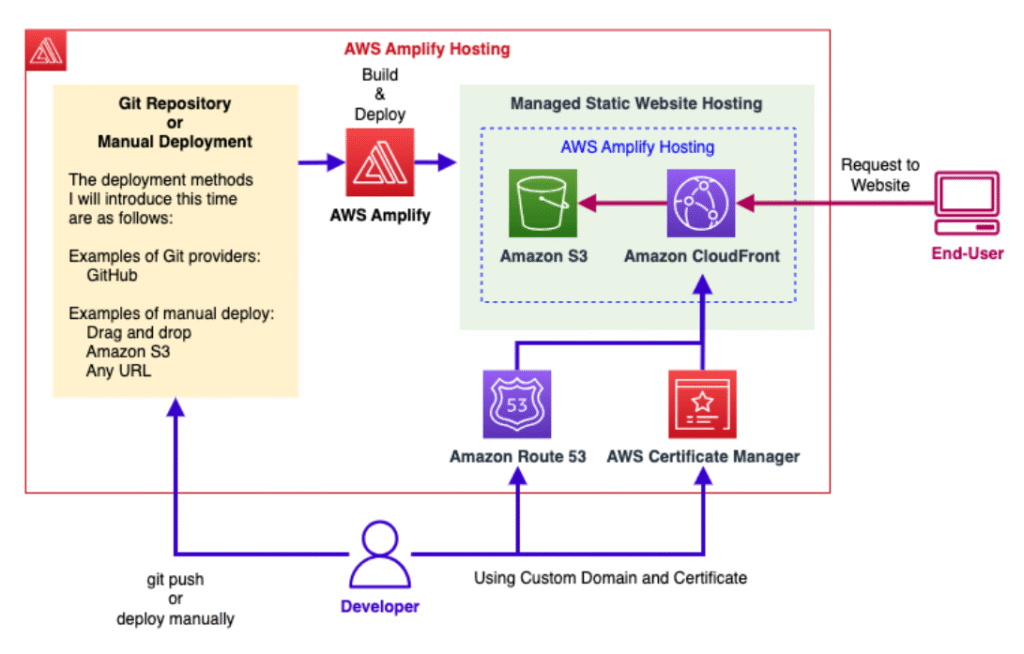
1.AWS Amplify (Recommended)
AWS Amplify is the easiest way to connect Flutter apps to AWS services.
It provides:
- Authentication
- APIs
- Storage
- Analytics
- Hosting
Why Amplify is best for Flutter?
- Official Flutter SDK support
- Simplified setup
- Built-in auth flows
- Cloud + local dev sync
2. Amazon Cognito (Authentication)
Amazon Cognito allows:
- Email/password login
- OTP login
- Google / Facebook sign-in
- JWT token management
https://pub.dev/packages/amplify_auth_cognito
Why Cognito?
- Secure token-based authentication
- Auto user pool management
- MFA support
3. Amazon S3 (File Storage)
Amazon S3 is used for:
- Image uploads
- PDF storage
- Video hosting
- Static files
Perfect for apps that allow:
- Profile pictures
- Product images
- Document uploads
How To Send Data From Your Flutter App to Amazon S3
This section explains how to send data from your Flutter app to Amazon S3 securely and efficiently.
It is highly scalable, secure, and globally distributed.
Recommended Method: Use AWS Amplify Storage (Best Practice)
Instead of manually signing requests, the safest and cleanest method is:
Use Amplify Storage S3 plugin
https://pub.dev/packages/amplify_storage_s3
This handles:
- Authentication
- Token refresh
- Secure upload
- IAM permissions
Step A: Add Required Packages
flutter pub add amplify_flutter
flutter pub add amplify_auth_cognito
flutter pub add amplify_storage_s3
Step B: Configure Amplify in Flutter
await Amplify.addPlugins([
  AmplifyAuthCognito(),
  AmplifyStorageS3(),
]);await Amplify.configure(amplifyconfig);
Make sure your backend is initialized using:
amplify add auth
amplify add storage
amplify push
Step C: Upload Image/File to Amazon S3
Upload a File
import 'dart:io';
import 'package:amplify_flutter/amplify_flutter.dart';Future<void> uploadFile(File file) async {
  try {
    final result = await Amplify.Storage.uploadFile(
      local: file,
      key: 'uploads/profile_${DateTime.now().millisecondsSinceEpoch}.png',
    ).result;    print("Uploaded file key: ${result.uploadedItem.key}");
  } catch (e) {
    print("Upload failed: $e");
  }
}
What is happening here?
local:→ Your Flutter filekey:→ File path inside S3 bucket.result→ Waits for upload completion
Step D: Upload JSON Data to Amazon S3
Sometimes you need to send structured data instead of images.
Example: Sending JSON file
import 'dart:convert';
import 'dart:io';Future<void> uploadJsonData(Map<String, dynamic> data) async {
  final file = File('${Directory.systemTemp.path}/data.json');
  await file.writeAsString(jsonEncode(data));  await Amplify.Storage.uploadFile(
    local: file,
    key: 'data/sample_data.json',
  ).result;
}
Step E: Get Download URL From S3
Future<String?> getDownloadUrl(String key) async {
  try {
    final result = await Amplify.Storage.getUrl(
      key: key,
    ).result;    return result.url.toString();
  } catch (e) {
    print("Error fetching URL: $e");
    return null;
  }
}
Now you can:
- Show uploaded images
- Share document links
- Store URL in database
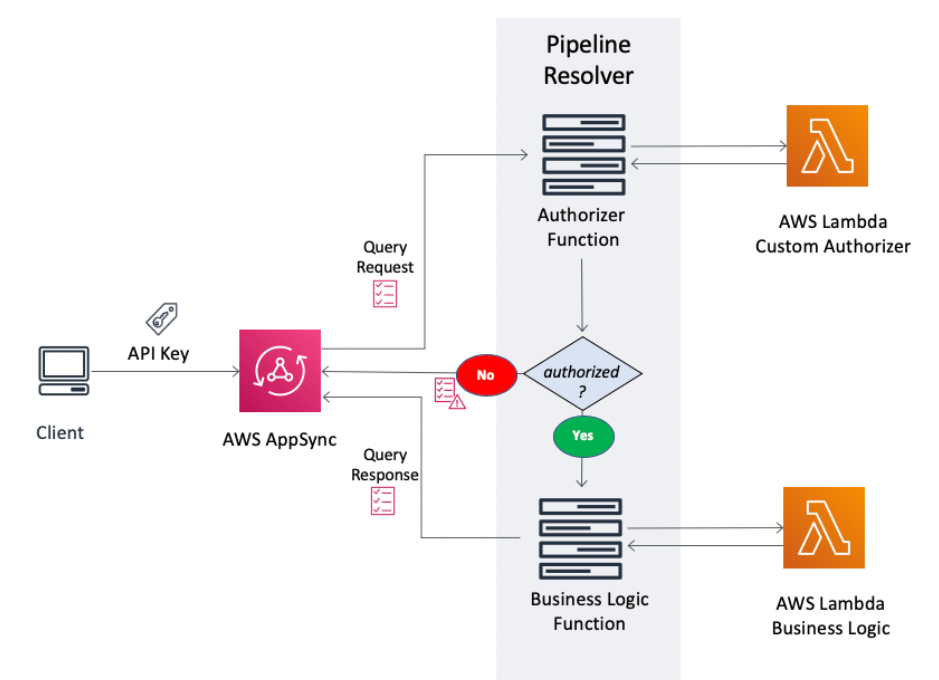
4. AWS AppSync (GraphQL API)
AWS AppSync enables:
- GraphQL APIs
- Real-time subscriptions
- Offline sync
Great for:
- Chat apps
- Live dashboards
- Realtime updates
Architecture of Flutter + AWS
Here’s a simplified architecture:
Flutter App
→ Amplify SDK
→ Cognito (Auth)
→ AppSync / API Gateway
→ Lambda
→ DynamoDB
→ S3
This is a fully serverless scalable backend.
Step-by-Step: AWS Integration with Flutter
Step 1: Install Amplify CLI
npm install -g @aws-amplify/cli
amplify configure
Step 2: Add Amplify to Flutter
flutter pub add amplify_flutter
flutter pub add amplify_auth_cognito
flutter pub add amplify_api
flutter pub add amplify_storage_s3
Step 3: Configure Amplify
await Amplify.addPlugins([
  AmplifyAuthCognito(),
  AmplifyAPI(),
  AmplifyStorageS3(),
]);await Amplify.configure(amplifyconfig);
Implement Authentication (Cognito)
Sign Up
await Amplify.Auth.signUp(
  username: email,
  password: password,
);
Sign In
await Amplify.Auth.signIn(
  username: email,
  password: password,
);
Upload Image to S3
await Amplify.Storage.uploadFile(
  local: file,
  key: "profile_images/user1.png",
);
Call GraphQL API (AppSync)
final request = GraphQLRequest<String>(
document: '''
query GetUser {
getUser(id: "1") {
name
}
}
''',
);final response = await Amplify.API.query(request: request).response;
Real-Time Subscription Example
Amplify.API.subscribe(
  GraphQLRequest(document: subscriptionQuery),
).listen((event) {
  print(event.data);
});
Security Best Practices for AWS Integration with Flutter
- Never hardcode AWS keys in Flutter
- Always use Cognito Identity Pools
- Enable MFA
- Configure IAM roles correctly
- Use HTTPS only
- Enable S3 bucket policies
When Should You Use AWS with Flutter?
Use AWS if:
- You expect scaling
- You need enterprise-level security
- You want global availability
- You need real-time features
Avoid AWS if:
- Your app is very small
- You don’t need scaling
- You prefer Firebase simplicity
AWS vs Firebase for Flutter
| Feature | AWS | Firebase |
|---|---|---|
| Scalability | Very High | High |
| Complexity | Medium/High | Low |
| Cost Control | Advanced | Simple |
| Enterprise Control | Strong | Moderate |
| Learning Curve | Higher | Easier |
Common Use Cases
- E-commerce apps
- Fintech apps
- Agri-tech platforms
- SaaS dashboards
- Social apps
- IoT apps
Performance Optimization Tips
- Enable caching
- Use CloudFront CDN
- Use lazy loading
- Optimize GraphQL queries
- Compress images before upload
Advanced Production Setup
For serious apps:
- Use AWS CodePipeline
- Enable CloudWatch logging
- Setup CI/CD
- Add WAF security
- Use environment-based configuration
Final Thoughts
AWS integration with Flutter is not just about connecting APIs.
It’s about building:
- Scalable architecture
- Secure authentication
- Reliable backend
- Global-ready apps
If you’re building a serious production app in 2026, learning Flutter AWS integration is a strong career move.
Read article : Hive Database in Flutter: The Ultimate Guide with Examples
FAQs (How to integrate AWS with Flutter in 2026)
Yes, especially for scalable and enterprise-level applications.
It has a free tier, but pricing depends on usage.
Yes, but Amplify simplifies integration significantly.
Firebase is easier; AWS is more powerful and flexible.
Primary Keyword: AWS integration with Flutter
Secondary Keywords: Flutter AWS integration, AWS Amplify Flutter, Flutter cloud backend, AWS authentication Flutter, AWS S3 upload Flutter, AWS AppSync Flutter, Flutter with AWS Cognito