

Notebook LM for Flutter Developers: Research Faster, Build Better

Every Flutter developer knows this pain: you’re building a feature, you open 20 tabs, you skim docs, GitHub issues, PDFs, internal notes, YouTube tutorials, and you still end up unsure:
“What’s the right approach? What did the docs actually say? Where is that exact line?”
This is exactly where Notebook LLM (NotebookLM) fits. It’s not “another chatbot”. Think of it as a source-grounded research workspace where you upload (or link) your own material and then ask questions — and it answers with citations pointing back to your sources, so you can verify in seconds.
If you’re building apps and you want faster learning, cleaner architecture decisions, better planning, and fewer “I think it said…” mistakes — NotebookLM can become your daily tool.
What is Notebook LLM (NotebookLM) in simple terms?
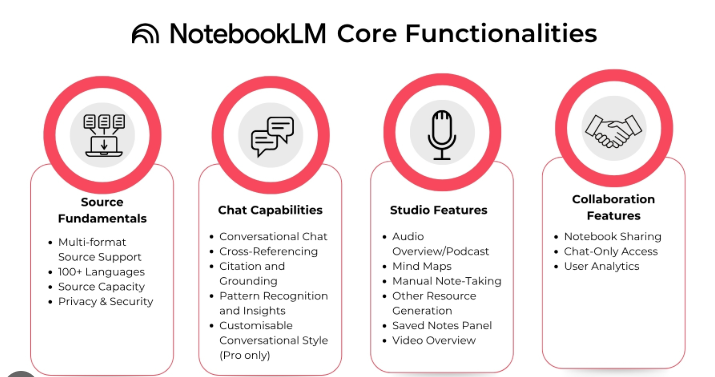
NotebookLM is Google’s AI-powered research and learning assistant. You give it your sources (docs, PDFs, websites, YouTube videos, audio files, Google Docs/Slides, etc.), and then you chat with the notebook to extract grounded answers and insights with inline citations.
Why Flutter devs should care
Because Flutter development is not only coding — it’s constant research:
- reading Flutter/Dart docs and release notes
- comparing packages and their breaking changes
- parsing long API specs
- scanning Firebase / Play Console policy docs
- reading GitHub issues to debug weird edge cases
- converting product requirements into clean tasks
NotebookLM helps you do that work faster and with more confidence.
The killer feature: “Grounded answers with citations”
Normal AI chat tools can hallucinate (confidently wrong). NotebookLM’s big advantage: it’s designed to answer based on your uploaded sources, and it shows citations so you can trace the claim back to the exact place in the source.
For developers, that means:
- fewer wrong decisions based on vague memory
- faster debugging because you can jump to the source line
- better documentation because you can quote accurately
- safer team sharing because claims can be verified
What sources can Flutter devs add?
NotebookLM supports uploading/adding common formats such as PDFs, websites (URLs), YouTube videos, audio files, Google Docs, Google Slides.
Google also expanded file type support and added stronger “research workflows” recently (for example, .docx and Google Sheets support, plus more research-oriented capabilities).
Practical Flutter examples of sources you should add:
- Flutter/Dart official docs pages (URLs)
- Package documentation pages (URLs)
- Your own project requirement PDFs
- API contracts (PDF / Doc)
- Meeting notes, sprint docs (Google Docs)
- Firebase rules / architecture notes
- YouTube deep-dive videos (for transcripts + summary)
Read Articles : Codex CLI, OpenAI Codex, ChatGPT Codex — How to Build Flutter Apps Smartly in 2026
10 high-impact ways NotebookLM helps Flutter developers
1) Turn “too-long docs” into a usable knowledge base
Upload long specs, SDK docs, internal requirements, then ask:
- “Summarize the authentication flow into steps.”
- “List all error codes and what the UI should show.”
- “What are the non-functional requirements?”
Because answers are grounded in your sources, it’s far more reliable for engineering work.
2) Debug faster by feeding it issues, logs, and known references
Create a “Debug Notebook” with:
- logs (as text)
- relevant GitHub issues pages
- package docs
- your own architectural notes
Then ask:
- “Given these logs, what likely caused the crash?”
- “Which workaround is suggested across the issues?”
- “Show the exact recommended config snippet from the docs.”
You’ll spend less time bouncing between tabs.
3) Make better package decisions
Instead of “Which package is best?” (generic AI answers), do this:
- Add official docs for 2–3 packages
- Add GitHub issue tracker pages (for stability signal)
- Add changelog pages
Then ask:
- “Compare limitations of A vs B based on sources.”
- “Which one has breaking changes recently?”
- “What are the known Android 14/15 issues?”
Now your decision is evidence-based.
4) Create a clean feature plan from messy requirements
Give it:
- client requirements doc
- screenshots of desired flow (if available)
- stakeholder notes
Ask:
- “Convert this into a module breakdown + user stories.”
- “List edge cases and failure states.”
- “Suggest database tables / entities mentioned.”
This is where devs save hours per sprint.
5) Generate study guides, quizzes, and internal training
Google highlights structured outputs like study aids (useful for learning/teaching).
For Flutter teams:
- onboarding a junior developer
- training QA/testing team
- documenting architecture decisions
Prompt ideas:
- “Make a study guide for Riverpod vs GetX based on these docs.”
- “Create 20 interview questions from these sources.”
Read Articles : Flutter GetX: Complete Guide to State Management, Navigation, Dependency Injection, and Performance
6) Audio Overviews: learn while traveling or doing chores
NotebookLM can generate Audio Overviews — “deep dive” AI-host discussions summarizing your sources.
And Google expanded Audio Overviews to 50+ languages, useful if your learning style is audio-first.
Flutter use case:
- Turn a long architecture doc into audio
- Listen to package docs summary
- Review release notes while commuting
7) Deep Research: create a research report and identify gaps
Google introduced Deep Research in NotebookLM to produce more comprehensive research-style outputs and help you work with sources effectively.
Flutter dev example:
- “Create a report: best practices for offline-first sync in Flutter from these sources.”
- “What’s missing from our current spec for payments module?”
This is extremely useful for system design and planning.
8) Generate “first-draft docs” for your repository
From your internal sources (architecture docs + code notes), ask:
- “Write a README for this module.”
- “Create API documentation sections.”
- “Write release notes summary from the changelog.”
You still review it, but your baseline draft is ready.
9) Create a “Policy Notebook” for Play Console / compliance
Developers often lose time on policy and compliance confusion. Make a notebook with:
- Play policy pages
- your app’s background work design notes
- your permission usage
Then ask:
- “Which permissions are risky and why?”
- “What text should be in our privacy policy based on these requirements?”
Because it’s source-driven, it stays anchored.
Read Articles : How to Deploy Flutter App on Google Play Store in 2026
10) Build confidence: “Show me where it says that”
This is the underrated productivity boost.
When NotebookLM answers with citations, you can verify instantly and reduce rework.
A practical workflow for Flutter devs
Step 1: Create notebooks by purpose
- Project Spec Notebook (requirements, API contract, user flows)
- Architecture Notebook (system design, decisions, diagrams)
- Debug Notebook (logs, known issues, package docs)
- Learning Notebook (Flutter updates, new patterns, experiments)
Step 2: Add sources
- PDFs, URLs, docs, slides, audio, YouTube — whatever you rely on.
Step 3: Use prompt templates
Use prompts like:
For planning
- “Convert this into a milestone plan with tasks, risks, and acceptance criteria.”
For debugging
- “List likely causes ranked by evidence from sources. Cite the exact lines.”
For coding decisions
- “Summarize recommended approach and constraints. Provide citations.”
For docs
- “Write a README: purpose, setup, usage, pitfalls, FAQ.”
Limitations and developer caution
- AI summaries can still contain errors; always verify citations.
- Don’t upload sensitive secrets (API keys, private tokens) into any AI tool.
- Treat outputs as drafts; you remain responsible for correctness.
Final takeaway: why this matters for FlutterFever readers
Flutter dev growth is limited less by coding speed and more by research speed + decision quality.
Notebook LLM helps you:
- learn faster (without losing accuracy)
- plan features cleanly
- debug with evidence
- write docs and reports quickly
- reduce “tab chaos” and improve focus
If you’re serious about shipping better Flutter apps and scaling your output, NotebookLM is one of the most practical AI tools you can adopt today.
Read Articles :
Keywords: NotebookLM for developers, AI research tool for Flutter, summarize PDFs with NotebookLM, grounded citations AI, NotebookLM Deep Research, Audio Overviews, developer documentation assistant
FAQ ( Notebook LLM for Flutter Developers )
NotebookLM is built around your sources and provides grounded answers with citations, so it’s better for research, specs, and documentation reliability.
Yes — it supports PDFs and websites/URLs and lets you ask questions over them inside a notebook.
Yes. You can turn long documents into audio summaries and review them while commuting or multitasking.
Audio Overviews expanded to 50+ languages, which is helpful if you prefer Hindi or bilingual learning.
It’s a feature designed to generate more comprehensive research outputs and help you work more effectively with your sources.
Advanced Notebook LLM use cases go beyond document summarization. Developers use Notebook LLM for:
Cross-document architectural validation
API schema consistency checks
Sprint breakdown automation
Technical requirement extraction
Database-to-API mapping validation
Risk analysis in system design
Notebook LLM becomes powerful when used as a reasoning engine over multiple technical documents instead of just a text summarizer.
Yes. One of the most powerful advanced features of Notebook LLM is multi-document reasoning.
Developers can upload:
API documentation
Database schema
ER diagrams
Then ask:
Check if API response fields match database schema.
Notebook LLM can detect mismatches, missing fields, and structural inconsistencies.
Flutter developers can use Notebook LLM for:
Generating Dart models from API schemas
Extracting integration steps from backend docs
Creating Firebase architecture plans
Reviewing technical documentation
Identifying performance risks in design docs
Notebook LLM is especially useful during backend-to-frontend integration.
es. Developers can upload:
Internal coding standards
Architecture documents
Feature proposals
And ask:
Highlight violations or risks.
Notebook LLM can identify inconsistencies and missing sections based on uploaded documentation.
Yes. Notebook LLM is ideal for:
Engineering documentation management
API governance validation
Compliance documentation review
Architecture alignment across teams
Because responses are source-grounded, Notebook LLM is safer for enterprise workflows compared to open-ended AI systems.
Notebook LLM can generate structured code suggestions based on uploaded API schemas or technical specifications.
For example:
Dart model generation
Repository pattern structure
Integration checklist
Error-handling mapping
However, it works best when grounded in accurate source documents.
References
- Google Help: Learn about NotebookLM
- Google Workspace: NotebookLM product page + privacy notes
- Google Help: Generate Audio Overviews
- Google Blog: Deep Research + new file types