

How to Build AI in Dart & Flutter (Beginner to Advanced Guide with DartPad Examples) – 2026

Artificial Intelligence is no longer restricted to Python ecosystems. In 2026, Flutter developers are increasingly integrating AI directly into applications using Dart. While Dart is not a traditional machine learning language, it is highly effective for building lightweight AI logic, intelligent features, and real-time decision systems.
This article takes a structured approach—from basic AI concepts to advanced Flutter integration—and demonstrates how developers can build real-world AI features using Dart. Each concept is explained clearly, followed by practical examples that can be executed and understood step-by-step.
Understanding AI in the Context of Dart and Flutter
Before writing any code, it is important to understand what “AI in Dart” actually means.
AI in Dart Does NOT Mean
- Training deep neural networks
- Building large-scale ML models
- Running GPU-heavy computations
AI in Dart DOES Mean
- Rule-based intelligent systems
- Natural Language Processing (NLP) basics
- Recommendation engines
- Predictive logic
- API-based AI integration (OpenAI, HuggingFace)
In Flutter applications, AI is typically used at three levels:
- Frontend Intelligence (Dart Logic)
- Fast, offline decision-making
- Example: form validation, suggestions, chatbot rules
- API-Based Intelligence
- External AI models
- Example: ChatGPT, sentiment APIs
- Hybrid Systems
- Local + cloud AI combined
- Example: offline classification + online enhancement
Part 1: Building a Basic AI System in Dart (Foundation)
Concept: Pattern-Based Intelligence
The simplest form of AI is pattern matching + scoring logic. This is the base of many production systems.
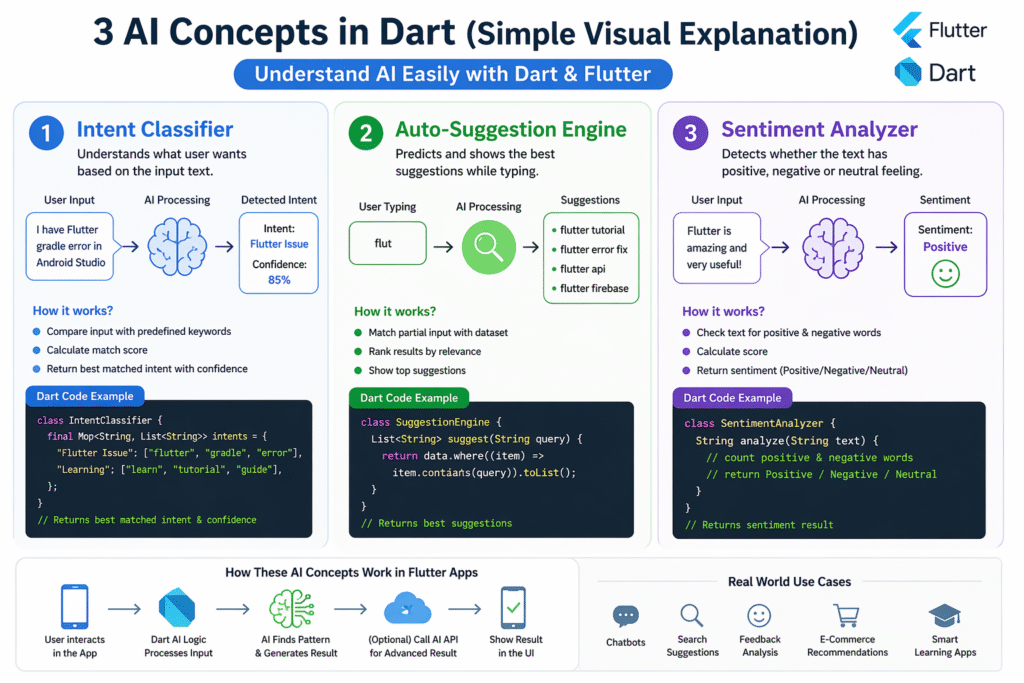
Example 1: AI Intent Classifier in flutter (Step-by-Step Explanation)
What It Does
- Takes user input
- Matches keywords
- Assigns intent
- Calculates confidence
Implementation
Note: After click on Run Button Please wait just few seconds while Dart SDK loading.
AI Intent Classifier
Explanation
- Each intent has a set of keywords
- Input is matched against keywords
- Score increases for each match
- Highest score decides the intent
This is a basic NLP system, widely used in:
- Chatbots
- Help systems
- AI assistants
Part 2: Improving AI Logic (Intermediate Level)
Concept: Weighted Scoring System
Basic keyword matching is limited. We improve it by assigning weights and confidence values.
Example 2: Smart Auto-Suggestion Engine in Flutter
What It Does
- Predicts what user is typing
- Returns best matching results
- Ranks suggestions
Implementation
Note: After click on Run Button Please wait just few seconds while Dart SDK loading.
Smart Auto-Suggestion Engine in dart
Explanation
- Each item has a weight (importance)
- Results are sorted by relevance
- This simulates real search engine behavior
Used in:
- Google search
- E-commerce apps
- Food delivery apps
Part 3: NLP-Based AI System (Sentiment Analysis)
Concept: Text Understanding
This introduces basic Natural Language Processing.
Example 3: Sentiment Analyzer
What It Does
- Detects positive/negative sentiment
- Analyzes user feedback
Implementation
Note: After click on Run Button Please wait just few seconds while Dart SDK loading.
Sentiment Analyzer in dart
Explanation
- Counts emotional words
- Compares positive vs negative
- Returns sentiment
Used in:
- Review analysis
- Social media tools
- Feedback systems
Part 4: Advanced AI Integration in Flutter
Using Open Source AI APIs
For real AI power, we connect Dart with external AI systems. Or HuggingFace
Example: HuggingFace API Integration
import 'dart:convert';
import 'package:http/http.dart' as http;Future<void> getAIResponse() async {
  final response = await http.post(
    Uri.parse("https://api-inference.huggingface.co/models/distilbert-base-uncased"),
    headers: {
      "Authorization": "Bearer YOUR_API_KEY",
      "Content-Type": "application/json"
    },
    body: jsonEncode({"inputs": "Flutter is amazing"}),
  );  print(response.body);
}
Explanation
- Sends text to AI model
- Model processes input
- Returns intelligent response
Part 5: How This Connects to Flutter Apps
In real Flutter apps:
- UI built using Flutter
- AI logic handled by Dart
- API connects to external AI
Example flow:
User Input → Dart AI Logic → API → Response → UI Update
Read : Dart Tutorials with Real-World Examples, API Handling, Cart Logic, and Async Programming
Conclusion
Dart and Flutter are not just UI technologies anymore. With proper implementation, they can power intelligent systems capable of classification, prediction, and user behavior analysis.
From simple rule-based AI to advanced API-driven intelligence, Flutter developers now have the tools to build modern AI-powered applications efficiently.
FAQs
Yes, for lightweight AI logic and frontend intelligence systems.
Yes, through Dart logic and external AI APIs.
Yes, for showcasing logic and prototypes.
Chatbots, recommendations, sentiment analysis.
Yes, using hybrid architecture (Dart + API).