

How to Build AI Agents in Flutter Apps in 2026

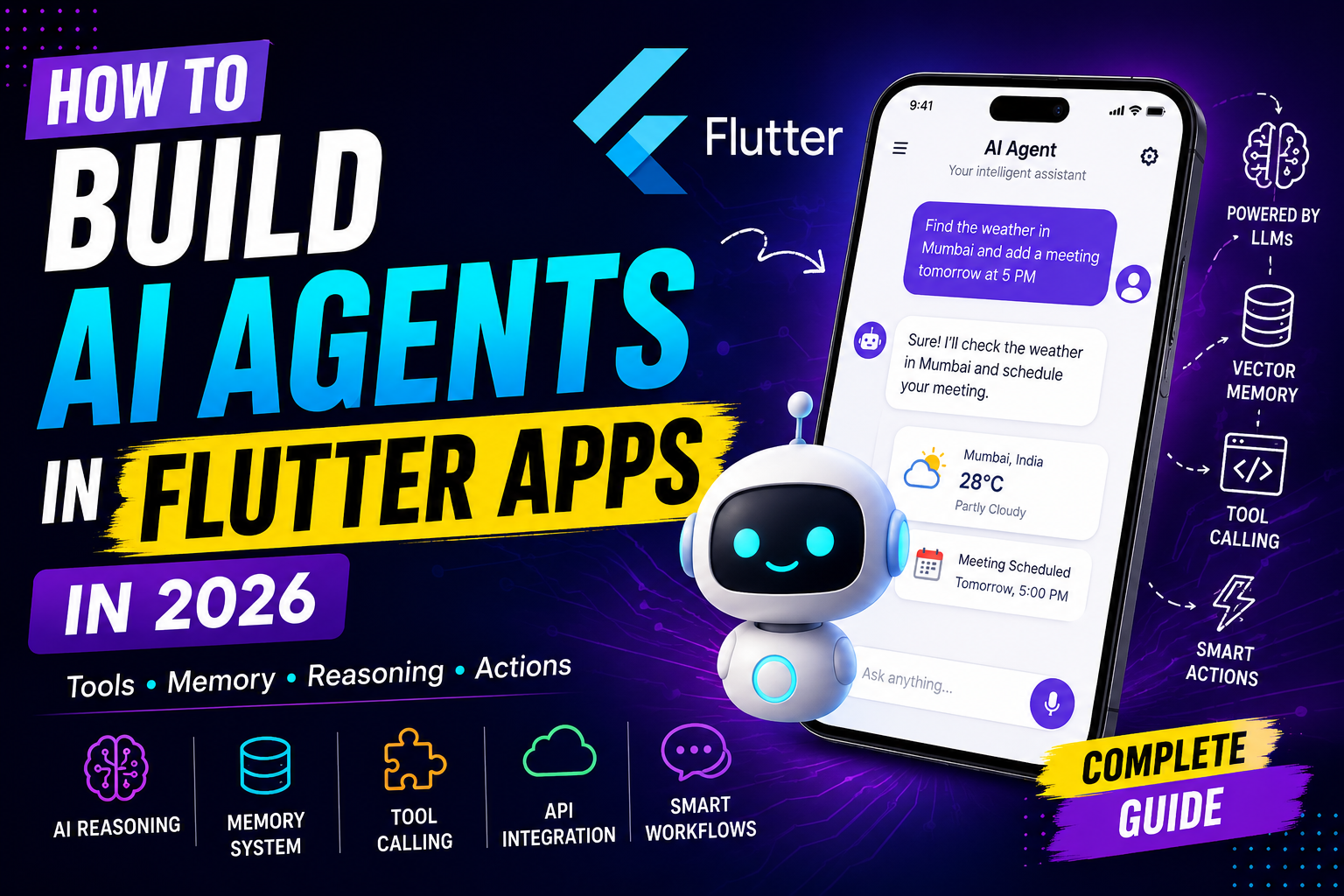
Artificial Intelligence is no longer limited to simple chatbots or text generation. In 2026, developers are building intelligent AI agents capable of reasoning, planning, remembering context, using tools, calling APIs, automating workflows, and performing real-world tasks autonomously.
With Flutter evolving rapidly across mobile, desktop, and web platforms, developers now have the perfect framework to create next-generation AI-powered applications.
In this comprehensive guide, you will learn how to build powerful AI agents in Flutter apps using modern AI architectures, OpenAI APIs, Gemini AI, function calling, memory systems, vector databases, and autonomous workflows.
Whether you are building an AI assistant, productivity app, coding assistant, automation platform, farming assistant, customer support tool, or voice AI system, this article will help you understand the complete AI agent architecture for Flutter apps in 2026.
Read : Flutter App Architecture in the AI Era: Why Code Generation Isn’t Enough
What is an AI Agent?
An AI agent is an intelligent software system capable of:
- Understanding user intent
- Reasoning about tasks
- Planning actions
- Using tools or APIs
- Remembering previous interactions
- Executing workflows autonomously
- Learning from context
Unlike traditional chatbots, AI agents can actually perform actions.
For example:
- Booking appointments
- Sending emails
- Fetching weather data
- Searching databases
- Calling APIs
- Generating reports
- Controlling smart devices
- Managing tasks
- Automating workflows
Modern AI agents combine:
- Large Language Models (LLMs)
- Memory systems
- Tool calling
- Retrieval systems
- Reasoning loops
- Workflow orchestration
Why Build AI Agents with Flutter?
Flutter has become one of the best frameworks for AI-powered applications because it supports:
- Android
- iOS
- Web
- Windows
- macOS
- Linux
Using a single codebase, developers can deploy AI agents across multiple platforms.
Advantages of Flutter for AI Apps
Cross-platform Development
Write once and deploy everywhere.
High-performance UI
Flutter’s rendering engine makes AI interactions smooth and responsive.
Excellent Real-Time Support
Perfect for:
- Streaming AI responses
- Voice assistants
- Live AI conversations
- Interactive workflows
Native API Access
Flutter supports:
- Camera
- Microphone
- GPS
- Bluetooth
- Sensors
- Native ML libraries
Strong AI Ecosystem
Flutter now supports:
- OpenAI
- Gemini
- Claude APIs
- ONNX Runtime
- TensorFlow Lite
- llama.cpp
- Edge AI systems
AI Agent Architecture in Flutter
Before writing code, you must understand the architecture.
A modern AI agent generally consists of:
1. Frontend Layer (Flutter UI)
Responsible for:
- Chat interface
- Voice interaction
- Agent controls
- Workflow display
- Streaming messages
Common Flutter packages:
- flutter_chat_ui
- flutter_markdown
- speech_to_text
- flutter_tts
2. AI Model Layer
This is the brain of the agent.
Popular models in 2026:
- GPT-4.5
- GPT-5
- Gemini 2
- Claude Sonnet
- DeepSeek
- Local LLMs
The model handles:
- Reasoning
- Planning
- Tool selection
- Response generation
3. Memory Layer
AI agents need memory.
Memory systems store:
- Previous conversations
- User preferences
- Task history
- Workflow state
- Context embeddings
Popular storage options:
- Supabase
- Firebase
- PostgreSQL
- SQLite
- Hive
- Vector databases
4. Tool Calling Layer
This allows the AI to perform actions.
Examples:
- Weather API
- Payment gateway
- Calendar access
- Maps integration
- IoT control
- Database queries
This is what transforms a chatbot into an AI agent.
5. Vector Database Layer
Used for:
- Semantic search
- Retrieval-Augmented Generation (RAG)
- Long-term memory
Popular vector databases:
- Pinecone
- Weaviate
- ChromaDB
- Qdrant
Understanding AI Agent Workflows
Modern AI agents operate in loops.
Basic Flow
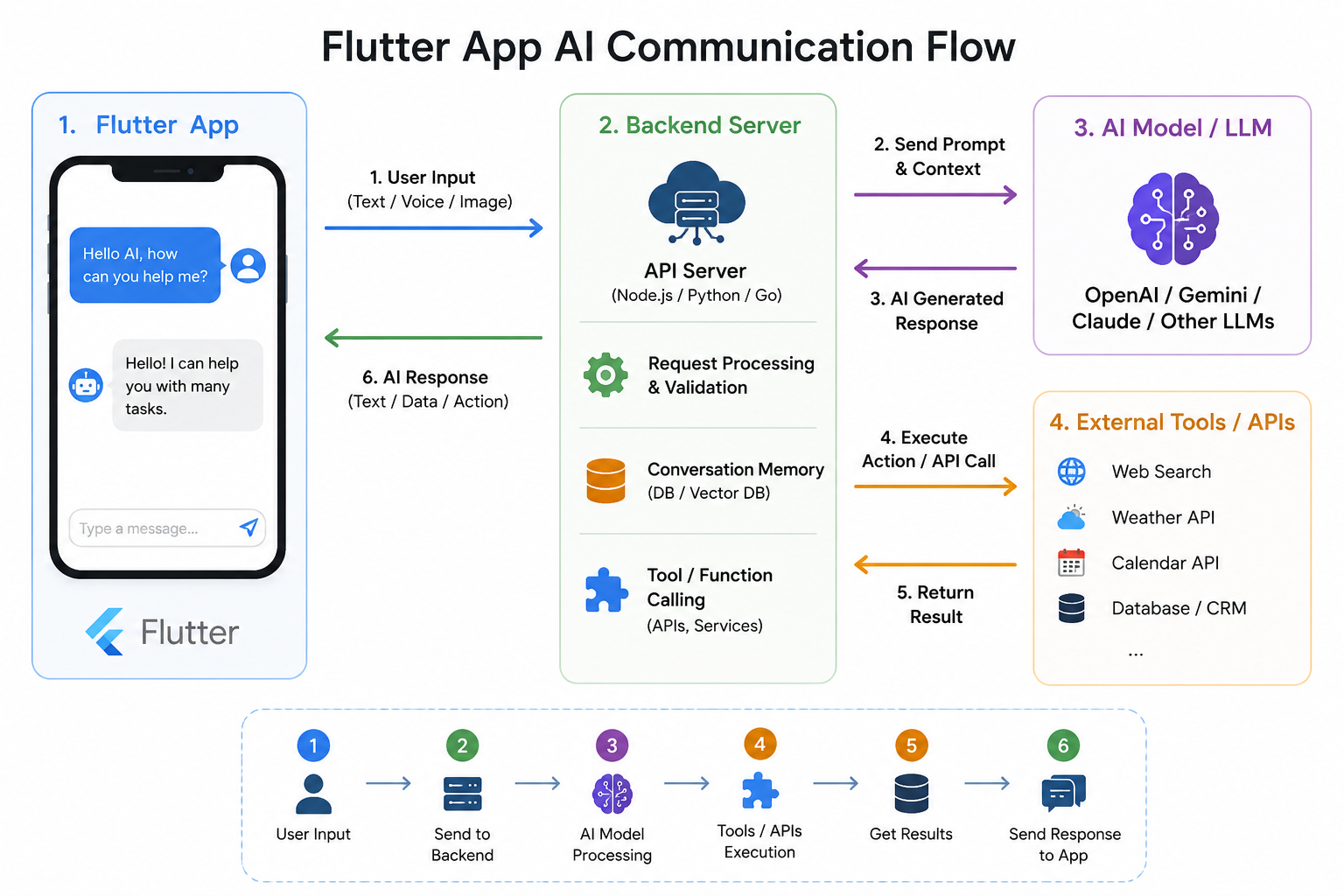
User Input → AI Reasoning → Tool Selection → Action Execution → Final Response
Example:
User:
“Book a meeting tomorrow at 5 PM.”
AI Agent:
- Understands intent
- Checks calendar
- Finds free slot
- Calls calendar API
- Creates event
- Confirms booking
This workflow requires:
- Function calling
- API integration
- State management
- Context handling
Setting Up Flutter for AI Agents
Step 1: Create Flutter Project
flutter create ai_agent_app
cd ai_agent_app
Step 2: Add Dependencies
dependencies:
  flutter:
    sdk: flutter

  http: ^1.2.0
  flutter_riverpod: ^2.6.0
  flutter_dotenv: ^5.1.0
  speech_to_text: ^7.0.0
  flutter_tts: ^4.0.0
  flutter_markdown: ^0.7.0
Integrating OpenAI API
Create API Service
class OpenAIService {
  final String apiKey;

  OpenAIService(this.apiKey);

  Future<String> sendMessage(String prompt) async {
    final response = await http.post(
      Uri.parse('https://api.openai.com/v1/chat/completions'),
      headers: {
        'Authorization': 'Bearer $apiKey',
        'Content-Type': 'application/json',
      },
      body: jsonEncode({
        "model": "gpt-4.5",
        "messages": [
          {"role": "user", "content": prompt}
        ]
      }),
    );

    final data = jsonDecode(response.body);

    return data['choices'][0]['message']['content'];
  }
}
Adding Tool Calling to AI Agents
Tool calling is the most important part of AI agents.
Example:
The AI decides whether to:
- Fetch weather
- Open maps
- Search products
- Send emails
- Query databases
Example Tool Schema
{
  "name": "get_weather",
  "description": "Get weather information",
  "parameters": {
    "type": "object",
    "properties": {
      "city": {
        "type": "string"
      }
    }
  }
}
The AI automatically decides when to use this tool.
Building AI Memory Systems
Without memory, AI agents feel unintelligent.
Types of Memory
Short-Term Memory
Stores recent conversation context.
Long-Term Memory
Stores:
- User preferences
- History
- Important facts
Semantic Memory
Uses embeddings for similarity search.
Implementing Local Memory in Flutter
Using Hive:
var box = await Hive.openBox('memory');

box.put('user_name', 'Rahul');

String name = box.get('user_name');
Read : Hive Database in Flutter: The Ultimate Guide with Examples
Adding Vector Search to Flutter AI Agents
Vector search enables semantic understanding.
Example:
User asks:
“Show my previous farming discussions.”
The AI retrieves similar conversations using embeddings.
Retrieval-Augmented Generation (RAG)
RAG allows AI agents to answer using custom data.
This is critical for:
- Enterprise apps
- Healthcare
- Agriculture
- Education
- Customer support
RAG Workflow
- User asks question
- Query converted into embeddings
- Similar documents retrieved
- AI generates contextual answer
Voice AI Agents in Flutter
Voice AI is becoming mainstream in 2026.
Required Components
Speech-to-Text
SpeechToText speech = SpeechToText();Text-to-Speech
FlutterTts tts = FlutterTts();
await tts.speak("Hello");
Streaming AI Responses Like ChatGPT
Modern AI apps stream responses token-by-token.
Benefits:
- Faster UX
- Better interactivity
- Lower perceived latency
Flutter supports streaming via:
- SSE
- WebSockets
- StreamBuilder
AI Agent State Management
AI apps generate continuous updates.
Best state management options:
Riverpod is highly recommended for AI workflows.
Offline AI Agents in Flutter
Offline AI is a major trend.
Developers now run:
- Tiny LLMs
- ONNX models
- TensorFlow Lite models
- llama.cpp
directly on mobile devices.
Benefits:
- Privacy
- Low latency
- No API cost
- Offline usage
Running Local LLMs in Flutter
Popular approaches:
- Flutter FFI
- Native Android bridge
- llama.cpp integration
Popular local models:
- Phi
- Gemma
- TinyLlama
- Mistral
Security Considerations
AI agents handle sensitive data.
Important practices:
- Never expose API keys
- Use backend proxy servers
- Encrypt user data
- Limit tool permissions
- Add moderation layers
- Validate AI-generated actions
Read : How to Integrate AI Features in Flutter Apps in 2026
AI Agent Use Cases in Flutter
Productivity Apps
- Smart scheduling
- AI reminders
- Task automation
E-commerce Apps
- AI shopping assistants
- Personalized recommendations
Agriculture Apps
- Crop advisory agents
- Market prediction systems
- Voice farming assistants
Healthcare Apps
- AI symptom assistants
- Medical workflow automation
Education Apps
- AI tutors
- Personalized learning
Read : How to Build AI in Dart & Flutter (Beginner to Advanced Guide with DartPad Examples) – 2026
Performance Optimization Tips
AI apps can become expensive and slow.
Best Practices
Use Streaming Responses
Reduces waiting time.
Cache Embeddings
Avoid repeated API calls.
Compress Context
Large prompts increase cost.
Background Processing
Use isolates for heavy tasks.
Lazy Load Conversations
Improve memory efficiency.
Common Challenges in AI Agent Development
Hallucinations
AI may generate incorrect information.
Solution:
- Use RAG
- Add validation layers
Context Window Limitations
Large conversations exceed token limits.
Solution:
- Summarization memory
- Vector memory
API Costs
LLMs can become expensive.
Solution:
- Hybrid AI architecture
- Local AI models
- Smart caching
Future of AI Agents in Flutter
The future of Flutter AI development includes:
- Autonomous mobile agents
- Real-time multimodal AI
- AI copilots
- Offline personal assistants
- Edge AI systems
- On-device reasoning
- AI-native operating systems
Flutter is perfectly positioned for this future because of its:
- cross-platform capability
- native performance
- flexible architecture
- strong ecosystem
Read : GenUI + Firebase AI in Flutter (2026): Building Dynamic, AI-Driven User Interfaces
Final Thoughts
AI agents are rapidly transforming mobile and web applications in 2026. Instead of building static apps, developers are now creating intelligent systems capable of understanding, reasoning, remembering, and acting autonomously.
Flutter provides one of the best environments for building modern AI-powered experiences because it combines beautiful UI development with powerful native integrations and cross-platform deployment.
Whether you are building:
- AI assistants
- Voice agents
- Smart automation systems
- AI copilots
- Productivity tools
- Agricultural advisory systems
- Enterprise AI platforms
Flutter gives you the flexibility and performance needed for next-generation AI applications.
The developers who start learning AI agent architecture today will have a massive advantage in the future software ecosystem.
As AI evolves from simple chat interfaces to autonomous systems, Flutter developers have an incredible opportunity to lead the next generation of intelligent applications.
Read : Codex CLI, OpenAI Codex, ChatGPT Codex — How to Build Flutter Apps Smartly in 2026
FAQ
An AI agent in Flutter is an intelligent application system that can understand user requests, reason about tasks, remember context, call APIs or tools, and perform actions autonomously using AI models like GPT or Gemini.
Yes, Flutter apps can integrate OpenAI APIs using HTTP requests, WebSockets, or backend proxy servers. Developers commonly use GPT models for chatbots, AI assistants, summarization, automation, and reasoning systems.
Popular AI models for Flutter apps in 2026 include GPT-4.5, GPT-5, Gemini 2, Claude Sonnet, DeepSeek, and local LLMs like Gemma and Phi. The best model depends on performance, cost, latency, and offline requirements.
AI agents work by combining large language models, memory systems, tool calling, APIs, vector databases, and reasoning workflows. The agent receives user input, analyzes intent, performs actions, and generates intelligent responses.
Yes, Flutter can run AI models offline using TensorFlow Lite, ONNX Runtime, llama.cpp, and Flutter FFI integrations. Developers can deploy lightweight local LLMs directly on Android and iOS devices.
RAG (Retrieval-Augmented Generation) is a technique where Flutter AI apps retrieve relevant information from databases or documents before generating AI responses. It improves accuracy and reduces hallucinations.
Popular databases for Flutter AI agents include Supabase, Firebase, PostgreSQL, SQLite, Hive, and vector databases like Pinecone, Qdrant, and Weaviate for semantic search and memory storage.
Voice AI can be added using speech-to-text and text-to-speech packages such as speech_to_text and flutter_tts. These systems enable voice assistants, conversational AI, and hands-free interactions.
Yes, Flutter is excellent for AI app development because it supports cross-platform deployment, real-time UI rendering, native integrations, streaming AI responses, and integration with modern AI services and local models.
Popular use cases include AI assistants, customer support bots, voice automation apps, AI copilots, smart agriculture platforms, healthcare assistants, educational tutors, AI search systems, and workflow automation tools.