

FlutterFever Studio: Free Flutter Developer Tools, Assets & Resources for Faster App Development
Everything a Flutter Developer Needs, in One Studio.
Build, debug, test, optimize and release Flutter apps faster with developer tools, reusable assets, code utilities, API tools, responsive testing and project resources.
Build, test and release faster
Use practical Flutter utilities without searching across multiple websites for every development task.
Flutter Build Doctor
Diagnose Flutter SDK, Gradle, Kotlin, Java and Android build configuration problems.
Diagnose Build →JSON Formatter & Dart Models
Format JSON responses and prepare clean Dart models for Flutter API integrations.
Open JSON Tool →pubspec Generator
Create cleaner pubspec.yaml configuration with dependencies, assets, fonts and SDK settings.
Create Pubspec →API Playground
Test REST APIs, inspect responses and prepare API integrations for your Flutter project.
Test API →Package Compatibility
Check Flutter package versions and platform compatibility before integrating dependencies.
Check Packages →Dependency Checker
Find conflicting, outdated or risky Flutter and Dart dependencies in your project.
Check Dependencies →Flutter Upgrade Checker
Review Flutter SDK upgrade requirements and identify possible migration risks.
Check Upgrade →Android Build Config
Prepare Gradle, Kotlin and Android SDK configuration for Flutter applications.
Open Config Tool →Responsive UI Tester
Preview Flutter layouts across phones, tablets and other screen sizes.
Test Responsive UI →Permission Builder
Prepare Android and iOS permissions for camera, location, microphone, notifications and more.
Build Permissions →Deep Link Tester
Validate URL schemes, Android App Links and iOS Universal Links.
Test Deep Link →Localization Auditor
Find missing and unused localization keys across multilingual Flutter projects.
Audit Localization →Asset Optimizer
Find oversized, unnecessary and unused assets that may increase application size.
Optimize Assets →Release Readiness
Check signing, package configuration, app icons and important release requirements.
Check Release →Package Recommender
Discover suitable Flutter packages based on your application type and required features.
Find Packages →Codebase Builder
Generate Flutter starter projects with architecture, networking, state management, storage, themes and localization.
Build Codebase →Lottie & Asset Studio
Explore Flutter-ready Lottie animations, SVG assets, illustrations and 3D resources.
Explore Assets →More than developer tools
Explore templates, visual assets, Flutter packages and practical development guides.
Flutter Assets
Lottie, SVG and 3D GLB resources for Flutter apps.
Flutter Templates
Reusable Flutter project templates and starter interfaces.
Flutter Packages
Discover packages based on your project requirements.
Flutter Guides
Read practical Flutter articles, tutorials and development guides.
Learning Flutter? Start building real projects faster.
Login to FlutterFever Studio and access practical tools for APIs, builds, packages, responsive testing, assets and release preparation.
What Is FlutterFever Studio?
Flutter development becomes much easier when developers have the right tools, reusable assets and development resources available in one place.
That is the idea behind FlutterFever Studio.
FlutterFever Studio is a growing Flutter-focused development platform designed to help beginners, students, freelancers, startup teams and professional Flutter developers build applications faster.
Instead of searching across multiple websites for a JSON formatter, Flutter dependency checker, Lottie animation, responsive testing tool, SVG illustration, package recommendation, Android configuration helper and release checker, developers can access multiple Flutter-focused resources from a single platform.
The platform combines:
- Free Flutter developer tools
- Flutter project utilities
- Build and dependency helpers
- Responsive testing tools
- Flutter Lottie animations
- SVG assets
- 3D GLB models
- Reusable development resources
- Codebase utilities
- Asset tools
- Release preparation tools
- Flutter learning-friendly utilities
The idea is simple:
Login, choose the tool you need, and start using it.
For many tools, developers do not need to create a separate local utility or install another desktop application just to complete a small development task.
Why Flutter Developers Need Better Development Tools
Flutter already provides a fast development workflow through:
- Hot Reload
- Hot Restart
- Dart
- Cross-platform widgets
- DevTools
- pub.dev ecosystem
- Strong Android and iOS support
But building a real application involves much more than writing widgets.
A developer may also need to:
- Fix Gradle problems
- Check Flutter SDK compatibility
- Compare package versions
- Format JSON
- Generate Dart models
- Clean
pubspec.yaml - Find unused dependencies
- Test APIs
- Configure Android permissions
- Verify deep links
- Check localization files
- Optimize images and assets
- Test responsive layouts
- Prepare an application for release
- Find Lottie animations
- Download SVG assets
- Integrate 3D models
Doing all of these manually can consume a surprising amount of development time.
FlutterFever Studio is designed to reduce that repetitive work.
FlutterFever Studio Is Built for the Entire Flutter Development Workflow
FlutterFever Studio is not just an asset website.
It can support developers throughout multiple stages of development.
A typical Flutter development lifecycle looks like:
Plan → Configure → Build → Test → Debug → Optimize → Upgrade → Release
FlutterFever Studio provides tools and resources across this entire workflow.
Free Flutter Developer Tools in FlutterFever Studio
One of the strongest parts of FlutterFever Studio is its growing collection of free Flutter-focused utilities.
Developers can login and start using these tools depending on their project needs.
1. Flutter Tools Hub
The Tools Hub acts as the central workspace for Flutter developer utilities.
Instead of bookmarking multiple unrelated websites, developers can access Flutter-focused tools from one place.
This is especially useful for new developers who may not yet know which tool is required for a specific problem.
The Tools Hub can help developers discover utilities related to:
- project setup
- debugging
- dependency management
- responsive design
- APIs
- Android configuration
- asset optimization
- application release
2. Flutter Build Doctor
Flutter build errors can be frustrating, especially for beginners.
Common issues include:
- Gradle errors
- Kotlin compatibility problems
- Android SDK issues
- Java version conflicts
- package problems
- build configuration mistakes
- incorrect SDK versions
The Flutter Build Doctor is designed to help developers diagnose project and build-related issues.
Instead of randomly searching error messages across multiple websites, developers can use a focused Flutter build analysis tool.
This can be particularly useful for developers searching for:
Flutter build error checker, Flutter Gradle error solution, or Flutter Android build diagnosis.
3. JSON Formatter and Dart Model Utility
APIs are a major part of modern Flutter applications.
Developers frequently receive JSON responses from REST APIs and need to:
- format JSON
- inspect nested structures
- identify errors
- understand API responses
- prepare Dart models
FlutterFever Studio provides a JSON-focused utility that can make this process faster.
For developers working with APIs every day, even a small JSON tool can save significant time.
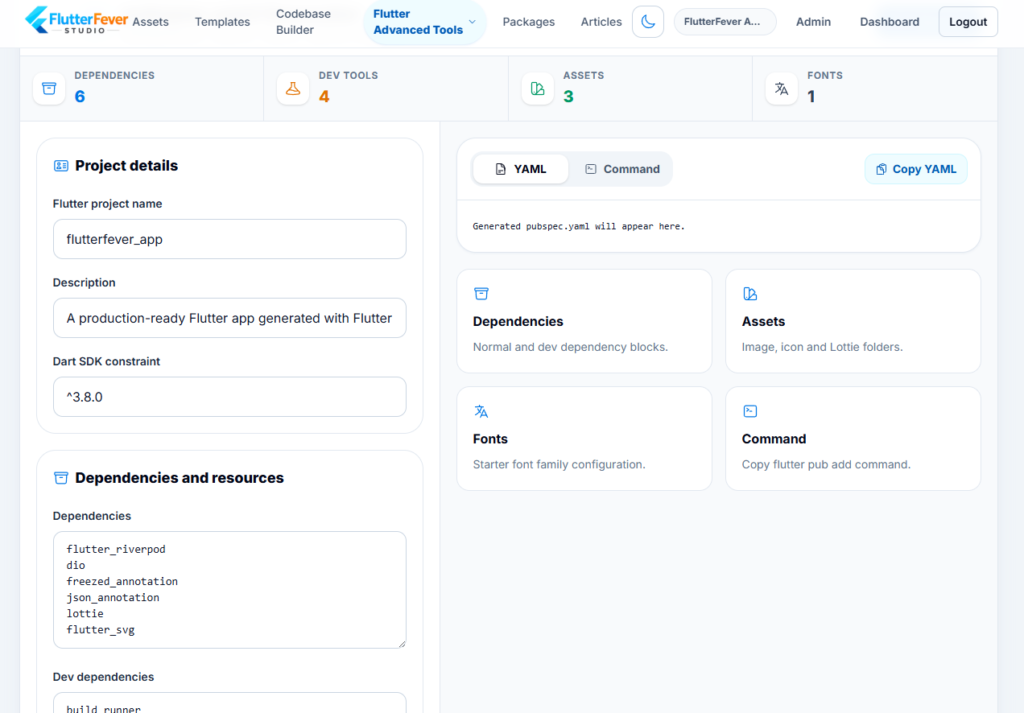
4. Pubspec Generator
The pubspec.yaml file is one of the most important files in any Flutter project.
It controls:
- dependencies
- assets
- fonts
- SDK requirements
- project metadata
For beginners, incorrect indentation or configuration can quickly create errors.
The Pubspec Generator helps developers prepare cleaner Flutter project configuration.
This makes it useful for searches such as:
- Flutter pubspec generator
- pubspec.yaml generator
- Flutter dependency setup tool
5. API Playground
Before integrating an API into a Flutter application, developers often need to test it.
The API Playground helps developers inspect API requests and responses before writing the complete Flutter integration.
This can be useful when working with:
- REST APIs
- authentication APIs
- AI APIs
- backend services
- custom application servers
Instead of immediately writing networking code, developers can first verify whether the API itself is working correctly.
6. Flutter Package Compatibility Checker
Flutter applications frequently depend on third-party packages.
But installing a package without checking compatibility can cause:
- version conflicts
- Android build errors
- iOS build issues
- SDK incompatibility
- dependency resolution failures
The Package Compatibility Checker helps developers review package versions and platform support.
This can be especially useful before upgrading an existing project.
7. Flutter Upgrade Safety Checker
Upgrading Flutter can bring:
- new APIs
- improved performance
- security fixes
- platform improvements
But upgrades can also cause compatibility problems.
The Upgrade Safety Checker is designed to help developers identify potential risks before changing Flutter SDK versions.
This is useful for production applications where an unplanned SDK upgrade could break:
- plugins
- Android Gradle configuration
- iOS dependencies
- deprecated APIs
8. Dependency Checker
Large Flutter projects can accumulate many dependencies.
Over time, developers may encounter:
- conflicting packages
- outdated libraries
- risky dependencies
- duplicated functionality
- version constraints
The Dependency Checker helps developers review project dependencies more carefully.
This can improve both maintainability and upgrade confidence.
9. Pubspec Cleaner
Not every package added to a Flutter project remains necessary forever.
Developers frequently remove features but forget to remove dependencies.
The Pubspec Cleaner can help identify:
- unused packages
- misplaced dependencies
- unnecessary entries
A cleaner dependency file can make the project easier to maintain.
10. Flutter Upgrade Checker
Flutter SDK upgrades often require more than simply running:
flutter upgradeDevelopers may need to review:
- platform configuration
- package compatibility
- Android changes
- migration requirements
The Flutter Upgrade Checker can help developers prepare for SDK changes more systematically.
11. Android Build Config Generator
Android configuration is one of the most confusing parts of Flutter development for many beginners.
A Flutter Android project may involve:
- Gradle
- Kotlin
- compileSdk
- targetSdk
- minSdk
- Java compatibility
- plugin configuration
The Android Build Config tool helps developers prepare or understand these configurations more easily.
This can save time when creating a new project or fixing an older project.
12. Responsive UI Tester
Flutter supports many screen sizes.
A layout that works perfectly on one Android phone may look broken on:
- a small phone
- tablet
- foldable
- web browser
- desktop window
The Responsive UI Tester helps developers preview layouts for different device categories.
This is useful for developers building responsive Flutter applications without constantly switching between physical devices.
13. Permission Builder
Mobile applications often need permissions for:
- camera
- microphone
- storage
- location
- notifications
- Bluetooth
- photos
Android and iOS handle permissions differently.
The Permission Builder can help developers prepare platform-specific permission configuration.
This is particularly useful for beginners who often struggle with AndroidManifest.xml and iOS permission descriptions.
14. Deep Link Tester
Deep links allow users to open specific areas of an application from a URL.
They are commonly used for:
- authentication
- password reset
- product pages
- referral links
- email verification
- campaigns
The Deep Link Tester helps developers validate app links and URL schemes.
This can reduce debugging time when implementing deep linking.
15. Localization Auditor
International Flutter applications frequently contain large translation files.
Over time, these files can contain:
- missing keys
- unused keys
- inconsistent translations
- duplicate entries
The Localization Auditor helps developers identify localization-related issues.
This is useful for apps targeting multiple languages or regions.
16. Asset Optimizer
Images and other visual assets can increase application size significantly.
Poorly optimized assets may contribute to:
- large APK or IPA size
- unnecessary memory usage
- slower loading
- storage waste
The Asset Optimizer helps developers identify oversized or unused project assets.
This can be particularly valuable before production release.
17. Release Readiness Checker
Publishing an application requires much more than simply compiling it.
Before release, developers may need to verify:
- signing configuration
- application icons
- package identity
- version information
- platform requirements
- release configuration
The Release Readiness tool helps developers review important checks before submitting an application.
This can reduce last-minute release problems.
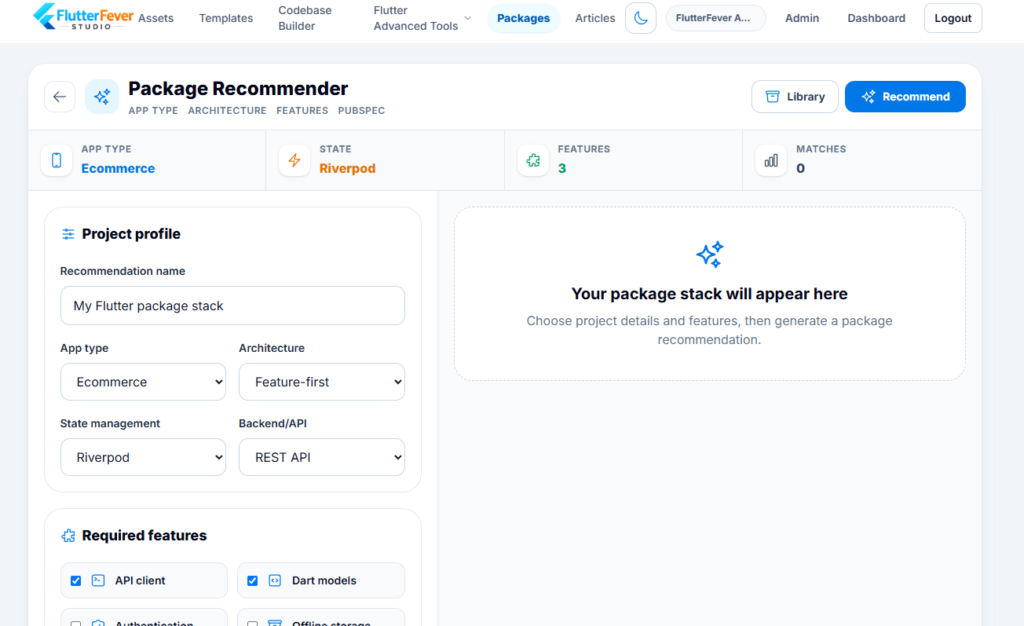
18. Flutter Package Recommender
Finding the right Flutter package can sometimes be difficult.
There may be dozens of packages for:
- state management
- networking
- charts
- storage
- authentication
- animations
The Package Recommender can help developers discover package options for specific development requirements.
This is especially useful for beginners who may not yet know the Flutter package ecosystem.
19. Codebase Builder
Starting a project with an organized structure can save significant time later.
The Codebase Builder can help developers prepare starter Flutter structures rather than beginning with an empty project every time.
Potential use cases include:
- starter architecture
- project folder structure
- reusable modules
- application foundations
20. Lottie and Asset Studio
FlutterFever Studio also includes visual development resources.
The Lottie and Asset Studio brings together Flutter-ready assets that can be used to make applications more attractive and interactive.
Resources can include:
- Lottie animations
- SVG graphics
- UI illustrations
- 3D assets
- visual components
Flutter Lottie Animations
Lottie animations are extremely useful for modern Flutter applications.
They can be used for:
- loading screens
- onboarding
- success states
- payment confirmation
- empty states
- notifications
- upload
- download
- cloud sync
- rewards
- shopping
- weather
- agriculture
- delivery
Flutter developers can integrate Lottie assets using the popular Lottie package.
For example:
Lottie.asset(
  'assets/animations/success.json',
)
Using ready-made animations can significantly reduce design and animation development time.
Flutter SVG Assets
SVG graphics are ideal for responsive Flutter applications because they remain sharp at different resolutions.
FlutterFever Studio can provide reusable SVG assets for:
- icons
- illustrations
- empty states
- category graphics
- onboarding
- dashboards
- branding
SVG assets can be integrated through Flutter packages such as flutter_svg.
Flutter 3D GLB Assets
Flutter applications are increasingly using 3D interfaces.
FlutterFever Studio also supports 3D GLB assets that can be used with compatible Flutter 3D viewers.
Examples can include:
- vehicles
- agriculture models
- coins
- gift boxes
- robots
- plants
- cameras
- interactive objects
These assets can be useful in:
- ecommerce
- education
- AR
- product viewers
- games
- visualization
- agriculture apps
Why FlutterFever Studio Can Be Helpful for Beginners
Flutter beginners often face a common problem.
They know basic Flutter widgets, but real projects require much more knowledge.
A beginner may suddenly need to understand:
- Gradle
- Kotlin
- permissions
- APIs
- responsive layout
- dependencies
- signing
- assets
- deep links
This can feel overwhelming.
FlutterFever Studio can act as a practical support platform by giving developers focused tools for individual development tasks.
Instead of learning every advanced configuration immediately, a beginner can use the appropriate tool and understand the result gradually.
A Beginner-Friendly Flutter Workflow
A new Flutter developer could use FlutterFever Studio like this:
Step 1: Login to FlutterFever Studio.
Step 2: Use Codebase Builder for a project starting point.
Step 3: Use Pubspec Generator to configure dependencies.
Step 4: Test APIs through API Playground.
Step 5: Use Package Compatibility Checker before installing packages.
Step 6: Add Lottie and SVG assets.
Step 7: Test layouts using Responsive UI Tester.
Step 8: Check permissions and deep links.
Step 9: Optimize assets and dependencies.
Step 10: Use Release Readiness before publishing.
This gives new developers a much clearer development path.
Why FlutterFever Studio Can Help Freelancers
Freelance developers usually work under strict deadlines.
A client may ask for:
- a modern UI
- API integration
- responsive layouts
- animation
- Android/iOS release
and expect everything quickly.
FlutterFever Studio can help freelancers reduce repetitive tasks so they can focus on project-specific features.
This can improve:
- delivery speed
- consistency
- development efficiency
- final application quality
FlutterFever Studio for Startup Teams
Startups need to move quickly.
The goal is often to build an MVP, test the idea and improve based on real user feedback.
Spending days on small development utilities or basic graphics can slow that process.
Using reusable tools and assets can help startup teams move from:
Idea → Prototype → MVP → Testing → Release
more efficiently.
FlutterFever Studio for Professional Developers
Experienced Flutter developers also deal with repetitive work.
Even senior developers repeatedly need to:
- inspect JSON
- verify dependencies
- check project configuration
- test device layouts
- optimize assets
- prepare release builds
A centralized Flutter utility platform can reduce context switching.
Instead of maintaining a long list of unrelated tools, developers can keep many workflows in one place.
FlutterFever Studio Is More Than a Download Website
FlutterFever Studio combines three important areas.
1. Flutter Developer Tools
Utilities that help developers build, test, debug, optimize and release applications.
2. Flutter Assets
Lottie animations, SVG illustrations, 3D GLB models and other reusable visual resources.
3. Flutter Development Resources
Reusable code, project foundations, documentation, examples and integration guidance.
This makes the platform useful throughout the entire development lifecycle.
Build Faster, Debug Faster and Release With More Confidence
Flutter development is already productive.
The right tools can make it even faster.
FlutterFever Studio is built around a simple goal:
Remove repetitive work from Flutter development.
Instead of manually solving the same small problems in every new project, developers can use specialized utilities and reusable resources.
This gives developers more time to focus on:
- business logic
- user experience
- unique features
- performance
- product quality
No Complicated Setup — Login and Start Using
One of the most attractive aspects of FlutterFever Studio is simplicity.
Developers can visit the platform, login and start exploring the available Flutter tools and resources.
There is no need to build a separate utility for every development task.
For a beginner who is just starting with Flutter, this means less setup and less confusion.
For an experienced developer, it means faster access to useful development utilities.
Why Fresh Flutter Developers Should Try FlutterFever Studio
If you are learning Flutter today, you are learning much more than Dart syntax.
Modern Flutter development requires knowledge of:
- Android
- iOS
- APIs
- packages
- responsive design
- permissions
- assets
- deployment
FlutterFever Studio can help bridge the gap between basic tutorials and real app development.
Instead of only reading about these topics, developers can work with practical tools designed around them.
FlutterFever Studio vs Searching the Web for Every Tool
Without a centralized platform, a developer might search:
Flutter JSON formatter
Flutter Gradle error checker
Flutter dependency checker
Flutter responsive tester
Flutter permission generator
Flutter SVG download
Flutter Lottie animation
Flutter release checklist
Each search may lead to a different website.
FlutterFever Studio aims to bring many of these workflows into one Flutter-focused environment.
That saves both time and context switching.
Who Should Use FlutterFever Studio?
FlutterFever Studio can be useful for:
- Flutter beginners
- Students learning Flutter
- Freelance developers
- Professional Flutter engineers
- Startup teams
- Development agencies
- UI developers
- Plugin developers
- Indie developers
- Android/iOS Flutter developers
If you regularly build Flutter applications, there is likely a tool or asset category that can improve your workflow.
Key Benefits of FlutterFever Studio
- Free Flutter developer utilities
- Simple login-based access
- Multiple tools in one workspace
- Faster project configuration
- Better dependency management
- Easier Flutter upgrades
- API testing utilities
- Responsive UI testing
- Android permission helpers
- Deep link testing
- Localization checking
- Asset optimization
- Release preparation
- Flutter package discovery
- Lottie animations
- SVG graphics
- 3D GLB assets
- Reusable project resources
- Beginner-friendly workflow
- Faster application development
A Complete Flutter Development Workspace
FlutterFever Studio can support a project from its first day to final release.
Start
Create or prepare project structure.
Configure
Generate pubspec and Android settings.
Build
Add packages, UI resources and assets.
Connect
Test and integrate APIs.
Validate
Check dependencies, permissions and links.
Test
Preview responsive layouts.
Optimize
Clean dependencies and project assets.
Upgrade
Review SDK and package compatibility.
Release
Check release readiness.
This creates a much more organized Flutter development workflow.
Why FlutterFever Studio Matters for the Flutter Community
The Flutter ecosystem is growing quickly.
Developers are building:
- mobile applications
- web applications
- desktop software
- AI tools
- 3D experiences
- business applications
- agriculture platforms
- ecommerce
- productivity tools
As projects become more advanced, developers need more specialized resources.
FlutterFever Studio can become a practical companion to traditional Flutter resources by focusing on day-to-day development utilities and reusable assets.
Start Using FlutterFever Studio
If you are a Flutter developer—or just starting your Flutter journey—you do not need to build every utility from scratch.
FlutterFever Studio gives you access to multiple Flutter-focused tools and reusable assets from a single workspace.
Login, select the tool you need and start building.
Whether you want to check a package, debug a build, test an API, generate configuration, preview a responsive layout or find an animation for your application, FlutterFever Studio is designed to make the process simpler.
Start Building Faster with FlutterFever Studio
Explore free Flutter developer tools, Lottie animations, SVG assets, 3D GLB models and reusable development resources.
Visit FlutterFever Studio on FlutterFever.com and start using the tools.
Frequently Asked Questions About FlutterFever Studio
1. What is FlutterFever Studio?
FlutterFever Studio is a Flutter-focused development platform providing developer tools, reusable assets and resources that help developers build, test, debug, optimize and release Flutter applications faster.
2. Are FlutterFever Studio tools free?
FlutterFever Studio includes free developer tools that users can access after logging in.
3. Is FlutterFever Studio useful for Flutter beginners?
Yes. Tools such as Build Doctor, Pubspec Generator, Package Compatibility Checker and Responsive UI Tester can be especially useful for developers learning real-world Flutter development.
4. Does FlutterFever Studio provide a Flutter Build Doctor?
Yes. Flutter Build Doctor helps developers diagnose Flutter SDK, Gradle and Android build-related problems.
5. Can I test APIs using FlutterFever Studio?
Yes. The API Playground can help developers test APIs before integrating them into Flutter applications.
6. Does FlutterFever Studio provide a pubspec.yaml generator?
Yes. The Pubspec Generator helps developers prepare cleaner Flutter project configuration.
7. Can FlutterFever Studio check Flutter package compatibility?
Yes. Package Compatibility tools can help developers review package versions and platform support before integration.
8. Is there a Flutter dependency checker?
Yes. FlutterFever Studio includes dependency-related utilities for identifying potentially conflicting, outdated or unnecessary project dependencies.
9. Can I test responsive Flutter UI?
Yes. The Responsive UI Tester is designed to help preview Flutter layouts across different device categories.
10. Does FlutterFever Studio provide Flutter assets?
Yes. FlutterFever Studio can provide reusable visual assets such as Lottie animations, SVG graphics and 3D GLB models.
11. Are Lottie animations available for Flutter apps?
Yes. Developers can use Flutter-ready Lottie animations for loading, onboarding, notifications, success screens, empty states and many other application scenarios.
12. Can Flutter developers find 3D assets in FlutterFever Studio?
Yes. 3D GLB resources can be used with compatible Flutter 3D packages and viewers.
13. Can FlutterFever Studio help before publishing an app?
Yes. Release Readiness and optimization tools can help developers review common requirements before deployment.
14. Do I need to install FlutterFever Studio?
The web-based FlutterFever Studio workflow is designed so developers can login and access available tools directly rather than installing a separate utility for every small task.
15. Who should use FlutterFever Studio?
Flutter students, beginners, freelancers, agencies, startup teams and professional Flutter developers can all use FlutterFever Studio to simplify common Flutter development workflows.
Build Flutter Apps Faster
Stop switching between multiple websites for every Flutter development task.
Use FlutterFever Studio to access free Flutter tools, test APIs, check packages, diagnose builds, optimize projects and discover Flutter-ready visual assets.
Login to FlutterFever Studio and start using the tools today.