

Flutter 3.50 Deep Dive: Native Interop, Dart 3.14, AI Integration, Android & iOS Changes — Complete Developer Guide

Flutter 3.50 is not just about building beautiful user interfaces anymore. It is about building more capable applications with deeper native platform access, intelligent features, modern development tools, and reliable production architectures.
Released on November 11, 2026, alongside Dart 3.14, Flutter 3.50 introduces a significant milestone for developers working beyond traditional UI development.
Direct native interoperability has reached production readiness, Android development is moving toward modern Gradle and built-in Kotlin architecture, Apple platform tooling is undergoing an important transition, and artificial intelligence is becoming increasingly accessible through the Dart and Flutter ecosystem.
For developers maintaining production applications, these changes deserve particular attention. They can influence everything from package selection and native SDK integration to build pipelines, application security, and future development strategies.
In this second part of our Flutter 3.50 release series, we will explore the technical changes that matter most to professional Flutter developers, with practical explanations, development workflows, migration recommendations, and real-world use cases.
If you are upgrading from an earlier release, start with our detailed guide on What’s New in Flutter 3.47? to understand how Flutter’s modern architecture has evolved.
Flutter 3.50: What Developers Need to Know
| Development Area | Key Changes |
|---|---|
| Native interoperability | Stable JNIgen and Objective-C FFIgen |
| Pigeon | Preview of native interoperability mode |
| Dart SDK | Dart 3.14 |
| Dart migration | Automated SDK migration tooling |
| Android Gradle Plugin | AGP 9.3.1 for new projects |
| Gradle | Version 9.5.0 for new projects |
| Android compile SDK | API 36 |
| Android target SDK | API 36 |
| Android minimum SDK | API 24 default |
| Android Kotlin | Continued transition to built-in Kotlin |
| Android security | Stronger release-mode Intent verification |
| Platform Views | Hybrid Composition++ improvements |
| Apple platforms | iOS 27 and Xcode 27 tooling improvements |
| Dependency management | Swift Package Manager transition |
| AI development | Genkit Dart 1.0 |
| On-device AI | MediaPipe integration |
| AI coding assistants | Official Flutter agent plugins and MCP integration |
| Developer tools | Improved analysis server and DevTools |
| DartPad | Re-engineered beta |
| Custom platforms | Expanded Vulkan and embedder capabilities |
These developments indicate that Flutter is expanding beyond its traditional role as a cross-platform UI framework.
To understand the complete release context, explore the official Flutter 3.50 announcement.
1. Direct Native Interoperability: One of Flutter 3.50’s Biggest Changes
For years, Flutter developers have used platform channels to communicate between Dart and native platform code.
Platform channels have enabled Flutter applications to access Android and iOS functionality that is not directly available through the framework.
However, as applications become more complex, developers increasingly need tighter integration with native libraries and operating-system APIs.
Flutter 3.50 makes direct native interoperability a production-ready option through stable binding-generation tools.
Understanding the Traditional Platform Channel Architecture
Consider a Flutter application that needs to retrieve information from an Android device.
Traditionally, the application communicates with Kotlin or Java through a MethodChannel.
A simplified workflow looks like this:
Flutter application → MethodChannel → Message encoding → Native method handler → Android API → Response encoding → Dart application
Developers usually maintain code on both sides of the communication boundary.
For example, a traditional Dart implementation may look like this:
import 'package:flutter/services.dart';

class NativeDeviceService {
  static const _channel = MethodChannel(
    'com.example.app/device',
  );

  Future<String?> getDeviceName() {
    return _channel.invokeMethod<String>(
      'getDeviceName',
    );
  }
}
The native Android implementation must register a corresponding channel handler and respond to the requested method.
This architecture works well for many applications. However, projects with numerous native integrations may require substantial message-handling code and ongoing synchronization between Dart and native implementations.
How Direct Native Interoperability Changes the Workflow
Direct interoperability allows Dart applications to interact with supported native APIs through generated bindings.
The conceptual architecture becomes:
Dart application → Generated type-safe bindings → JNI or FFI → Native API → Result
Instead of defining string-based method names and manually transferring messages for every operation, applications can use generated interfaces that correspond to native APIs.
This can simplify native SDK integration and reduce avoidable communication overhead.
For developers building reusable Flutter plugins, this architectural improvement can be particularly valuable.
Platform Channels vs Direct Native Interoperability
| Feature | Traditional Platform Channels | Direct Native Interoperability |
|---|---|---|
| Communication model | Message passing | Native bindings |
| Method identification | Commonly string-based | Generated typed interfaces |
| Data transfer | Message encoding and decoding | Native interoperability mechanisms |
| Synchronous native calls | Not the conventional channel model | Supported where appropriate |
| Implementation | Dart and native channel handlers | Generated bindings and integration code |
| Background execution | Supported with relevant constraints | Additional direct integration possibilities |
| Maintenance | Manual interface coordination | Generated interface coordination |
| Best suited for | Existing integrations and application-specific bridges | Native libraries and strongly typed SDK integration |
Direct interoperability does not mean every platform channel should be removed.
Existing channels remain useful, particularly when they already provide reliable integrations or implement application-specific communication contracts.
For technical guidance, refer to Flutter Native Interoperability Documentation.
2. JNIgen: Bringing Android Native APIs Closer to Dart
JNIgen is especially important for Flutter developers working with Android.
JNI stands for Java Native Interface. It enables interoperability with Java-based environments, including Android’s native application ecosystem.
JNIgen generates Dart bindings for supported Java and Kotlin APIs.
How JNIgen Works
A conceptual JNIgen development workflow involves:
- Identify the Java or Kotlin library you need.
- Configure the binding-generation process.
- Generate Dart interfaces corresponding to the selected APIs.
- Integrate the generated bindings into your Flutter project.
- Invoke the supported native APIs from Dart.
- Validate native object lifetimes, permissions, threading, and error handling.
For example, imagine a company developing a warehouse management application that integrates with a proprietary Android barcode scanner SDK.
Previously, the development team might maintain numerous channel handlers for scanner initialization, configuration, device information, and barcode events.
Generated bindings can reduce the amount of handwritten communication code required for suitable operations.
Where JNIgen Can Be Useful
| Application Type | Potential Native Integration |
|---|---|
| Retail applications | Barcode scanners and POS hardware |
| Logistics applications | Industrial scanners and tracking devices |
| Enterprise applications | Proprietary Android SDKs |
| Automotive software | Supported native device integrations |
| Healthcare applications | Connected device SDKs |
| Multimedia applications | Java-based audio and video libraries |
| Financial applications | Supported native authentication SDKs |
Important Considerations
Direct native access does not eliminate Android permissions, lifecycle requirements, or thread restrictions.
Developers must still understand the native libraries they are integrating.
An API that requires Android’s main thread does not automatically become safe to invoke from a background isolate.
Similarly, a long-running synchronous native operation can block the calling isolate.
The most effective JNIgen integrations combine generated bindings with clearly defined service layers and appropriate native resource management.
3. FFIgen: Direct Integration with C and Objective-C Libraries
FFI stands for Foreign Function Interface.
Dart has supported interoperability with C libraries for years. Flutter 3.50 advances the ecosystem through stable Objective-C binding generation with FFIgen.
This is particularly relevant for developers working with iOS, macOS, and native libraries.
What Can Developers Build with FFIgen?
Potential use cases include:
- Native image-processing libraries.
- Audio-processing engines.
- Scientific computation libraries.
- Document-processing SDKs.
- Existing C-based business logic.
- Supported Apple native APIs.
- Performance-oriented native algorithms.
- Cross-platform libraries implemented using compatible native interfaces.
Practical Architectural Example
Imagine a Flutter application that needs to process large image files using an existing native image-processing library.
Instead of replacing the library with a new Dart implementation, the application may integrate it through generated native bindings.
Conceptual workflow:
Flutter UI → Dart image-processing service → Generated FFI bindings → Native processing library → Processed result
This approach allows the development team to reuse established native functionality while maintaining Flutter as the application’s primary interface.
Native Memory Management Still Matters
Native interoperability introduces responsibilities that ordinary Dart code may not expose directly.
Developers need to consider:
- Native memory ownership.
- Object lifetimes.
- Callback registration and disposal.
- Thread safety.
- Pointer validity.
- Native error handling.
- Platform-specific library packaging.
Dart’s garbage collector does not automatically manage every native resource.
A reliable integration must clearly define who owns each resource and when it should be released.
4. Pigeon’s New Native Interoperability Mode
Pigeon has traditionally helped Flutter developers generate strongly typed communication interfaces between Dart and native platform code.
Flutter 3.50 introduces a preview of a new native interoperability mode that uses JNIgen and FFIgen internally.
This can be particularly interesting for developers maintaining plugins that support both Android and Apple platforms.
Why Pigeon Matters for Plugin Developers
Consider a plugin that exposes a shared device-management API.
The plugin may need to communicate with:
- Kotlin implementations on Android.
- Objective-C-compatible native interfaces on iOS.
- Native functionality on macOS.
- A shared Dart interface used by Flutter applications.
Maintaining consistent data types and communication behavior across these platforms can become difficult.
Generated interfaces help reduce duplicated interface definitions and make changes easier to coordinate.
However, Pigeon’s native interoperability mode is still a preview in Flutter 3.50.
Developers should distinguish between the stable JNIgen and FFIgen tools and the newer Pigeon integration mode.
For business-critical applications, evaluate preview functionality separately before replacing an established communication architecture.
5. Choosing the Right Native Integration Strategy
The availability of several interoperability technologies does not mean developers should use all of them.
Choose the integration method based on the platform, library, communication requirements, and project maturity.
| Requirement | Recommended Approach to Evaluate |
|---|---|
| Existing stable Flutter plugin | Continue using the plugin |
| Simple custom native integration | Platform channels |
| Structured typed platform messaging | Traditional Pigeon |
| Java or Kotlin SDK integration | JNIgen |
| C library integration | Dart FFI and FFIgen |
| Objective-C native integration | FFIgen |
| New cross-platform native binding architecture | Pigeon native interop preview |
For an existing enterprise application, migrating every native integration simultaneously can create unnecessary risk.
A better strategy is to identify the integrations that genuinely benefit from direct interoperability.
Validate one integration at a time, compare its functional behavior and performance, and retain a rollback strategy.
If you maintain a large application, our Flutter SDK Upgrade Guide for Existing Projects provides a useful foundation for controlled migration planning.
6. What’s New in Dart 3.14?
Flutter 3.50 ships alongside Dart 3.14, bringing several important improvements to the underlying programming language ecosystem.
While Flutter developers primarily interact with widgets and framework APIs, Dart’s tools directly influence compilation, dependency resolution, code analysis, performance, and development productivity.
Dart 3.14 focuses on making these workflows more automatic and efficient.
Dart 3.14 Major Improvements
| Feature | Developer Benefit |
|---|---|
| dart migrate | Automated SDK migration |
| Pub metadata caching | Reduced repeated network requests |
| Dart Analysis Server | Improved editor responsiveness |
| DartPad beta | Browser-based development improvements |
| WebAssembly exceptions | Broader runtime compatibility |
| Hardware SIMD | Faster supported numerical operations |
| Typed-data range comparison | Efficient binary-data comparisons |
| Native interoperability | Stable generated native bindings |
The most important change for developers maintaining packages and applications is the introduction of the Dart migration tool.
7. Automated SDK Migration with dart migrate
Upgrading Dart applications has traditionally involved reviewing language changes, updating SDK constraints, applying recommended fixes, and checking compatibility manually.
Dart 3.14 introduces a dedicated migration command to automate part of this process.
Preview Migration Changes
Before modifying your application or package, inspect the proposed migration:
dart migrate --dry-runThe preview helps developers understand which files and constraints may change.
Apply the Migration
dart migrate --applyTo migrate toward Dart 3.14 specifically:
dart migrate --apply --target-sdk=3.14.0The migration tool can apply preparatory fixes and update the minimum Dart SDK constraint.
Optional cleanup operations can help adopt newer language conventions.
Understand the Migration Workflow
Existing Dart package → Compatibility preparation → SDK constraint update → Optional modernization → Static analysis → Automated testing
This is particularly useful when a package needs to move across several Dart SDK releases.
The tool supports packages whose existing SDK constraint requires Dart 3.0 or later.
dart fix vs dart migrate
| Feature | dart fix | dart migrate |
|---|---|---|
| Primary purpose | Apply supported analyzer fixes | Coordinate SDK migration |
| SDK constraint management | Not its primary responsibility | Integrated into migration workflow |
| Code modernization | Supported fixes | Optional migration cleanup |
| Migration across SDK releases | Individual fixes | Version-oriented workflow |
Developers should not assume that automated migration resolves every application-specific incompatibility.
Native plugins, business logic, generated code, and deployment configuration still require manual verification.
Read the official Dart 3.14 release announcement for additional technical details.
8. Faster Dart Package Resolution
Flutter developers frequently use dependency-management commands such as:
flutter pub getflutter pub upgradeflutter pub add package_nameThese operations may involve retrieving package-version metadata from the package repository.
Dart 3.14 improves repeated dependency resolution by introducing ETag-based metadata caching.
What Is ETag-Based Caching?
An ETag is an HTTP resource identifier that helps determine whether server-side content has changed.
When cached package metadata remains current, the package manager can reuse it instead of downloading the entire version listing again.
The conceptual workflow is:
Package dependency request → Cached metadata check → Conditional network request → Reuse existing metadata or download updated metadata
This improvement is especially useful for developers working with large projects containing extensive dependency graphs.
It can also improve the development experience on slower or higher-latency internet connections.
Keep Your Dependencies Organized
Faster package resolution does not eliminate dependency compatibility problems.
Developers should regularly inspect package status:
flutter pub outdatedReview both your direct dependencies and packages brought into the project indirectly.
You can also use FlutterFever’s Developer Tools to explore package compatibility, dependency analysis, and pubspec management tools.
9. DartPad Gets a New Development Experience
DartPad has long provided developers with a convenient environment for learning Dart and experimenting with Flutter.
Dart 3.14 introduces a re-engineered DartPad beta.
The revised architecture performs more development operations directly within the browser using WebAssembly.
Why This Matters
Developers can experiment with code in a more capable browser-based environment without immediately configuring a complete local IDE.
The new approach supports broader package usage, multi-file organization, and enhanced editor assistance.
Potential use cases include:
- Testing Dart language features.
- Exploring Flutter widget behavior.
- Experimenting with supported packages.
- Preparing educational examples.
- Sharing reproducible code demonstrations.
- Prototyping smaller application components.
However, browser-based experimentation does not replace physical-device testing, native SDK integration, or production builds.
For developers transitioning from browser experiments to local development, follow our Flutter Installation Guide for Windows.
10. Dart WebAssembly, SIMD and Binary Data Performance
Dart 3.14 introduces several technical improvements that are particularly relevant to developers building computationally intensive applications.
Hardware SIMD Support
SIMD stands for Single Instruction, Multiple Data.
Instead of performing the same numerical operation independently for each value, SIMD allows supported operations to process multiple values together.
Potential beneficiaries include:
- Numerical calculations.
- Graphical transformations.
- Scientific computing.
- Multimedia processing.
- Data visualization.
- Signal-processing algorithms.
Dart’s WebAssembly compiler can take advantage of suitable hardware SIMD instructions.
This does not mean that every Flutter application automatically receives a substantial performance improvement.
Applications benefit when their workloads and data structures can use the relevant optimized operations.
Standalone WebAssembly Execution
Dart’s updated WebAssembly support also makes suitable compiled modules easier to use outside conventional browser environments.
This opens possibilities for isolated computation, extensible server systems, and compatible edge-computing runtimes.
A standalone Dart Wasm module should not be confused with a complete Flutter graphical application.
Faster Binary Data Comparisons
The new rangeEquals functionality in dart:typed_data allows developers to compare supported binary-data ranges more efficiently.
This is useful when implementing file-format detection, binary protocols, document processing, and buffer comparisons.
An illustrative example:
import 'dart:typed_data';

void main() {
  final data = Uint8List.fromList([
    0x01,
    0x02,
    0x03,
    0x04,
  ]);

  final expected = Uint8List.fromList([
    0x01,
    0x02,
  ]);

  final matches = data.rangeEquals(
    0,
    2,
    expected,
  );

  print(matches);
}
Here, the application compares part of an existing binary buffer with another byte sequence.
For applications performing these operations frequently, avoiding unnecessary temporary data structures can improve efficiency.
11. Flutter 3.50 Android Gradle and Kotlin Changes Explained
Android development is undergoing a significant tooling transition.
For Flutter developers, this is one of the most important areas to understand before upgrading an existing application.
A Flutter application does not depend solely on the Flutter and Dart SDKs.
Its Android build also depends on several interconnected components:
Flutter SDK → Android Gradle Plugin → Gradle → Java → Kotlin tooling → Android SDK
An incompatible configuration anywhere in this chain can prevent the application from building.
Flutter 3.50 Android Toolchain Defaults
| Component | Configuration |
|---|---|
| Android Gradle Plugin | 9.3.1 |
| Gradle | 9.5.0 |
| Kotlin Gradle Plugin verification | 2.4.20 |
| Minimum Java version | Java 17 |
| Default compileSdk | API 36 |
| Default targetSdk | API 36 |
| Default minSdk | API 24 |
These values describe the release’s new-project defaults and verified tooling configuration.
They are not instructions to overwrite every existing application’s Gradle configuration.
Projects with native dependencies, custom build scripts, signing requirements, and older plugins may need an incremental migration.
For a dedicated explanation of these technologies, read our New Flutter SDK Android Gradle and Kotlin Changes Explained.
12. Built-in Kotlin: What Changes for Flutter Developers?
Traditionally, Android projects have applied a separate Kotlin Gradle Plugin to enable Kotlin compilation.
A typical project may contain:
plugins {
    id("com.android.application")
    id("org.jetbrains.kotlin.android")
}
Android’s modern build architecture is moving toward Kotlin support integrated directly into the Android Gradle Plugin.
This changes how Kotlin is configured and maintained.
Why Built-in Kotlin Is Important
Historically, Flutter Android development required developers to coordinate separate versions of AGP, Gradle, Kotlin, and Java.
Built-in Kotlin simplifies part of this relationship by placing Kotlin compatibility management within the Android build tooling.
For plugin authors, this transition is particularly important.
Packages that continue relying on legacy Kotlin plugin configuration may encounter compatibility problems with future Android Gradle Plugin releases.
What Should Existing Flutter Developers Do?
Before migrating:
- Identify plugins containing Android native code.
- Review whether those plugins support modern Kotlin configuration.
- Inspect your application’s Gradle files.
- Verify Java and Gradle compatibility.
- Review build flavors and signing settings.
- Test both debug and release builds.
Do not remove the Kotlin Gradle Plugin blindly.
The correct migration depends on your project’s AGP version and the compatibility of its Android plugins.
If you encounter Kotlin, Java, or Gradle version conflicts, use the FlutterFever Build Doctor to help identify affected components.
13. Android Gradle Plugin 9 and the New DSL
Flutter 3.50 advances support for modern public AGP APIs.
The Flutter Gradle Plugin has been updated to work with the newer Android build configuration architecture.
What Is the Android Gradle DSL?
DSL stands for Domain-Specific Language.
In Android development, the Gradle DSL allows developers to describe application configuration, including:
- Application namespaces.
- Android SDK requirements.
- Build types.
- Product flavors.
- Signing configurations.
- Native build settings.
- Packaging behavior.
- Dependency configuration.
A modern build system provides better opportunities for maintainability, but migration can expose compatibility problems in older plugins and custom Gradle scripts.
Review Your Android Project Files
Pay particular attention to:
android/
├── settings.gradle.kts
├── build.gradle.kts
├── gradle.properties
├── gradle/
│   └── wrapper/
│       └── gradle-wrapper.properties
└── app/
    └── build.gradle.kts
Older projects may use Groovy-based .gradle files instead of Kotlin-based .gradle.kts files.
The migration requirements depend on the actual project configuration.
Flutter 3.50 allows developers to opt into AGP 9’s modern DSL when the application’s plugins support built-in Kotlin.
Teams should verify third-party plugins before enabling this configuration in production.
14. Understanding compileSdk, targetSdk and minSdk
Many Flutter developers encounter Android build issues because these three settings are misunderstood.
compileSdk
The compile SDK determines which Android APIs are available when compiling an application.
Flutter 3.50 exposes API 36 as its default compile SDK value.
targetSdk
The target SDK declares the Android platform behavior level for which the application is designed.
Changing this value can introduce operating-system behavior changes involving permissions, background services, notifications, and other platform features.
minSdk
The minimum SDK determines the oldest Android API level on which an application can be installed.
Flutter 3.50’s default minimum SDK is API 24, corresponding to Android 7.0.
Typical Flutter-Managed Android Configuration
android {
    namespace = "com.example.app"
    compileSdk = flutter.compileSdkVersion

    defaultConfig {
        applicationId = "com.example.app"
        minSdk = flutter.minSdkVersion
        targetSdk = flutter.targetSdkVersion
        versionCode = flutter.versionCode
        versionName = flutter.versionName
    }
}
Using Flutter-managed SDK values can help newly generated projects stay aligned with the framework’s supported defaults.
However, existing applications should evaluate the consequences of changing their minimum and target SDK requirements.
Raising the minimum SDK can exclude users running older Android versions.
Changing the target SDK can alter runtime behavior even when the application’s Dart code remains unchanged.
15. Android Security Improvements: Stronger Intent Validation
Security is an area where Flutter developers should pay particular attention during the migration to Flutter 3.50.
Android applications use Intents to communicate between activities, services, and other application components.
Intents also play an important role in deep linking, file sharing, notifications, and application navigation.
Flutter 3.50 strengthens validation of externally supplied runtime configuration in Android release builds.
What Changes?
Release applications no longer treat certain externally supplied engine and entry-point configuration values as trusted instructions.
This reduces the risk of another application influencing Flutter runtime configuration through unexpected Intent extras.
Custom debug engine configuration is also more restricted in production builds.
Does This Break Deep Linking?
Standard deep-linking behavior remains supported.
However, applications relying on custom runtime configuration passed through external Intent extras should review their implementation.
Recommended Secure Deep-Linking Architecture
External URL → Validated deep link → Application router → Authentication check → Authorized destination
For example, a finance application receiving a payment-detail URL should verify the user’s session and authorization before displaying sensitive information.
A route being technically reachable should never be treated as proof that the user is authorized to access its content.
Developer Security Checklist
- Validate incoming deep-link parameters.
- Never trust externally supplied application identifiers without verification.
- Enforce authentication for sensitive routes.
- Review exported Android components.
- Avoid enabling debug-only configurations in production.
- Test release-mode application entry points.
- Keep signing credentials outside the source repository.
These recommendations remain important even with Flutter’s improved runtime protections.
16. Hybrid Composition++: Better Native Views Inside Flutter
Many Flutter applications need to display interfaces provided by native Android libraries.
Examples include:
- Interactive maps.
- Embedded web views.
- Native advertisements.
- Android media components.
- Specialized SDK interfaces.
Flutter uses Platform Views to integrate these native interface elements into its widget hierarchy.
However, mixing Flutter-rendered content with native Android views introduces additional rendering complexity.
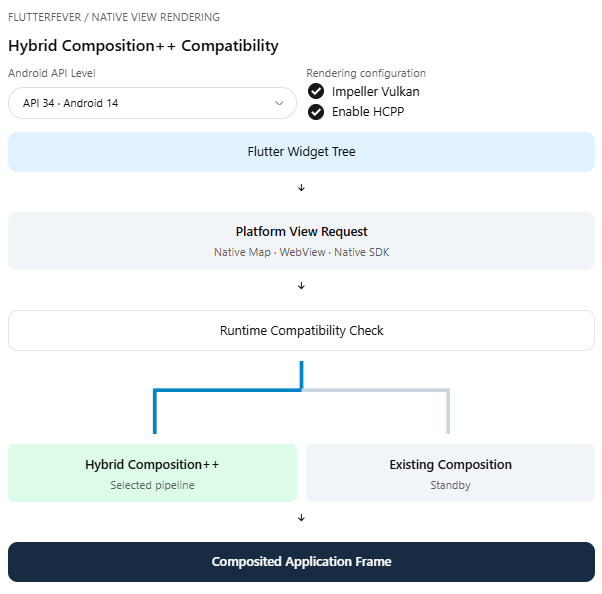
Hybrid Composition++ is a newer architecture designed to improve this integration.
Why Native View Composition Is Challenging
Imagine an application containing an interactive map inside a scrollable Flutter screen.
The application must coordinate Flutter widgets, native map rendering, touch events, scrolling, and graphical synchronization.
Poor coordination can create visual inconsistencies or interaction problems.
Hybrid Composition++ improves the composition relationship between Flutter and Android’s graphical system.
Hybrid Composition++ Requirements
The architecture requires:
| Requirement | Supported Configuration |
|---|---|
| Android version | Android 14 or newer |
| Android API | API 34 or newer |
| Rendering engine | Impeller |
| Graphics backend | Vulkan |
Devices that do not satisfy these conditions fall back to an existing platform view strategy.
Flutter 3.50 improves Hybrid Composition++ behavior, but it is not yet the universal stable default.
How to Enable Hybrid Composition++
For compatible development environments:
flutter config --enable-hcppRun the application on an appropriate physical Android device and inspect the debug logs to confirm which composition strategy is used.
Which Applications Should Evaluate It?
Hybrid Composition++ is particularly relevant for applications involving maps, browsing experiences, graphical native SDKs, and complex layouts containing native interface elements.
However, it is not necessary to enable the feature for every Flutter application.
Evaluate compatibility, touch behavior, scrolling, and graphics performance based on your application’s actual requirements.
17. Flutter 3.50 iOS 27 and Xcode 27 Improvements
Apple platform development continues to introduce new operating-system requirements and development-tool changes.
Flutter 3.50 improves the development experience for teams using iOS 27 and Xcode 27.
The release addresses physical-device preparation, application debugging, and certain launch-related issues.
Why Physical-Device Debugging Matters
An application may behave differently on an iOS simulator compared with a real iPhone or iPad.
Physical testing is especially important for:
- Camera functionality.
- Push notifications.
- Location services.
- Bluetooth functionality.
- Authentication.
- Device permissions.
- Native SDK integration.
- Touch responsiveness.
- Background application behavior.
Flutter’s improved device preparation helps reduce development friction when connecting newly paired or recently updated Apple devices.
Capturing Screenshots from the Flutter CLI
Flutter 3.50 restores physical-device screenshot support when using the appropriate Xcode 27 environment.
Developers can use the Flutter screenshot command during supported debugging sessions.
flutter screenshotThis is useful when documenting UI behavior, investigating visual issues, and preparing development demonstrations.
Developers should also verify their Apple toolchain configuration:
flutter doctor -vxcodebuild -versionflutter devicesThese commands help identify development environment and connected-device issues.
18. Swift Package Manager: The Future of Flutter Apple Dependencies
For years, CocoaPods has played a major role in Flutter’s iOS and macOS dependency management.
Flutter is now moving toward stronger integration with Swift Package Manager.
Swift Package Manager, commonly abbreviated as SPM, is Apple’s native package-management system.
CocoaPods vs Swift Package Manager
| Feature | CocoaPods | Swift Package Manager |
|---|---|---|
| Dependency ecosystem | External Apple dependency manager | Native Apple tooling |
| Configuration | Commonly Podfile-based | Swift package configuration |
| Xcode integration | Generated dependency integration | Native package integration |
| Flutter direction | Transitional fallback | Increasingly preferred approach |
| Existing application compatibility | Extensive historical support | Growing plugin support |
The transition is important because CocoaPods trunk is scheduled to become read-only in December 2026.
Flutter 3.50 introduces warnings when developers disable Swift Package Manager.
This is part of the framework’s preparation for eventually removing the older fallback workflow.
How to Prepare an Existing Application
- Identify plugins containing iOS or macOS native dependencies.
- Review their Swift Package Manager support.
- Check custom native frameworks and SDKs.
- Re-enable SPM if it was previously disabled for compatibility.
- Test dependency resolution.
- Validate application signing and entitlements.
- Build and test a production archive.
Do not delete the Podfile or existing native configurations without understanding the migration requirements.
Some projects may still require transitional compatibility arrangements.
19. Apple Silicon and the Future of macOS Development
Flutter is also preparing for a development ecosystem increasingly focused on Apple Silicon hardware.
Flutter 3.50 warns developers building on Intel-based Macs as part of the broader transition away from Intel Mac host support.
Developers can prepare Apple Silicon-only macOS builds using:
flutter config --enable-macos-arm64-onlyShould Every macOS Application Enable This?
Not necessarily.
Developers need to distinguish between the computer used to build an application and the computers on which the distributed application will run.
An Apple Silicon-only application excludes Intel-based Macs.
Before changing the distribution architecture, evaluate:
- Existing customer hardware.
- Enterprise compatibility requirements.
- Native library architectures.
- Release infrastructure.
- Hardware availability.
- Long-term customer support commitments.
For organizations maintaining Apple applications, this is also a reminder to review development hardware and CI/CD infrastructure before future tooling transitions become mandatory.
20. Genkit Dart 1.0: Building Production AI Applications with Flutter
Artificial intelligence is becoming a practical component of modern application development.
Developers increasingly want to build applications that understand natural-language requests, retrieve relevant information, interact with tools, and automate structured workflows.
Genkit Dart reaches a stable 1.0 release in the Flutter 3.50 ecosystem.
It provides a foundation for integrating AI workflows into Dart and Flutter applications.
What Is Genkit?
Genkit is an open-source AI application framework that helps developers organize interactions between application logic, AI models, tools, and structured responses.
Instead of treating AI as a simple text-generation endpoint, developers can build coordinated workflows.
Potential capabilities include typed AI flows, model integrations, tool invocation, streaming responses, and observability.
Traditional AI Integration vs Structured AI Workflows
| Traditional AI Integration | Structured Genkit Workflow |
|---|---|
| Send a prompt to an API | Define a reusable application flow |
| Receive generated text | Receive structured or streamed output |
| Manually organize tool operations | Integrate tools into controlled workflows |
| Limited application context | Connect relevant application data |
| Custom debugging arrangements | Integrated tracing capabilities |
| Often conversation-focused | Supports task-oriented applications |
Example: AI-Powered Inventory Assistant
Imagine an enterprise inventory application with an intelligent assistant.
A user asks:
“Which products are running low, and what needs to be reordered?”
Instead of responding with general inventory advice, the AI workflow can retrieve authorized inventory records and generate a relevant answer.
A conceptual workflow:
User request → Flutter conversational interface → Genkit flow → Authorized inventory tool → Business data → Structured response → Flutter UI
If the assistant recommends creating a purchase order, the application should request appropriate user approval before performing that action.
AI Application Architecture
A production AI application may contain:
| Layer | Responsibility |
|---|---|
| Flutter presentation | User interaction and structured UI |
| Application services | Request validation and session handling |
| Genkit workflow | AI orchestration |
| Model provider | Language or multimodal inference |
| Tools | Controlled business operations |
| Data layer | Authorized database and API access |
| Observability | Monitoring, tracing, and diagnostics |
This architecture separates user interface development from AI orchestration and business operations.
For more technical information, explore the official Genkit framework.
21. Agentic Flutter Applications and Generative UI
Traditional applications display predefined screens.
For example, a shopping application may have separate screens for product search, order history, and delivery tracking.
AI-powered applications can take a different approach.
Depending on the user’s request, an assistant may generate structured information that the application presents through appropriate interactive components.
This is where generative UI and agentic application development become particularly interesting.
What Is Agentic UI?
An agentic interface allows an AI system to participate in a structured application workflow rather than merely returning conversational text.
Imagine a travel application where a user asks for suitable hotel options.
Instead of returning only a written response, the application could present structured hotel cards, date-selection controls, comparison information, and a confirmation interface.
The AI assists with interpreting the request, while the application maintains control over actual business operations.
Conceptual Generative UI Workflow
Natural-language request → AI workflow → Validated structured response → Approved Flutter component mapping → Interactive interface → User action
Technologies such as A2UI complement this approach by enabling structured interface descriptions within compatible application architectures.
Important Security Considerations
Never grant an AI model unrestricted control over application operations.
Production systems should validate structured responses and restrict which components and tools are available.
Permission checks, transaction authorization, user confirmation, input validation, and audit logs remain essential.
AI-generated recommendations and actual business actions should be treated as separate responsibilities.
22. On-Device AI with MediaPipe
Cloud-based AI is not always the most appropriate solution.
Some applications require immediate responses, offline functionality, more controlled data handling, or reduced dependence on network connectivity.
The Flutter ecosystem’s new Google AI Edge MediaPipe package introduces a collection of on-device AI capabilities across vision, audio, and text tasks.
These capabilities are powered by technologies including LiteRT and LiteRT-LM.
What Is On-Device AI?
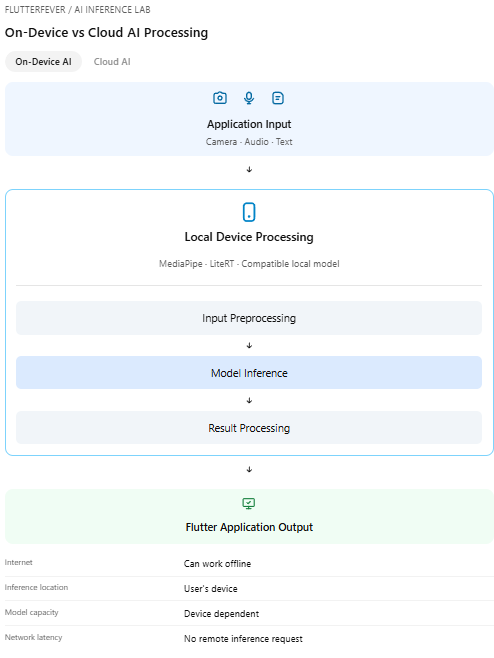
On-device AI performs supported model inference directly on the user’s hardware.
Instead of sending every request to a remote AI server, the application executes the relevant model locally.
A conceptual workflow:
Camera, audio or text input → Local preprocessing → On-device model → Inference result → Flutter application
This is particularly useful when the task must operate in an environment with limited internet connectivity.
Cloud AI vs On-Device AI
| Feature | Cloud AI | On-Device AI |
|---|---|---|
| Processing location | Remote infrastructure | User’s device |
| Internet requirement | Generally required | Can support offline execution |
| Latency | Includes network communication | Avoids remote request latency |
| Model capacity | Can use larger hosted models | Limited by device resources |
| Data handling | May involve remote processing | Can keep inference data local |
| Infrastructure costs | Often usage-dependent | Local inference avoids per-request cloud charges |
| Device resource usage | Usually lower inference workload locally | May require substantial CPU, GPU or memory |
Neither architecture is universally better.
Applications should choose an approach based on model requirements, hardware capability, accuracy, privacy, and operational needs.
Practical Use Cases
| Industry | Potential On-Device AI Feature |
|---|---|
| Agriculture | Visual classification of supported crop images |
| Education | Local text or image recognition |
| Retail | Product recognition and camera assistance |
| Productivity | Document-processing assistance |
| Accessibility | Visual and audio assistance |
| Manufacturing | Supported visual inspection workflows |
| Field services | Offline image and sensor analysis |
An agricultural application, for example, could use a suitable trained image-classification model to help identify visual crop characteristics without requiring a continuous internet connection.
However, an AI classification result should not be presented as a guaranteed diagnosis.
The accuracy depends on the model, training data, image quality, and operating conditions.
Explore the official MediaPipe Flutter Gallery for examples of available on-device AI tasks.
23. Building Hybrid AI Applications with Flutter
Some of the most useful AI architectures combine on-device and cloud inference.
Consider an application that captures documents and extracts information.
Basic image processing and supported recognition tasks may execute locally, while more complex semantic analysis may use a cloud model.
Hybrid AI Architecture
| Task | Potential Execution Location |
|---|---|
| Image preprocessing | On-device |
| Basic classification | On-device |
| Supported text recognition | On-device |
| Complex reasoning | Cloud |
| Multi-document analysis | Cloud or suitable local model |
| Sensitive validation | Controlled application backend |
| Final presentation | Flutter UI |
Hybrid architectures allow developers to balance responsiveness, privacy, capability, and operational costs.
Production teams should also define fallback behavior when the device is offline or the cloud service is unavailable.
A well-designed application should remain useful even when one AI component temporarily fails.
24. Official Flutter AI Coding Plugins and MCP Integration
Flutter 3.50 introduces improvements not only for building AI-powered products but also for developers using AI while writing code.
Official Flutter agent plugins provide a more structured way for compatible coding assistants to interact with Flutter projects.
These integrations can incorporate development instructions, reusable skills, project-aware tools, and Dart or Flutter MCP server configuration.
What Is MCP?
MCP stands for Model Context Protocol.
It provides a standardized mechanism through which compatible AI assistants can access exposed tools and relevant context.
For Flutter development, this can enable a coding assistant to interact more effectively with supported development operations rather than relying exclusively on generated text.
Traditional AI Coding vs Tool-Connected AI Coding
| Traditional AI Coding | MCP-Connected Development |
|---|---|
| Generate a code suggestion | Generate and inspect code in context |
| Manually run commands | Invoke supported development tools |
| Copy errors into chat | Retrieve available diagnostic information |
| Manually verify changes | Assist with analysis and validation |
| Separate coding and testing | More coordinated development workflow |
Actual functionality depends on the coding assistant, connected MCP tools, application state, and user authorization.
Example AI-Assisted Flutter Development Workflow
- The developer describes a required feature.
- The coding assistant inspects relevant project files.
- The assistant proposes or applies appropriate code changes.
- Static analysis identifies possible issues.
- A running application is updated where supported.
- The developer reviews the resulting behavior.
- Automated tests validate the implementation.
- Approved changes are committed.
This creates a more complete development loop than simply copying generated code into an editor.
However, AI-assisted coding does not eliminate the need to review architecture, dependencies, security, performance, and business requirements.
25. Proactive Hot Reload with Flutter Agent Tools
Hot reload is one of Flutter’s most important development productivity features.
Flutter’s agent tooling introduces a proactive hot-reload rule that can initiate supported reload or restart operations after changes within application source files.
Why This Is Useful
Imagine using an AI coding assistant to modify a dashboard layout.
In a conventional workflow, the assistant updates the code and the developer must then manually trigger a reload.
With an appropriately connected development environment, supported agent tooling can help coordinate the source-code modification and application refresh.
The conceptual workflow becomes:
Developer request → Code modification → Analysis → Hot reload or restart → Visual verification
This can reduce repetitive manual operations during interface development.
Nevertheless, hot reload is not sufficient for every code change.
Changes affecting native plugins, application initialization, or platform configuration may require a restart or complete rebuild.
26. Reusable Package Skills for AI Coding Assistants
Flutter and Dart packages often have specific usage conventions that are difficult for a generic coding assistant to understand.
Package authors may want to provide guidance about correct initialization, preferred architecture, supported methods, and common implementation mistakes.
The Dart ecosystem now allows package authors to distribute reusable agent skills within their packages.
What Are Package Skills?
Package skills are structured instructions intended to help compatible AI coding assistants use a package more accurately.
For example, a database package could provide guidance concerning migration operations, transaction boundaries, generated models, and recommended error handling.
A package may contain a top-level skills directory.
Conceptually:
my_flutter_package/
├── lib/
├── test/
├── example/
├── skills/
│   └── package-usage/
│       └── SKILL.md
├── pubspec.yaml
└── README.md
Developers can discover and retrieve supported dependency-provided skills using:
dart run skills@ getPackage authors can also use skill-validation tooling before publishing.
Why Package Skills Matter
A coding assistant with relevant package guidance can potentially avoid outdated implementation patterns and reduce incorrect assumptions.
However, instructions supplied inside third-party packages should be reviewed, particularly when they request command execution, access to sensitive files, or changes outside the intended project scope.
For developers exploring new Flutter packages, our FlutterFever Package Knowledge Base provides additional tutorials and implementation guidance.
27. Improved Dart Analysis Server and Flutter DevTools
Large Flutter projects frequently contain multiple packages, generated files, shared modules, and complex dependency relationships.
Code analysis and refactoring can become more demanding as the workspace grows.
Flutter 3.50 and Dart 3.14 introduce improvements that help make these operations more responsive.
Improvements Developers May Notice
- Faster discovery of shared package directories.
- More efficient analysis across multi-package workspaces.
- Improved responsiveness during supported refactoring operations.
- Reduced blocking in certain editor tasks.
- Better analysis-server startup behavior.
- Improved foundations for AI-assisted development workflows.
Flutter DevTools also adopts the independently distributed Material and Cupertino packages as part of the broader design-system transition.
Why Analysis Performance Matters
An enterprise Flutter workspace may contain separate packages for:
packages/
├── core/
├── authentication/
├── networking/
├── design_system/
├── analytics/
├── payments/
└── shared_models/
When developers rename a commonly used class or inspect references across multiple packages, the analysis server must understand the relationships among these modules.
More efficient workspace analysis can improve development productivity.
It is important to distinguish editor responsiveness from application runtime performance.
A faster rename operation does not automatically make an application’s production interface render faster.
28. Pluggable Platforms and Custom Flutter Embedders
Flutter is best known for supporting Android, iOS, web, Windows, macOS, and Linux.
However, the rendering framework can also be relevant to specialized hardware and operating-system environments through custom embedder development.
Flutter 3.50 expands certain underlying embedding capabilities.
Vulkan External Texture Support
Custom embedders gain improved opportunities to provide externally managed graphical textures to the Flutter engine.
This can be valuable when integrating Flutter interfaces with specialized graphics pipelines.
Potential applications include:
- Automotive displays.
- Industrial control panels.
- Smart appliances.
- Embedded touch interfaces.
- Specialized multimedia systems.
- Custom hardware dashboards.
Improved Memory-Pressure Handling
Custom embedder developers also receive improvements that allow relevant rendering resources to be released more promptly when the system experiences memory pressure.
This is particularly useful in constrained hardware environments.
For ordinary mobile application developers, these changes may not require immediate action.
Their significance is primarily architectural: Flutter is becoming more adaptable to specialized deployment environments.
Custom platform development still requires substantial native engineering, graphics integration, and device-specific testing.
29. Flutter GPU and Advanced Graphics Development
Flutter’s graphics ecosystem continues to expand beyond conventional application interfaces.
Flutter 3.50 introduces additional support for texture-array-based workflows within Flutter GPU.
Why Texture Arrays Matter
Graphics-heavy applications may need to process numerous images or visual layers within a single scene.
Examples include sprite-based games, tile-based maps, visualization tools, and custom graphical experiences.
Texture arrays can make it possible to group suitable graphical resources and reduce separate drawing operations.
Improved diagnostics also help developers identify certain shader-pipeline configuration problems.
However, these are specialized graphics-development capabilities rather than ordinary widget requirements.
Developers building traditional Flutter applications do not need to introduce custom GPU processing simply because newer APIs are available.
Use advanced rendering techniques only when the application has a genuine graphical requirement.
30. Flutter Ecosystem Growth: What It Means for Developers
Flutter’s ecosystem has reached an important adoption milestone, with more than one million Flutter applications published on Google Play, according to the Flutter team.
The framework is increasingly used across consumer software, enterprise applications, education, commerce, and AI-oriented products.
Its package ecosystem is also expanding into new development areas.
Examples highlighted around Flutter 3.50 include Terradart for cloud infrastructure development using Dart and vyuh_diagram_flutter for interactive node and diagram interfaces.
The latter can be particularly interesting to developers building:
- Workflow editors.
- Business process visualization.
- Architecture diagrams.
- Node-based programming interfaces.
- Data-processing pipelines.
- Interactive relationship maps.
The release also highlights performance work involving inline advertising components.
As with any package-level optimization, developers should assess improvements against the actual behavior of their own applications.
The ecosystem is gradually becoming broader than conventional mobile UI development.
You can explore additional packages, development resources, and professional tools through FlutterFever Studio.
31. Flutter RFCs: A More Transparent Engineering Process
An RFC, or Request for Comments, is a structured way to propose and discuss technical changes before implementation.
Flutter is introducing a public RFC process to support more transparent architectural discussion.
Why RFCs Matter
Large frameworks must balance new features with performance, compatibility, accessibility, developer experience, and long-term maintenance.
Public technical discussions allow contributors and maintainers to evaluate important design decisions before introducing substantial changes.
For professional Flutter developers, RFCs can provide insight into how the framework may evolve.
They can also help package authors and enterprise engineering teams identify developing architectural directions.
However, an RFC is a proposal rather than a guaranteed feature commitment.
Developers should not base production delivery schedules on unapproved or experimental proposals.
32. Flutter 3.50 Breaking Changes and Deprecations
New features are exciting, but breaking changes are often more important for developers maintaining existing production applications.
Flutter 3.50 introduces several changes that require application-level review.
Important Migration Areas
| Breaking Change or Deprecation | Recommended Review |
|---|---|
| Bundled Material and Cupertino imports | Plan migration to standalone packages |
| Legacy localization delegates | Review localization dependencies and imports |
| DropdownButtonFormField behavior | Review explicit enabled configuration |
| Soft-hyphen rendering | Recheck text wrapping |
| RTL WidgetSpan ordering | Test multilingual interfaces |
| Mobile browser SafeArea | Review display cutout and bottom spacing |
| ignoringSemantics removal | Update affected pointer widgets |
| Dry baseline behavior | Review custom render objects |
| Android Intent restrictions | Test custom native entry points |
| Release-mode engine flags | Separate debug and production configuration |
Not every application is affected equally.
The required migration depends on which APIs, custom widgets, and native integrations your project uses.
Material and Cupertino Migration
Existing applications can use the provided migration fix:
dart fix --apply --code=migrate_design_widgetsReview the resulting changes before committing them.
DropdownButtonFormField Changes
The standalone Material package introduces more explicit control over whether a dropdown form field is enabled.
For affected applications, a conceptual implementation may look like this:
DropdownButtonFormField<String>(
  enabled: false,
  items: const [
    DropdownMenuItem(
      value: 'active',
      child: Text('Active'),
    ),
    DropdownMenuItem(
      value: 'inactive',
      child: Text('Inactive'),
    ),
  ],
  onChanged: (value) {
    // Handle an enabled selection.
  },
)
Developers should verify enabled and disabled states, validation behavior, and visual styling after migration.
Removed ignoringSemantics Property
Applications using the previously deprecated ignoringSemantics property on affected pointer widgets must update their implementation.
Review related accessibility behavior rather than simply deleting the property without understanding its original purpose.
Mobile Web SafeArea Changes
Applications using viewport coverage configurations should retest layouts on mobile browsers with display cutouts and home indicators.
Existing manual padding workarounds may need to be reconsidered.
For a complete list of affected APIs and migration instructions, refer to Flutter’s Official Breaking Changes and Migration Guides.
33. How to Upgrade an Existing Application to Flutter 3.50 Safely
Upgrading a production Flutter application should be treated as a structured engineering activity.
The SDK update itself may be straightforward, but the surrounding dependencies, platform configuration, and business-critical functionality require careful evaluation.
Stage 1: Establish a Known-Good Baseline
Record your current development environment:
flutter --version
dart --version
flutter doctor -v
Run your existing tests:
flutter analyze
flutter test
Confirm that a production build succeeds before introducing the new SDK.
This makes it easier to distinguish existing problems from migration-related issues.
Stage 2: Create a Dedicated Migration Branch
Review your current repository status:
git statusCommit reviewed application changes and create a separate migration branch:
git checkout -b upgrade/flutter-3.50Avoid committing signing secrets, local credentials, or unrelated generated files.
Stage 3: Upgrade the Flutter SDK
Check the release channel:
flutter channelSwitch to stable if appropriate:
flutter channel stableUpgrade the SDK:
flutter upgradeVerify the resulting version:
flutter --versionRemember that the upgrade command retrieves the latest available release on the selected channel.
If you specifically require Flutter 3.50.0, use a suitable SDK version-management approach.
For editor-specific instructions, read our How to Update Flutter SDK in VS Code guide.
You can also review our Flutter Stable and Beta Channel Guide before changing release channels.
Stage 4: Review Dependency Compatibility
flutter pub get
flutter pub outdated
flutter pub deps
Identify packages that constrain Flutter or Dart compatibility.
Pay particular attention to native plugins, code generators, authentication libraries, payment SDKs, database packages, and push notification integrations.
Avoid upgrading every dependency to a new major version simultaneously.
Stage 5: Review Automated Fixes
Preview supported Dart fixes:
dart fix --dry-runPreview SDK migration where applicable:
dart migrate --dry-runApply only the migration operations appropriate to your project.
Review the resulting source and configuration changes.
Stage 6: Validate Android and Apple Toolchains
For Android, inspect Java and Gradle compatibility.
java -version
flutter doctor -v
On macOS, verify Xcode configuration and Apple dependencies.
xcodebuild -version
flutter doctor -v
Review platform SDK requirements, signing configuration, plugin support, and relevant migration warnings.
Stage 7: Run Automated Tests
flutter analyze
flutter test
For projects with integration tests, execute the configured integration-testing workflow on appropriate devices.
Focus especially on business-critical operations.
Stage 8: Validate Release Builds
Android App Bundle:
flutter build appbundle --releaseAndroid APK:
flutter build apk --releaseiOS on macOS:
flutter build ios --releaseWeb:
flutter build web --releaseWindows on Windows:
flutter build windows --releaseA successful debug launch does not guarantee release compatibility.
Stage 9: Conduct Real-Device Regression Testing
Verify authentication, notifications, payments, native SDKs, file handling, camera behavior, permissions, navigation, and background operations.
Where possible, include older supported devices alongside recent high-performance hardware.
Stage 10: Release Gradually
For production applications with established users, consider a controlled rollout.
Monitor application crashes, startup behavior, API errors, authentication problems, rendering issues, and reported user experience.
Keep a known-good release and documented rollback strategy available.
For additional migration guidance, explore our Step-by-Step Flutter SDK Upgrade Tutorial.
34. Preparing Your CI/CD Pipeline for Flutter 3.50
A production Flutter application is often built by automated infrastructure rather than individual developers.
CI/CD stands for Continuous Integration and Continuous Delivery or Deployment.
A Flutter SDK upgrade can affect both local development and remote build environments.
Recommended CI/CD Migration Workflow
Source repository → Pinned Flutter SDK → Compatible native toolchain → Dependency resolution → Static analysis → Automated tests → Signed release build → Controlled deployment
Review your CI/CD configuration for:
- Flutter SDK version.
- Java version.
- Gradle wrapper configuration.
- Android SDK installations.
- Apple build-machine architecture.
- Xcode version.
- Swift Package Manager compatibility.
- Environment variables.
- Signing credentials.
- Automated test execution.
- Artifact publishing rules.
Pinning SDK and build-tool versions helps create reproducible environments.
A successful build on a developer’s computer is not sufficient if the remote release pipeline uses different tooling.
Teams using automated Android release workflows can read our Codemagic Flutter CI/CD Guide for Android and Google Play for practical guidance.
35. Common Flutter 3.50 Upgrade Problems and Solutions
| Problem | Recommended First Step |
|---|---|
| Android Gradle build failure | Verify AGP, Gradle and Java compatibility |
| Kotlin compilation errors | Review plugin support and Kotlin migration status |
| Dart SDK constraint conflict | Inspect pubspec.yaml and dependency requirements |
| Material or Cupertino warnings | Review design-package migration |
| iOS dependency errors | Check Swift Package Manager and plugin compatibility |
| Physical iPhone debugging issue | Verify Xcode and device preparation |
| Native binding errors | Review generated interfaces and library configuration |
| WebAssembly compilation failure | Inspect unsupported packages and legacy JS imports |
| AI SDK integration errors | Validate package compatibility and platform requirements |
| Release-only navigation errors | Review Android Intent security changes |
| Native view rendering problems | Verify platform composition strategy |
| Older macOS hardware incompatibility | Review build host and distribution architecture |
When Should You Use flutter clean?
Developers frequently use:
flutter clean
flutter pub get
This can help remove stale generated build artifacts.
However, it should not be treated as a universal solution.
If the actual problem is an incompatible Java version, outdated native plugin, or invalid Gradle configuration, cleaning the build will not resolve the underlying incompatibility.
Identify the root cause before applying repetitive troubleshooting commands.
For additional assistance, explore the FlutterFever Build Doctor.
36. Flutter 3.47 vs Flutter 3.50: Technical Comparison
| Feature | Flutter 3.47 | Flutter 3.50 |
|---|---|---|
| Dart SDK | Earlier Dart release | Dart 3.14 |
| Design packages | Newly available standalone packages | Expanded default adoption and deprecation transition |
| Native interoperability | Continued development | Stable direct native bindings |
| Pigeon | Established typed communication | Native interoperability preview |
| Android build tooling | Ongoing modernization | Expanded AGP 9 DSL support |
| Kotlin | Migration toward built-in Kotlin | Broader modern tooling integration |
| Hybrid Composition++ | Available from earlier releases | Additional improvements |
| Apple tooling | Preparation for upcoming platform versions | iOS 27 and Xcode 27 improvements |
| Swift Package Manager | Continued adoption | Stronger transition warnings |
| AI ecosystem | GenUI and agentic development foundations | Stable Genkit Dart 1.0 |
| On-device AI | Existing package ecosystem | Expanded MediaPipe capabilities |
| Package migration | Conventional migration workflows | dart migrate |
| DartPad | Existing browser development experience | Re-engineered beta |
| AI developer tools | Existing integrations | Expanded official agent tooling |
Flutter 3.50 builds upon architectural directions introduced in previous versions.
The most important difference is that several previously developing technologies are now more mature or closer to becoming standard development practices.
For historical comparison, revisit our Flutter 3.47 New Features and Release Guide.
37. Which Flutter 3.50 Features Should You Learn First?
Flutter 3.50 introduces a broad range of changes, but developers do not need to master every technology immediately.
Your learning priorities should reflect your professional responsibilities.
| Developer Profile | Recommended Learning Focus |
|---|---|
| Beginner Flutter developer | Dart 3.14 and modern project structure |
| Mobile application developer | Android and iOS compatibility changes |
| Flutter plugin developer | JNIgen, FFIgen and modern Kotlin |
| AI application developer | Genkit, MediaPipe and structured AI workflows |
| Enterprise developer | Migration strategy and dependency compatibility |
| DevOps engineer | CI/CD and native toolchain alignment |
| Graphics developer | Flutter GPU and rendering architecture |
| Desktop developer | Native interoperability and Apple Silicon changes |
| Package author | Dart migration, package skills and modern plugin tooling |
| Technical architect | Modular design architecture and custom platform integration |
For developers who are still strengthening their Flutter fundamentals, explore the tutorials, development resources, and practical guides available on FlutterFever.
38. Is Flutter 3.50 Ready for Enterprise and Production Applications?
Flutter 3.50 contains several capabilities that are attractive to enterprise development teams.
Stable native interoperability can improve native SDK integration. Modern Android build tooling supports long-term compatibility. Improved AI development infrastructure introduces new opportunities for intelligent application features.
However, framework stability should not be confused with universal project compatibility.
An enterprise application may depend on proprietary libraries, older native SDKs, specialized hardware, regulatory requirements, and extensive internal infrastructure.
Before adopting Flutter 3.50, evaluate:
- Compatibility of critical dependencies.
- Native platform requirements.
- Automated test coverage.
- Security and authorization.
- Accessibility.
- Build reproducibility.
- Production monitoring.
- Deployment and rollback capabilities.
- Experimental feature exposure.
Stable features should be evaluated differently from preview and experimental technologies.
A production team may adopt the new SDK while postponing specific experimental capabilities.
That is often a more effective strategy than treating the entire release as one indivisible migration.
Frequently Asked Questions About Flutter 3.50
What are the biggest technical changes in Flutter 3.50?
The release introduces stable direct native interoperability, Dart 3.14 migration tooling, Android Gradle modernization, Apple platform improvements, expanded AI development capabilities, and updated developer tools.
Which Dart version comes with Flutter 3.50?
Flutter 3.50 ships alongside Dart 3.14.
Is native interoperability stable in Flutter 3.50?
Yes. JNIgen and Objective-C FFIgen reach stable status, complementing established C interoperability capabilities.
Are Flutter platform channels deprecated?
No. Platform channels remain supported and useful.
Direct native interoperability provides another integration option rather than universally replacing platform channels.
What is JNIgen in Flutter?
JNIgen generates Dart bindings for supported Java and Kotlin APIs, enabling direct integration with compatible Android native libraries.
What is FFIgen?
FFIgen generates bindings for native interfaces, including supported C and Objective-C APIs.
Is Pigeon’s native interoperability mode stable?
No. The new native interoperability mode is introduced as a preview in this release.
What is the default AGP version in Flutter 3.50?
New projects use Android Gradle Plugin 9.3.1.
Existing applications should evaluate plugin compatibility before changing their build configuration.
Which Gradle version does Flutter 3.50 use for new projects?
Gradle 9.5.0 is the new-project default.
Does Flutter 3.50 require Java 17?
Java 17 is the minimum Java version identified for the release’s updated Android toolchain configuration.
The complete compatible environment should be checked using Flutter Doctor.
What is the default minimum Android SDK in Flutter 3.50?
API 24, corresponding to Android 7.0.
What are the default compileSdk and targetSdk values?
Both are API 36 in Flutter 3.50.
Is built-in Kotlin mandatory for every existing Flutter app immediately?
Existing applications should evaluate their plugin ecosystem and migration status. The broader Android tooling direction requires preparation for built-in Kotlin, particularly for plugin developers.
What is Hybrid Composition++?
Hybrid Composition++ is a newer architecture for embedding and composing supported native Android views within Flutter applications.
Does Hybrid Composition++ work on every Android device?
No. It requires Android 14 or newer and the relevant Impeller Vulkan configuration.
Unsupported devices use an existing fallback strategy.
Does Flutter 3.50 remove CocoaPods?
No. CocoaPods remains available as a transitional fallback, but Flutter is moving toward Swift Package Manager.
Does Flutter 3.50 support iOS 27 and Xcode 27?
The release introduces improvements specifically related to iOS 27 and Xcode 27 development and debugging.
What is Genkit Dart 1.0?
Genkit Dart 1.0 is a stable AI development framework release that supports structured AI application workflows, model integration, tools, streaming, and tracing.
Can Flutter run AI models without the internet?
Yes. Suitable on-device AI technologies, including supported MediaPipe functionality, can perform compatible inference tasks locally.
Actual offline capability depends on the model, package, and hardware requirements.
What is MCP in Flutter development?
MCP provides a standardized way for compatible AI assistants to access exposed development tools and context.
What is dart migrate?
It is an automated Dart SDK migration tool that helps update supported package code and SDK constraints.
Should I immediately upgrade my production Flutter application?
Not necessarily. Establish a working baseline, identify migration requirements, validate critical packages, and test release builds before deployment.
Conclusion: Flutter 3.50 Is Expanding the Definition of Cross-Platform Development
Flutter 3.50 represents an important evolution in how developers build, integrate, and maintain modern applications.
Its significance extends beyond framework widgets and rendering improvements.
With stable native interoperability, developers have new options for integrating platform-specific functionality. Dart 3.14 improves package maintenance, code analysis, and modern compilation workflows. Android and Apple development are moving toward updated tooling architectures, while AI integration is becoming increasingly practical through technologies such as Genkit and MediaPipe.
For developers building intelligent applications, Flutter can provide the interface through which users interact with sophisticated data, AI models, and business workflows.
For enterprise engineering teams, the release offers opportunities to modernize native integrations, improve maintainability, and establish more reliable development pipelines.
The most effective approach is not to adopt every new feature immediately.
It is to understand what each technology solves, evaluate its maturity, and introduce it where it delivers meaningful value.
A successful Flutter application still depends on good software architecture, secure implementation, appropriate testing, accessible interfaces, and disciplined production deployment.
Flutter 3.50 provides a broader set of tools to achieve these goals.
Stay connected with FlutterFever for professional Flutter tutorials, Dart programming guides, AI application development, package integration examples, Android and iOS troubleshooting, and practical software engineering resources.
Official References and Technical Documentation
For developers who want to explore the complete implementation details and individual framework changes, refer to the Flutter 3.50.0 Technical Release Notes.