

What’s New in Flutter 3.50? Top Features, UI Upgrades, and Major Performance Improvements

Flutter 3.50 is here, bringing a significant set of improvements that go beyond a conventional SDK update. From independently maintained Material and Cupertino design packages to enhanced Impeller rendering, smarter image caching, improved WebAssembly support, and modern framework APIs, this release represents another important milestone in cross-platform application development.
Released alongside Dart 3.14, Flutter 3.50 focuses on improving the developer experience while helping teams build more responsive, accessible, scalable, and maintainable applications.
Whether you are developing a mobile application, an enterprise dashboard, an e-commerce platform, a SaaS product, or a desktop application, understanding the latest Flutter features can help you make better technical decisions.
But what exactly has changed in Flutter 3.50? Which features should developers adopt immediately? And how does this release compare with its predecessor?
In this comprehensive FlutterFever guide, we will explore the most important Flutter 3.50 features, understand their practical applications, and examine what they mean for the future of Flutter development.
If you missed the previous major release, read our detailed coverage of What’s New in Flutter 3.47? to understand the architectural changes that laid the foundation for this update.
Flutter 3.50: Release Highlights at a Glance
Flutter 3.50 introduces improvements across the framework, rendering engine, web platform, desktop development, and application architecture.
| Feature | What’s New in Flutter 3.50 |
|---|---|
| Flutter SDK | Flutter 3.50 |
| Dart SDK | Dart 3.14 |
| Material and Cupertino | Continued transition to standalone design packages |
| Scrolling | Dedicated sliver clipping and improved list layout APIs |
| Image Management | Logical cache sizing and background image placeholders |
| Text Input | Secure numeric keyboards and email OTP autofill |
| Accessibility | Improved semantics, focus management, and reduced-motion support |
| Impeller | Expanded GPU-accelerated rendering capabilities |
| Flutter Web | Improved cross-browser WebAssembly execution |
| Web Deployment | Built-in content hashing |
| Browser Text Rendering | Experimental WebParagraph implementation |
| Desktop | Graphics improvements and experimental multi-window capabilities |
| iOS | Improved touch input responsiveness |
| Native Integration | Stable direct native interoperability |
While Flutter 3.50 also introduces important developments in native interoperability, artificial intelligence, and platform tooling, this first part of our release series focuses primarily on UI development, framework improvements, rendering, and application performance.
For a complete overview of the release, developers can refer to the official Flutter 3.50 announcement.
1. Material and Cupertino Packages: A Major Architectural Shift
One of the most significant changes in Flutter 3.50 is the continued separation of Material and Cupertino design libraries from the core Flutter SDK.
For years, developers have relied on the built-in Material library to create modern Flutter applications.
A traditional Material application begins with:
import 'package:flutter/material.dart';Similarly, Cupertino-based applications traditionally use:
import 'package:flutter/cupertino.dart';These libraries have played a central role in Flutter’s development ecosystem, providing ready-to-use widgets, themes, navigation components, dialogs, buttons, and platform-inspired interfaces.
Flutter 3.47 introduced standalone Material and Cupertino packages, establishing the foundation for a more modular design architecture.
Flutter 3.50 advances this transition, with the standalone Material package becoming the default approach for newly generated projects and the traditional bundled design-library imports entering a formal deprecation transition.
Why Is Flutter Separating Its Design Libraries?
Consider an enterprise application containing hundreds of screens, custom themes, reusable widgets, and numerous third-party dependencies.
When design libraries are tightly coupled with the Flutter SDK, adopting design-related improvements may require upgrading the entire framework.
That upgrade can introduce unrelated changes involving platform tooling, graphics rendering, or framework behavior.
Independent design packages create opportunities for a more flexible development model.
The potential benefits include:
- Independent design-library release schedules.
- More granular dependency management.
- Greater flexibility when adopting design-system updates.
- Reduced coupling between framework and design components.
- Better opportunities for custom design systems.
- Improved long-term application maintainability.
- More controlled architectural modernization.
This transition does not mean that Material or Cupertino widgets are disappearing. Instead, Flutter is evolving how these design systems are distributed and maintained.
How to Migrate Existing Flutter Applications
Flutter provides an automated migration fix for the design-package transition.
dart fix --apply --code=migrate_design_widgetsBefore applying automated changes, create a dedicated Git branch and commit your existing working code.
After migration, validate your application using:
flutter pub get
flutter analyze
flutter test
Pay particular attention to:
- Application themes.
- Localization delegates.
- Custom Material and Cupertino widgets.
- Navigation and routing.
- Dialogs and bottom sheets.
- Third-party package compatibility.
- Widget and golden tests.
Deprecation does not mean that every existing application immediately stops working. Production teams should approach this transition as a controlled migration rather than an emergency rewrite.
Developers maintaining existing applications can follow our Flutter SDK Upgrade Guide for Existing Projects for additional upgrade recommendations.
2. New Sliver Widgets for Modern Scrolling Interfaces
Scrolling is a fundamental part of modern application development.
From social media feeds and e-commerce catalogues to banking applications and business dashboards, users expect scrolling interfaces to remain smooth, responsive, and visually consistent.
Flutter 3.50 introduces two useful widgets for sliver-based layouts:
- SliverClipRect
- SliverClipRRect
These widgets allow developers to apply clipping boundaries directly to sliver content.
Understanding Sliver-Based Layouts
Slivers are specialized layout components designed to participate in a scrolling viewport.
Unlike ordinary box widgets, slivers allow developers to combine multiple scrolling elements within a coordinated scrolling experience.
For example, a CustomScrollView can contain expandable headers, product grids, article lists, pinned navigation elements, and promotional banners.
Applying consistent clipping boundaries across these elements has traditionally required additional implementation techniques.
The new sliver clipping widgets provide a more direct approach.
Practical Example
Imagine an e-commerce application with a collapsible promotional banner, a pinned category header, and a rounded product-listing section.
The design requires the product section to maintain its rounded boundaries while users scroll through the content.
Dedicated sliver clipping widgets can simplify this implementation without relying entirely on box-based clipping workarounds.
Real-World Use Cases
| Application | Potential Use |
|---|---|
| E-commerce | Rounded product catalogue sections |
| Banking | Clipped transaction history panels |
| Social media | Grouped content feeds |
| News applications | Rounded article sections |
| Education | Structured course listings |
| Business dashboards | Scrollable analytical panels |
The new clipping capabilities also provide additional control over overlapping content and pinned headers.
However, developers should remember that complex clipping operations can introduce rendering costs. Use clipping where it contributes meaningful visual or functional value.
For more application-level optimization techniques, explore our Flutter Performance Optimization Guide.
3. More Efficient ListView Rendering with itemExtentBuilder
ListView is one of the most frequently used widgets in Flutter applications.
Whether you are displaying products, transactions, messages, notifications, or customer records, efficient list rendering plays an important role in application performance.
Flutter 3.50 adds itemExtentBuilder support to ListView.separated.
Why Is Item Extent Important?
When Flutter lays out a scrolling list, it needs to determine how much space individual items occupy.
If an application’s data model already provides enough information to calculate an item’s dimensions, the scrolling system can use that information instead of relying entirely on widget measurement.
Consider a transaction history containing standard transactions and detailed transactions.
Standard rows may have a predictable height, while detailed rows may require additional space for payment information or transaction notes.
An extent-based layout can help the scrolling system handle these structured datasets more efficiently.
Practical Benefits
- More predictable list layouts.
- Reduced unnecessary layout calculations.
- Better handling of large structured datasets.
- Improved scrolling efficiency in suitable applications.
- Greater flexibility when rendering separated lists.
However, item heights should not be assigned arbitrarily.
Content that depends on accessibility text scaling, localization, screen width, or dynamic expansion may require flexible dimensions.
Framework-level improvements should be combined with proper pagination, lazy loading, efficient state management, and lightweight widget construction.
4. Improved Scrolling Physics and Interaction Behavior
Flutter 3.50 introduces additional flexibility for custom scrolling implementations through ScrollPhysics.shouldUpdate.
Modern applications may need to adjust scrolling behavior dynamically.
For example, a desktop application may provide different interaction experiences depending on whether the user is using a mouse, trackpad, or touchscreen.
Similarly, an application may need to change scrolling behavior when accessibility preferences or interaction settings are updated.
Improved support for updating scrolling physics gives developers more control over these situations.
Flutter 3.50 also includes fixes involving:
- Scrollbar pointer interactions.
- Pinned-header visibility.
- Overscroll calculations.
- Scroll boundaries.
- Expandable hierarchical content.
- Complex scrolling layouts.
These improvements are especially relevant to enterprise applications containing expandable navigation trees, data grids, pinned headers, and multiple scrolling regions.
Although individual scrolling fixes may appear minor, their combined effect can improve the reliability and consistency of complex user interfaces.
5. Smarter Image Caching and Memory Management
Image management is one of the most important aspects of Flutter application performance.
Images frequently consume more memory than developers expect, particularly in e-commerce applications, social media platforms, property listings, news applications, and image-heavy dashboards.
Flutter 3.50 introduces additional density-aware image sizing capabilities through:
- ResizeImage.useLogicalSize
- Image.useLogicalCacheSize
These APIs provide greater flexibility when controlling image decoding and cache dimensions.
Logical Pixels vs Physical Pixels
Flutter interfaces are generally designed using logical pixels.
However, devices with different screen densities require different physical pixel dimensions to display images clearly.
For example, an image displayed at 200 logical pixels on a device with a pixel ratio of 3 may require approximately 600 physical pixels for appropriate visual quality.
Decoding an unnecessarily large image can increase memory consumption without delivering a noticeable improvement in the user experience.
Understanding Image Memory Consumption
Consider the approximate decoded memory requirements of different image resolutions.
| Image Resolution | Approximate RGBA Memory |
|---|---|
| 4000 × 3000 | 48 MB |
| 1920 × 1080 | 8.29 MB |
| 800 × 600 | 1.92 MB |
| 400 × 300 | 0.48 MB |
These calculations assume four bytes per pixel and are illustrative rather than official Flutter 3.50 benchmarks.
Actual memory consumption depends on image decoding, caching behavior, graphical resources, and platform implementation.
Nevertheless, the comparison demonstrates why image dimensions matter.
Practical Example: Optimizing Network Image Cache Size
Image.network(
  imageUrl,
  width: 300,
  height: 200,
  cacheWidth: 600,
  fit: BoxFit.cover,
)
This example requests a controlled image decoding width instead of relying entirely on the original image resolution.
Flutter 3.50’s newer logical sizing capabilities provide additional flexibility when building reusable image components across devices with different pixel densities.
Best Practices for Image-Heavy Flutter Applications
Developers should combine SDK improvements with established image optimization techniques:
- Request appropriately sized images from the server.
- Avoid decoding unnecessarily large photographs.
- Use suitable image formats.
- Implement pagination for large image collections.
- Monitor image-cache memory consumption.
- Avoid loading excessive offscreen content.
- Test application behavior on low-memory devices.
For a deeper understanding of these techniques, read our Flutter Performance Optimization Guide.
6. DecorationImage Now Supports Loading Placeholders
Background images are commonly used in promotional banners, product cards, profile screens, travel applications, and business dashboards.
However, loading a remote background image can introduce a visible delay.
Before the image becomes available, the container may remain empty or display an incomplete visual state.
Flutter 3.50 introduces a placeholder property for DecorationImage, providing a more convenient approach to background-image loading experiences.
Example: Background Image with a Placeholder
Container(
  height: 220,
  decoration: BoxDecoration(
    borderRadius: BorderRadius.circular(16),
    image: DecorationImage(
      image: NetworkImage(imageUrl),
      placeholder: const AssetImage(
        'assets/images/placeholder.png',
      ),
      fit: BoxFit.cover,
    ),
  ),
)
Register the placeholder asset in your pubspec.yaml file:
flutter:
  assets:
    - assets/images/placeholder.png
The placeholder can maintain the visual appearance of the container while the network image becomes available.
Why Does This Matter?
Imagine a travel application displaying several destination cards.
Without placeholders, users may initially see multiple empty sections while images are being retrieved.
With appropriate placeholders, the layout remains visually understandable and consistent.
This improvement is particularly useful for:
- E-commerce product cards.
- Travel booking applications.
- Real estate platforms.
- Food delivery applications.
- News and article previews.
- Agricultural marketplaces.
- Image-based business dashboards.
A thoughtfully designed loading experience improves perceived responsiveness, even when the actual network transfer time remains unchanged.
7. Improved Image Transitions and Painting APIs
Flutter 3.50 also expands image animation and graphical compositing capabilities.
One notable addition is FadeInImageTransition.fadeInOver, which provides additional control over image transitions involving opaque placeholders.
This can help developers create more visually consistent loading experiences and avoid undesirable blank flashes during transitions.
Another improvement introduces a blendMode property for RawImage.
Blend modes determine how graphical elements interact with underlying colors and visual content.
This can be particularly useful when developing:
- Custom image overlays.
- Graphical editing applications.
- Animated visual effects.
- Interactive dashboards.
- Branded image components.
- Custom painting implementations.
Improved Color Animation Behavior
The release also includes improvements to HSV and HSL color interpolation.
Color interpolation determines how an animation moves between different colors over time.
Moving through the shorter direction around the color wheel can produce more natural transitions in suitable animations.
These changes can benefit animated themes, color-selection interfaces, graphical indicators, and custom design systems.
8. Secure Numeric Keyboards and Email OTP Autofill
Authentication is an essential part of modern application development.
Banking applications, digital wallets, e-commerce platforms, healthcare services, and enterprise software frequently require PINs, passwords, and one-time verification codes.
Flutter 3.50 introduces improvements that make these interactions more convenient on supported Android environments.
Secure Numeric Keyboard for PIN Entry
The password option in TextInputType.numberWithOptions allows developers to request an appropriate numeric password keyboard.
TextField(
  obscureText: true,
  keyboardType: const TextInputType.numberWithOptions(
    password: true,
  ),
  decoration: const InputDecoration(
    labelText: 'Enter your PIN',
    border: OutlineInputBorder(),
  ),
)
This is useful for applications that require:
- Numeric security PINs.
- Transaction verification.
- Digital wallet authentication.
- Application access codes.
- Secure employee authentication.
Remember that keyboard configuration alone does not make an authentication system secure.
Production applications must also implement secure server-side validation, rate limiting, appropriate session management, and protected credential storage.
Email OTP Autofill
Flutter 3.50 introduces AutofillHints.emailOTPCode for supported Android autofill workflows.
TextField(
  keyboardType: TextInputType.number,
  autofillHints: const [
    AutofillHints.emailOTPCode,
  ],
  decoration: const InputDecoration(
    labelText: 'Enter verification code',
  ),
)
This can make email-based verification more convenient when the operating system and available autofill services support it.
Developers should continue providing a reliable manual-entry option because autofill behavior may vary across devices and services.
9. Better Text Editing and Selection Across Platforms
Flutter is increasingly being used to develop sophisticated document editors, communication platforms, business applications, and multilingual interfaces.
These applications require reliable text editing, selection, cursor movement, and keyboard interactions.
Flutter 3.50 addresses several issues involving:
- Multiline text selection.
- Keyboard-based cursor movement.
- Mixed-direction text.
- Text editing inside horizontally paginated layouts.
- Word wrapping and soft-hyphen behavior.
- Selection interactions across platforms.
Why Are These Improvements Important?
Consider an application supporting English, Hindi, Arabic, and other languages within the same interface.
Text direction, cursor positioning, selection handles, and line wrapping must behave consistently.
Even small editing inconsistencies can become significant usability problems when users interact with lengthy documents or complex forms.
Improved framework-level text behavior reduces the need for application-specific workarounds and provides a stronger foundation for multilingual applications.
10. Custom Dialog Backdrops with barrierBuilder
Dialogs are commonly used to request confirmation, display important information, collect input, and present temporary controls.
Traditional Flutter dialogs generally display a modal barrier behind the dialog content.
Flutter 3.50 introduces a barrierBuilder callback for dialog customization, giving developers additional control over the surrounding visual presentation.
What Can Developers Build with Custom Dialog Backdrops?
Imagine a financial application displaying a payment confirmation dialog.
Instead of relying exclusively on a dark overlay, the application could display a subtle blurred background while preserving the visual context of the underlying screen.
Potential applications include:
- Premium payment confirmations.
- Branded alert dialogs.
- Advanced settings interfaces.
- Subscription screens.
- Media playback controls.
- Image preview experiences.
Developers should consider the performance implications of expensive effects such as background blur, particularly on devices with limited graphical capabilities.
Custom dialog implementations must also preserve accessibility, focus management, and predictable dismissal behavior.
Visual customization should improve the user experience rather than interfere with it.
11. Improved Accessibility and Reduced-Motion Support
Accessibility is an essential requirement for modern application development.
Users may interact with applications through screen readers, keyboard navigation, larger text settings, reduced-motion preferences, or alternative input methods.
Flutter 3.50 improves several accessibility and interaction capabilities.
Respecting Reduced-Motion Preferences
Applications can use MediaQueryData.reduceMotion to detect supported reduced-motion preferences.
final reduceMotion =
    MediaQuery.of(context).reduceMotion;

final animationDuration = reduceMotion
    ? Duration.zero
    : const Duration(milliseconds: 300);
The resulting duration can be incorporated into appropriate animation components.
This allows applications to reduce unnecessary movement for users who prefer less motion.
Developers may also choose gentler fades instead of aggressive sliding, scaling, or rotating animations.
Additional Accessibility Improvements
Flutter 3.50 includes improvements involving semantics, focus traversal, keyboard-controlled interfaces, tooltips, and interactive components.
These changes are particularly relevant to web and desktop applications, where keyboard navigation and assistive technologies are commonly used.
When testing your Flutter application, consider:
- Screen-reader compatibility.
- Keyboard-only navigation.
- Increased text scaling.
- High-contrast environments.
- Reduced-motion preferences.
- Focus behavior inside modal interfaces.
- Accessible labels for interactive controls.
Framework improvements provide better foundations, but accessible application development still requires deliberate design and testing.
12. Impeller Rendering Engine Gets More Powerful
Impeller plays a central role in Flutter’s modern rendering strategy.
The rendering engine is responsible for converting application interfaces into graphical output displayed on the screen.
Every rounded container, animated transition, gradient, border, shadow, and graphical component contributes to rendering work.
Flutter 3.50 continues expanding Impeller’s hardware-accelerated rendering capabilities.
Understanding Signed Distance Field Rendering
Signed Distance Field rendering, commonly known as SDF rendering, represents geometric shapes using distance information relative to their boundaries.
This representation can help suitable graphical primitives achieve efficient rendering and smooth visual edges.
Flutter 3.50 expands the use of this approach for desktop graphical components, including suitable lines, narrow borders, rounded shapes, and gradients.
Why Does This Matter for Complex Applications?
Imagine a desktop analytics dashboard containing multiple graphical cards, animated charts, rounded panels, custom indicators, and interactive navigation components.
Each visual element contributes to the overall graphical workload.
More efficient rendering primitives can improve the foundation on which these interfaces are built.
Flutter 3.50 also includes graphics stability improvements affecting certain mobile GPU configurations.
However, a more capable rendering engine cannot automatically compensate for inefficient application architecture.
Common application-level performance bottlenecks include:
- Excessive widget rebuilds.
- Unnecessarily large images.
- Expensive computations on the main isolate.
- Complex visual effects.
- Poorly optimized scrolling layouts.
- Inefficient state management.
Developers should combine rendering improvements with disciplined engineering practices.
13. Better Desktop Graphics on Windows and Linux
Flutter desktop development continues to evolve as more organizations adopt Flutter for professional business software.
Common desktop use cases include inventory management, point-of-sale systems, enterprise dashboards, financial applications, and administration platforms.
Flutter 3.50 introduces graphics compatibility and rendering-quality improvements across desktop environments.
Windows receives updates involving graphics API behavior, text rendering, and graphical efficiency. The release also addresses certain file-path compatibility issues involving international characters.
Windows and Linux receive additional improvements related to anti-aliasing.
What Is Anti-Aliasing?
Anti-aliasing reduces the jagged appearance of graphical edges when diagonal lines, rounded shapes, and other geometric components are represented on a pixel-based display.
Without appropriate anti-aliasing, charts, icons, borders, and custom graphical elements may appear less polished.
Improved rendering quality can help desktop applications achieve a more consistent visual experience.
Recommended Desktop Testing Strategy
Developers should test applications across different hardware configurations.
| Device Configuration | Testing Purpose |
|---|---|
| Windows with integrated GPU | Common business hardware compatibility |
| Windows with dedicated GPU | Graphics-intensive workloads |
| Linux desktop | Platform-specific rendering behavior |
| macOS desktop | Graphics and window-management behavior |
| Low-memory systems | Resource efficiency |
| High-resolution displays | Visual clarity and scaling |
Testing exclusively on a powerful development machine may conceal problems experienced by users with less capable hardware.
14. Flutter WebAssembly Gets a Major Cross-Browser Update
Flutter Web is becoming an increasingly important deployment platform for SaaS products, business dashboards, internal tools, and cross-platform applications.
Flutter 3.50 advances its WebAssembly strategy by improving execution across supported browser environments.
What Is WebAssembly in Flutter?
WebAssembly, commonly abbreviated as Wasm, is a portable binary execution format supported by modern web browsers.
Compatible Flutter applications can use WebAssembly-based compilation rather than relying exclusively on traditional JavaScript compilation.
Developers can create a WebAssembly-enabled build using:
flutter build web --wasmFlutter generates a build capable of using WebAssembly where supported, with JavaScript fallback behavior for environments lacking the required capabilities.
Expanded Safari and Firefox Support
One of the notable developments in Flutter 3.50 is the continued expansion of WebAssembly support beyond Chromium-based browsers.
The release introduces opt-in support for compatible Safari and Firefox versions.
This is particularly important for organizations that need their web applications to operate consistently across different browser ecosystems.
Developers should review the current browser requirements and compatibility limitations before enabling these configurations in production.
Does WebAssembly Automatically Make Every Application Faster?
Not necessarily.
Flutter Web performance depends on several factors:
- Application architecture.
- Browser capabilities.
- Network conditions.
- Package compatibility.
- JavaScript interoperability.
- Rendering complexity.
- Hardware resources.
- Initial download requirements.
- Startup behavior.
A computationally intensive dashboard may benefit differently from a lightweight registration form.
Developers should measure their actual workloads rather than assume that benchmark improvements apply universally.
For detailed technical requirements, refer to the official Flutter WebAssembly documentation.
15. Built-in Web Content Hashing: A Better Deployment Experience
Browser caching is one of the most common challenges in web application deployment.
Imagine publishing an important application update only to discover that some returning users are still seeing the previous version.
This can happen when browsers or content delivery networks retain older application resources.
Flutter 3.50 introduces built-in web content hashing to help address this challenge.
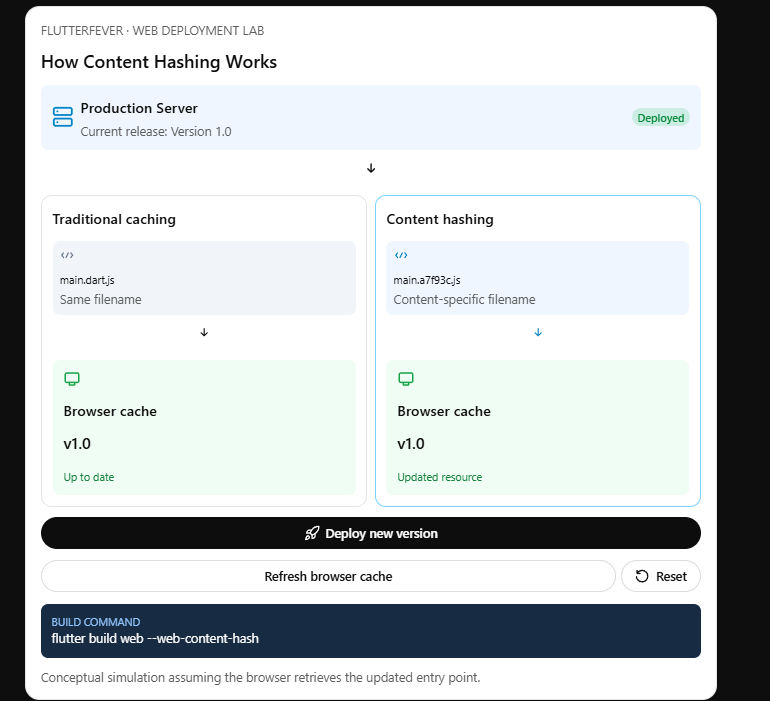
What Is Content Hashing?
Content hashing associates generated application resources with identifiers derived from their contents.
When a resource changes, its identifier changes as well.
This allows browsers to distinguish updated resources from previously cached versions.
How to Enable Web Content Hashing
flutter build web --web-content-hashA traditional deployment may repeatedly use the same resource filename.
A content-hashed deployment can assign different identifiers to updated resources.
For example, a conceptual resource filename might change from main.dart.js to a filename containing a content-specific identifier.
The actual generated filenames depend on Flutter’s build implementation.
Traditional Deployment vs Content Hashing
| Traditional Deployment | Content-Hashed Deployment |
|---|---|
| Resources may retain the same filename | Changed resources receive distinct identifiers |
| Older cached resources can persist | Browsers can distinguish updated resources |
| Cache invalidation may require custom handling | Build tooling assists resource versioning |
| Deployment consistency can be difficult | Resource versioning becomes more predictable |
Recommended Web Caching Strategy
| Resource | Recommended Cache Approach |
|---|---|
| index.html | Revalidate frequently |
| flutter_bootstrap.js | Revalidate on access |
| Content-hashed JavaScript | Long-lived immutable caching |
| Content-hashed assets | Long-lived immutable caching |
| Content-hashed Wasm resources | Long-lived immutable caching |
| Dynamic API responses | Application-specific cache policies |
Content hashing is particularly useful for frequently deployed SaaS applications, enterprise portals, and cloud-hosted dashboards.
However, it does not eliminate the need for appropriate server-side caching configuration.
Developers should also review CDN policies, reverse proxies, service workers, and deployment infrastructure.
16. Moving Beyond Legacy JavaScript Interoperability
Flutter web applications frequently interact with browser functionality and third-party JavaScript libraries.
These integrations may include payment gateways, browser storage, authentication services, analytics, mapping platforms, and external software development kits.
Some older packages rely on legacy JavaScript interoperability approaches that are unsuitable for modern WebAssembly compilation.
Flutter 3.50 introduces additional tooling to help developers identify these dependencies.
Audit Legacy JavaScript Interoperability
flutter build web --no-deprecated-js-interopDevelopers can also audit applicable browser-based tests:
flutter test --platform chrome --no-deprecated-js-interopLegacy vs Modern Interoperability
| Legacy Approach | Modern Migration Direction |
|---|---|
| dart:html | package:web |
| dart:js | dart:js_interop |
| package:js | dart:js_interop |
| dart:js_util | Modern interoperability APIs |
These are general migration directions rather than universal drop-in replacements.
Applications integrating external JavaScript SDKs should carefully review dependency compatibility before adopting WebAssembly as a production compilation target.
Developers working with standalone Dart projects can also explore our Dart SDK Download and Setup Guide.
For ordinary Flutter application development, remember that the Flutter SDK already includes a compatible Dart SDK.
17. Experimental Browser-Native Text Rendering
Text rendering is one of the most complex aspects of cross-platform application development.
Applications must handle typography, font fallback, multiple writing systems, emojis, text shaping, and platform-specific fonts.
Flutter 3.50 introduces an experimental browser-native text layout approach known as WebParagraph.
This implementation explores using browser capabilities for text layout rather than handling every aspect through bundled rendering infrastructure.
Potential Benefits of WebParagraph
- Opportunities to reduce rendering infrastructure downloads.
- Improved access to native system fonts.
- Better integration with browser text capabilities.
- Native color emoji support.
- Potential startup-performance improvements.
- Greater flexibility for multilingual web applications.
For applications targeting international audiences, browser-native text capabilities could become particularly valuable.
However, WebParagraph remains experimental.
Developers should carefully evaluate:
- Text measurements.
- Line wrapping.
- Custom typography.
- Font fallback.
- Emoji rendering.
- Cross-browser consistency.
Experimental capabilities should not be treated as universally available production features.
18. Desktop Multi-Window Development Continues to Evolve
Mobile applications generally operate within a single primary application window.
Desktop users often expect more sophisticated interaction models.
For example, an inventory management application may require a separate billing window, product editor, reporting dashboard, and customer management workspace.
Flutter 3.50 continues developing experimental multi-window capabilities across desktop platforms.
Real-World Multi-Window Use Cases
| Industry | Potential Application |
|---|---|
| Retail | Independent billing and inventory windows |
| Finance | Separate analytical charts and transaction panels |
| Education | Teaching and presentation workspaces |
| Software development | Editors and preview windows |
| Business management | Independent reporting dashboards |
| Media applications | Editing and playback interfaces |
| Commodity trading | Separate market-monitoring and accounting windows |
Multi-window desktop applications introduce architectural requirements beyond ordinary mobile navigation.
Developers need to consider:
- Application state ownership.
- Window lifecycle management.
- Focus coordination.
- Resource sharing.
- Navigation synchronization.
- Independent window sizing.
- Cross-window communication.
As the relevant APIs remain experimental, production teams should evaluate their stability requirements before adopting them.
19. More Responsive Touch Interaction on iOS
A smooth application is not necessarily a responsive application.
Rendering performance determines how efficiently graphical frames are produced, while input latency determines how quickly user interactions become visible on the screen.
Flutter 3.50 improves aspects of frame scheduling in response to touch events on iOS.
The improvement can reduce input latency by approximately one display frame under relevant conditions.
For reference:
| Display Refresh Rate | Approximate Duration of One Frame |
|---|---|
| 60 Hz | 16.67 milliseconds |
| 90 Hz | 11.11 milliseconds |
| 120 Hz | 8.33 milliseconds |
These figures represent frame durations rather than guaranteed application-wide latency improvements.
Which Applications Can Benefit?
- Drawing applications.
- Drag-and-drop interfaces.
- Gesture-based navigation.
- Interactive charts.
- Graphical editing tools.
- Games and animated interfaces.
Even relatively small latency improvements can make highly interactive applications feel more responsive.
Developers should evaluate these changes on physical iOS devices rather than relying exclusively on simulator behavior.
20. Flutter 3.47 vs Flutter 3.50: What’s Changed?
Flutter 3.47 established several important architectural directions for the framework.
Flutter 3.50 builds upon those foundations while introducing additional capabilities.
| Feature | Flutter 3.47 | Flutter 3.50 |
|---|---|---|
| Independent Design Packages | Introduced | Expanded default adoption |
| Legacy Design Imports | Available | Formal deprecation transition |
| Desktop Impeller | Default rendering direction | Expanded graphical capabilities |
| Widget Previews | Stable | Continued availability |
| Sliver Clipping | Earlier implementation approaches | Dedicated clipping widgets |
| Image Caching | Existing cache controls | Additional logical sizing options |
| Background Images | Custom placeholder implementations | DecorationImage placeholder |
| Text Authentication | Existing keyboard APIs | Secure numeric and email OTP improvements |
| Dialog Customization | Existing barrier configuration | Custom barrier builder |
| WebAssembly | Continued platform development | Expanded cross-browser capabilities |
| Web Deployment | Custom caching strategies | Built-in content hashing |
| Browser-Native Text Layout | Earlier development | Experimental WebParagraph |
| Desktop Windowing | Experimental | Further improvements |
Flutter 3.50 should be understood as a continuation of the architectural modernization introduced in earlier releases.
Developers upgrading from older versions can read our complete Flutter 3.47 release guide to understand the changes introduced before Flutter 3.50.
21. Which Flutter 3.50 Features Should Developers Adopt First?
Not every new SDK feature needs to be implemented immediately.
The most effective adoption strategy depends on the challenges your application needs to solve.
| Application Type | Recommended Features to Evaluate |
|---|---|
| E-commerce | Image placeholders, cache sizing, and scrolling |
| Social media | List rendering and image transitions |
| Banking | Secure keyboards, autofill, and accessibility |
| SaaS applications | WebAssembly and content hashing |
| Enterprise desktop | Impeller and desktop graphics |
| News applications | Sliver clipping and image optimization |
| Education | Accessibility and multilingual text editing |
| Drawing applications | Improved input latency |
| Existing production applications | Design-package migration and compatibility testing |
An image-heavy marketplace may receive greater immediate value from improved image management than from experimental desktop windowing.
Similarly, a frequently deployed SaaS platform may benefit more from content hashing than from changes to its existing visual design system.
Choose features according to measurable business and technical requirements rather than adopting every new API simply because it is available.

22. How to Download and Upgrade to Flutter 3.50
Before upgrading your Flutter SDK, check your current version:
flutter --versionCheck your development environment:
flutter doctor -vIf you are installing Flutter for the first time, follow our Flutter SDK Download and Installation Guide.
Step 1: Create a Backup or Git Branch
Before upgrading a production application, commit your current working code.
git add .
git commit -m "Backup before Flutter SDK upgrade"
Create a dedicated upgrade branch:
git checkout -b upgrade/flutter-3.50This makes it easier to review changes and return to your previous working configuration if compatibility problems occur.
Step 2: Check Your Flutter Release Channel
flutter channelFor production development, the stable channel is generally recommended.
Switch to stable if necessary:
flutter channel stableStep 3: Upgrade the Flutter SDK
flutter upgradeThis command installs the newest available Flutter SDK on the selected channel.
It does not necessarily install exactly Flutter 3.50.0 if a newer stable release is available.
For a detailed explanation of the update process, read our Step-by-Step Flutter SDK Update Guide.
Step 4: Verify the Updated SDK
flutter --version
dart --version
flutter doctor -v
These commands help confirm the installed SDK versions and identify potential development environment issues.
Step 5: Validate Application Dependencies
From your application directory, run:
flutter pub get
flutter pub outdated
flutter analyze
flutter test
Review dependency conflicts, deprecated APIs, and automated test results before making further architectural changes.
Step 6: Validate Production Builds
For Android:
flutter build appbundle --releaseFor web:
flutter build webFor iOS, on a supported macOS development environment:
flutter build ios --releaseFor Windows, on Windows:
flutter build windows --releaseA successful debug session does not guarantee production compatibility.
Always validate the release configuration for every platform your application supports.
Installing a Specific Flutter SDK Version
Organizations maintaining multiple applications may require different Flutter SDK versions for different projects.
A version-management strategy can help maintain reproducible development environments.
Read our Flutter SDK Archive and Version Management Guide to understand how to manage SDK versions without unnecessarily disrupting existing projects.
23. Common Mistakes Developers Should Avoid After Upgrading
Upgrading Flutter is not simply a matter of downloading a new SDK.
Production applications may contain hundreds of dependencies, native integrations, customized build configurations, and platform-specific requirements.
Avoid the following common mistakes.
Upgrading Every Dependency Simultaneously
Changing the Flutter SDK and all major package versions at the same time makes it difficult to identify compatibility problems.
Evaluate SDK compatibility first, then upgrade dependencies deliberately.
Ignoring Deprecated APIs
An application may continue compiling even when it uses deprecated functionality.
Use static analysis to identify changes requiring future migration.
Testing Only the Home Screen
An application can launch successfully while important workflows remain broken.
Test authentication, payments, notifications, navigation, database operations, permissions, image loading, and native integrations.
Adopting Experimental Features Without Evaluation
Experimental browser rendering and desktop windowing APIs may change in future releases.
Evaluate them in controlled environments before adopting them in business-critical workflows.
Assuming Every Performance Improvement Is Automatic
A new SDK cannot automatically resolve inefficient application architecture.
Measure application behavior and identify the actual performance bottlenecks.
Ignoring Low-End Devices
Applications that perform smoothly on modern development hardware may behave differently on older devices.
Include representative low-memory and low-performance devices in your testing strategy.
24. How to Measure Flutter 3.50 Performance Improvements
Performance optimization should begin with measurement.
Before upgrading an existing application, record its behavior under representative conditions.
After upgrading, repeat the same tests using comparable hardware, application data, network conditions, and build configurations.
Important Performance Metrics
| Metric | What It Measures |
|---|---|
| Application startup time | Time required to launch the application |
| First meaningful content | Time required to display useful information |
| Frame rendering time | Graphical processing consistency |
| Dropped frames | Visible scrolling or animation interruptions |
| Memory consumption | Application resource efficiency |
| Image decoding | Graphical resource overhead |
| Network loading | Initial resource transfer requirements |
| Interaction latency | Time between user input and visible response |
| Release build size | Application distribution footprint |
Developers can run supported applications in profile mode using:
flutter run --profileUse Flutter DevTools and appropriate platform-specific profiling tools to identify performance bottlenecks.
For web applications, browser developer tools can help evaluate resource downloads, runtime behavior, rendering, and caching.
A disciplined benchmarking process allows developers to determine whether an SDK upgrade improves their particular application.
For additional optimization strategies, read our Flutter Performance Optimization Guide.
25. Should You Upgrade to Flutter 3.50?
Flutter 3.50 introduces compelling improvements across UI development, rendering, web deployment, accessibility, and application architecture.
However, the correct upgrade strategy varies according to project requirements.
For New Flutter Developers
Starting with a current stable release is generally a sensible choice.
New developers can learn modern APIs and design-package architecture without carrying extensive legacy migration requirements.
For Existing Production Applications
Adopt Flutter 3.50 in a separate development branch.
Evaluate package compatibility, design-library migration, native dependencies, automated tests, and deployment requirements before releasing the updated application.
For Flutter Web Developers
Expanded WebAssembly capabilities, built-in content hashing, and modern JavaScript interoperability make Flutter 3.50 particularly relevant.
Teams maintaining frequently deployed web applications should evaluate the new caching and compilation capabilities.
For Desktop Developers
Expanded Impeller rendering capabilities and continued multi-window development provide a stronger foundation for sophisticated desktop applications.
Experimental windowing features should still be evaluated carefully.
For Enterprise Development Teams
The most valuable strategy is controlled adoption.
Maintain predictable SDK versions, validate important business workflows, measure performance, and introduce experimental features only when they satisfy your organization’s reliability requirements.
The objective is not simply to use the newest SDK. It is to build better, more reliable applications.
Frequently Asked Questions About Flutter 3.50
What is Flutter 3.50?
Flutter 3.50 is a major stable SDK release introducing improvements in framework architecture, user interface development, rendering, WebAssembly, native interoperability, and developer tooling.
Which Dart version comes with Flutter 3.50?
Flutter 3.50 is released alongside Dart 3.14.
What are the biggest new features in Flutter 3.50?
Major developments include standalone design packages, dedicated sliver clipping widgets, improved image caching, enhanced Impeller rendering, WebAssembly improvements, web content hashing, and modern accessibility APIs.
Is Material Design removed from Flutter 3.50?
No. Flutter is transitioning Material and Cupertino toward independently maintained design packages. Developers can continue building applications using these design systems.
Can existing Flutter applications migrate to the standalone Material package?
Yes. Flutter provides an automated migration fix. Developers should review the resulting changes and validate third-party dependencies, themes, localization, and customized widgets.
Does Flutter 3.50 improve Flutter Web performance?
Flutter 3.50 introduces improvements related to WebAssembly execution, browser integration, content hashing, and experimental text rendering.
Actual performance improvements depend on application architecture, browser capabilities, hardware, and workload.
How do I enable WebAssembly in Flutter 3.50?
Run the following command:
flutter build web --wasmReview browser requirements and dependency compatibility before deploying the application.
What is web content hashing in Flutter 3.50?
Web content hashing associates generated application resources with content-specific identifiers, helping browsers distinguish updated files from previously cached versions.
How do I enable Flutter web content hashing?
Use:
flutter build web --web-content-hashAppropriate HTTP caching policies should be configured alongside content hashing.
Does Flutter 3.50 improve image memory management?
Yes. Additional logical cache-sizing and image-loading capabilities give developers greater flexibility when managing graphical resources.
Appropriate image dimensions and caching policies remain essential for memory-efficient applications.
Is WebParagraph stable in Flutter 3.50?
No. WebParagraph is introduced as an experimental browser-native text layout approach.
Developers should evaluate its limitations before considering production adoption.
Is desktop multi-window support stable in Flutter 3.50?
The multi-window capabilities discussed in this release remain experimental.
Is Flutter 3.50 faster than Flutter 3.47?
Flutter 3.50 introduces several rendering, interaction, and web execution improvements that may benefit particular workloads.
Overall performance differences depend on the application, platform, browser, hardware, and usage patterns.
Should I upgrade my production Flutter application immediately?
Not necessarily. Review dependency compatibility, breaking changes, platform tooling, automated test coverage, and deployment requirements before upgrading a production application.
Can I install Flutter 3.50 without affecting my other projects?
Yes. An SDK version-management approach can help maintain separate Flutter versions for different projects.
Conclusion: Flutter 3.50 Is Building the Foundation for the Next Generation of Cross-Platform Applications
Flutter 3.50 represents more than a collection of new widgets and performance fixes.
It reflects a broader evolution toward modular design systems, efficient graphical processing, capable web applications, accessible interfaces, and maintainable cross-platform architecture.
For UI developers, the improved scrolling, image, text input, and accessibility APIs create opportunities to build more polished and responsive interfaces.
For web developers, content hashing and expanded WebAssembly capabilities provide a stronger foundation for modern browser-based applications.
For desktop developers, continued graphics and window-management improvements expand the possibilities for professional business software.
And for teams maintaining existing production applications, Flutter 3.50 provides an opportunity to modernize application architecture through a carefully planned migration.
However, the most successful Flutter applications will continue to combine framework capabilities with thoughtful engineering practices, efficient state management, performance measurement, accessibility, automated testing, and disciplined deployment strategies.
Flutter 3.50 is another significant step in that direction.
Coming Next — Flutter 3.50 Release Series, Part 2
In our next article, we will explore direct native interoperability, JNIgen, FFIgen, Android Gradle modernization, iOS development changes, Genkit Dart 1.0, on-device AI, developer tooling, breaking changes, and a practical production migration strategy.
Stay connected with FlutterFever for the latest Flutter news, professional development tutorials, practical architecture guides, performance optimization techniques, and SDK updates.