

Hybrid Composition++ (HCPP) in Flutter: How Flutter 3.44 Solves Android Platform View Performance

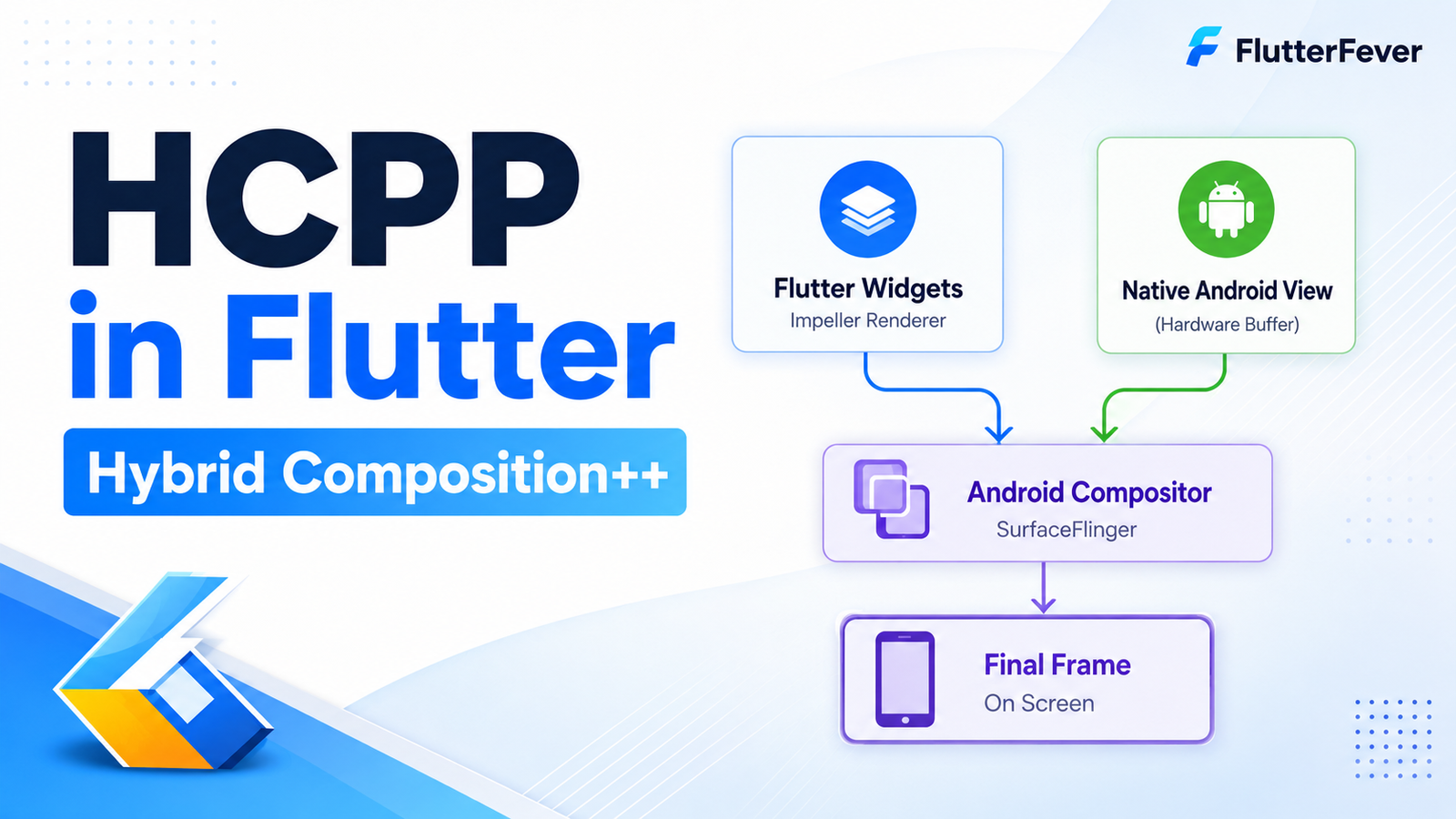
Hybrid Composition++—usually shortened to HCPP—is a new Android Platform View composition strategy introduced experimentally with Flutter 3.44.
It is designed to solve one of Flutter’s longest-running Android integration challenges: how to place a real native Android View inside a Flutter interface without having to choose between native fidelity and Flutter rendering performance.
Platform Views are needed whenever a Flutter application embeds native Android UI such as:
- Google Maps
- WebViews
- Camera previews
- Video surfaces
- Advertising SDK views
- Payment SDK interfaces
- Native media players
- Custom Android controls
- SDKs based on
SurfaceView - Other Android components that cannot be fully recreated as Flutter widgets
Flutter has supported Android Platform Views for years, but every earlier rendering strategy came with trade-offs.
HCPP attempts to remove many of those compromises by allowing the Android operating system itself to compose Flutter and native Android surfaces together.
Why Flutter Needed Hybrid Composition++
To understand HCPP properly, you first need to understand the underlying problem.
A normal Flutter application renders most of its UI using Flutter’s own rendering pipeline.
On Android, however, some components are not Flutter widgets. A native Google Map, WebView or Android SDK component is an actual Android View.
Flutter therefore has to combine two different worlds:
- Flutter-rendered content
- Android-native view content
The difficult part is getting them onto the screen together while maintaining:
- smooth scrolling
- correct input handling
- animations
- clipping
- transforms
- accessibility
- keyboard behavior
- good frame rates
- minimal GPU overhead
Flutter’s official Platform Views documentation explicitly notes that the available Android implementations have historically involved trade-offs between performance and fidelity.
That trade-off is exactly what HCPP is designed to improve.
Understanding Android Platform Views First
A Platform View allows an actual Android View to appear inside a Flutter widget hierarchy.
For example, Flutter can host a native Android map while the rest of the screen remains normal Flutter UI.
Conceptually, you might have:
Flutter App
│
├── Flutter AppBar
├── Flutter Search Field
├── Native Android Google Map
├── Flutter Floating Button
└── Flutter Bottom Sheet
The map is controlled by Android.
Everything surrounding it may be rendered by Flutter.
The challenge is compositing those separate rendering pipelines into one visually synchronized frame.
Flutter’s official documentation currently describes three major Android approaches:
- Texture Layer
- Hybrid Composition
- Hybrid Composition++ (HCPP)
The Evolution of Flutter Android Platform Views
HCPP makes much more sense when viewed as the latest stage in the evolution of Flutter Platform Views.
Stage 1: Texture-Based Rendering
A native Android View can be rendered into a texture.
Flutter then takes that texture and draws it inside the Flutter scene.
Conceptually:
Android View
     ↓
Texture
     ↓
Flutter Rendering
     ↓
Final Frame
This gives Flutter significant control over how the native view appears.
Flutter can apply things such as:
- transforms
- opacity
- clipping
- positioning
The official Flutter documentation says the texture-layer approach provides good Flutter and Android View performance and supports Flutter widget transforms.
But it also introduces limitations.
Problems With the Texture Layer Approach
Flutter’s documentation identifies several important considerations.
Fast scrolling—for example inside a WebView—can become janky.
SurfaceView-based content can have accessibility limitations.
Text magnification can also break in certain configurations.
So while texture rendering gives Flutter flexibility, moving native content through a texture is not always ideal.
Stage 2: Traditional Hybrid Composition
Hybrid Composition takes a very different approach.
Instead of converting the native Android View into a texture managed by Flutter, the actual native view remains part of Android’s view hierarchy.
Android’s system compositor then combines the native view with Flutter content.
This provides much stronger native fidelity.
Flutter’s official comparison highlights benefits including:
- correct accessibility
- native
SurfaceViewsupport - high native-view fidelity
But it creates another performance problem.
The Traditional Hybrid Composition Performance Problem
A typical Flutter application separates work across different threads.
The Flutter UI can render using its raster pipeline while Android’s platform/UI thread handles operating-system work.
This separation helps Flutter maintain fluid rendering.
Traditional Hybrid Composition requires tighter synchronization between the Flutter canvas and the Android view hierarchy.
According to Flutter’s official documentation, this can require Flutter’s raster and platform threads to be merged so that both sides are synchronized.
That means Flutter rendering now competes more directly with:
- Android UI messages
- plugin calls
- platform work
- native view updates
The result can be lower FPS or dropped frames in demanding interfaces.
Why This Matters in Real Flutter Apps
Imagine a Flutter screen containing:
- an animated header
- Google Maps
- a draggable bottom sheet
- markers
- Flutter overlays
- map controls
- continuous gestures
Traditional Hybrid Composition may give the map excellent native behavior, but Flutter widgets around it can experience extra rendering pressure.
Another example is a WebView embedded in a scrolling Flutter page.
The native WebView itself may behave correctly, but Flutter animation and scrolling performance around it may become less consistent.
This is the performance-versus-fidelity compromise HCPP targets.
Enter Hybrid Composition++
Flutter 3.44 introduces Hybrid Composition++ as a new experimental composition strategy.
Flutter describes HCPP as its latest hybrid composition approach and says it is specifically intended to solve the compositing performance and synchronization problems associated with traditional Hybrid Composition.
Instead of making Flutter itself do all the expensive compositing work, HCPP relies more heavily on Android’s native surface infrastructure.
The simplified architecture becomes:
Flutter UI → Native Android Surface
                    │
                    ├─────┐
                    │     │
Native View → Native Android Surface
                    │     │
                    └─────┤
                          ↓
                   Android compositor
                          ↓
                      Display
The important shift is who performs final composition.
How HCPP Works Under the Hood
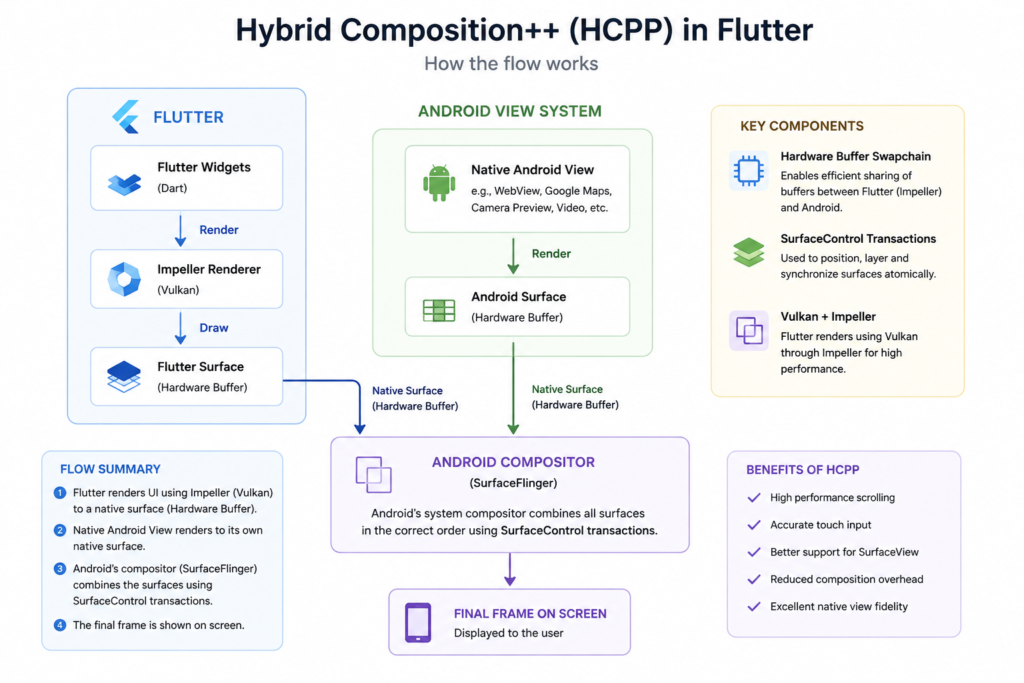
Flutter’s official 3.44 announcement explains that HCPP uses Vulkan’s lower-level graphics capabilities together with hardware buffer swapchains and Android SurfaceControl transactions.
The goal is to synchronize Flutter UI surfaces and Android-native view surfaces through Android itself.
The Platform Views documentation summarizes the pipeline like this:
- The Platform View renders to a native Android Surface.
- Impeller renders Flutter content to a native Android Surface.
- Android’s system compositor combines those surfaces.
That architecture is fundamentally different from forcing the native View through a Flutter-managed texture.
What Is an Android Surface?
A Surface is essentially a rendering destination used by Android’s graphics system.
Various components can draw into surfaces, including:
- applications
- camera previews
- video players
- system UI
- Android Views
- graphics engines
Instead of converting every component into a single shared image first, Android can combine multiple surfaces at the system-compositor level.
This is highly relevant to HCPP because both Flutter and the embedded Platform View can retain their own native surfaces.
What Is SurfaceControl?
SurfaceControl is part of Android’s low-level surface composition infrastructure.
It provides mechanisms for controlling how surfaces are:
- positioned
- layered
- transformed
- synchronized
- displayed
Flutter 3.44 uses Android-native transaction synchronization as part of HCPP on supported devices.
This is one reason HCPP requires a modern Android API level.
What Role Does SurfaceFlinger Play?
Android’s display system includes a system-level compositor commonly known as SurfaceFlinger.
Conceptually, it receives different graphical surfaces and combines them into the final screen output.
With HCPP, the important architectural idea is that Flutter content and native Platform View content can remain in separate native surfaces and be composed at the Android system level.
Instead of:
Native View
   ↓
Texture Copy
   ↓
Flutter GPU Pipeline
   ↓
Final Frame
HCPP moves closer to:
Flutter Surface ───┐
                   ├── Android composition → Display
Native Surface ────┘
This eliminates some unnecessary intermediate composition work.
Why Vulkan Is Important to HCPP
Flutter’s newer graphics architecture uses Impeller, and on Android HCPP requires a Vulkan-capable device.
Flutter’s documentation lists Vulkan support as an explicit HCPP requirement because Vulkan is required for the relevant Impeller rendering path.
Vulkan provides low-level access to GPU operations.
That allows Flutter to better coordinate native surfaces and rendering workloads without going through expensive intermediate texture paths.
HCPP and Impeller Work Together
HCPP should not be thought of as an isolated widget feature.
It is closely connected to Flutter’s rendering-engine modernization.
Impeller renders Flutter content.
Android native Views render into Android surfaces.
Android performs final surface composition.
So conceptually:
Flutter Widgets
      ↓
   Impeller
      ↓
Flutter Surface
      │
      │
      ├─────────┐
                ↓
Native View → Native Surface
                │
                ↓
        Android Composition
                ↓
             Display
Flutter’s documentation requires Impeller-compatible Vulkan rendering for HCPP.
HCPP Requirements
HCPP does not work on every Android device.
Flutter currently lists two major requirements.
Android API 34 or Later
HCPP requires:
Android API level 34 or newer.
API 34 corresponds to Android 14.
Flutter states that this requirement exists because HCPP depends on native transaction synchronization capabilities available on these newer Android versions.
Vulkan Support
The device must also support Vulkan rendering.
This is necessary because the HCPP pipeline depends on Impeller running through the Vulkan backend.
Therefore a device must satisfy both conditions:
Android API >= 34
+
Vulkan support
+
Impeller
=
HCPP eligible
What Happens on Older Android Devices?
This is one of HCPP’s most practical design decisions.
If HCPP is enabled in your application but the end user’s device does not satisfy its requirements, Flutter automatically falls back to the app’s existing Platform View strategy.
So your application does not necessarily need separate Dart UI implementations for:
Android 14+ → HCPP

Android 13 → entirely different application
Flutter handles the fallback.
That makes HCPP much easier to gradually adopt.
HCPP Is a Global Platform View Upgrade
Another important architectural detail is that HCPP is not enabled by selecting a new Platform View constructor in Dart.
Flutter’s documentation states that HCPP works as a global upgrade to the backing mechanism used for Platform Views.
This means you do not normally rewrite your entire Platform View integration.
Existing Platform View APIs continue to be used.
You enable the newer composition mode at the application/configuration level.
How to Test HCPP in Flutter 3.44
For local development, enable HCPP using:
flutter run --enable-hcppFlutter also supports the flag with tests:
flutter test --enable-hcppFlutter’s documentation explicitly notes that this CLI option is intended for local execution and testing.
Important: --enable-hcpp Cannot Be Used With flutter build
This is an important detail that developers can easily miss.
The local command-line flag cannot simply be passed to:
flutter build apkor:
flutter build appbundleFor release builds, Flutter requires HCPP to be enabled through the Android application manifest.
Read :
Enable HCPP for Production Builds
Open:
android/app/src/main/AndroidManifest.xmlInside the <application> section, add:
<meta-data
    android:name="io.flutter.embedding.android.EnableHcpp"
    android:value="true" />
Your structure will look similar to:
<application
    android:label="my_app"
    android:name="${applicationName}"
    android:icon="@mipmap/ic_launcher">

    <meta-data
        android:name="io.flutter.embedding.android.EnableHcpp"
        android:value="true" />

</application>
This is Flutter’s documented production configuration for opting into HCPP.
Do You Need to Rewrite Existing Platform View Code?
Usually, no.
Flutter explicitly says there are no new Platform View APIs required simply to adopt HCPP. Existing Platform Views can gain the new backing strategy when the feature is enabled and the device supports it.
This is one of HCPP’s biggest strengths.
If your app already uses:
AndroidViewPlatformViewLinkAndroidViewSurfaceAndroidViewController
you do not necessarily rebuild those integrations from scratch just to test HCPP.
HCPP vs Texture Layer vs Hybrid Composition
The differences become clearer when put side by side.
| Feature | Texture Layer | Hybrid Composition | HCPP |
|---|---|---|---|
| Flutter performance | Generally good | Can degrade | Designed to remain high |
| Native fidelity | Some limitations | Excellent | Excellent |
| Accessibility | Limitations with some SurfaceViews | Strong | Strong |
| SurfaceView support | Problematic in some cases | Supported | Supported |
| Fast scrolling | Can jank | Better native fidelity but Flutter FPS cost | Designed for smoother performance |
| Flutter transforms | Strong | More constrained by native composition | Platform-dependent composition considerations |
| Android requirement | Broad | Broad | API 34+ |
| Vulkan requirement | No | No | Yes |
| Impeller requirement | Not specifically | Not specifically | Yes |
| Status | Existing | Existing | Experimental |
| Fallback | N/A | N/A | Automatic |
The underlying trade-offs in this comparison are documented by Flutter’s Platform Views guide.
Why HCPP Can Improve Scrolling
Scrolling is one of the clearest places where old Platform View strategies can expose problems.
Imagine a WebView showing a complex webpage.
During fast scrolling:
- Android continuously updates the WebView.
- Flutter may animate surrounding widgets.
- input events need to remain synchronized.
- both layers need to appear in exactly the same frame.
If the native view must constantly move through an intermediate texture path, additional buffering and copying can contribute to jank.
If Flutter must instead merge rendering and platform work onto one thread, Flutter rendering itself can suffer.
HCPP allows Flutter and Android to render more independently while relying on synchronized system composition.
Flutter specifically highlights high-performance scrolling as one of HCPP’s major benefits.
Better Touch Input With HCPP
Input synchronization is equally important.
Platform Views can receive:
- taps
- drags
- multi-touch
- scrolling
- text input
- native gestures
At the same time, surrounding Flutter widgets may also participate in gesture recognition.
Flutter says HCPP provides accurate touch input while maintaining improved rendering performance.
This is particularly valuable for:
- maps
- interactive charts
- drawing canvases
- embedded browsers
- native media controls
Why SurfaceView Support Matters
Android’s SurfaceView is widely used for content requiring its own rendering surface.
Common examples can include:
- video
- camera previews
- maps
- real-time graphics
- SDKs that render using their own native surface
Earlier Platform View approaches could create significant limitations around these components.
Flutter says HCPP provides reliable support for SurfaceView components while preserving better performance characteristics.
That potentially makes Flutter much easier to use with complex native SDKs.
HCPP and WebView
WebView is probably one of the most common practical use cases.
Flutter applications often embed WebViews for:
- payment pages
- documentation
- authentication
- legacy web modules
- rich HTML content
- third-party dashboards
WebViews are particularly demanding because their contents can scroll rapidly while frequently repainting.
Flutter’s texture-layer documentation specifically mentions that fast scrolling of components such as WebViews can produce jank.
HCPP’s architecture is therefore especially interesting for WebView-heavy apps running on supported devices.
HCPP and Google Maps
Google Maps is another obvious use case.
A map may continuously:
- pan
- zoom
- rotate
- redraw markers
- respond to gestures
- update overlays
while Flutter itself renders:
- floating buttons
- sheets
- search bars
- cards
- animation
HCPP enables native Android map rendering and Flutter rendering to remain more naturally separated before Android combines their surfaces.
This is exactly the type of composition scenario HCPP is intended to improve.
HCPP and Camera Applications
Camera previews also benefit conceptually from native-surface composition.
Camera pipelines often produce high-frequency frame updates.
Copying these through extra intermediate layers can add unnecessary overhead.
A native-surface-based architecture can therefore be particularly relevant for:
- camera apps
- barcode scanners
- AR interfaces
- document scanners
- video conferencing
- live image analysis
Actual performance gains will depend on the plugin and device, so developers should benchmark rather than assume universal improvements.
HCPP and Video Players
Video rendering is another natural fit for surface-based composition.
A native video player may rely on a dedicated rendering surface while Flutter renders:
- play controls
- timelines
- subtitles
- menus
- overlays
Allowing Android’s compositor to combine those surfaces can reduce the need for Flutter to process the native video content itself.
Performance Architecture Comparison
The traditional texture path can be visualized as:
Native Android View
        ↓
Intermediate Graphics Buffer
        ↓
Texture
        ↓
Flutter / Impeller
        ↓
Final Surface
Traditional Hybrid Composition is closer to:
Flutter Rendering
       +
Native Android View
       ↓
Tightly synchronized composition
       ↓
Final Display
HCPP is closer to:
Flutter
   ↓
Impeller
   ↓
Flutter Native Surface ────┐
                           │
Native Android View        │
   ↓                       │
Native Android Surface ────┤
                           ↓
                  Android compositor
                           ↓
                        Display
This final model is the key architectural innovation.
Does HCPP Eliminate GPU Copies?
Its design reduces the intermediate copying and Flutter-side composition associated with older strategies by giving Flutter and the Platform View native surfaces that Android can compose.
Flutter’s official documentation emphasizes that the Platform View and Impeller each render to native Android surfaces, with Android’s compositor combining them.
Developers should therefore think of HCPP less as “a faster texture” and more as a different composition architecture.
HCPP Known Limitations
HCPP is still experimental in Flutter 3.44.
That means developers should not assume every complex composition scenario is already perfect.
Flutter documents one specific issue involving complex overlay stacking.
Transparent Platform Views may not render correctly when four intersecting layers follow this structure:
Flutter Canvas
      ↓
Platform View
      ↓
Overlay
      ↓
Transparent Platform View
when all of those layers intersect.
If your application uses sophisticated transparent native views and Flutter overlays, this deserves careful testing.
HCPP Is Still Experimental
Flutter’s documentation currently labels HCPP experimental and states that it is available beginning with Flutter 3.44.
That has several implications.
You should:
- benchmark it
- test on physical devices
- test different manufacturers
- test fallback devices
- test accessibility
- test keyboard behavior
- test scrolling
- test overlays
- test app lifecycle transitions
- check newer Flutter patch releases
Do not enable it in a mission-critical app solely because the architecture sounds faster.
Measure it.
How to Benchmark HCPP Properly
A good HCPP test should compare the same screen using the previous Platform View path and HCPP.
Test areas such as:
Frame performance
Measure:
- average FPS
- worst-frame time
- raster duration
- UI duration
- dropped frames
Scrolling
Use:
- rapid WebView scrolling
- map panning
- Flutter ListView around native views
- repeated gesture input
CPU Usage
Watch whether HCPP reduces CPU pressure in Platform View-heavy scenarios.
GPU Behavior
Look for:
- frame pacing
- rendering spikes
- dropped frames
- thermal behavior
Interaction
Check:
- touch accuracy
- keyboard input
- focus
- text fields
- gestures
Accessibility
Test:
- TalkBack
- focus navigation
- native controls
- mixed Flutter/native screens
Test in Profile Mode
Do not benchmark Flutter rendering in debug mode.
Use:
flutter run --profile --enable-hcppThen compare it with your normal Platform View configuration.
Debug mode includes development overhead that can distort performance measurements.
Test on Real Hardware
HCPP is specifically tied to:
- Android API levels
- Vulkan
- GPU behavior
- platform composition
- device drivers
Because of this, emulator-only testing is not sufficient.
Ideally test several physical Android devices including:
- Android 14
- Android 15
- Android 16
- Android 17 test devices when appropriate
- different GPU vendors
- mid-range hardware
- flagship hardware
Automatic Fallback Is Critical
The fallback mechanism is one of HCPP’s strongest migration features.
Imagine your app has millions of users.
Not all of them will immediately be running API 34+ Vulkan-compatible hardware.
Without fallback, enabling HCPP could force you to dramatically raise your application’s minimum supported Android version.
Flutter avoids that.
If the device cannot use HCPP, Flutter automatically uses the existing Platform View strategy configured for the app.
This enables gradual adoption.
Do You Need to Raise minSdkVersion to 34?
Not necessarily.
HCPP requiring Android API 34 does not inherently mean your entire Flutter app must require API 34.
The feature can activate on eligible devices and fall back elsewhere.
This distinction is important.
For example, an app may still support:
Android 8+while HCPP is only used automatically for suitable newer devices.
Your exact Android requirements still depend on the rest of your plugins and project configuration.
HCPP Is Especially Important for Plugin Authors
Plugin developers should pay attention to HCPP because many Flutter plugins internally rely on Platform Views.
Examples include plugins for:
- Maps
- WebView
- ads
- cameras
- authentication SDKs
- video
- payments
- enterprise SDKs
Even if an application developer never directly calls PlatformViewsService, a plugin may do so internally.
HCPP therefore has ecosystem-wide implications.
Does HCPP Require Changes to Plugin APIs?
Flutter’s current design intentionally avoids requiring a completely new Platform View API for HCPP.
The composition strategy is enabled globally.
However, plugin authors should still test their existing Platform Views because unusual assumptions involving:
- transparency
- overlays
- invalidation
SurfaceView- resizing
- lifecycle
may expose differences.
Manual Invalidation Can Still Matter
Flutter’s Android Platform Views documentation notes that certain Android views do not automatically invalidate themselves when their contents change.
Examples include:
SurfaceViewSurfaceTexture
In these situations, native code may still need to manually call invalidate() after relevant drawing changes.
HCPP does not automatically eliminate every native-view lifecycle responsibility.
When Should You Use HCPP?
HCPP is especially worth testing if your Flutter application heavily uses:
- WebView
- Google Maps
- native video
- native camera previews
SurfaceView- SDK-provided Android UI
- payment components
- complex Platform Views
You may see less dramatic differences in applications composed almost entirely of Flutter widgets.
If your application contains no Platform Views at all, HCPP provides little direct benefit because it specifically addresses Platform View composition.
When Should You Avoid Enabling HCPP Immediately?
Consider waiting or testing more thoroughly if:
- your app uses complicated transparent Platform Views
- you heavily stack Flutter and native overlays
- device compatibility is critical
- a core plugin has known HCPP issues
- you have not benchmarked the change
- you rely heavily on older Android hardware
- your QA coverage is limited
Because HCPP is experimental, controlled rollout is preferable for large applications.
Is HCPP the Future Default?
Flutter’s 3.44 announcement says developers can test HCPP before it becomes the default rendering mode in the future.
That is an important signal.
HCPP is not merely an experimental side feature.
Flutter appears to see this architecture as the future direction for Android Platform View composition where hardware and Android version requirements are satisfied.
Why HCPP Is Bigger Than a Performance Optimization
The significance of HCPP goes beyond higher FPS.
It represents a more native approach to how Flutter participates in Android’s display stack.
Older solutions often required Flutter to work around the fact that it owned its own rendering pipeline while Android-native UI used another.
HCPP embraces Android’s native surface compositor instead.
That means Flutter does not need to “own” every pixel before final display.
Flutter and Android can each render their content efficiently and let Android combine the final result.
This is a more scalable architecture for increasingly complex native integrations.
HCPP and Flutter’s Broader Graphics Strategy
HCPP also shows why Flutter’s investment in Impeller matters.
Impeller is not simply intended to improve animation smoothness.
It gives Flutter greater control and predictability over the graphics pipeline.
That architecture makes deeper integrations with modern APIs such as Vulkan and native surface synchronization possible.
Flutter 3.44 itself includes additional Vulkan memory-management and GPU/CPU synchronization improvements in Impeller.
So HCPP and Impeller should be viewed as connected pieces of Flutter’s broader rendering modernization.
A Practical HCPP Adoption Strategy
For a production application, a sensible rollout could look like this:
Step 1 — Upgrade to Flutter 3.44+
First verify your application builds correctly.
flutter upgrade
flutter doctor
Step 2 — Identify Platform Views
Check whether your project uses:
- Google Maps
- WebViews
- native video
- camera plugins
- native SDK UI
Step 3 — Create a Test Build
Run:
flutter run --profile --enable-hcppStep 4 — Benchmark
Compare scrolling, FPS, CPU usage and interaction behavior.
Step 5 — Test Android 14+
Use multiple real Vulkan-capable devices.
Step 6 — Test Unsupported Devices
Make sure fallback still behaves correctly.
Step 7 — Test Accessibility
Use TalkBack and native input.
Step 8 — Check Overlay Layouts
Pay special attention to transparent views and overlapping Flutter widgets.
Step 9 — Enable Through Manifest
After validation:
<meta-data
    android:name="io.flutter.embedding.android.EnableHcpp"
    android:value="true" />
Step 10 — Roll Out Gradually
For high-traffic apps, consider staged Play Store rollout and monitor crash/performance metrics.
Common HCPP Misconceptions
“HCPP replaces Platform Views.”
No.
It changes how Platform Views are composed.
“HCPP works on every Android phone.”
No.
Flutter currently requires Android API 34+ and Vulkan capability.
“I need to rewrite my AndroidView implementation.”
Usually no.
HCPP is globally enabled and designed to work with existing Platform View APIs.
“HCPP means old Android users lose Platform Views.”
No.
Flutter automatically falls back when HCPP requirements are not met.
“HCPP is already a completely stable default.”
No.
It remains experimental and opt-in in Flutter 3.44.
HCPP vs Traditional Flutter Widgets
Another important distinction is that HCPP is not needed for ordinary Flutter widgets such as:
Container()
ListView()
CustomPaint()
TextField()
Image()
Stack()
Those are already rendered entirely through Flutter.
HCPP becomes relevant when you introduce native Android views into the Flutter rendering hierarchy.
Therefore:
100% Flutter UI
→ HCPP generally irrelevant

Flutter + native Android views
→ HCPP potentially very important
What HCPP Means for Flutter Developers
For most application developers, HCPP’s greatest achievement may be what you do not have to do.
You do not need to:
- create a new Platform View API
- manually move every native component
- build separate Dart UI for HCPP devices
- drop support for every old Android device
Instead, Flutter is trying to make HCPP a lower-level upgrade to the existing Platform View architecture.
That’s exactly how a graphics-system improvement should ideally behave.
Final Thoughts
Hybrid Composition++ is one of the most technically important Android improvements introduced in Flutter 3.44.
Flutter Android developers have historically faced a difficult compromise when embedding native components.
Texture-based approaches preserved Flutter rendering flexibility but could introduce scrolling, accessibility and SurfaceView issues.
Traditional Hybrid Composition preserved native fidelity but could put significant pressure on Flutter’s rendering pipeline through tighter thread synchronization.
HCPP changes the architecture.
On supported devices, Flutter’s Impeller renderer and native Android Platform Views render into native surfaces, while Android handles synchronized final composition. This approach is designed to provide the native fidelity developers expect while reducing the performance penalties associated with previous methods.
It is not yet a feature developers should enable blindly.
HCPP remains experimental, requires Android API 34 or later plus Vulkan support, and currently has known limitations involving certain complex transparent overlay arrangements.
But its architecture is significant.
For applications that depend on WebViews, Maps, camera surfaces, video, native Android SDKs or other Platform Views, HCPP could become one of the most valuable improvements in Flutter’s Android rendering stack.
And because Flutter has indicated that HCPP is intended to become a default rendering strategy in the future, understanding it now gives developers a valuable preview of where Flutter’s Android platform integration is heading.
Frequently Asked Questions About Flutter HCPP
1. What is Hybrid Composition++ in Flutter?
Hybrid Composition++ is an experimental Android Platform View composition strategy introduced in Flutter 3.44. It uses native surface synchronization to improve Platform View performance and fidelity.
2. What does HCPP stand for?
HCPP stands for Hybrid Composition++.
3. Which Flutter version introduced HCPP?
Flutter officially documents HCPP as available experimentally beginning with Flutter 3.44.
4. Why was HCPP introduced?
It was designed to address synchronization and performance issues found in traditional Android Hybrid Composition while retaining high native-view fidelity.
5. What Android version does HCPP require?
HCPP currently requires Android API 34 or later.
6. Does HCPP require Vulkan?
Yes. The Android device must support Vulkan because HCPP depends on the relevant Impeller Vulkan rendering path.
7. Is Impeller required for HCPP?
Yes. Flutter’s documentation lists use of the Impeller rendering engine together with Vulkan among HCPP’s requirements.
8. How do I enable HCPP locally?
Run:
flutter run --enable-hcpp9. How do I enable HCPP for a release build?
Add this inside the <application> section of AndroidManifest.xml:
<meta-data
    android:name="io.flutter.embedding.android.EnableHcpp"
    android:value="true" />
10. Can I pass --enable-hcpp to flutter build apk?
No. Flutter documents the CLI flag for local run/test use. Release builds should use the Android manifest configuration.
11. What happens if a user’s device cannot run HCPP?
Flutter automatically falls back to the existing Platform View strategy configured for the app.
12. Do existing Platform Views need to be rewritten?
Generally no. Flutter says no new APIs are required simply to adopt HCPP; it acts as a global backing upgrade for Platform Views.
13. Is HCPP good for Flutter WebView performance?
HCPP is especially relevant to Platform Views with frequent updates and scrolling, such as WebViews, because it is designed to reduce composition overhead. Actual results should still be benchmarked on real devices.
14. Is HCPP stable for production?
HCPP is currently marked experimental in Flutter 3.44, so production use should follow extensive testing and staged rollout.
15. Will HCPP become the default in Flutter?
Flutter’s 3.44 announcement says developers can test HCPP ahead of its planned future use as the default rendering mode.
Official References
[1] Flutter Documentation — Hosting native Android views with Platform Views
Primary reference for HCPP architecture, requirements, enabling, fallback, limitations and Platform View performance behavior.
Editorial Note: HCPP is still experimental. APIs, requirements, limitations and default behavior may evolve in future Flutter releases, so production teams should verify the latest official Flutter documentation before deployment.
Last Updated: August 2026
Download Fluttefever Newsletter