

Flutter 3.50 Generative UI: Building Dynamic AI-Powered Interfaces with A2UI and Genkit Dart

For years, application development has followed a familiar pattern: developers design screens, define navigation routes, create widgets, connect APIs, and decide how users interact with information.
Artificial intelligence is beginning to change that pattern.
Imagine opening a business management application and asking:
Show my sales performance for the last three months, compare outstanding payments, and prepare a list of customers who need payment reminders.
Instead of receiving a lengthy text response, the application presents an interactive dashboard containing charts, customer information, date filters, financial summaries, and actionable controls.
Now imagine asking the same application a completely different question. Instead of navigating to another predefined screen, the application generates an appropriate interface for your new requirement.
This is the fundamental idea behind Generative UI.
With Flutter 3.50, Dart 3.14, Genkit Dart, and Google’s A2UI 1.0 protocol, developers have an increasingly capable ecosystem for building these intelligent application experiences.
The significance of this development goes beyond conversational AI. It introduces an architectural approach in which artificial intelligence can participate in determining what an application displays and how users interact with it.
In this research-oriented guide, we will explore the underlying technology, practical implementation strategies, real-world industry applications, architectural challenges, security considerations, and the future of Generative UI in Flutter development.
1. Why Traditional Application Interfaces Are Beginning to Evolve
Traditional applications are designed around predefined user journeys.
For example, a business management application might contain:
- Sales dashboard.
- Customer management screen.
- Outstanding payments screen.
- Inventory management screen.
- Reports section.
- Transaction history.
- Settings.
Each screen is designed in advance. Users navigate between these screens to find information and perform operations.
This architecture is effective when user requirements are predictable.
However, real-world requirements are not always predictable.
A business owner might want to compare sales, inventory, customer payments, and regional performance within a single view. A fixed dashboard may not provide that exact combination.
Developers must either create additional screens or introduce increasingly complicated filtering and reporting systems.
Generative UI offers another possibility.
Instead of designing a separate screen for every possible question, developers build reusable interface components and expose their capabilities to an AI agent.
The agent can then compose relevant interfaces from those approved components.
The application becomes more adaptable without giving the AI unrestricted control over its source code.
Traditional UI vs Generative UI
| Feature | Traditional UI | Generative UI |
|---|---|---|
| Interface structure | Predefined | Context-dependent |
| User interaction | Menus and navigation | Natural language and interactive controls |
| Dashboard composition | Developer-defined | Agent-assisted |
| Data presentation | Fixed layouts | Adaptable layouts |
| User workflows | Predetermined | Dynamically composed |
| Component ownership | Developer | Developer |
| Business logic | Application backend | Application backend |
| Personalization | Manually implemented rules | Context-aware composition |
| Testing approach | Screen-based testing | Screen and generated-surface testing |
Generative UI does not eliminate conventional application architecture. Instead, it introduces an additional presentation mechanism for situations where flexibility is valuable.
2. What Is Generative UI in Flutter?
Generative UI, often abbreviated as GenUI, is an approach in which an AI system produces a structured description of a user interface based on conversational context, user intent, and available application data.
Flutter renders that description using supported widgets.
The AI does not necessarily generate Dart source code. It can instead describe the components, values, relationships, and actions required for a particular interface.
For example, a user asks:
Compare my revenue and expenses for November.
The AI agent can request an interface containing:
- A revenue summary.
- An expense summary.
- A comparison chart.
- A selectable date range.
- A transaction list.
- A report-generation button.
Flutter is responsible for rendering these components.
The backend remains responsible for providing accurate financial information and enforcing business rules.
This separation is particularly important in enterprise applications.
Generative UI is not AI-generated Flutter source code
There is a major difference between asking an AI coding assistant to generate a Flutter screen and using Generative UI inside an application.
| AI-generated code | Generative UI |
|---|---|
| Operates during development | Operates during application usage |
| Produces source code | Produces structured UI descriptions |
| Typically requires compilation | Uses components already available at runtime |
| Changes the application implementation | Changes the displayed interface |
| Developer reviews code | Application validates generated surfaces |
A Generative UI system does not need to download and execute arbitrary Dart code to present a new interface.
It can assemble registered components dynamically while maintaining application-level control.
3. Why Flutter 3.50 Matters for Generative UI Development
Flutter 3.50, announced on November 11, 2026, arrives during an important development period for AI-powered application architecture.
The associated ecosystem includes several complementary technologies.
| Technology | Architectural responsibility |
|---|---|
| Flutter 3.50 | Cross-platform application framework |
| Dart 3.14 | Application and server programming language |
| Genkit Dart | AI model integration and workflow orchestration |
| A2UI 1.0 | Structured agent-to-interface communication |
| A2UI Flutter renderer | Native Flutter component rendering |
| Custom component catalogs | Domain-specific UI capabilities |
Together, these technologies allow developers to explore intelligent applications whose presentation layer can respond to changing user requirements.
For developers maintaining existing applications, upgrading the SDK should still be treated as a separate compatibility decision.
Read our earlier What’s New in Flutter 3.47 article to understand how the Flutter ecosystem has been evolving.
For Flutter 3.50-specific improvements, refer to the Official Flutter 3.50 Announcement.
Is Generative UI built directly into Flutter 3.50?
Not exactly.
Flutter 3.50 provides the application framework. Genkit and A2UI are complementary ecosystem technologies distributed separately.
Installing Flutter 3.50 does not automatically enable an AI agent or a dynamic interface-generation system.
Developers must configure the relevant packages, connect a model provider, implement backend tools, and register UI components.
The official full-stack A2UI example also supports Dart versions earlier than Dart 3.14. Therefore, Generative UI is not exclusively available to Flutter 3.50 applications.
The importance of Flutter 3.50 is its position within this increasingly mature ecosystem.
4. What Is A2UI?
A2UI stands for Agent-to-User Interface.
It is an open protocol that enables AI agents to communicate interface requirements to client applications through structured messages.
Google announced the first stable A2UI 1.0 protocol on November 11, 2026.
Instead of sending only conversational answers, an agent can describe an interface that contains interactive elements.
These elements may include:
- Cards and lists.
- Text and images.
- Date selectors.
- Forms and input fields.
- Sliders.
- Choice controls.
- Buttons.
- Tabs and dialogs.
- Registered custom components.
The receiving application translates the structured description into its own supported UI implementation.
A Flutter application renders Flutter widgets. Other supported clients may render their corresponding framework components.
Why use a protocol instead of arbitrary generated HTML?
Allowing an AI model to return unrestricted executable interface code introduces considerable security, compatibility, and maintenance challenges.
A2UI follows a more controlled architecture.
The application defines which components are available. The model describes how those components should be arranged. The renderer interprets the description and constructs the interface.
This keeps rendering and executable application behavior under developer control.
Read the Official A2UI 1.0 Announcement and the A2UI Project on GitHub for protocol-level details.
5. What Is Genkit Dart?
Genkit is an open-source framework for developing AI-powered application workflows.
Its Dart ecosystem allows Flutter developers to use the same programming language across parts of both the frontend and AI backend.
Genkit manages responsibilities such as:
- Connecting to supported AI models.
- Processing natural-language requests.
- Defining application tools.
- Coordinating multi-step operations.
- Maintaining conversational state.
- Producing structured responses.
- Streaming output.
- Inspecting and debugging AI workflows.
When integrated with A2UI, Genkit can deliver interface descriptions alongside ordinary conversational responses.
Consider an inventory management application.
The AI agent receives a request to identify low-stock products. Genkit coordinates the appropriate model and inventory tools. The A2UI middleware processes the generated interface description. Flutter renders the resulting inventory dashboard.
The responsibilities remain distinct:
Genkit coordinates intelligence. A2UI communicates interface structure. Flutter renders the application.
Technology maturity matters
Although A2UI 1.0 is a stable protocol and Genkit Dart has reached its 1.0 milestone, the Genkit Agents API and A2UI integration packages are still documented as preview or experimental.
A stable protocol does not automatically mean every implementation library is production-stable.
Developers should pin compatible package versions and review release notes before using these APIs in critical applications.
Official reference: Genkit Generative UI Documentation.
6. How A2UI and Genkit Work Together in Flutter
A typical Flutter Generative UI architecture contains several distinct layers.
Layer 1: User interaction
The user communicates through a text prompt, voice input, or an existing interface action.
For example:
Show customers with outstanding payments above ₹20,000 and allow me to select customers for reminders.
Layer 2: AI orchestration
Genkit passes the request to a configured model and makes authorized application tools available.
The agent determines which information is required.
Layer 3: Business data retrieval
The backend queries relevant databases or APIs.
For the outstanding-payments example, the data might include customer names, invoice balances, due dates, and registered contact information.
The authenticated user’s access permissions determine which records are available.
Layer 4: Interface composition
The agent receives the relevant data and describes an interface using an approved component catalog.
The resulting surface might contain financial summaries, payment-status indicators, customer cards, and selection controls.
Layer 5: Validation and streaming
The A2UI integration processes the interface description and checks its compatibility with the configured catalog.
Valid interface messages are streamed to the Flutter client.
Layer 6: Flutter rendering
Flutter constructs the corresponding interface using its registered widgets.
The surface is displayed inside the existing application.
Layer 7: Action processing
When the user selects customers or submits a form, the application sends a structured action to the authorized backend workflow.
The backend verifies the request before performing any operation.
The interface can then be updated to show the result.
Complete architecture
User Prompt / UI Interaction
             |
             v
Flutter Application
             |
             v
Authenticated Backend
             |
             v
Genkit Dart Agent
             |
     +-------+-------+
     |               |
     v               v
  AI Model       Business Tools
                     |
                     v
              Database / APIs
     |               |
     +-------+-------+
             |
             v
A2UI Composition & Validation
             |
             v
Structured UI Message Stream
             |
             v
Flutter A2UI Renderer
             |
             v
Interactive Application Surface
             |
             v
User Action / Backend Verification
This architecture combines flexible presentation with conventional application engineering.
7. Understanding the A2UI Component Catalog
The component catalog is one of the most important concepts in Generative UI.
It defines which interface components the AI agent is allowed to request.
Imagine an e-commerce application exposing the following components:
| Component | Responsibility |
|---|---|
| ProductCard | Displays product information |
| PriceComparison | Compares selected products |
| ProductFilter | Captures filtering preferences |
| DeliverySelector | Displays delivery choices |
| CartSummary | Presents the current cart |
| OrderConfirmation | Displays a verified order result |
These are example custom components that developers could implement and register.
The AI agent does not invent their internal Flutter implementation. It selects from the available component definitions and supplies compatible properties.
The official A2UI basic catalog provides commonly used interface elements. Custom components can extend that catalog to support specialized application requirements.
For example, an accounting application might register an InvoiceSummary component, while a logistics application might register a ShipmentTimeline component.
Why custom catalogs matter
A custom catalog helps maintain:
- Brand consistency.
- Accessibility.
- Visual performance.
- Predictable behavior.
- Domain-specific functionality.
- Reusable business interfaces.
- Controlled interaction capabilities.
For enterprise applications, the component catalog becomes something similar to a design system that AI agents can understand and use.
8. Understanding A2UI Messages and Dynamic Surface Updates
An interface is more useful when it can change in response to new information.
A2UI describes independently identifiable UI surfaces.
These surfaces can be created, updated, and removed through structured messages.
| Message concept | Responsibility |
|---|---|
| createSurface | Establishes a new interface surface |
| updateComponents | Changes the component structure |
| updateDataModel | Updates values associated with the surface |
| deleteSurface | Removes an existing surface |
| action | Communicates a user interaction |
Consider a sales dashboard that initially displays the current month’s performance.
The user changes the date range to the previous quarter.
The application does not necessarily need to create an entirely new screen. The existing surface can receive updated data and components.
This makes Generative UI suitable for iterative workflows.
Example of an application-level action payload
The following JSON illustrates an internal business action that could be mapped to an A2UI event. It is not a complete A2UI protocol envelope.
{
  "action": "refreshSalesDashboard",
  "surfaceId": "sales-overview",
  "parameters": {
    "period": "last_quarter",
    "region": "North"
  }
}
The backend validates the requested period and region, retrieves authorized records, and returns the updated information.
A2UI handles the structured interface communication, while the application determines the permitted business behavior.
9. Real-World Example: Intelligent Business Management Dashboard
Consider a digital accounting, billing, or business management application.
Traditional management systems often contain multiple dashboards, reports, customer lists, and financial filters.
A small business owner may not have the time to understand every available reporting feature.
Generative UI can provide a more direct interaction model.
User request
Show my outstanding payments, identify overdue customers, and compare this month’s collections with last month.
Agent workflow
The AI agent can coordinate authorized tools such as:
getOutstandingPayments()
getOverdueCustomers()
getMonthlyCollections()
getCollectionComparison()
The backend performs the actual financial calculations.
The agent receives structured results and requests an appropriate composition.
Example generated interface
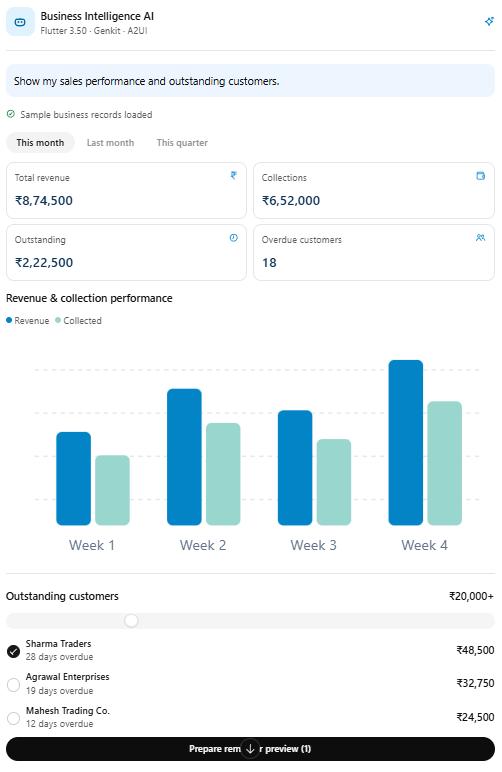
| Dashboard metric | Illustrative value |
|---|---|
| Total sales | ₹8,74,500 |
| Payments received | ₹6,52,000 |
| Outstanding balance | ₹2,22,500 |
| Overdue customers | 18 |
The resulting interface might also contain:
- Collection-performance charts.
- Outstanding customer lists.
- Date filters.
- Invoice details.
- Customer-selection controls.
- Payment-reminder previews.
If the user subsequently asks to view customers with outstanding payments above ₹25,000, the application can update the existing interface.
Business actions require additional controls
Suppose the user asks:
Send payment reminders to all overdue customers.
The application should not allow an AI-generated interface to trigger bulk communication without appropriate safeguards.
Instead, it can present a review surface showing selected customers, outstanding balances, message previews, and confirmation controls.
The backend verifies permissions and customer-contact rules before sending anything.
Potential business value
This architecture could reduce reporting-navigation complexity, make financial information easier to understand, and support less technically experienced business users.
These are potential benefits that should be evaluated through actual usability testing rather than assumed to occur automatically.
10. Real-World Example: Commodity Market Intelligence and Agricultural Trade
Commodity trading is an interesting application area for Generative UI because market information changes continuously.
Traders may need to compare multiple commodities, market locations, arrival quantities, historical prices, and trading opportunities.
A traditional market intelligence application might provide separate screens for every type of information.
An AI-assisted interface can compose a focused dashboard based on the trader’s question.
Trader request
Compare soybean prices across three markets, show the last seven days’ price movements, and display market arrivals.
Possible application tools
getCommodityPrices()
getHistoricalPriceSeries()
getMarketArrivals()
compareMarkets()
The backend retrieves verified information from authorized market-data sources.
The generated interface can combine comparative price cards, historical charts, arrival summaries, market selectors, and date-range controls.
Illustrative dashboard
| Market | Price per quintal | Daily arrivals |
|---|---|---|
| Market A | ₹4,550 | 1,250 qtl |
| Market B | ₹4,620 | 980 qtl |
| Market C | ₹4,480 | 1,780 qtl |
All values in this example are fictional.
If the trader changes the commodity from soybean to mustard, the interface can update while preserving the same comparison structure.
The agent must not fabricate missing market data or present speculative price movements as confirmed forecasts.
A production application should display data timestamps, units, source information, and information-quality indicators.
This example demonstrates how Generative UI can bring domain-specific intelligence into an existing Flutter business application.
11. Real-World Example: AI-Powered E-Commerce Applications
Online shopping frequently requires users to apply many filters, compare products, and navigate multiple product-detail pages.
Generative UI can combine conversational discovery with conventional shopping controls.
User request
Find a smartphone under ₹30,000 with good battery life, compare three options, and show available delivery dates.
The AI agent could coordinate product-search, inventory, pricing, and delivery tools.
Flutter could then display:
- Product comparison cards.
- Price and specification tables.
- Budget controls.
- Delivery selectors.
- Product availability indicators.
- Cart actions.
If the customer changes the budget to ₹35,000, the existing interface can request updated results.
Why this is different from an ordinary shopping chatbot
An ordinary chatbot might respond with a text list of recommended products.
A Generative UI shopping assistant can present a structured shopping interface within the conversation, allowing the customer to compare, filter, and select products directly.
However, current prices, availability, seller information, payment calculations, and order creation must come from verified commerce services.
The model should not independently determine the final payable amount.
Sensitive payment operations should remain within established secure checkout flows.
12. Real-World Example: Intelligent Travel and Booking Applications
Travel applications are particularly suitable for interactive AI interfaces because users often refine their preferences through multiple steps.
For example:
Find a three-day holiday within my ₹50,000 budget, with hotel options and flexible travel dates.
The agent could retrieve authorized travel information and present a dynamically composed experience containing:
- Date selectors.
- Destination choices.
- Accommodation cards.
- Budget sliders.
- Travel comparisons.
- Booking summaries.
The user can modify preferences without repeatedly writing lengthy prompts.
Official Flutter implementation example
On November 24, 2026, the Flutter team published a full-stack dining concierge implementation using Flutter, Genkit Dart, and A2UI.
The sample demonstrates a reservation interface that checks available options, captures user choices, and replaces the form with a confirmation component after the confirmation workflow.
It is an official technical demonstration, not evidence of a deployed commercial reservation service.
The same interaction pattern could be adapted to travel, appointment management, event booking, and other reservation systems.
Read the official implementation guide: Build Full-Stack Agentic UI with Dart, Flutter, and Genkit.
13. Real-World Example: Enterprise Analytics and Decision Support
Enterprise applications frequently expose a large amount of information through fixed reporting dashboards.
Different users may require different combinations of information.
A regional sales manager might ask:
Show underperforming territories, compare quarterly targets, and identify products with declining sales.
The generated interface could contain:
- Performance indicators.
- Regional comparisons.
- Target-versus-actual charts.
- Product-level tables.
- Department filters.
- Report-generation controls.
A finance manager might ask a completely different question using the same application architecture.
The agent can request a different component arrangement based on authorized financial data.
Role-based composition
An enterprise Generative UI system should never assume that an interface request grants access to additional information.
The backend must enforce existing access controls.
| User role | Example permitted information |
|---|---|
| Sales employee | Assigned customers and sales |
| Regional manager | Authorized regional performance |
| Finance manager | Permitted financial records |
| Inventory manager | Warehouse and stock information |
| Administrator | Explicitly granted administrative access |
Role-based authorization must apply before data is passed to the model or exposed through generated surfaces.
Hiding a widget is not a substitute for securing the associated API.
14. How to Start Building Generative UI with Flutter 3.50
The following implementation approach uses a separate Dart backend and Flutter client.
This separation helps keep sensitive model credentials and business operations away from the distributed application.
Step 1: Verify your Flutter environment
flutter --version
dart --version
flutter doctor -v
Confirm that your intended Flutter 3.50 installation is active.
Step 2: Create the backend and client projects
dart create server
flutter create client
Your development workspace can use the following organization:
generative_ui_project/
├── server/
│   ├── bin/
│   ├── lib/
│   └── pubspec.yaml
└── client/
    ├── lib/
    ├── test/
    └── pubspec.yaml
Step 3: Install the backend packages
From the server directory:
dart pub add genkit genkit_a2ui genkit_google_genaiFor an HTTP server, typed application schemas, and associated code generation:
dart pub add genkit_shelf shelf shelf_router schemantic
dart pub add --dev build_runner schemantic_builder
Step 4: Install the Flutter client packages
From the client directory:
flutter pub add genkit a2ui_flutter a2ui_core json_schema_builder url_launcherThese package names follow the newer official Flutter full-stack example.
Review package compatibility and lock compatible versions before deployment.
Several earlier tutorials use the legacy genui package. For a new A2UI 1.0-oriented implementation, refer to the newer renderer documentation rather than mixing older client code with the latest backend message format.
Step 5: Configure the AI provider
Configure the model provider on your server using environment variables or an appropriate secret-management service.
Do not embed private model API keys inside a Flutter application.
For a Google AI integration, the server can use the configured GEMINI_API_KEY environment variable.
Step 6: Define application data tools
The following Dart code demonstrates a simplified business-data function.
Future<Map<String, Object>> getSalesSummary() async {
  return {
    'currency': 'INR',
    'totalSales': 874500,
    'paymentsReceived': 652000,
    'outstanding': 222500,
    'overdueCustomers': 18,
  };
}
This example returns fictional data.
In a production application, replace it with an authenticated service or repository that retrieves authorized financial information.
The function can then be registered as a Genkit tool using the appropriate typed input and output schemas.
Step 7: Configure A2UI middleware
The core integration involves registering the A2UI plugin with Genkit and enabling its middleware for an AI workflow.
Conceptually:
final ai = Genkit(
  plugins: [
    googleAI(),
    A2uiPlugin(),
  ],
);
An enabled agent or generation workflow then uses:
use: [a2ui()]These are implementation fragments, not a complete runnable agent.
A full implementation must also configure the necessary imports, model, agent definition, tools, session handling, HTTP routes, and client streaming logic.
The current Genkit A2UI API Reference provides package-specific implementation details.
Step 8: Register the application component catalog
Begin with the basic catalog.
Then introduce a small number of domain-specific components.
For a business dashboard, a suitable custom catalog might expose:
SalesSummaryCard
RevenueChart
OutstandingPaymentsList
DateRangeFilter
CustomerSelection
ReminderPreview
Each custom component needs a server-side schema and a corresponding Flutter rendering implementation.
Charts and business-specific widgets should not be assumed to exist in the basic catalog.
Step 9: Connect the Flutter client
The Flutter client receives the agent’s streamed output, processes A2UI messages, and renders the corresponding surfaces.
The architectural responsibilities include:
- Maintaining the active conversation.
- Receiving structured UI messages.
- Registering trusted component implementations.
- Updating surface state.
- Processing user interactions.
- Handling timeouts, errors, and cancellation.
The official full-stack sample uses remoteAgent, MessageProcessor, and A2uiSurface as part of this pipeline.
Step 10: Handle application actions
Consider a user selecting a reporting period.
The Flutter application captures the action and sends it to the backend workflow.
The backend validates the requested operation, retrieves the relevant records, and returns an updated surface.
For sensitive operations, introduce an additional server-side confirmation mechanism.
The model must not become the final authority on whether a transaction is permitted.
15. How Generative UI Works with Flutter State Management
Generative UI does not remove the need for application state management.
A modern application still needs to maintain authentication state, navigation state, cached data, user preferences, connectivity status, and business workflows.
Existing Flutter architectures using Provider, Riverpod, BLoC, or other approaches can coexist with generated interface surfaces.
A useful separation is:
| State category | Responsibility |
|---|---|
| Authentication state | Existing application architecture |
| Business data | Repositories and backend services |
| Conversation state | Agent session |
| Generated component structure | A2UI surface |
| Interactive surface values | A2UI data model |
| Critical transactions | Verified backend workflow |
For example, a generated dashboard may display a customer-selection form.
A2UI can maintain the selection values within that surface.
However, customer records, permissions, and the final reminder-sending process remain responsibilities of the existing application architecture.
This allows developers to introduce Generative UI gradually rather than rewrite their entire Flutter application.
16. Generative UI vs Server-Driven UI
Developers familiar with JSON-driven interfaces may recognize similarities between A2UI and server-driven UI.
However, their primary approaches differ.
| Feature | Server-Driven UI | Generative UI |
|---|---|---|
| Interface selection | Backend rules | AI-assisted composition |
| Response structure | Predefined templates | Context-dependent |
| Predictability | Generally higher | Requires stronger validation |
| Personalization | Rule-based | Intent-based |
| Model dependency | Not required | Usually required |
| Flexible reporting | Limited by available rules | Can compose approved components |
| Operational cost | Conventional infrastructure | Infrastructure and model inference |
| Testing | Deterministic templates | Deterministic and variable outputs |
The two approaches are not mutually exclusive.
An enterprise application could use server-driven UI for predictable workflows and Generative UI for exploratory reporting or conversational assistance.
For mission-critical operations, deterministic screens often remain the better choice.
17. Performance, Latency and Cost Considerations
One of the most important questions is whether dynamic interface generation can provide a sufficiently responsive experience.
Unlike a conventional Flutter screen, a generated interface may require model inference before its final structure is available.
Total response time can include:
Network request
+ AI model processing
+ Business tool execution
+ Interface generation
+ Validation
+ Rendering
Developers must optimize the complete pipeline, not just Flutter rendering.
Streaming interfaces
Streaming can allow useful content to appear before the entire response is complete.
For example, financial summary cards can appear while a larger transaction analysis is being prepared.
Component simplicity
A generated interface should avoid unnecessary nested components or oversized payloads.
Reusable widgets with controlled properties are usually easier to maintain and optimize.
Deterministic calculations
Totals, invoice balances, taxes, and financial comparisons should be calculated by application services rather than generated through model reasoning.
This improves reproducibility and can reduce model workload.
Selective AI usage
Not every screen interaction requires a new AI request.
Sorting an existing list, changing a chart view, or toggling local presentation preferences can often be handled directly by Flutter.
Reserve model inference for tasks where understanding intent or composing a new interface creates meaningful value.
18. Security and Privacy in AI-Generated Interfaces
Generative UI introduces a new trust boundary between the AI model, the interface description, and executable application behavior.
The generated content must be treated as untrusted input.
Component validation
Only registered components and supported properties should be accepted.
Unexpected component types or malformed structures should be rejected or handled safely.
Action allow-listing
Every executable application action should be explicitly defined.
An arbitrary action name produced by the model must not automatically become an executable operation.
Server-side authorization
Every data retrieval or modification request must be checked against the authenticated user’s permissions.
Human approval
Sensitive and irreversible operations should require appropriate confirmation.
Examples include financial transactions, order placement, bulk communications, account changes, and record deletion.
Data minimization
Only relevant data should be exposed to the model.
Sending entire customer databases or unnecessary personal information creates avoidable risks.
Prompt injection protection
Documents, database records, customer messages, and external content may contain malicious instructions.
These inputs should remain data and must not override application policies.
Auditability
Record significant tool calls, authorization decisions, confirmations, and action results.
For enterprise systems, audit logs are particularly important when AI participates in recommending or initiating business operations.
A2UI validation helps control interface structure, but it does not replace conventional security engineering.
19. Accessibility and User Experience
AI-generated interfaces must meet the same accessibility expectations as conventional Flutter applications.
The introduction of a dynamic composition mechanism makes this especially important.
Developers should verify:
- Screen-reader descriptions.
- Logical reading order.
- Keyboard navigation.
- Accessible labels.
- Text scaling.
- Color contrast.
- Touch-target sizes.
- Error messages.
- Focus behavior after surface updates.
A generated interface should also maintain usability when the AI service is unavailable.
Conventional navigation and reporting screens can provide a reliable fallback.
Users should not be forced to communicate exclusively through an AI assistant to access essential application functionality.
20. How to Evaluate Generative UI: A Research-Oriented Framework
The value of Generative UI should be measured rather than assumed.
A useful evaluation compares a conventional Flutter interface against an equivalent AI-assisted interface.
Proposed research experiment
Select a common business workflow:
Identify overdue customers and prepare a payment-reminder list.
Group A uses the traditional dashboard and navigation system.
Group B uses a Generative UI assistant connected to the same underlying data and business logic.
Measure the following outcomes:
| Evaluation metric | Purpose |
|---|---|
| Task completion time | Measures workflow efficiency |
| Task success rate | Measures whether users reach the correct result |
| User interactions | Measures navigation and interaction complexity |
| Data accuracy | Verifies correspondence with backend records |
| Surface validation failure rate | Measures generated-interface reliability |
| Time to first useful interface | Measures perceived responsiveness |
| AI inference cost | Measures operational expenses |
| Accessibility task success | Measures inclusive usability |
| Unauthorized action attempts | Evaluates enforcement of security boundaries |
| User satisfaction | Measures the perceived experience |
Research hypotheses
A Generative UI implementation may reduce navigation effort for complex or unfamiliar tasks.
However, traditional interfaces may remain faster for repetitive, predictable operations.
An AI-assisted reporting interface may improve flexibility but introduce additional latency and operating costs.
These are hypotheses for evaluation, not established experimental findings.
The results should determine where Generative UI provides meaningful product value.
21. When You Should Not Use Generative UI
Generative UI is not the best solution for every application screen.
Conventional Flutter screens are often preferable for:
- Authentication and password entry.
- Banking transaction authorization.
- Emergency interfaces.
- Predictable checkout processes.
- High-frequency data entry.
- Offline-critical workflows.
- Safety-sensitive operations.
- Interfaces requiring strict regulatory consistency.
The most practical architecture may be a hybrid application.
Use fixed, deterministic interfaces for critical operations. Introduce Generative UI for information discovery, exploratory analytics, personalized recommendations, and adaptable reporting.
This approach combines innovation with reliability.
22. The Future of Flutter Generative UI Beyond 2026
Flutter’s architecture is particularly interesting for Generative UI because applications already rely heavily on composable widgets.
The component-catalog approach extends that composability into a controlled runtime environment.
Several potential directions deserve attention.
Context-aware dashboards
Applications could assemble dashboards that reflect the user’s current role, task, and information requirements rather than displaying identical reports to everyone.
Conversational business workflows
Users could initiate complex reporting and management activities through natural-language requests while completing them through familiar interactive controls.
Multimodal interfaces
Voice, images, documents, and text could provide inputs that lead to appropriate task-specific interfaces.
Domain-specific component ecosystems
Industries could develop reusable component catalogs for finance, education, agriculture, logistics, commerce, and enterprise management.
Hybrid AI architecture
Applications could combine cloud-based reasoning with supported local inference for selected workloads.
Cross-platform agentic experiences
Compatible protocol implementations could allow related agent-generated experiences to appear across different client technologies.
These possibilities do not imply that every capability is automatically available in Flutter 3.50. Their implementation depends on model capabilities, package maturity, platform support, and application engineering.
Frequently Asked Questions
What is Generative UI in Flutter 3.50?
Generative UI is an architectural approach that allows AI agents to describe context-dependent interfaces which Flutter renders using supported application components.
What is A2UI?
A2UI is an open protocol for communicating agent-generated interactive interfaces to client applications.
What is the role of Genkit Dart in Generative UI?
Genkit coordinates AI models, application tools, workflows, and conversational state. Its A2UI integration enables structured interface generation and streaming.
Does A2UI generate Flutter source code at runtime?
No. The typical A2UI approach describes UI components and their associated data. Flutter renders registered widget implementations.
Can I create dynamic charts with A2UI?
Yes, by registering appropriate custom chart components and connecting them to verified data.
Do not assume that every specialized chart type is available in the basic catalog.
Can I integrate Generative UI into an existing Flutter application?
Yes. An existing application can introduce generated surfaces within selected sections without replacing its entire navigation and state-management architecture.
Is A2UI 1.0 production-ready?
A2UI 1.0 is a stable protocol. However, the associated Genkit Agents API and integration packages may still be experimental. Evaluate the maturity of the exact libraries you intend to deploy.
Does Generative UI require an internet connection?
Cloud-model implementations generally require connectivity. Local-model architectures may support some offline workflows, depending on the model, runtime, device, and available data.
Will Generative UI replace traditional Flutter widgets?
No. It relies on existing component implementations and can coexist with conventional Flutter screens.
Can Genkit use different AI models?
Genkit supports multiple model integrations. The available capabilities and compatibility depend on the selected model provider and package configuration.
Is Flutter 3.50 mandatory for A2UI?
No. The official full-stack implementation supports compatible Flutter installations with Dart 3.12 or later. Flutter 3.50 is a modern development target, not an exclusive requirement.
Can AI-generated interfaces perform business transactions?
They can provide interactive controls that request authorized backend operations. Transaction execution must remain subject to business validation, permissions, and appropriate user confirmation.
Conclusion: From Static Screens to Intelligent Applications
The emergence of A2UI and Genkit Dart represents an important development in the wider Flutter ecosystem.
For many years, developers have focused on building reusable widgets, designing cross-platform interfaces, and creating consistent application experiences.
Generative UI introduces another possibility: allowing approved interface components to be assembled according to the user’s immediate requirements.
A business owner could request a personalized financial dashboard. A trader could compare commodity markets. A shopper could interact with an adaptive comparison interface. A manager could explore enterprise information without navigating multiple independent reporting screens.
The underlying application still requires reliable data services, secure business logic, accessible components, and carefully managed state.
The AI layer adds flexibility rather than replacing those foundations.
Flutter 3.50 offers developers an opportunity to explore these architectures using a modern cross-platform framework and the growing Dart AI ecosystem.
The future of intelligent applications may not be defined by chatbots alone.
It may increasingly be defined by applications that understand what users need and present the appropriate interactive experience at the right moment.
Official and Technical References
- What’s New in Flutter 3.50 — November 11, 2026
- Flutter 3.50.0 Technical Release Notes
- Google A2UI 1.0 Official Announcement
- Build Full-Stack Agentic UI with Dart, Flutter, and Genkit — November 24, 2026
- Genkit Generative UI Documentation
- A2UI SDK Architecture
- Genkit A2UI Dart API Reference
- Official A2UI GitHub Repository