

What’s New in Flutter 3.47? Simple Guide to the Latest Flutter SDK Update

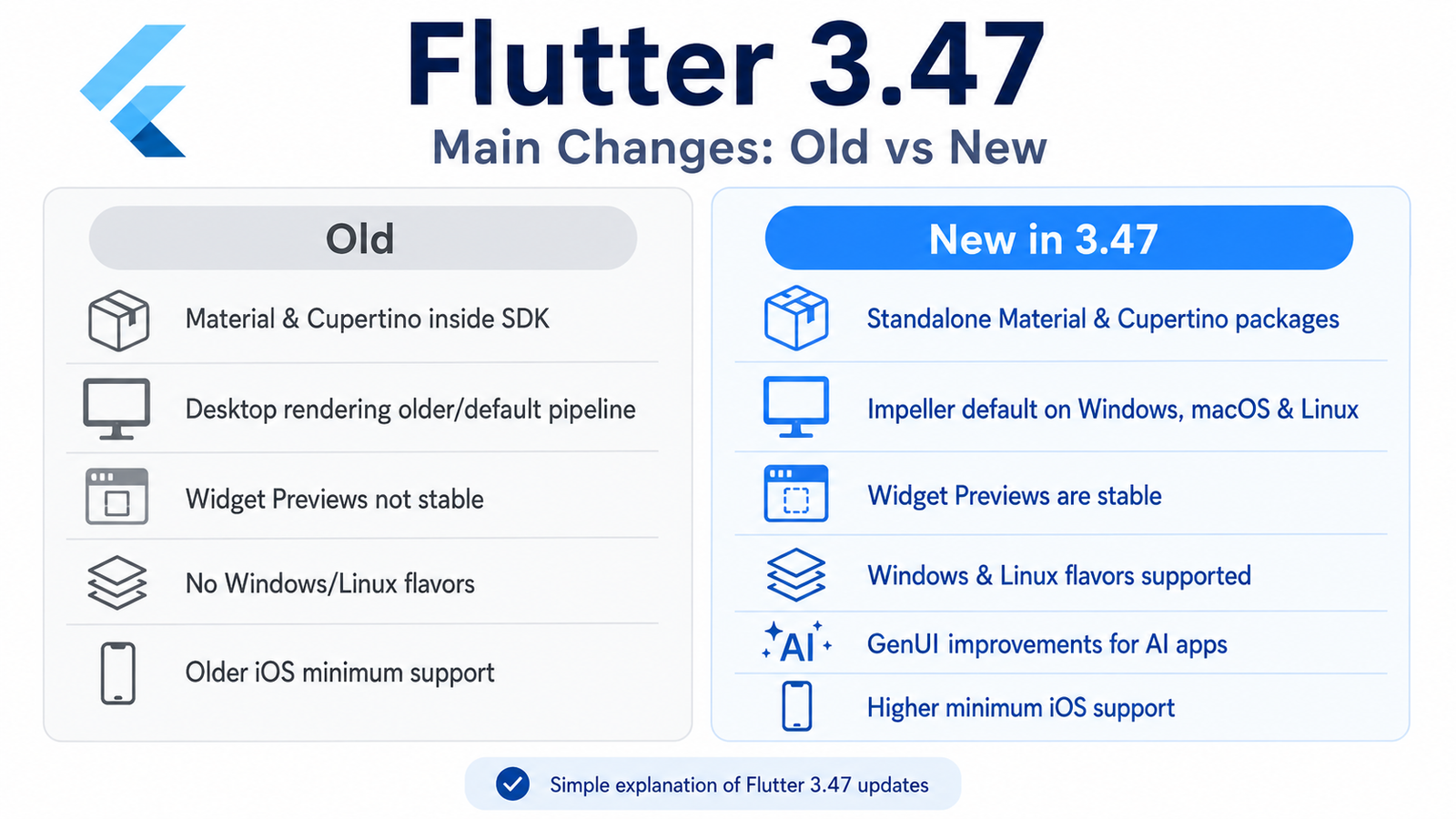
Flutter 3.47 is a major update focused on better performance, easier UI development, improved desktop support, stronger web performance, AI-powered UI possibilities, and important platform changes for Android, iOS, macOS, Windows, and Linux.
If you are searching for what’s new in Flutter 3.47, this guide explains the update in simple language without unnecessary technical complexity.
Flutter 3.47 was released on August 12, 2026. The release highlights standalone Material and Cupertino UI packages, Impeller becoming the default renderer on desktop, stable Widget Previews, GenUI improvements, WebAssembly progress, desktop flavors, and several Android and Apple platform updates.
1. Material and Cupertino UI Are Becoming Separate Packages
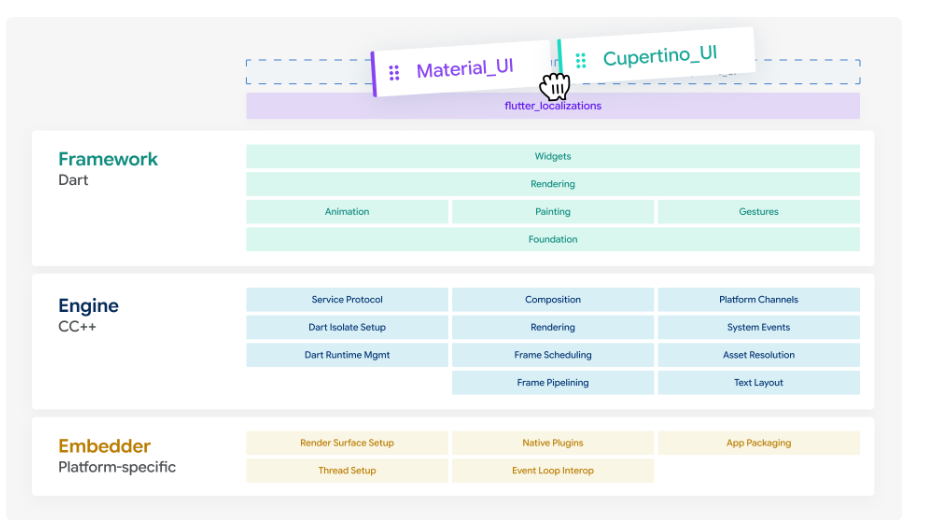
One of the biggest changes in Flutter 3.47 is that Flutter’s Material and Cupertino UI libraries are now available as separate packages:
material_uicupertino_ui
Previously, these design systems were tightly included inside the Flutter SDK.
Now Flutter is moving toward keeping them separate from the core framework.
Why is this helpful?
The main advantage is that Flutter developers may get UI fixes, new widgets, and design improvements faster without waiting for a complete Flutter SDK release.
For example, if a new Material component becomes available, it could potentially be updated through the Material UI package instead of waiting months for another major Flutter release.
This can make Flutter UI development more flexible and easier to maintain.
Flutter says the standalone packages can follow their own release schedule independently from the quarterly Flutter SDK cycle.
2. Easier Migration to the New Material UI Packages
Flutter 3.47 also provides a migration command for developers who want to move to the new standalone UI packages.
You can use:
dart fix --apply --code=migrate_design_widgetsThis can automatically update many existing Flutter imports to the new package structure.
Why is this helpful?
Without migration tools, developers might need to manually update many files in large projects.
The migration command can reduce repetitive work and make upgrading older Flutter projects easier.
3. Flutter Localization Is Also Becoming More Modular
Flutter’s localization system for Material and Cupertino widgets is also being separated.
Translations and localization support related to Material and Cupertino now live with their respective packages.
Why is this helpful?
It keeps related features together.
For developers, this could eventually make Flutter projects cleaner and allow design-system updates to happen more independently.
4. Flutter 3.47 Is Preparing for iOS 27 and Xcode 27
Flutter 3.47 includes important preparation for upcoming Apple platform releases, including:
- Xcode 27
- iOS 27
- macOS 27
Flutter recommends developers begin testing their applications against Apple’s upcoming platform versions.
Why is this helpful?
Whenever Apple releases a major iOS or Xcode update, applications may face compatibility problems.
Flutter 3.47 prepares the framework early so developers have more time to test and fix their applications before users upgrade their devices.
5. Flutter Minimum iOS Version Is Increasing
Flutter 3.47 changes the minimum supported Apple operating system versions.
The minimum iOS version moves from:
iOS 13 → iOS 15
The minimum macOS version moves from:
macOS 10.15 → macOS 12.
Why is this important?
Developers maintaining older applications should check their user base before upgrading.
If your application still needs to support very old Apple devices, this change may affect you.
For newer applications, however, higher minimum versions make it easier for Flutter to support modern Apple technologies.
6. Important iOS App Lifecycle Change
Apple’s newer SDK requires apps to use the UIScene lifecycle.
Flutter 3.47 can handle this migration automatically for many standard applications.
However, developers using custom native iOS code may need to make changes manually.
Why is this helpful?
Flutter automatically handling part of this migration means many developers will not have to deeply modify native iOS code themselves.
7. Flutter Is Moving Away From Intel Macs
Flutter is gradually reducing support for Intel-based Macs as Apple continues moving toward Apple Silicon.
Flutter 3.47 now shows warnings when developers build on Intel Macs or target certain Intel architectures.
Why is this important?
If you are developing Flutter apps on a newer Apple Silicon Mac, this probably won’t affect you.
But developers still using Intel Macs should start planning an upgrade.
8. Better Swift Package Manager Support
Flutter is continuing its move toward Swift Package Manager for iOS plugin dependencies.
According to Flutter, 92 of the top 100 iOS plugins have already migrated.
Why is this helpful?
Swift Package Manager is Apple’s modern package management system.
It can make dependency handling easier and reduce long-term reliance on CocoaPods.
Flutter 3.47 also improves build performance by removing unnecessary Swift Package Manager schemes earlier during builds.
9. Flutter Web Is Moving Toward WebAssembly by Default
Flutter is continuing its plan to make WebAssembly, or Wasm, the default technology for Flutter web apps.
You can already build your Flutter web application using:
flutter build web --release --wasmWhy is Wasm useful?
WebAssembly can help Flutter web applications achieve better performance and a more app-like experience inside browsers.
For developers building dashboards, productivity apps, SaaS products, or complex web interfaces with Flutter, this is an important direction.
10. Experimental Deferred Loading for Flutter Web
Flutter 3.47 also introduces experimental deferred loading for Wasm applications.
In simple terms, this means a large Flutter web application could be split into smaller parts and only load some parts when they are needed.
Why is this helpful?
Imagine a Flutter web application with 30 screens.
Normally, a large amount of code may need to be downloaded before the app starts.
With deferred loading, some features could load later.
That could improve:
- Initial loading time
- Web performance
- User experience
- Large Flutter web applications
11. Impeller Is Now Default on Windows, macOS and Linux
One of the most important Flutter 3.47 performance updates is Impeller becoming the default renderer on desktop.
It is now enabled by default on:
- Windows
- macOS
- Linux
What is Impeller in simple language?
Impeller is Flutter’s newer graphics engine.
It prepares more graphical work ahead of time instead of waiting until an animation starts.
Why is this helpful?
It can reduce animation stuttering and make transitions feel smoother.
This is particularly useful for Flutter desktop applications with:
- Animations
- Large dashboards
- Custom graphics
- Interactive UI
- Complex transitions
Flutter says Impeller helps reduce shader compilation jank by compiling a known set of shaders ahead of runtime.
12. Better Text Quality on Flutter Desktop
Flutter 3.47 improves text and vector rendering on desktop when using Impeller.
Flutter now uses Signed Distance Function rendering on Windows, macOS, and Linux.
Why is this useful?
Simply put, text and vector shapes should look cleaner and sharper on desktop displays.
This is useful for:
- Business software
- Admin dashboards
- Desktop editors
- Productivity apps
- Professional Windows applications
13. Better Multi-Window Support
Flutter continues improving multi-window support on desktop.
Windows and Linux can now create popup windows through Flutter’s experimental window APIs.
This can be useful for creating:
- Context menus
- Floating tool panels
- Utility windows
- Secondary windows
- Professional desktop applications
Flutter also adds better access to native window handles, which can help developers integrate advanced Windows, macOS, or Linux features.
14. Windows and Linux Now Support Flutter Flavors
Flutter flavors are now supported on Windows and Linux.
What are Flutter flavors?
Flavors let you create different versions of the same application from one codebase.
For example:
Development App
Production App
Free Version
Premium Version
You can now build Windows applications using commands such as:
flutter build windows --flavor productionWhy is this useful?
This is especially helpful for companies that maintain multiple environments or branded versions of the same desktop application.
15. Flutter Widget Previews Are Now Stable
This is one of my favorite Flutter 3.47 developer improvements.
Flutter Widget Previews are now stable.
Widget Preview lets developers see an individual Flutter widget without running the complete application.
For example, you could preview:
- Login button
- Product card
- Profile screen component
- Custom navigation widget
- Dashboard card
without launching the whole app.
Why is this helpful?
It can dramatically speed up UI development.
Instead of:
Change code → build app → navigate to screen → check widget
you can work more like:
Change widget → instantly preview it
Flutter 3.47 also improves preview startup speed through local caching and provides better theme and web asset support.
16. Flutter 3.47 Improves GenUI for AI Apps
Flutter 3.47 also includes improvements related to GenUI, which is important for developers building AI-powered and agentic Flutter applications.
The GenUI package recently reached version 0.10.0 and introduces a new a2ui_core package.
What does GenUI mean in simple language?
Traditional AI apps usually work like:
User asks question → AI returns text
GenUI allows developers to create experiences where AI can help control or generate parts of an interactive interface.
Instead of only displaying:
Select your preferred date.
an AI-powered application could potentially show an actual date picker, form, card, or another interactive component.
Read : GenUI + Firebase AI in Flutter (2026): Building Dynamic, AI-Driven User Interfaces
17. AI Can Perform Small UI Tasks Locally
GenUI now supports A2UI client-side functions.
These functions allow an AI agent to tell the Flutter application to perform certain small operations on the device itself.
For example:
- Validate a form
- Calculate a value
- Update derived values
- Perform small UI-related operations
Why is this useful?
Previously, an app might need to send every tiny action back to the AI model or server.
Now some tasks can happen locally.
That can potentially mean:
- Faster interaction
- Fewer network requests
- Lower AI/API usage
- Better user experience
18. Android Keyboard Fixes
Flutter 3.47 fixes an Android virtual keyboard problem where modifier keys such as Shift could sometimes remain stuck during keyboard events.
This may sound small, but these fixes improve reliability for apps using:
- Text editors
- Hardware keyboards
- Custom keyboard interactions
- Productivity tools
19. Updated Android Development Requirements
Flutter 3.47 has also been tested with newer Android build tools.
The official release lists:
- Java 17 minimum
- Kotlin Gradle Plugin 2.4.0
- Android Gradle Plugin 9.1.0
- Gradle 9.3.1
- Compile SDK API 36
- Target SDK API 36
- Minimum SDK API 24
Why is this important?
Developers upgrading older projects may need to update their Android build environment.
Keeping these tools current helps reduce build failures and compatibility problems.
20. Better Android Accessibility Support
Flutter 3.47 can automatically detect Android settings such as:
- High contrast
- Color inversion
Why is this helpful?
Your Flutter app can better respect accessibility settings chosen by the user.
This helps developers create apps that are easier to use for people with visual accessibility needs.
21. Better Text Selection
Flutter 3.47 improves text selection behavior.
Selection handles are more stable while scrolling and there are fixes for context menus and selectable regions.
Why is this useful?
Apps involving lots of text—such as:
- Document apps
- Note apps
- Chat apps
- Editors
- Reading apps
can provide a smoother user experience.
22. Better Flutter Images and Animations
Flutter 3.47 adds smaller but useful widget improvements.
For example, ImageIcon can preserve original image colors using:
useOriginalColors: trueThere are also improvements to AnimatedCrossFade clipping and image error tracking.
These changes give developers better control over UI behavior.
Should You Upgrade to Flutter 3.47?
For most developers, Flutter 3.47 is worth considering, especially if you are working on:
- Flutter Windows apps
- Flutter desktop software
- Flutter web apps
- AI-powered Flutter applications
- Modern iOS applications
- Large Flutter projects
- UI-heavy applications
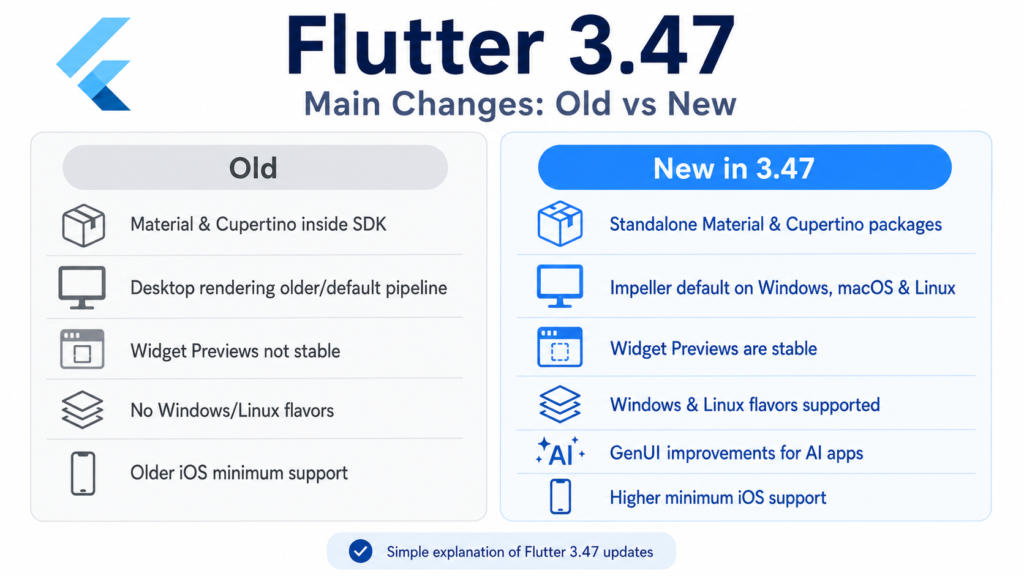
The biggest benefits are better desktop rendering, stable Widget Previews, progress toward faster Flutter web apps, better AI UI tooling, desktop flavors, and a more modular Flutter framework.
Before upgrading an important production project, however, test your dependencies and review Flutter’s breaking changes, particularly because Flutter is beginning the migration toward standalone Material and Cupertino packages.
How to Upgrade to Flutter 3.47
Open your terminal and run:
flutter upgradeThen verify your installed version:
flutter --versionFlutter itself recommends flutter upgrade for moving to the new release.
Read : How to Update Flutter SDK (Step by Step Guide for Developers)
Frequently Asked Questions About Flutter 3.47
What is Flutter 3.47?
Flutter 3.47 is the August 2026 Flutter stable release with updates for desktop performance, Flutter web, Widget Previews, GenUI, Material and Cupertino packages, Android, iOS, macOS, Windows, and Linux.
What are the biggest new features in Flutter 3.47?
The major changes include standalone Material and Cupertino packages, Impeller by default on desktop, stable Widget Previews, GenUI improvements, Windows/Linux flavors, and continued progress toward WebAssembly for Flutter web.
Is Impeller enabled on Windows in Flutter 3.47?
Yes. Impeller becomes the default renderer for Windows, macOS, and Linux in Flutter 3.47.
Does Flutter 3.47 improve AI development?
Yes. Flutter highlights new GenUI capabilities including a2ui_core and client-side A2UI functions for agentic application experiences.
Are Flutter Widget Previews stable now?
Yes. Widget Previews are stable in Flutter 3.47 and can be used to inspect and iterate on individual widgets without launching the complete application.
Does Flutter 3.47 support Windows flavors?
Yes. Windows and Linux now support Flutter flavors.
Does Flutter 3.47 support WebAssembly?
Yes. Flutter continues moving toward Wasm by default, and developers can currently opt in using the --wasm build option.
What is the minimum Android SDK for Flutter 3.47?
The Flutter 3.47 release lists API 24 as the default flutter.minSdkVersion.
What is the minimum iOS version for Flutter 3.47?
Flutter 3.47 raises the supported minimum from iOS 13 to iOS 15.
How do I upgrade to Flutter 3.47?
Run:
flutter upgradeand then verify using:
flutter --versionRefrences:
Flutter Official Blog – What’s New in Flutter 3.47
https://flutter.dev/blog/whats-new-in-flutter-3-47