

Function Calling in Flutter AI Apps: Let Gemini or OpenAI Execute Real App Actions

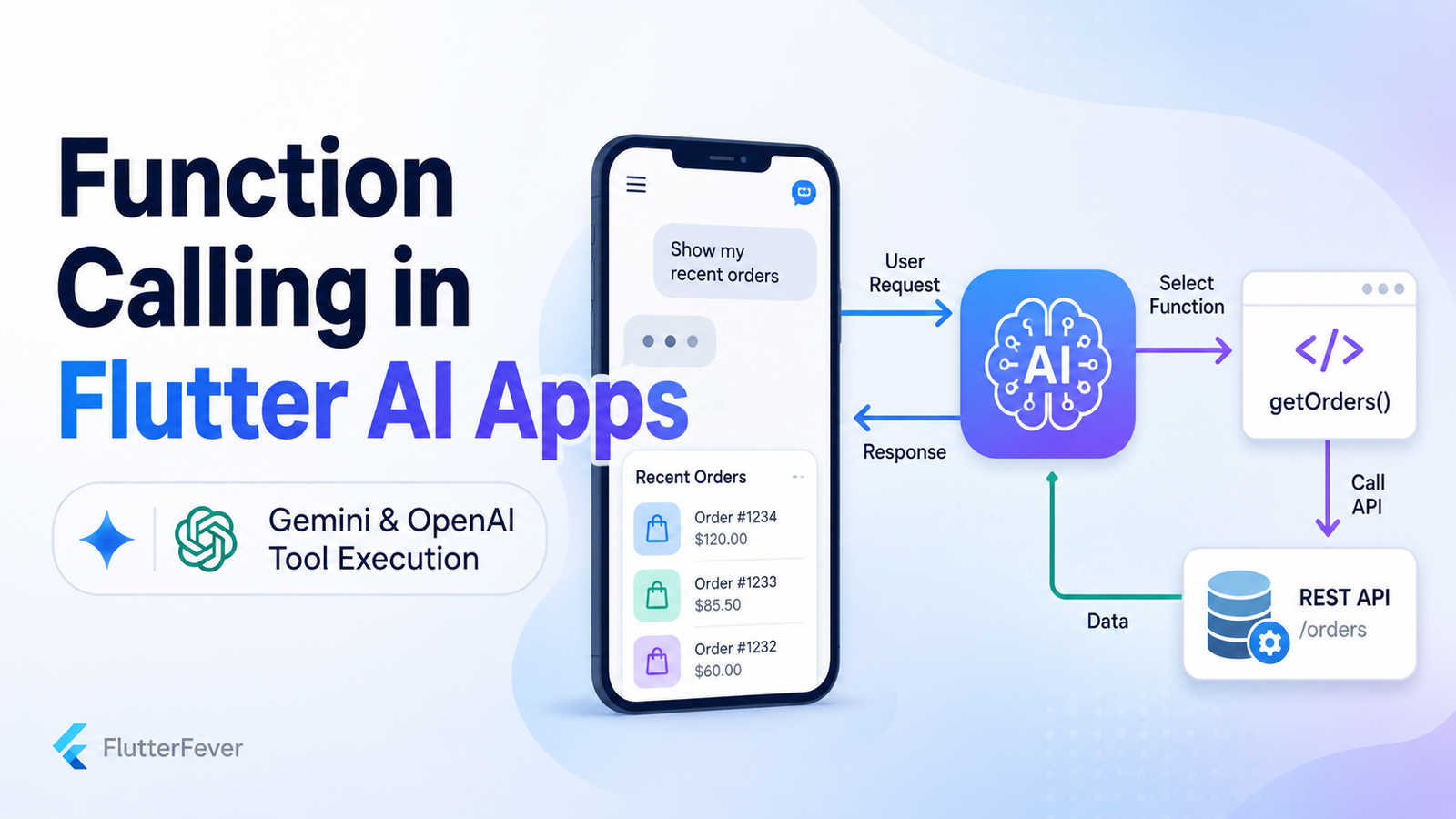
Adding an AI chatbot to a Flutter application is relatively easy.
A user writes:
How can I track my order?The AI generates some text, and the application displays it.
That is useful, but it is still only a chatbot.
Modern AI applications can go much further.
Imagine that the same user writes:
Show my orders from yesterday.Instead of inventing an answer, the AI understands that it needs real order information.
It selects a function such as:
getOrders()Your Flutter application or backend executes that function, fetches the actual orders from your REST API or database, and returns the result to the AI.
The AI can then respond:
You placed 3 orders yesterday.

1. Order #1042 – Delivered
2. Order #1048 – Processing
3. Order #1051 – Shipped
This architecture is commonly called function calling or tool calling.
Both Gemini and OpenAI support connecting AI models with external tools or application functions. Gemini describes function calling as a mechanism that lets the model determine when a custom function or external API should be used and provide the arguments required for that call. OpenAI’s current API platform similarly supports agent workflows and tools that can connect models with external systems.
For Flutter developers, this is one of the most important concepts behind the next generation of AI-powered mobile applications.
What Is Function Calling in Flutter?
Function calling allows an AI model to request an application action instead of only generating text.
The model itself normally does not directly execute your Dart code, modify your database, or call your private REST endpoint.
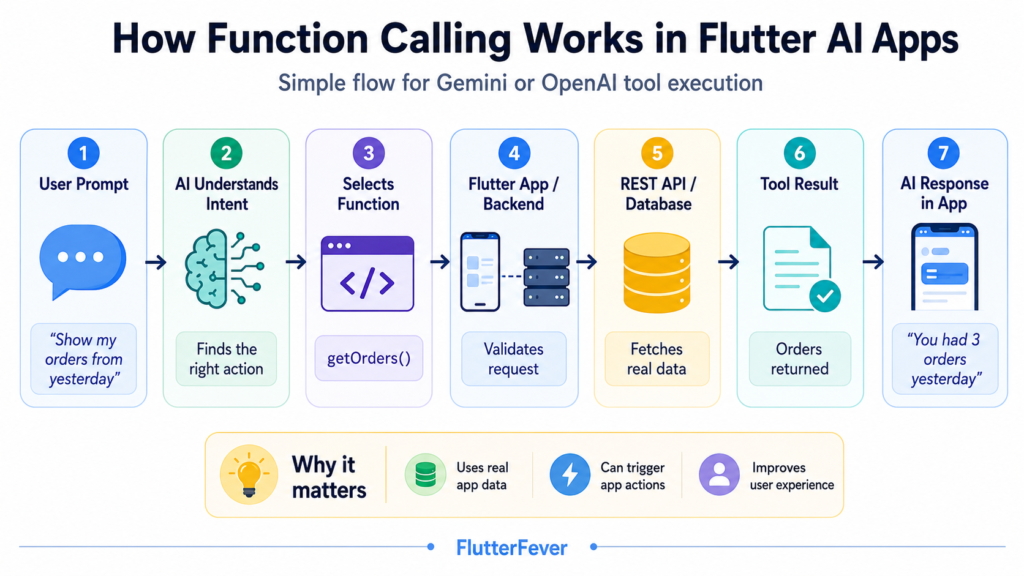
Instead, the process works like this:
User
  ↓
Flutter App
  ↓
AI Model
  ↓
Model selects a tool/function
  ↓
Flutter App or Backend executes it
  ↓
REST API / Database / Service
  ↓
Tool result
  ↓
AI Model
  ↓
Natural-language response
  ↓
Flutter UI
For example:
User:
"Show my orders from yesterday."
The model may produce a structured request similar to:
{
  "name": "get_orders",
  "arguments": {
    "date": "2026-08-18"
  }
}
Your application receives that request.
Then your application executes:
getOrders(date: '2026-08-18');The backend might return:
{
  "orders": [
    {
      "id": 1042,
      "status": "delivered",
      "total": 1499
    },
    {
      "id": 1048,
      "status": "processing",
      "total": 799
    }
  ]
}
That data is sent back to the AI.
The AI converts the raw result into something readable:
You placed two orders yesterday.

Order #1042 has been delivered, while Order #1048 is still processing.
That is function calling.
Why Function Calling Matters for Flutter Developers
Traditional chatbot architecture usually looks like this:
User → Prompt → AI → Text ResponseFunction calling changes it to:
User
   ↓
AI reasoning
   ↓
Choose application capability
   ↓
Execute tool
   ↓
Retrieve real data
   ↓
AI explains result
This means your Flutter AI feature can move from simply answering questions to actually operating parts of the application.
For example, AI can potentially:
- retrieve an order
- search products
- fetch account information
- check available appointments
- calculate shipping costs
- retrieve weather information
- search a private knowledge base
- create a support ticket
- add something to a shopping cart
- navigate to an application screen
- apply filters
- update a user preference
- check payment status
- retrieve analytics
- call your REST APIs
That is why function calling is an important building block for agentic Flutter applications.
Read : How to Build AI in Dart & Flutter (Beginner to Advanced Guide with DartPad Examples) – 2026
A Simple Example
Suppose we are building an e-commerce app.
The application already has this REST API:
GET /api/orders?date=2026-08-18Normally the Flutter developer might create:
Future<List<Order>> getOrders(String date)and call it from a screen.
With function calling, the same capability can also be exposed to the AI.
The user no longer needs to manually open:
Orders
→ Filters
→ Date
→ Yesterday
→ Apply
They can simply type:
Show my orders from yesterday.The AI determines:
Intent = retrieve orders
Date = yesterday
Required tool = get_orders
Then:
get_orders
     ↓
Orders Repository
     ↓
REST API
     ↓
Backend
     ↓
Database
The AI receives the result and explains it.
This is one of the biggest UX advantages of function calling.
Function Calling Does Not Mean the AI Runs Your Dart Function Directly
This distinction is extremely important.
When you define something like:
{
  "name": "get_orders",
  "description": "Returns the user's orders for a given date"
}
you are describing a capability to the model.
The model might respond:
{
  "name": "get_orders",
  "arguments": {
    "date": "2026-08-18"
  }
}
Your application must decide what to do with it.
Usually your own code performs something similar to:
switch (functionName) {
  case 'get_orders':
    return await orderRepository.getOrders(date);
}
This separation is essential because your application remains responsible for authorization, validation, business rules and execution.
Read : GenUI + Firebase AI in Flutter (2026): Building Dynamic, AI-Driven User Interfaces
Recommended Production Architecture
A professional Flutter implementation should normally avoid putting all function-calling logic directly inside widgets.
A cleaner architecture is:
Flutter UI
     ↓
AI Controller
     ↓
AI Service
     ↓
Tool Router
     ↓
Repository
     ↓
Backend API
     ↓
Database / External Services
A possible project structure could be:
lib/
│
├── features/
│   └── ai_assistant/
│       ├── presentation/
│       │   ├── ai_chat_screen.dart
│       │   └── ai_controller.dart
│       │
│       ├── domain/
│       │   ├── ai_message.dart
│       │   ├── ai_tool.dart
│       │   └── tool_result.dart
│       │
│       └── data/
│           ├── ai_service.dart
│           └── tool_router.dart
│
├── repositories/
│   └── order_repository.dart
│
└── services/
    └── api_client.dart
The UI should not know how getOrders() communicates with the server.
That responsibility belongs to the repository or service layer.
Step 1: Create Your Normal Flutter API Service
Before adding AI, build the feature normally.
For example:
class OrderRepository {
  final ApiClient apiClient;

  OrderRepository(this.apiClient);

  Future<Map<String, dynamic>> getOrders({
    required String date,
  }) async {
    return await apiClient.get(
      '/api/orders',
      queryParameters: {
        'date': date,
      },
    );
  }
}
This is important.
Do not create separate business logic specifically for AI unless necessary.
Your AI tools should preferably call the same application services that the rest of your Flutter app already uses.
Step 2: Describe the Function to the AI
The model needs to understand what tools are available.
A function definition may conceptually look like this:
{
  "name": "get_orders",
  "description": "Get orders placed by the authenticated user for a specific date.",
  "parameters": {
    "type": "object",
    "properties": {
      "date": {
        "type": "string",
        "description": "Date in YYYY-MM-DD format"
      }
    },
    "required": ["date"]
  }
}
Notice how detailed the description is.
Instead of:
Get ordersprefer:
Get orders belonging to the currently authenticated customer for a specific calendar date.Better tool descriptions help the model understand when the function should and should not be called.
Step 3: Send the User Message and Available Tools to the Model
Suppose the user asks:
Show me yesterday's orders.Your request to the AI provider includes:
User message
+
available functions
The AI now decides whether it can answer directly or needs a tool.
Gemini officially supports custom function declarations and allows models to determine when an external function should be called.
A similar pattern is used when working with OpenAI tools.
Step 4: Receive the Tool Call
Conceptually, your Flutter application might receive something equivalent to:
{
  "tool_call": {
    "name": "get_orders",
    "arguments": {
      "date": "2026-08-18"
    }
  }
}
Now the model has finished its job for this stage.
Your code takes control.
Step 5: Build a Tool Router
Do not scatter if conditions throughout your chat screen.
Create one central tool router.
Example:
class AiToolRouter {
  final OrderRepository orderRepository;

  AiToolRouter({
    required this.orderRepository,
  });

  Future<Map<String, dynamic>> execute(
    String toolName,
    Map<String, dynamic> arguments,
  ) async {
    switch (toolName) {
      case 'get_orders':
        final date = arguments['date'] as String?;

        if (date == null || date.isEmpty) {
          throw ArgumentError('Date is required.');
        }

        return await orderRepository.getOrders(
          date: date,
        );

      default:
        throw UnsupportedError(
          'Unknown AI tool: $toolName',
        );
    }
  }
}
Now tool execution is centralized.
As your AI assistant becomes larger, you may have:
get_orders
get_order_details
search_products
get_profile
create_support_ticket
get_payment_status
get_shipping_quote
check_inventory
All can be routed through the same layer.
Read : How to Design Flutter Enterprise App Architecture in 2026: Scalable & AI-Ready App Systems
Step 6: Execute the Actual REST API
The router eventually calls your normal REST service:
final result = await orderRepository.getOrders(
  date: date,
);
For example:
GET /api/orders?date=2026-08-18
Authorization: Bearer USER_TOKEN
The server might return:
{
  "success": true,
  "data": [
    {
      "order_id": 1042,
      "status": "delivered",
      "amount": 1499
    },
    {
      "order_id": 1048,
      "status": "processing",
      "amount": 799
    }
  ]
}
This is real application data.
The AI has not invented it.
Step 7: Return the Tool Result to the AI
Now send the function result back to the model.
Conceptually:
{
  "tool": "get_orders",
  "result": {
    "success": true,
    "orders": [
      {
        "order_id": 1042,
        "status": "delivered",
        "amount": 1499
      }
    ]
  }
}
The model can now transform structured API data into a natural-language response.
For example:
You had two orders yesterday.

Order #1042 for ₹1,499 has already been delivered, while Order #1048 for ₹799 is still processing.
The Complete Flow
The entire process becomes:
User:
"Show my orders from yesterday."
          ↓
Flutter AI Controller
          ↓
Gemini / OpenAI
          ↓
Model identifies:
get_orders
date = yesterday
          ↓
AiToolRouter
          ↓
OrderRepository
          ↓
REST API
          ↓
Database
          ↓
Order data
          ↓
Tool result sent to AI
          ↓
AI generates explanation
          ↓
Flutter renders response
This is the core function-calling architecture.
Read : Flutter App Architecture in the AI Era: Why Code Generation Isn’t Enough
Function Calling With Gemini in Flutter
Google’s Gemini API officially supports function calling for connecting models to external tools and APIs. The model can choose a function and generate the required parameters rather than pretending to execute the action itself.
Google also documents function calling as one of the core capabilities of the Gemini API.
The conceptual Gemini workflow is:
Flutter
  ↓
Gemini + function declarations
  ↓
Gemini returns functionCall
  ↓
Flutter/backend executes tool
  ↓
Send function result to Gemini
  ↓
Gemini returns final response
An important implementation detail for developers in 2026 is SDK choice.
The older google_generative_ai Dart package still has API documentation available, but Google indicates that development has moved toward its newer mobile/Firebase AI tooling rather than continuing that Dart SDK.
Therefore, before copying an older tutorial, check Google’s current recommended SDK and architecture.
For production Flutter applications, the safest long-term design is to keep your own:
AiProvider
ToolRouter
Repository
Backend
layers independent from a particular Gemini package.
That way, SDK changes do not require rewriting the entire application.
Function Calling With OpenAI in Flutter
OpenAI also supports tool-driven application workflows.
The broader OpenAI platform currently positions the Responses API and related tool capabilities as foundations for applications and agent workflows that can interact with external systems.
A conceptual OpenAI implementation follows the same basic architecture:
Flutter prompt
     ↓
OpenAI
     ↓
Tool call
     ↓
Your application executes function
     ↓
Tool output
     ↓
OpenAI
     ↓
Final answer
The key advantage of designing your Flutter app correctly is that the execution layer does not need to care which provider requested the function.
You can define:
abstract class AiProvider {
  Future<AiResponse> sendMessage(
    String message,
  );
}
Then implement:
GeminiAiProviderand:
OpenAiProviderwhile both use the same:
AiToolRouterProvider-Independent Architecture
A scalable architecture can look like:
                ┌───────────────────┐
                │    Flutter UI     │
                └────────┬──────────┘
                         │
                ┌────────▼──────────┐
                │  AI Controller    │
                └────────┬──────────┘
                         │
                ┌────────▼──────────┐
                │   AiProvider      │
                └────────┬──────────┘
                         │
             ┌───────────┴───────────┐
             │                       │
      ┌──────▼──────┐         ┌──────▼──────┐
      │   Gemini    │         │   OpenAI    │
      └──────┬──────┘         └──────┬──────┘
             │                       │
             └───────────┬───────────┘
                         │
                 Function Call
                         │
                ┌────────▼────────┐
                │  AiToolRouter   │
                └────────┬────────┘
                         │
                  ┌──────▼──────┐
                  │ Repository  │
                  └──────┬──────┘
                         │
                  ┌──────▼──────┐
                  │ REST API    │
                  └──────┬──────┘
                         │
                  ┌──────▼──────┐
                  │  Database   │
                  └─────────────┘
This is much easier to maintain than tightly coupling every screen to Gemini or OpenAI.
Read : Codex CLI, OpenAI Codex, ChatGPT Codex — How to Build Flutter Apps Smartly in 2026
Practical Flutter Function Calling Use Cases
Function calling becomes especially powerful when your application already contains structured services.
1. E-Commerce Applications
User:
Where is my latest order?AI tool:
get_latest_orderBackend:
GET /orders/latest2. Banking or FinTech Apps
User:
How much did I spend on food this month?Possible tools:
get_transactions
categorize_transactions
calculate_spending
For sensitive financial actions, authorization and confirmation should remain controlled by the application rather than being delegated blindly to the model.
3. Appointment Apps
User:
Do I have any appointments Friday?Tool:
get_appointmentsResult:
Two appointments found.4. Food Delivery
User:
Show vegetarian restaurants that deliver in under 30 minutes.AI might call:
search_restaurantswith:
{
  "vegetarian": true,
  "max_delivery_minutes": 30
}
5. Healthcare Apps
User:
Show my upcoming appointments.Tool:
get_upcoming_appointmentsSensitive medical data requires particularly careful authentication, authorization and privacy controls.
6. Agriculture Apps
A farmer might ask:
Show today's tomato price in my nearby mandis.AI could call:
get_mandi_priceswith:
{
  "commodity": "tomato",
  "location": "user_location"
}
Your backend retrieves actual market information and sends it to the model.
7. Developer Tools
A Flutter developer might type:
Analyze my latest Android build failure.Potential tools:
get_build_log
analyze_dependencies
get_flutter_environment
This is where function calling can become the foundation for an AI-powered developer assistant.
Read Operations vs Write Operations
Not all functions carry the same risk.
A function such as:
get_ordersonly reads information.
But:
cancel_orderchanges application state.
You should treat them differently.
A useful classification is:
READ TOOLS
- get_orders
- search_products
- get_profile
- check_inventory

WRITE TOOLS
- cancel_order
- update_address
- submit_payment
- delete_account
- place_order
Read tools may often execute immediately after authentication.
Write tools usually need additional protection.
Require Confirmation for Sensitive Actions
Suppose the user writes:
Cancel my latest order.The AI may correctly determine:
cancel_order(orderId: 1042)That does not mean you should immediately cancel it.
Instead:
AI identifies action
        ↓
Flutter receives tool request
        ↓
App detects destructive action
        ↓
Confirmation UI
        ↓
User confirms
        ↓
Backend executes cancellation
Flutter might display:
Cancel Order #1042?

This action cannot be undone.

[Keep Order]   [Cancel Order]
Only after explicit confirmation should your backend process the request.
Never Trust AI-Generated Arguments
Consider:
{
  "name": "get_order",
  "arguments": {
    "user_id": 742,
    "order_id": 999
  }
}
Never assume the user_id supplied by the model is authorized.
Your backend should derive the current user from the authenticated session:
Bearer token
        ↓
Backend determines user
        ↓
Authorization check
        ↓
Retrieve only that user's records
Bad design:
AI says userId = 742
Backend trusts 742
Better design:
AI says orderId = 999
Backend identifies authenticated user
Backend verifies that order 999 belongs to that user
Function calling must never bypass your authorization layer.
Read : How to Integrate AI Features in Flutter Apps in 2026
API Keys Should Not Be Exposed in Production Flutter Apps
Another major architectural concern is provider credentials.
A mobile application can be reverse engineered.
Therefore, a production architecture generally should not rely on embedding unrestricted server API secrets directly in client code.
Instead of:
Flutter → Secret AI API Key → OpenAI/Geminiconsider:
Flutter
  ↓
Your Backend
  ↓
AI Provider
Your backend can handle:
- authentication
- API secrets
- rate limiting
- tool permissions
- auditing
- cost control
- abuse detection
- sensitive tool execution
This is especially important when tools can perform real actions.
Use Your Backend as a Security Boundary
A production architecture might be:
Flutter App
    ↓
Authenticated API Request
    ↓
Your Backend
    ↓
AI Orchestrator
    ↓
Gemini / OpenAI
    ↓
Tool Request
    ↓
Authorization Layer
    ↓
Business Service
    ↓
Database
The model should not become your security layer.
Your backend remains the authority.
Validate Every Function Argument
Suppose the AI requests:
{
  "name": "get_orders",
  "arguments": {
    "date": "yesterday please"
  }
}
Your API expects:
YYYY-MM-DDValidate the argument before execution.
Example:
bool isValidDate(String value) {
  final regex = RegExp(
    r'^\d{4}-\d{2}-\d{2}$',
  );

  return regex.hasMatch(value);
}
Then:
if (!isValidDate(date)) {
  throw ArgumentError(
    'Invalid date format',
  );
}
Never let malformed AI-generated input flow directly into database queries.
Do Not Let the Model Construct Raw SQL
Avoid designing tools like:
execute_sql(query)where the model generates:
SELECT * FROM users ...This unnecessarily expands the attack surface.
Prefer narrowly scoped tools:
get_user_orders
get_product_inventory
search_products
get_sales_summary
Your backend controls the actual database query.
Keep Tools Small and Specific
Bad tool:
manage_everythingBetter tools:
get_orders
get_order_details
cancel_order
track_order
get_refund_status
Specific tools make:
- model selection more reliable
- argument validation easier
- authorization easier
- testing easier
- monitoring easier
- failures easier to debug
Tool Result Should Be Structured
Avoid returning something like:
"Yeah the request worked and there were a few things..."Return structured data:
{
  "success": true,
  "orders": [
    {
      "id": 1042,
      "status": "delivered"
    }
  ]
}
This makes it easier for the model to interpret the result.
Standardize Tool Errors
Create a predictable error shape.
For example:
{
  "success": false,
  "error": {
    "code": "ORDER_NOT_FOUND",
    "message": "The requested order could not be found."
  }
}
Then the AI can generate:
I couldn't find that order. It may have been removed or may not belong to your account.Instead of crashing your chat flow.
Handle Network Failures
A real Flutter application will eventually experience:
SocketException
TimeoutException
401 Unauthorized
403 Forbidden
429 Rate Limit
500 Server Error
Your tool execution layer should handle them.
For example:
try {
  final result = await toolRouter.execute(
    functionName,
    arguments,
  );

  return ToolResult.success(result);
} catch (e) {
  return ToolResult.failure(
    message: e.toString(),
  );
}
Then show the user something meaningful.
Prevent Infinite Tool Loops
An AI workflow can theoretically become:
Model → Tool
Tool → Model
Model → Tool
Tool → Model
...
Set a maximum number of tool iterations.
For example:
const maxToolCalls = 5;Then stop if the limit is exceeded.
This helps control:
- runaway requests
- accidental loops
- token usage
- API costs
- backend load
Multiple Tool Calls
A more advanced request might be:
Find my latest order and tell me whether I can still cancel it.The workflow could require:
get_latest_order()
        ↓
get_order_details()
        ↓
check_cancellation_eligibility()
This moves function calling toward an agent workflow.
Gemini documentation also distinguishes different function-calling behaviors and increasingly supports workflows involving tools and model reasoning.
However, the application should still enforce execution limits and permissions.
Function Calling vs Structured Output
Developers sometimes confuse these features.
Structured Output
You ask the model to return:
{
  "product": "Laptop",
  "maximumPrice": 1000
}
Nothing is executed.
Function Calling
The model requests:
search_products(
  product: "Laptop",
  maximumPrice: 1000
)
Your application executes it.
So:
Structured output
= organize AI response

Function calling
= connect AI with capabilities
Function Calling vs RAG
RAG and function calling solve different problems.
RAG typically means:
Question
 ↓
Retrieve documents
 ↓
Provide context to AI
 ↓
Generate answer
Function calling means:
Question
 ↓
AI chooses application capability
 ↓
Execute function/API
 ↓
Return live result
 ↓
Generate answer
They can also work together.
For example:
User:
"Why was my insurance claim rejected?"
Your AI might:
get_claim_status()and:
search_policy_documents()Then combine both sources.
Function Calling vs Normal REST API Integration
A REST API integration usually requires predetermined UI logic.
For example:
User taps Orders
        ↓
Flutter calls GET /orders
Function calling adds a language-driven decision layer:
User says:
"Which of my recent orders are still pending?"
          ↓
AI understands intent
          ↓
AI chooses get_orders
          ↓
REST API
The REST API still does the real work.
AI simply makes the application easier to operate using natural language.
Function Calling vs AI Agents
Function calling is one building block.
An AI agent may combine:
reasoning
+
tool selection
+
multiple tool calls
+
memory
+
planning
+
external APIs
+
business workflows
Therefore:
Function calling ≠ complete AI agentBut it is one of the most important technologies used to build agents.
Example: A Real Flutter Commerce Assistant
Imagine your Flutter application exposes:
get_orders
get_order_details
search_products
get_cart
add_to_cart
get_shipping_status
get_refund_status
Now the user can say:
Show me my last order.or:
Where is it?or:
Find the same shoes in black.or:
Add size 9 to my cart.Instead of manually navigating multiple screens, the assistant becomes a natural-language control layer over the application.
That is much more powerful than a chatbot.
Recommended Tool Registry
As your application grows, define tools centrally.
For example:
class AiTools {
  static const getOrders = 'get_orders';
  static const getOrderDetails = 'get_order_details';
  static const searchProducts = 'search_products';
  static const getPaymentStatus = 'get_payment_status';
}
Or create models:
class AiToolDefinition {
  final String name;
  final String description;
  final Map<String, dynamic> schema;

  const AiToolDefinition({
    required this.name,
    required this.description,
    required this.schema,
  });
}
This makes it easier to reuse tool definitions across providers.
Separate Tool Definition From Tool Execution
This distinction greatly improves maintainability.
Tool definition:
What can the AI request?Tool executor:
How does the application perform it?For example:
AiToolDefinition
        ↓
"get_orders"
and separately:
AiToolExecutor
        ↓
orderRepository.getOrders()
This allows the AI integration to change without rewriting the business logic.
A Better Flutter Controller Flow
Your controller can conceptually work like this:
Future<void> sendMessage(String message) async {
  addUserMessage(message);

  var response = await aiProvider.sendMessage(
    message,
  );

  var toolCount = 0;

  while (
      response.hasToolCall &&
      toolCount < 5
  ) {
    toolCount++;

    final call = response.toolCall!;

    final result = await toolRouter.execute(
      call.name,
      call.arguments,
    );

    response = await aiProvider.sendToolResult(
      call,
      result,
    );
  }

  addAssistantMessage(
    response.text,
  );
}
The exact SDK syntax will differ between Gemini and OpenAI, but the architecture remains the same.
That is exactly why provider-independent code is useful.
UI States You Should Handle
Your AI chat should not simply display a spinner for everything.
Function calls introduce multiple states:
thinking
callingTool
waitingForApi
processingResult
completed
failed
requiresConfirmation
For example, while retrieving an order:
Checking your orders...While checking shipment:
Getting the latest shipment status...For a sensitive action:
Confirmation requiredGood status messages dramatically improve the perceived reliability of an AI assistant.
Logging and Observability
Production function calling should be observable.
Record information such as:
request_id
user_id
model
tool_requested
tool_arguments
tool_execution_time
tool_status
API latency
error_code
token usage
But avoid logging sensitive personal data unnecessarily.
Useful metrics include:
Tool success rate
Tool failure rate
Average tool latency
Average AI response latency
Most commonly requested tools
Invalid tool argument rate
Tool calls per conversation
This information becomes extremely useful once thousands of users are interacting with your AI feature.
Testing Function Calling in Flutter
Do not test only with perfect prompts.
Test variations such as:
Show yesterday's ordersWhat did I buy yesterday?Anything ordered yesterday?Show orders from Aug 18Did I place an order yesterday?All of these may map to:
get_ordersAlso test ambiguous requests:
Show my orderIf multiple orders exist, the application may need clarification instead of guessing.
Test Tool Permissions Separately
You should test:
Authenticated user
Unauthenticated user
Expired token
Different user's resource
Deleted resource
Admin user
Regular user
Blocked user
Do not assume that because the AI selected the right tool, authorization is correct.
Common Mistakes Flutter Developers Should Avoid
Mistake 1: Putting the AI API key directly in source code
Avoid:
const apiKey = 'sk-xxxxx';Production secrets should not be treated as safe simply because they are inside an APK or compiled application.
Mistake 2: Letting the AI call arbitrary URLs
Avoid generic tools such as:
request_url(anyUrl)Prefer controlled endpoints.
Mistake 3: Trusting function arguments
Always validate them.
Mistake 4: Giving every user every tool
A normal customer should not automatically receive:
delete_user
update_inventory
refund_any_order
Tool availability should respect roles and permissions.
Mistake 5: Automatically executing destructive actions
Require confirmation for important write operations.
Mistake 6: Allowing unlimited tool calls
Set tool-call limits.
Mistake 7: Mixing business logic with Flutter widgets
Keep:
UI
AI orchestration
tool execution
business logic
network
separate.
Tool Permission by User Role
Suppose your app has:
Customer
Seller
Admin
The customer may receive:
get_my_orders
get_refund_status
track_shipment
The seller might receive:
get_inventory
get_sales
update_stock
The admin might have additional tools.
Do not expose every tool description to every user unnecessarily.
Should Function Calls Run in Flutter or on the Backend?
Both approaches are possible depending on the action.
Client-Side Tools
Useful for:
open_screen
change_theme
set_filter
read_local_setting
open_camera
navigate_to_cart
Example:
User:
"Open my cart."
The AI can request:
open_cartFlutter handles it locally.
Server-Side Tools
Better for:
get_orders
cancel_order
process_refund
update_database
retrieve_private_data
payment operations
These normally belong on the backend.
A hybrid architecture is often ideal.
Local Flutter Tool Example
Suppose the user writes:
Switch the app to dark mode.The tool could be:
set_themewith:
{
  "theme": "dark"
}
Your Flutter code could execute:
themeController.setTheme(
  ThemeMode.dark,
);
No REST API is required.
Navigation Tool Example
User:
Take me to my profile.AI returns:
open_profileFlutter executes:
Navigator.pushNamed(
  context,
  '/profile',
);
This is still function calling.
The tool does not always need to connect to a server.
Combining Local and Remote Tools
An advanced Flutter application could expose:
LOCAL

open_profile
open_cart
change_theme
start_camera

REMOTE

get_orders
search_products
get_payment_status
get_delivery_status
The tool router decides where each action should execute.
AI tool request
      ↓
ToolRouter
      ↓
Local? → Flutter
Remote? → Backend
This is a highly scalable pattern.
Why Function Calling Can Improve Mobile UX
Traditional mobile applications require users to understand the interface.
The user must know:
Which menu?
Which screen?
Which filter?
Which button?
Function calling introduces another interaction method:
Tell the app what you want.For example:
Find unpaid invoices from last month.Instead of:
Invoices
→ Filters
→ Status
→ Unpaid
→ Date
→ Previous Month
→ Apply
AI becomes a natural-language layer over the existing interface.
The traditional interface should still remain available, but function calling can make complex operations much easier to discover.
Function Calling Is Particularly Valuable for Complex Apps
The more screens and operations an application has, the more useful natural-language interaction can become.
Examples include:
ERP applications
CRM applications
Business dashboards
Banking applications
Healthcare systems
Agriculture platforms
E-commerce applications
Developer tools
Analytics apps
Productivity applications
Customer support systems
In these environments, users often know what they want, but not necessarily where the feature is located.
Function calling can bridge that gap.
Gemini or OpenAI: Which Should Flutter Developers Use?
There is no universal answer.
Both ecosystems support tool-driven AI workflows.
Gemini explicitly provides function-calling support for connecting models to application APIs and tools.
OpenAI’s current platform similarly focuses on building applications and agents that can work with tools and external systems.
Instead of tightly coupling your entire Flutter application to one model provider, consider building:
AiProvider
     ↓
GeminiProvider
OpenAiProvider
with a shared:
AiToolRouterThis gives you greater flexibility if model pricing, latency, capability or SDK APIs change later.
Final Recommended Architecture
For a production Flutter AI application, a strong architecture is:
Flutter Chat UI
      ↓
AI Controller
      ↓
Provider Abstraction
      ↓
Gemini / OpenAI
      ↓
Structured Tool Call
      ↓
Tool Validation
      ↓
Permission Check
      ↓
Optional User Confirmation
      ↓
Tool Router
      ↓
Repository / Service
      ↓
Backend REST API
      ↓
Database / External Service
      ↓
Structured Tool Result
      ↓
AI Provider
      ↓
Natural-Language Response
      ↓
Flutter UI
This gives you clear separation between:
AI reasoning
Application execution
Business rules
Security
User interface
That separation is extremely important.
Read : How to Run Gemma 3 1B On-Device AI in Flutter – Complete Offline AI Guide
Conclusion
Function calling changes what an AI feature inside a Flutter application can actually do.
Without function calling:
User → AI → TextWith function calling:
User
 ↓
AI understands intent
 ↓
AI selects a tool
 ↓
Flutter/backend executes real logic
 ↓
REST API/database returns real data
 ↓
AI interprets the result
 ↓
User receives a useful response
The important idea is that the AI is not your backend.
It should not replace:
authentication
authorization
validation
business rules
repositories
REST APIs
databases
confirmation flows
Instead, Gemini or OpenAI becomes an intelligent layer that decides which approved capability may help satisfy the user’s request.
That is the difference between adding a chatbot to a Flutter app and building an application that can genuinely act on natural-language instructions.
For Flutter developers building the next generation of mobile AI experiences, understanding function calling in Flutter is therefore much more important than simply knowing how to send a prompt and display an AI response.
Download Function calling in AI using flutter PDF free
Frequently Asked Questions
1. What is function calling in Flutter?
Function calling in Flutter is an AI integration pattern where a model such as Gemini or OpenAI determines that a predefined application function or tool should be used. Flutter or the backend then executes that function and sends its result back to the model.
2. Can Gemini call Flutter functions?
Gemini can generate structured function-call requests based on functions you declare. Your Flutter app or backend receives that request and performs the actual Dart function or API operation. Gemini officially documents function calling for connecting models with external tools and APIs.
3. Does OpenAI support function calling?
Yes. OpenAI supports tool-based workflows that allow models to interact with developer-defined capabilities and external systems. Its current platform emphasizes the Responses API and tools for building agent workflows.
4. Does the AI execute Dart code directly?
Normally, no. The model requests a named tool and supplies arguments. Your Flutter application or backend validates the request and executes the corresponding Dart or server function.
5. Can function calling work with REST APIs?
Yes. One of the most useful patterns is:
AI → function → repository → REST API → backendThe API result can then be returned to the AI.
6. Can function calling access a database?
It can indirectly access database data through your backend services. The AI itself should generally not receive unrestricted database access.
7. Should I let AI generate SQL queries?
For most Flutter applications, narrowly scoped functions such as get_orders or search_products are safer and easier to control than exposing unrestricted SQL execution.
8. Where should OpenAI or Gemini API keys be stored?
For production applications, sensitive unrestricted API credentials should generally be protected behind an appropriate backend or secure infrastructure rather than considered safe merely because they are embedded inside Flutter code.
9. Can function calling navigate between Flutter screens?
Yes. Local functions such as open_cart, open_profile, or open_settings can be executed directly by Flutter.
10. Can an AI function modify data?
Yes, technically, but write operations such as deleting data, submitting payments or canceling orders require strong validation, authorization and often explicit user confirmation.
11. What is the difference between function calling and RAG?
RAG retrieves information to provide context to a model. Function calling allows a model to request execution of an approved capability or API operation. An advanced application can use both.
12. Is function calling the same as an AI agent?
No. Function calling is one important component of agentic systems. Full agents may additionally use planning, memory, multiple tools and multi-step reasoning.
13. Can one Flutter app support both Gemini and OpenAI tools?
Yes. A provider abstraction combined with a shared tool router allows both providers to use the same application business logic.
14. Should tool calls execute directly from Flutter?
Local UI actions can execute inside Flutter. Sensitive database, payment or server-side operations should generally be executed through your authenticated backend.
15. Is function calling useful for production Flutter applications?
Yes. It is especially useful when your app contains existing APIs or services that users could access more naturally through commands such as “show my last order,” “find unpaid invoices,” or “check my delivery status.”